Introduction
GST compliance in India is becoming more structured and data-driven. One of the biggest challenges for businesses and accountants has always been accurate reconciliation of Input Tax Credit (ITC) using GSTR-2B.
Now, with the introduction of the IMS Offline Tool, the process is becoming easier, faster, and more controlled. This update is especially useful for businesses dealing with large volumes of invoices and complex vendor data.
In this tutorial, you will understand what IMS Offline Tool is, how it helps in GSTR-2B reconciliation, and how to use it step by step in real scenarios.
What is GSTR-2B?
GSTR-2B is a static, auto-generated ITC statement that shows:
- Eligible Input Tax Credit
- Ineligible ITC
- Supplier invoice details
- Credit/debit notes
It is generated monthly and cannot be changed, which makes it a reliable source for reconciliation.
What is IMS Offline Tool?
IMS (Invoice Management System) Offline Tool is a new utility introduced to help taxpayers manage invoice-level data offline and reconcile it with GSTR-2B efficiently.
Instead of depending completely on the portal, you can now:
- Download data
- Analyze it offline
- Identify mismatches
- Take corrective actions faster
Why IMS Offline Tool is Important
Before this tool, reconciliation involved:
- Manual Excel work
- Multiple downloads
- High chances of errors
Now, IMS simplifies this by:
- Providing structured data
- Reducing manual effort
- Improving accuracy
- Helping in faster decision-making
Key Features of IMS Offline Tool
1. Offline Reconciliation
You can work without internet interruptions and handle large data easily.
2. Invoice-Level Matching
Match purchase data with GSTR-2B invoice by invoice.
3. Error Identification
Quickly identify missing, duplicate, or mismatched invoices.
4. ITC Validation
Check whether ITC is eligible or blocked.
5. Bulk Processing
Handle thousands of invoices in one go.
Understanding GSTR-2B Reconciliation
Reconciliation means comparing:
- Your purchase register (books)
- GSTR-2B data (GST portal)
Objective:
Ensure that:
- All eligible ITC is claimed
- No incorrect ITC is taken
- No supplier invoice is missed
Common Issues in GSTR-2B Reconciliation
1. Missing Invoices
Supplier has not uploaded invoice.
2. Mismatch in Values
Difference in taxable value or tax amount.
3. Duplicate Entries
Same invoice recorded multiple times.
4. Ineligible ITC
Blocked credits mistakenly claimed.
5. Timing Differences
Invoice appears in a different month.
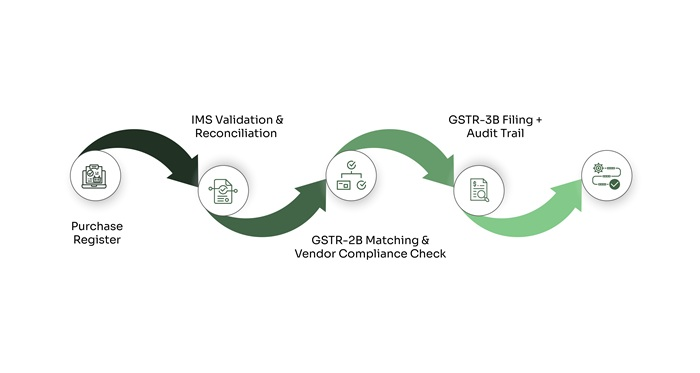
Step-by-Step Guide to Use IMS Offline Tool
Step 1: Download GSTR-2B Data
- Login to GST portal
- Download GSTR-2B for the relevant month
Step 2: Prepare Purchase Register
- Export your accounting data
- Ensure it includes GST details
Step 3: Import Data into IMS Tool
- Upload GSTR-2B file
- Upload purchase register
Step 4: Run Reconciliation
- Tool matches invoices automatically
- Highlights matched and unmatched entries
Step 5: Analyze Differences
Focus on:
- Missing invoices
- Value mismatches
- Duplicate entries
Step 6: Take Action
- Follow up with suppliers
- Correct accounting entries
- Adjust ITC claims
Step 7: Final Validation
Ensure:
- Only eligible ITC is claimed
- Data is clean and accurate
Practical Example
Let’s say:
- Your books show 500 purchase invoices
- GSTR-2B shows 480 invoices
After reconciliation:
- 20 invoices missing → supplier follow-up needed
- 10 invoices mismatch → correction required
- 5 invoices duplicate → remove extra entries
This ensures correct ITC claim and avoids future notices.
Benefits of Using IMS Offline Tool
✔ Accuracy Improvement
Reduces human error in reconciliation.
✔ Time Saving
Automates repetitive matching work.
✔ Better Compliance
Helps avoid GST notices and penalties.
✔ Data Control
You can manage and analyze data independently.
✔ Scalability
Works well even for large businesses.
Best Practices for GSTR-2B Reconciliation
- Reconcile every month (do not delay)
- Maintain clean purchase records
- Regularly follow up with vendors
- Avoid claiming ITC without verification
- Keep documentation ready for audit
Common Mistakes to Avoid
- Claiming ITC without checking GSTR-2B
- Ignoring small mismatches
- Not reconciling regularly
- Depending only on manual Excel work
- Missing vendor communication
Who Should Use IMS Offline Tool?
- Accountants and tax professionals
- SMEs with GST registration
- Large enterprises handling bulk invoices
- Consultants managing multiple clients
Future Impact of This Update
This tool is a step towards:
- More automation in GST compliance
- Reduced dependency on manual processes
- Improved transparency between buyers and suppliers
- Stronger audit and compliance ecosystem
Conclusion
The introduction of the IMS Offline Tool is a significant improvement in GST compliance. It directly addresses one of the biggest pain points—GSTR-2B reconciliation.
Instead of struggling with manual matching and errors, businesses can now work in a structured and efficient way. However, tools alone are not enough. Consistency, discipline, and proper process management are equally important.
If used correctly, this tool can help you:
- Save time
- Improve accuracy
- Avoid penalties
- Maintain clean GST records
Start using it early and make reconciliation a monthly habit, not a last-minute task.
FAQs
1. What is IMS Offline Tool?
It is a utility that helps in offline invoice management and GSTR-2B reconciliation.
2. Is IMS Tool mandatory?
No, but it is highly recommended for better accuracy.
3. Can small businesses use it?
Yes, it is useful for businesses of all sizes.
4. Does it replace GSTR-2B?
No, it works alongside GSTR-2B.
5. Can I reconcile large data sets?
Yes, it supports bulk invoice processing.
6. Is internet required to use it?
Only for downloading/uploading data, not for analysis.
7. How often should reconciliation be done?
Monthly is recommended.
8. What if invoices are missing in GSTR-2B?
You need to follow up with the supplier.
9. Can it detect duplicate invoices?
Yes, it highlights duplicates.
10. Does it help in ITC validation?
Yes, it helps ensure only eligible ITC is claimed.