Introduction
AI Code Assistants are intelligent tools that help developers write, debug, optimize, and understand code using artificial intelligence. These tools leverage large language models and machine learning to provide real-time code suggestions, generate entire functions, explain logic, and even automate repetitive programming tasks.
As software development becomes more complex and fast-paced, AI code assistants are transforming how developers work. They reduce development time, improve code quality, and help both beginners and experienced engineers become more productive. These tools integrate directly into development environments, making them an essential part of modern coding workflows.
Real-world use cases include:
- Auto-generating code snippets and functions
- Debugging and fixing errors
- Code refactoring and optimization
- Writing documentation and comments
- Learning new programming languages and frameworks
Key evaluation criteria for buyers:
- Code generation accuracy
- Language and framework support
- IDE integration and compatibility
- Real-time suggestions and performance
- Security and privacy controls
- Customization and training capabilities
- Collaboration features
- Scalability for large projects
- Ease of use and developer experience
- Pricing and value
Best for:
AI code assistants are ideal for developers, software engineers, DevOps teams, and learners aiming to improve productivity and code quality.
Not ideal for:
Highly regulated or security-sensitive environments where code generation must be strictly controlled and reviewed manually.
Key Trends in AI Code Assistants
- Context-aware code generation using advanced LLMs
- Deep IDE integration for seamless workflows
- Multi-language and cross-framework support
- AI-powered debugging and code explanation
- Automation of repetitive coding tasks
- Integration with DevOps and CI/CD pipelines
- Enhanced security and vulnerability detection
- Collaborative coding with AI pair programming
- Customization using private codebases
- Real-time feedback and suggestions
How We Selected These Tools (Methodology)
- Evaluated code generation quality and accuracy
- Assessed integration with IDEs and workflows
- Reviewed language and framework support
- Checked real-time performance and responsiveness
- Considered security and compliance features
- Examined ease of use and developer experience
- Evaluated customization and extensibility
- Reviewed community support and adoption
- Considered pricing and value for money
- Ensured applicability across individual developers to enterprises
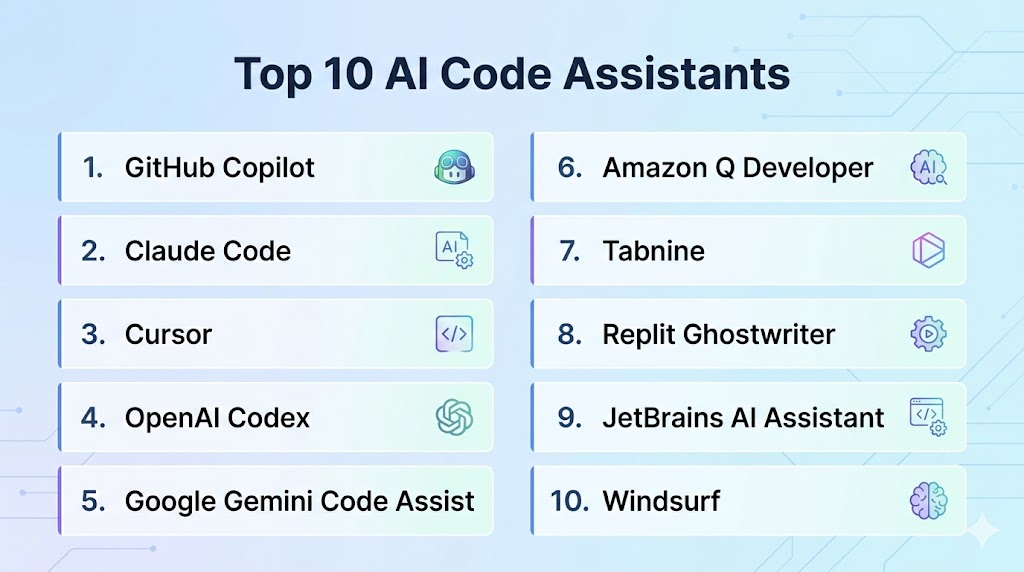
Top 10 AI Code Assistants
#1 — GitHub Copilot
Short description (3-4 lines): GitHub Copilot is one of the most popular AI coding assistants, providing real-time code suggestions and full-function generation directly inside IDEs.
Key Features
- Real-time code completion
- Multi-language support
- Context-aware suggestions
- Integration with popular IDEs
- Code generation from comments
- Refactoring support
Pros
- High accuracy
- Seamless IDE integration
Cons
- Subscription cost
- May generate incorrect code
Platforms / Deployment
- Web / IDE (VS Code, JetBrains) / Cloud
Security & Compliance
- Enterprise controls available
Integrations & Ecosystem
- GitHub ecosystem, IDEs
Support & Community
- Large developer community
#2 — Claude Code
Short description: Claude Code provides advanced reasoning and code generation capabilities with strong context understanding.
Key Features
- Code generation
- Debugging assistance
- Code explanation
- Multi-language support
- Context-aware responses
Pros
- Strong reasoning
- High-quality outputs
Cons
- Limited IDE integration
- Cloud-based
Platforms / Deployment
- Web / Cloud
Security & Compliance
- Standard controls
Integrations & Ecosystem
- APIs
Support & Community
- Growing community
#3 — Cursor
Short description: Cursor is an AI-powered code editor designed for deep integration with AI-assisted development.
Key Features
- AI-powered code editing
- Real-time suggestions
- Context awareness
- Codebase understanding
- Refactoring tools
Pros
- Deep AI integration
- Developer-friendly
Cons
- Newer platform
- Limited ecosystem
Platforms / Deployment
- Desktop / Cloud
Security & Compliance
- Standard controls
Integrations & Ecosystem
- Development tools
Support & Community
- Growing community
#4 — OpenAI Codex
Short description: OpenAI Codex powers many AI coding tools, offering advanced code generation and understanding.
Key Features
- Code generation
- Natural language to code
- Multi-language support
- API integration
- Automation
Pros
- Powerful models
- Flexible
Cons
- Requires integration
- API usage cost
Platforms / Deployment
- Cloud
Security & Compliance
- Encryption
Integrations & Ecosystem
- APIs
Support & Community
- Large ecosystem
#5 — Google Gemini Code Assist
Short description: Google Gemini Code Assist provides AI-driven coding help integrated with cloud development environments.
Key Features
- Code suggestions
- Debugging assistance
- Cloud integration
- Multi-language support
- Real-time feedback
Pros
- Strong integration
- Scalable
Cons
- Cloud dependency
- Limited customization
Platforms / Deployment
- Cloud
Security & Compliance
- IAM, encryption
Integrations & Ecosystem
- Google Cloud
Support & Community
- Google support
#6 — Amazon Q Developer
Short description: Amazon Q Developer is an AI coding assistant optimized for AWS environments and cloud development.
Key Features
- Code generation
- Debugging
- Cloud integration
- Multi-language support
- Security insights
Pros
- AWS integration
- Enterprise-ready
Cons
- AWS-focused
- Learning curve
Platforms / Deployment
- Cloud
Security & Compliance
- IAM, encryption
Integrations & Ecosystem
- AWS ecosystem
Support & Community
- AWS support
#7 — Tabnine
Short description: Tabnine is an AI code assistant focused on privacy and on-prem deployment.
Key Features
- Code completion
- Local model deployment
- Multi-language support
- Custom training
- IDE integration
Pros
- Privacy-focused
- Fast
Cons
- Limited advanced features
- Paid plans
Platforms / Deployment
- Local / Cloud
Security & Compliance
- Strong privacy controls
Integrations & Ecosystem
- IDEs
Support & Community
- Active community
#8 — Replit Ghostwriter
Short description: Ghostwriter provides AI coding assistance within the Replit development platform.
Key Features
- Code generation
- Debugging
- Real-time suggestions
- Multi-language support
- Cloud-based IDE
Pros
- Easy to use
- Integrated environment
Cons
- Limited outside Replit
- Subscription
Platforms / Deployment
- Cloud
Security & Compliance
- Standard controls
Integrations & Ecosystem
- Replit ecosystem
Support & Community
- Community support
#9 — JetBrains AI Assistant
Short description: JetBrains AI Assistant enhances JetBrains IDEs with AI-powered coding features.
Key Features
- Code suggestions
- Refactoring
- Documentation generation
- Debugging support
- IDE integration
Pros
- Deep IDE integration
- High productivity
Cons
- Requires JetBrains tools
- Paid
Platforms / Deployment
- Desktop / Cloud
Security & Compliance
- Standard controls
Integrations & Ecosystem
- JetBrains IDEs
Support & Community
- Strong community
#10 — Windsurf
Short description: Windsurf is a newer AI coding assistant offering intelligent code generation and editing features.
Key Features
- Code generation
- Context-aware editing
- Multi-language support
- Real-time suggestions
- Developer tools
Pros
- Modern interface
- Fast
Cons
- New platform
- Limited adoption
Platforms / Deployment
- Cloud
Security & Compliance
- Standard controls
Integrations & Ecosystem
- APIs
Support & Community
- Growing community
Comparison Table
| Tool | Best For | Platform | Deployment | Standout Feature | Rating |
|---|---|---|---|---|---|
| Copilot | Developers | IDE | Cloud | Real-time coding | N/A |
| Claude | Reasoning | Web | Cloud | Context understanding | N/A |
| Cursor | AI editor | Desktop | Hybrid | Deep integration | N/A |
| Codex | API use | Cloud | Cloud | Flexibility | N/A |
| Gemini | Cloud dev | Cloud | Cloud | Google integration | N/A |
| Amazon Q | AWS dev | Cloud | Cloud | Cloud-native | N/A |
| Tabnine | Privacy | Multi | Hybrid | Local models | N/A |
| Ghostwriter | Beginners | Cloud | Cloud | Simplicity | N/A |
| JetBrains AI | IDE users | Desktop | Hybrid | IDE integration | N/A |
| Windsurf | New dev | Cloud | Cloud | Modern UI | N/A |
Evaluation & Scoring
| Tool | Core | Ease | Integration | Security | Performance | Support | Value | Total |
|---|---|---|---|---|---|---|---|---|
| Copilot | 10 | 9 | 10 | 8 | 9 | 9 | 8 | 9.2 |
| Claude | 9 | 8 | 7 | 8 | 9 | 8 | 8 | 8.4 |
| Cursor | 9 | 8 | 8 | 7 | 9 | 7 | 8 | 8.3 |
| Codex | 9 | 7 | 9 | 8 | 9 | 8 | 8 | 8.5 |
| Gemini | 8 | 8 | 9 | 8 | 8 | 8 | 7 | 8.0 |
| Amazon Q | 8 | 7 | 9 | 9 | 8 | 8 | 7 | 8.1 |
| Tabnine | 8 | 8 | 8 | 9 | 8 | 7 | 8 | 8.1 |
| Ghostwriter | 7 | 9 | 7 | 7 | 7 | 7 | 8 | 7.5 |
| JetBrains | 8 | 8 | 9 | 8 | 8 | 8 | 7 | 8.1 |
| Windsurf | 7 | 8 | 7 | 7 | 8 | 7 | 8 | 7.4 |
Which AI Code Assistant Is Right for You?
Solo / Freelancer
Replit Ghostwriter or Tabnine is best for simplicity and affordability.
SMB
GitHub Copilot or Cursor offers strong productivity gains.
Mid-Market
JetBrains AI or Google Gemini provides integration and scalability.
Enterprise
Amazon Q Developer or Copilot Enterprise delivers security and performance.
Frequently Asked Questions (FAQs)
What is an AI code assistant?
An AI code assistant is a tool that helps developers write, debug, and optimize code using artificial intelligence. It provides real-time suggestions, generates code snippets, and explains logic. These tools act like virtual pair programmers to improve productivity.
How accurate are AI code assistants?
AI code assistants can be highly accurate, especially for common patterns and well-documented frameworks. However, they may produce incorrect or incomplete code, so human review is essential. Accuracy improves with better context and prompts.
Can AI code assistants replace developers?
No, they assist developers rather than replace them. They automate repetitive tasks and provide suggestions, but human expertise is required for architecture, decision-making, and debugging complex systems.
Are AI code assistants secure?
Enterprise tools offer security features such as access controls and data protection. However, developers should avoid sharing sensitive code and review outputs to ensure compliance and security.
Do these tools support multiple languages?
Yes, most AI code assistants support multiple programming languages including Python, JavaScript, Java, C++, and more. This makes them versatile for different development environments.
Can AI code assistants help beginners?
Yes, they are extremely helpful for beginners by providing code suggestions, explanations, and examples. They can accelerate learning and reduce the time needed to understand programming concepts.
Do AI code assistants integrate with IDEs?
Most tools integrate directly with popular IDEs such as VS Code, JetBrains, and cloud-based environments. This allows seamless coding without switching tools.
Are AI code assistants scalable for teams?
Yes, enterprise versions support team collaboration, centralized control, and integration with development workflows. They can scale across large engineering teams.
What are the limitations of AI code assistants?
Limitations include incorrect suggestions, lack of deep context understanding, and dependency on prompts. They also require human validation to ensure code quality and security.
How to choose the right AI code assistant?
Choose based on your development environment, language support, integration needs, and budget. Testing tools in real workflows helps identify the best fit.
Conclusion
AI code assistants are transforming software development by enabling faster coding, improved productivity, and better code quality. Tools like GitHub Copilot and Tabnine provide strong support for everyday development tasks, while platforms like Cursor and JetBrains AI enhance coding workflows with deeper integration. Mid-market teams benefit from tools like Google Gemini Code Assist and Amazon Q Developer, which offer scalability and cloud integration. Enterprises can leverage advanced solutions with enhanced security and performance for large-scale development environments. Choosing the right AI code assistant depends on your technical requirements, development environment, and team size. A practical approach is to experiment with a few tools, evaluate their impact on productivity, and integrate the one that best aligns with your workflow.