Introduction
Digital Audio Workstations (DAWs) are software platforms used for recording, editing, mixing, and producing audio. They serve as the backbone of modern music production, podcast creation, film sound design, and audio post-production workflows.
A DAW allows users to work with multiple audio tracks, apply effects, use virtual instruments, and produce high-quality sound outputs—all within a single environment. With advancements in computing power and AI-driven tools, DAWs have evolved into highly sophisticated systems that support everything from bedroom producers to professional studios.
Common use cases include:
- Music production and beat making
- Podcast recording and editing
- Film and video sound design
- Voice-over production
- Live performance and DJ workflows
Key evaluation criteria buyers should consider:
- Multitrack recording and editing capabilities
- Plugin support (VST, AU, AAX)
- MIDI and virtual instrument support
- Real-time performance and latency
- Built-in effects and sound libraries
- Workflow flexibility (timeline vs session-based)
- Hardware compatibility (audio interfaces, MIDI controllers)
- Collaboration and cloud features
- Ease of use vs advanced control
Best for: Musicians, producers, podcasters, sound engineers, and content creators working with audio production.
Not ideal for: Users needing only basic audio trimming or playback tools—simpler audio editors may suffice.
Key Trends in Digital Audio Workstations (DAWs)
- AI-assisted production: Auto-mixing, mastering, and sound generation
- Cloud collaboration: Shared sessions and remote production workflows
- Low-latency performance: Optimized real-time audio processing
- Spatial and immersive audio: Dolby Atmos and 3D sound workflows
- Plugin ecosystems: Expanding third-party integrations
- Cross-platform compatibility: Desktop and mobile workflows
- Loop-based and session workflows: Faster music creation
- Automation tools: Smart mixing and arrangement suggestions
- Hardware integration: Seamless connection with MIDI controllers and interfaces
- Subscription and hybrid pricing models: Flexible licensing options
How We Selected These Tools (Methodology)
- Evaluated industry adoption across music, film, and content creation
- Assessed core recording, editing, and mixing capabilities
- Reviewed plugin and instrument ecosystem support
- Considered performance and latency optimization
- Included tools for beginners to professionals
- Analyzed workflow flexibility and usability
- Evaluated integration with hardware and external tools
- Reviewed community support and documentation
- Balanced free, open-source, and premium solutions
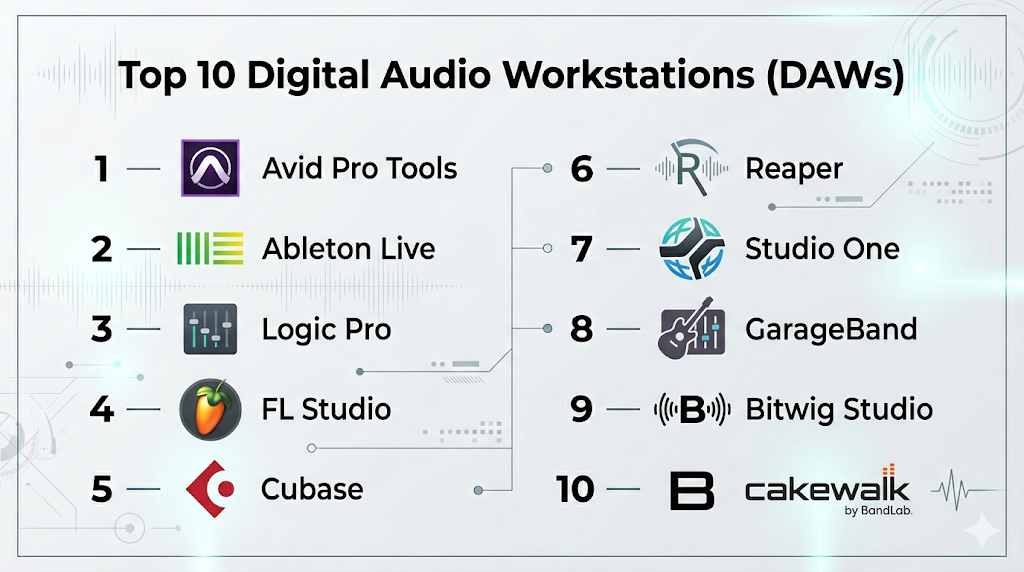
Top 10 Digital Audio Workstations (DAWs)
#1 — Avid Pro Tools
Short description: An industry-standard DAW used in professional studios for recording, mixing, and post-production.
Key Features
- Advanced multitrack recording
- High-end mixing and mastering tools
- AAX plugin support
- Surround and immersive audio workflows
- Cloud collaboration
- Precision editing tools
Pros
- Widely used in professional studios
- High-quality audio processing
Cons
- Expensive
- Steep learning curve
Platforms / Deployment
Windows / macOS
Cloud / Local
Security & Compliance
Not publicly stated
Integrations & Ecosystem
Deep integration with professional audio ecosystems.
- Studio hardware
- Plugin suites
- Production pipelines
Support & Community
Strong enterprise support and large professional community.
#2 — Ableton Live
Short description: A versatile DAW designed for music production and live performance with a unique session-based workflow.
Key Features
- Session and arrangement views
- Real-time audio manipulation
- MIDI sequencing
- Built-in instruments and effects
- Time-stretching and warping
- Plugin support
Pros
- Ideal for live performance
- Flexible workflow
Cons
- Expensive
- Learning curve for beginners
Platforms / Deployment
Windows / macOS
Local
Security & Compliance
Not publicly stated
Integrations & Ecosystem
Strong ecosystem for music creators.
- MIDI controllers
- Plugins
- Live performance tools
Support & Community
Large global user base and strong community.
#3 — Logic Pro
Short description: A macOS-exclusive DAW offering powerful music production tools and a rich library of sounds.
Key Features
- Advanced MIDI editing
- Built-in instruments and loops
- Spatial audio support
- Smart tempo and AI tools
- High-quality mixing tools
Pros
- One-time purchase
- Extensive built-in content
Cons
- macOS-only
- Learning curve
Platforms / Deployment
macOS
Local
Security & Compliance
Not publicly stated
Integrations & Ecosystem
Apple ecosystem integration.
- GarageBand
- macOS tools
Support & Community
Strong music production community.
#4 — FL Studio
Short description: A popular DAW for beat making and electronic music production with a pattern-based workflow.
Key Features
- Pattern-based sequencing
- Piano roll editor
- Built-in plugins and instruments
- Lifetime free updates
- Automation tools
Pros
- Great for beginners and producers
- Intuitive workflow
Cons
- Less suited for traditional recording
- Windows-focused features
Platforms / Deployment
Windows / macOS
Local
Security & Compliance
Not publicly stated
Integrations & Ecosystem
Strong plugin ecosystem.
- VST plugins
- MIDI tools
Support & Community
Massive global community.
#5 — Cubase
Short description: A professional DAW known for its advanced composition, recording, and editing tools.
Key Features
- MIDI editing tools
- Audio recording and editing
- Built-in instruments
- Scoring and notation tools
- Automation features
Pros
- Strong MIDI capabilities
- Professional-grade features
Cons
- Expensive
- Complex interface
Platforms / Deployment
Windows / macOS
Local
Security & Compliance
Not publicly stated
Integrations & Ecosystem
Supports extensive workflows.
- Plugins
- Hardware integration
Support & Community
Established professional community.
#6 — Reaper
Short description: A lightweight and customizable DAW offering professional features at an affordable price.
Key Features
- Multitrack recording
- Custom scripting
- Low system requirements
- Plugin support
- Flexible routing
Pros
- Affordable
- Highly customizable
Cons
- Less polished UI
- Requires setup
Platforms / Deployment
Windows / macOS / Linux
Local
Security & Compliance
Not publicly stated
Integrations & Ecosystem
Flexible ecosystem.
- Plugins
- Custom scripts
Support & Community
Active and supportive community.
#7 — Studio One
Short description: A modern DAW focused on ease of use and fast workflows.
Key Features
- Drag-and-drop interface
- Integrated mastering tools
- MIDI and audio editing
- Automation tools
- Plugin support
Pros
- User-friendly interface
- Fast workflow
Cons
- Paid features for advanced tools
- Smaller ecosystem
Platforms / Deployment
Windows / macOS
Local
Security & Compliance
Not publicly stated
Integrations & Ecosystem
Growing ecosystem.
- Plugins
- Hardware integration
Support & Community
Moderate but growing community.
#8 — GarageBand
Short description: A beginner-friendly DAW for macOS and iOS users.
Key Features
- Simple recording tools
- Built-in loops and instruments
- Touch-friendly interface
- Real-time playback
- Easy export options
Pros
- Free for Apple users
- Easy to learn
Cons
- Limited advanced features
- Apple-only
Platforms / Deployment
macOS / iOS
Local
Security & Compliance
Not publicly stated
Integrations & Ecosystem
Apple ecosystem integration.
- Logic Pro
- iOS tools
Support & Community
Strong beginner community.
#9 — Bitwig Studio
Short description: A modern DAW designed for sound design and modular workflows.
Key Features
- Modular sound design
- Advanced automation
- Cross-platform support
- MIDI and audio editing
- Plugin sandboxing
Pros
- Innovative workflow
- Stable performance
Cons
- Smaller user base
- Paid subscription model
Platforms / Deployment
Windows / macOS / Linux
Local
Security & Compliance
Not publicly stated
Integrations & Ecosystem
Supports modular workflows.
- Plugins
- Controllers
Support & Community
Growing community.
#10 — Cakewalk by BandLab
Short description: A free, full-featured DAW offering professional tools for music production.
Key Features
- Multitrack recording
- MIDI and audio editing
- Built-in effects
- Automation tools
- Plugin support
Pros
- Free with advanced features
- Professional capabilities
Cons
- Windows-only
- Smaller ecosystem
Platforms / Deployment
Windows
Local
Security & Compliance
Not publicly stated
Integrations & Ecosystem
Supports plugins and workflows.
- VST plugins
- Audio tools
Support & Community
Active user base.
Comparison Table (Top 10)
| Tool Name | Best For | Platform(s) Supported | Deployment | Standout Feature | Public Rating |
|---|---|---|---|---|---|
| Pro Tools | Studios | Windows/macOS | Hybrid | Industry standard | N/A |
| Ableton Live | Live performance | Windows/macOS | Local | Session workflow | N/A |
| Logic Pro | Musicians | macOS | Local | Built-in instruments | N/A |
| FL Studio | Beat making | Windows/macOS | Local | Pattern workflow | N/A |
| Cubase | Composition | Windows/macOS | Local | MIDI tools | N/A |
| Reaper | Budget users | Multi-platform | Local | Customization | N/A |
| Studio One | Fast workflows | Windows/macOS | Local | Drag-and-drop | N/A |
| GarageBand | Beginners | macOS/iOS | Local | Ease of use | N/A |
| Bitwig Studio | Sound design | Multi-platform | Local | Modular system | N/A |
| Cakewalk | Free DAW | Windows | Local | Free pro features | N/A |
Evaluation & Scoring of Digital Audio Workstations (DAWs)
| Tool Name | Core (25%) | Ease (15%) | Integrations (15%) | Security (10%) | Performance (10%) | Support (10%) | Value (15%) | Weighted Total |
|---|---|---|---|---|---|---|---|---|
| Pro Tools | 10 | 5 | 10 | 6 | 10 | 9 | 6 | 8.5 |
| Ableton Live | 9 | 6 | 9 | 6 | 9 | 8 | 7 | 8.2 |
| Logic Pro | 9 | 7 | 8 | 6 | 9 | 8 | 9 | 8.5 |
| FL Studio | 8 | 9 | 8 | 5 | 8 | 9 | 9 | 8.4 |
| Cubase | 9 | 6 | 9 | 6 | 9 | 8 | 7 | 8.2 |
| Reaper | 8 | 6 | 7 | 5 | 8 | 7 | 10 | 7.9 |
| Studio One | 8 | 8 | 7 | 5 | 8 | 7 | 8 | 7.8 |
| GarageBand | 6 | 10 | 6 | 5 | 7 | 8 | 10 | 7.6 |
| Bitwig Studio | 8 | 7 | 8 | 5 | 8 | 7 | 7 | 7.6 |
| Cakewalk | 8 | 7 | 6 | 5 | 7 | 7 | 10 | 7.5 |
How to interpret the scores:
- Scores reflect relative strengths across different criteria
- Higher scores indicate balanced performance
- Professionals should prioritize core features and integrations
- Beginners should prioritize ease of use and value
- Choose based on workflow requirements, not just total score
Which Digital Audio Workstations (DAWs) Tool Is Right for You?
Solo / Freelancer
- Best options: GarageBand, Reaper, FL Studio
- Focus on affordability and ease
SMB
- Best options: Logic Pro, Studio One
- Balance features and usability
Mid-Market
- Best options: Ableton Live, Cubase
- Require scalable workflows
Enterprise
- Best options: Pro Tools
- Need professional-grade pipelines
Budget vs Premium
- Budget: Cakewalk, Reaper
- Premium: Pro Tools, Cubase
Feature Depth vs Ease of Use
- Advanced: Pro Tools, Cubase
- Easy: GarageBand, FL Studio
Integrations & Scalability
- Strong: Pro Tools, Ableton
- Limited: Cakewalk
Security & Compliance Needs
- Most tools: Not publicly stated
- Enterprises should validate internally
Frequently Asked Questions (FAQs)
What is a DAW?
A Digital Audio Workstation used to record, edit, and produce audio.
Which DAW is best for beginners?
GarageBand and FL Studio are beginner-friendly.
Are there free DAWs?
Yes, Cakewalk and GarageBand are free options.
Which DAW is industry standard?
Pro Tools is widely used in professional studios.
Do I need a powerful computer?
Yes, especially for large projects and plugins.
What are plugins in DAWs?
Add-ons that provide effects, instruments, and tools.
Can I record vocals in a DAW?
Yes, all DAWs support recording.
What is MIDI?
A system for controlling digital instruments.
Can I switch DAWs later?
Yes, but workflows may differ.
Is AI used in DAWs?
Yes, for mixing, mastering, and automation.
Conclusion
Digital Audio Workstations (DAWs) are essential tools for modern audio production, offering everything from simple recording to complex music production and post-processing workflows.
I think compatibility with plugins and external hardware deserves as much attention as recording features. A strong ecosystem can significantly influence long-term usability