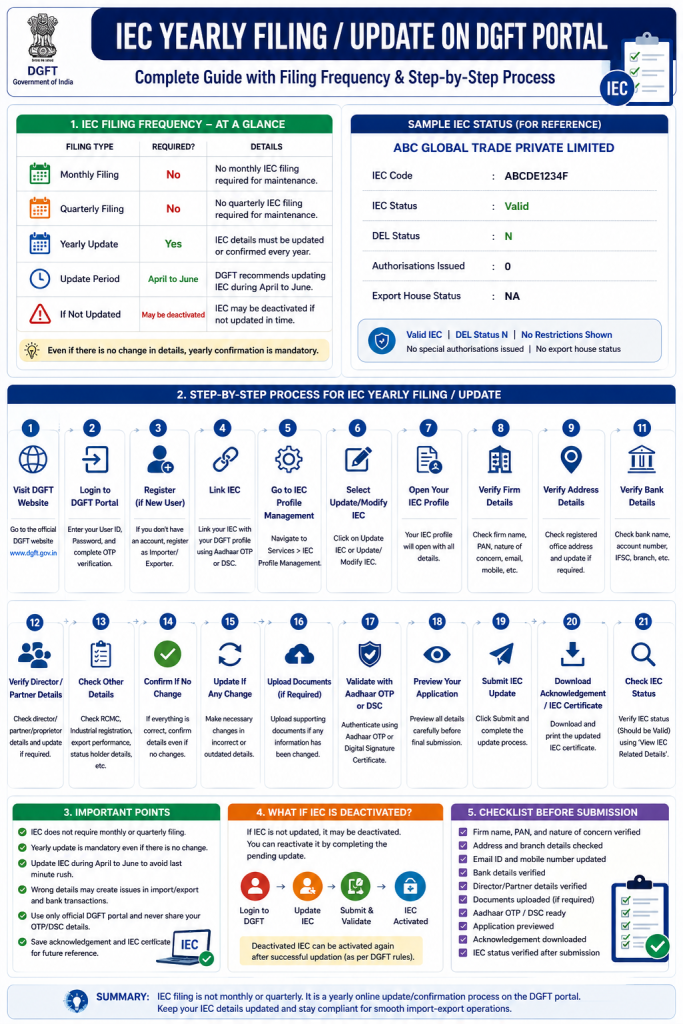
IEC stands for Importer Exporter Code. It is a business identification number used for import and export activities in India. IEC is issued by DGFT, which means Directorate General of Foreign Trade.
Many business owners get confused about IEC compliance. They often ask whether IEC needs monthly filing, quarterly filing, or yearly filing. The simple answer is: IEC does not require monthly or quarterly filing for regular maintenance. IEC requires yearly online update/confirmation on the DGFT portal.
DGFT states that IEC holders must update IEC details electronically every year during the April to June period. Even if there is no change in the IEC details, the same must be confirmed online. If IEC is not updated within the prescribed time, it may be deactivated and can be activated again after successful updation.
Sample Company Used in This Tutorial
To protect privacy, this tutorial uses a random sample company name:
ABC GLOBAL TRADE PRIVATE LIMITED
Sample details:
| Field | Sample Value |
|---|---|
| Company Name | ABC GLOBAL TRADE PRIVATE LIMITED |
| IEC Code | ABCDE1234F |
| IEC Status | Valid |
| DEL Status | N |
| Authorisations Issued | 0 |
| Export House Status | NA |
This tutorial is only for educational understanding. You should always verify your actual IEC details on the official DGFT portal.
Part 1: Is IEC Filing Monthly, Quarterly, or Yearly?
1. Monthly IEC Filing
There is no monthly IEC filing required only for maintaining IEC.
This means a business does not need to visit the DGFT portal every month just to keep the IEC active.
However, this does not mean the business has no other monthly compliance. Depending on the business type, there may be GST, TDS, accounting, customs, or other compliance requirements. But for IEC maintenance specifically, there is no normal monthly filing.
Simple meaning:
IEC does not need monthly return filing on DGFT.
2. Quarterly IEC Filing
There is no quarterly IEC filing required only for IEC maintenance.
A business does not need to update IEC every quarter unless there is a change in business details that should be corrected on the DGFT portal.
For example, if the company address, mobile number, email ID, bank details, director details, or branch details change, it is better to update IEC details immediately instead of waiting.
Simple meaning:
IEC does not need quarterly return filing on DGFT.
3. Yearly IEC Update
IEC requires yearly online update or confirmation on the DGFT portal.
This is the main regular IEC compliance requirement.
DGFT has clearly stated that IEC holders must ensure their IEC details are updated electronically every year during the April to June period. Even if there are no changes in IEC details, the IEC holder still needs to confirm the same online.
Simple meaning:
IEC requires yearly confirmation/update on DGFT.
IEC Filing Frequency Summary
| Filing Type | Required for IEC Maintenance? | Explanation |
|---|---|---|
| Monthly filing | No | No monthly IEC filing is required only to keep IEC active |
| Quarterly filing | No | No quarterly IEC filing is required only to keep IEC active |
| Yearly update | Yes | IEC details must be updated or confirmed every year |
| No-change confirmation | Yes | Even if nothing changed, confirmation is still required |
| Update period | April to June | DGFT has specified April-June period for yearly IEC updation |
| If not updated | IEC may be deactivated | Deactivated IEC can be reactivated after successful updation |
Important Point
IEC yearly update is not like a tax return. It is mainly a profile confirmation and updation process. You are confirming that the IEC details available on DGFT are correct and updated.
Part 2: What Happens If IEC Is Not Updated Yearly?
If IEC is not updated within the prescribed time, DGFT may deactivate it.
DGFT trade notices have mentioned deactivation of IECs that were not updated on the DGFT portal. These notices also explain that IEC holders were required to update their IEC electronically and that IECs not updated could be deactivated in phases.
A deactivated IEC may create problems in:
- Import/export documentation
- Customs clearance
- Bank export payment processing
- DGFT scheme applications
- Trade-related approvals
- Business verification
The good part is that a deactivated IEC can generally be activated again after successful updation, subject to DGFT rules and portal process.
Part 3: Details You Should Keep Ready Before IEC Yearly Update
Before starting the IEC yearly filing or annual update process, keep the following details ready:
| Required Detail | Purpose |
|---|---|
| IEC Number | To identify your IEC record |
| PAN of firm/company | IEC is linked with PAN |
| DGFT login ID and password | Required to access DGFT portal |
| Registered mobile number | For OTP and verification |
| Registered email ID | For OTP and official communication |
| Firm/company address | To verify registered address |
| Branch details | Required if the business has branch offices |
| Bank account details | To verify account linked with IEC |
| Director/partner/proprietor details | To verify responsible persons |
| Aadhaar details | May be needed for OTP authentication |
| Digital Signature Certificate | May be needed for DSC-based validation |
| Updated documents, if any | Needed if any information has changed |
DGFT’s IEC Profile Management page says PAN, bank details, and firm details are important for IEC-related processes. It also says that address may be physically verified by DGFT.
Part 4: Step-by-Step Process for IEC Yearly Filing / IEC Annual Update
Step 1: Visit the Official DGFT Website
Open the official DGFT website:
dgft.gov.in
Always use the official DGFT portal only. DGFT has also cautioned users about fake or similar-looking websites collecting money in the name of DGFT services.
Step 2: Login to DGFT Portal
Click on Login.
Enter:
- User ID / registered email ID
- Password
- Captcha
- OTP, if asked
After successful login, you will reach your DGFT dashboard.
Step 3: Register on DGFT If You Do Not Have Login
If you do not already have a DGFT login, first create an account.
General path:
Login → Register → Register as Importer/Exporter
You may need:
- Name
- Email ID
- Mobile number
- PAN
- OTP verification
- Password creation
After registration, login again with your credentials.
Step 4: Link IEC With DGFT Profile
If your IEC is already issued but not linked with your DGFT profile, you must link it first.
General path:
Login → Link IEC → Enter IEC Number → Authenticate
DGFT mentions that existing IEC holders can link IEC after registration and login. The portal may ask for Aadhaar-based OTP or Digital Signature authentication.
You may need:
- IEC number
- PAN details
- Aadhaar OTP or DSC
- Registered mobile/email access
Once linked, your IEC will appear in your dashboard.
Step 5: Go to IEC Profile Management
After login, go to the IEC service section.
General path:
Services → IEC Profile Management
Or you may see options like:
- Update IEC
- Modify IEC
- View IEC Profile
- Print IEC
- Link IEC
DGFT’s IEC Profile Management page includes options such as View IEC Profile, Update/Modify IEC, Print IEC, Surrender IEC, and other IEC-related services.
Step 6: Select Update/Modify IEC
Click on:
Update IEC or Update/Modify IEC
This option is used for yearly IEC updation and for changing IEC details if required.
DGFT says that to modify an IEC, users can click and modify IEC details and submit the request.
Step 7: Open Your IEC Profile
Once you click Update/Modify IEC, your IEC profile will open.
You should carefully review every section.
Main sections may include:
- Firm details
- Address details
- Branch details
- Bank details
- Director/partner/proprietor details
- RCMC details, if applicable
- Industrial registration details, if applicable
- Status holder details, if applicable
- Past export performance details, if applicable
DGFT states that the Importer-Exporter Profile captures important details such as IEC, RCMC, industrial registration details, status holder details, and past export performance.
Step 8: Verify Firm Details
Check the basic firm or company information.
Verify:
- Business name
- PAN
- Nature of concern
- Constitution type
- Registered email ID
- Registered mobile number
- Date of incorporation, if shown
- GST details, if shown
Make sure the firm name and PAN match the official records.
Step 9: Verify Address Details
Check the registered office address carefully.
Verify:
- Building number
- Street name
- Area/locality
- City
- District
- State
- PIN code
- Country
If there is any change in address, update it correctly.
Address is important because DGFT may use it for communication and verification. DGFT also mentions IEC address validation and verification of addresses mentioned in IEC.
Step 10: Verify Branch Details
If your business has branch offices, check branch details.
Verify:
- Branch address
- City
- State
- PIN code
- Contact details
If there is no branch, check whether the portal shows branch details correctly as not applicable or blank.
Step 11: Verify Bank Details
Check the bank details linked with the IEC.
Verify:
- Bank name
- Account holder name
- Account number
- IFSC code
- Branch name
- Account type, if shown
The bank account should generally belong to the business or IEC holder.
Incorrect bank details may create issues in export payment, refund, or trade documentation.
Step 12: Verify Director / Partner / Proprietor Details
Depending on the business structure, verify the responsible person details.
For a company, check director details.
For LLP, check designated partner details.
For partnership firm, check partner details.
For proprietorship, check proprietor details.
Verify:
- Name
- PAN
- Aadhaar-related details, if applicable
- Mobile number
- Email ID
- Designation
- DIN, if applicable
If any director, partner, or authorized person has changed, update the correct information.
Step 13: Check RCMC and Other Trade Details
If your business has RCMC or any export promotion council registration, check whether those details are properly reflected.
Also check:
- Export performance details
- Status holder details
- Industrial registration details
- Authorisation details, if applicable
If these fields are not applicable, it is normal for them to show blank, NA, or not available.
Step 14: Confirm Details If There Is No Change
This is very important.
Even if there is no change in any IEC details, you still need to confirm the details online.
DGFT’s Foreign Trade Policy provision says that where there are no changes in IEC details, the same also needs to be confirmed online.
So do not ignore IEC annual update just because there is no change.
Step 15: Update Details If There Is Any Change
If any information is incorrect or outdated, update it before submitting.
Common changes include:
- Business address change
- Email ID change
- Mobile number change
- Bank account change
- Director/partner change
- Branch addition/removal
- Authorized person update
Before submission, make sure all information is accurate.
Step 16: Upload Documents If Required
In some cases, the portal may ask for supporting documents.
Documents may include:
- Address proof
- Bank proof
- PAN-related document
- Board resolution or authorization, if applicable
- Director/partner details
- Digital signature validation
Document requirements may vary depending on what you are changing.
If there is no change, document upload may not be required in many cases.
Step 17: Validate Through Aadhaar OTP or Digital Signature
After checking/updating all details, the portal may ask for authentication.
Common validation methods:
- Aadhaar OTP
- Digital Signature Certificate
- Registered mobile/email OTP
For companies and LLPs, DSC may be commonly used depending on the portal requirement and authorized signatory setup.
Keep your DSC token and password ready if using DSC.
Step 18: Preview the IEC Update Application
Before final submission, use the preview option.
Check every detail again:
- IEC number
- Firm name
- PAN
- Address
- Mobile number
- Email ID
- Bank details
- Director/partner/proprietor details
- Branch details
- Uploaded documents
- Declaration
Do not submit in a hurry. Small mistakes can create future compliance issues.
Step 19: Submit the IEC Update
After preview and validation, click on Submit.
Once submitted, the portal may show:
- Success message
- Application reference number
- Acknowledgement
- Updated IEC confirmation
Save the acknowledgement safely.
Step 20: Download or Print Updated IEC Certificate
After successful submission, you can download or print the IEC certificate.
DGFT’s IEC Profile Management page includes a Print IEC option. The IEC certificate may contain the firm name, address, IEC number, date of issue, branch details, and QR code for verification.
Keep a copy for:
- Company records
- Bank records
- Export documentation
- Import documentation
- Customs use
- Internal compliance file
Step 21: Check IEC Status After Filing
After completing the update, check IEC status again.
You can use the DGFT option:
View IEC Related Details
Confirm:
- IEC Status is Valid
- DEL Status is N
- Company name is correct
- IEC details are updated
- No unexpected restriction is shown
Simple IEC Yearly Filing Flow
Login to DGFT → Link IEC if not linked → Go to IEC Profile Management → Click Update/Modify IEC → Check all IEC details → Update changes if any → Confirm no change if everything is same → Validate with Aadhaar OTP/DSC → Preview → Submit → Download acknowledgement/IEC certificate → Verify IEC status
Part 5: What If IEC Is Deactivated?
If IEC is deactivated because annual updation was not done, the IEC holder should login to the DGFT portal and complete the IEC update process.
As per DGFT’s policy provision, an IEC that is deactivated for non-updation may be activated after successful updation.
General process:
- Login to DGFT
- Go to IEC Profile Management
- Select Update/Modify IEC
- Complete pending updation
- Validate and submit
- Check IEC status again
If the portal shows any technical or compliance issue, raise a request through DGFT helpdesk or consult a professional.
Part 6: Common Mistakes to Avoid
1. Ignoring IEC update because there is no change
Even if there is no change, yearly confirmation is required.
2. Waiting until the last moment
It is better to update IEC during the April-June window instead of delaying.
3. Using unofficial websites
Always use the official DGFT website only.
4. Sharing OTP or DSC access with unknown persons
Never share OTP, password, DSC token, or login credentials with untrusted people.
5. Entering wrong bank details
Wrong bank details can create payment and documentation issues.
6. Not updating email and mobile number
If your registered email or mobile number is outdated, you may miss OTPs and DGFT communication.
7. Not downloading acknowledgement
Always save proof of submission for future reference.
Part 7: Useful Checklist Before Submission
Use this checklist before final IEC yearly filing:
| Checklist Point | Status |
|---|---|
| DGFT login working | Yes / No |
| IEC linked with profile | Yes / No |
| Firm name checked | Yes / No |
| PAN checked | Yes / No |
| Registered address checked | Yes / No |
| Branch details checked | Yes / No |
| Email ID checked | Yes / No |
| Mobile number checked | Yes / No |
| Bank details checked | Yes / No |
| Director/partner/proprietor details checked | Yes / No |
| Documents uploaded, if required | Yes / No |
| Aadhaar OTP/DSC ready | Yes / No |
| Preview checked | Yes / No |
| Final submission completed | Yes / No |
| Acknowledgement downloaded | Yes / No |
| IEC status verified after submission | Yes / No |
Part 8: Blog-Friendly Summary
IEC does not require monthly or quarterly filing for regular maintenance. The main compliance requirement is a yearly online update or confirmation on the DGFT portal. Every IEC holder should review and confirm IEC details every year, generally during the April to June period. Even when there is no change in company details, the IEC holder must confirm the same online.
The process is simple: login to the DGFT portal, link IEC if not already linked, open IEC Profile Management, select Update/Modify IEC, check firm details, address, bank details, branch details, and director or partner details, update anything that has changed, validate through Aadhaar OTP or DSC, preview the application, submit it, and download the acknowledgement or updated IEC certificate.
In short, IEC yearly filing is not a return filing. It is an annual profile update and confirmation process that helps keep the IEC active and valid on the DGFT portal.
One missing area is how users handle portal errors or downtime during IEC updates. In real cases, submission failures can delay compliance. It would be useful to explain how to track application status, manage retries, and keep proof of submission for future reference.
The article explains the update process well, but operational tracking is equally important. Many exporters forget annual IEC confirmation because there’s no structured compliance calendar or ownership inside small businesses.
feel one missing point is how users handle partial submissions if the session expires. This happens often on government portals.