Introduction
Physics engines are software systems that simulate physical interactions such as motion, gravity, collisions, and forces in digital environments. They are a core component of modern game development, simulations, robotics, and virtual reality applications, enabling realistic behavior and interactions between objects.
As digital experiences become more immersive and interactive, physics engines play a critical role in delivering believable environments. From realistic character movement in games to accurate simulations in training systems, these engines are essential for both visual realism and functional accuracy.
Common use cases include:
- Game development (character movement, collisions, ragdoll physics)
- Simulation and training environments
- Robotics and AI experimentation
- Virtual reality and augmented reality experiences
- Animation and visual effects
Key evaluation criteria buyers should consider:
- Accuracy and realism of physics simulation
- Performance and scalability
- Integration with game engines and frameworks
- Ease of use and developer experience
- Support for 2D and/or 3D physics
- Real-time simulation capabilities
- Documentation and community support
- Cross-platform compatibility
- Extensibility and customization
Best for: Game developers, simulation engineers, robotics teams, AR/VR creators, and studios needing realistic physics interactions.
Not ideal for: Static applications or projects that don’t require real-time interaction or physical simulation. In such cases, simpler animation systems may be sufficient.
Key Trends in Physics Engines
- Real-time high-fidelity simulation: Increasing demand for more accurate and stable simulations
- GPU-accelerated physics: Leveraging GPUs for faster computation and scalability
- AI-assisted simulation tuning: Automated optimization of physics parameters
- Cross-platform consistency: Uniform behavior across devices and platforms
- Cloud-based simulation: Remote processing for large-scale simulations
- Integration with game engines: Physics engines tightly embedded in development ecosystems
- Soft body and fluid simulation advancements: More realistic materials and environments
- Modular physics systems: Developers can choose and combine components
- Improved debugging tools: Visualization and testing tools for physics behavior
- Open-source adoption: Growing popularity of community-driven engines
How We Selected These Tools (Methodology)
- Analyzed industry adoption and usage across games and simulations
- Evaluated core physics capabilities and realism
- Assessed performance and stability in real-time environments
- Reviewed integration with popular engines and frameworks
- Considered developer experience and ease of use
- Included tools for various use cases (2D, 3D, robotics, VFX)
- Examined community support and ecosystem maturity
- Prioritized tools with active development and updates
- Balanced open-source and commercial offerings
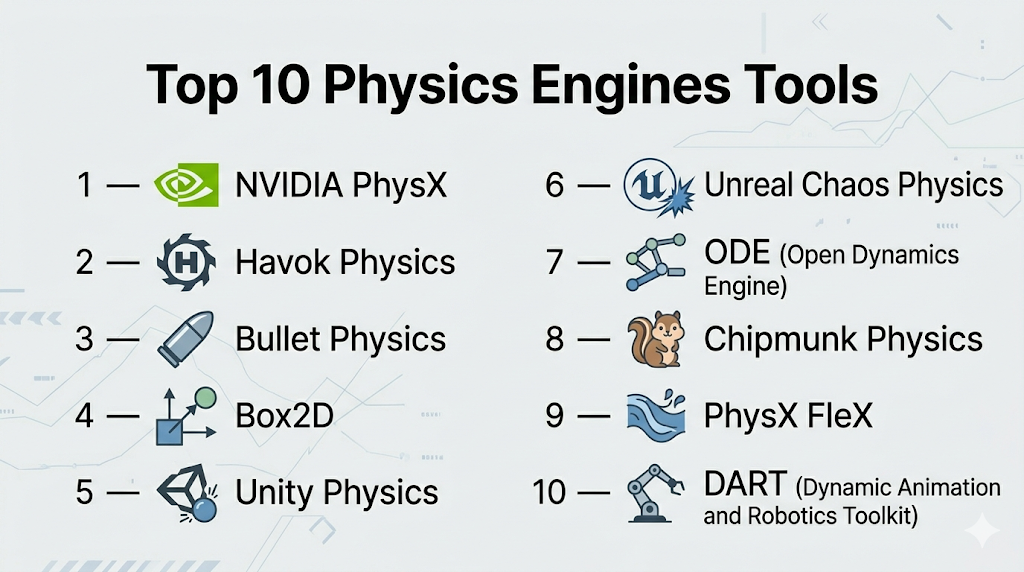
Top 10 Physics Engines Tools
#1 — NVIDIA PhysX
Short description: A widely used physics engine known for real-time simulation in games and high-performance environments.
Key Features
- Rigid body dynamics
- Collision detection
- Cloth and particle simulation
- GPU acceleration
- Real-time physics processing
- Integration with major engines
Pros
- High performance and scalability
- Strong industry adoption
Cons
- Complex setup for beginners
- Advanced features require expertise
Platforms / Deployment
Windows / Linux
Local / Embedded
Security & Compliance
Not publicly stated
Integrations & Ecosystem
PhysX integrates deeply with game engines and simulation tools.
- Unreal Engine
- Custom engines
- GPU frameworks
- SDK access
Support & Community
Well-documented with strong developer support and community resources.
#2 — Havok Physics
Short description: A premium physics engine widely used in AAA games for realistic simulation.
Key Features
- Rigid body simulation
- Destruction physics
- Character controllers
- Advanced collision detection
- Scalable performance
Pros
- High-quality simulation
- Proven in large-scale games
Cons
- Commercial licensing
- Limited accessibility for indie developers
Platforms / Deployment
Windows / Console platforms
Local
Security & Compliance
Not publicly stated
Integrations & Ecosystem
Used in major game pipelines.
- Custom engines
- AAA development pipelines
Support & Community
Professional support available; community less accessible.
#3 — Bullet Physics
Short description: An open-source physics engine supporting real-time collision detection and simulation.
Key Features
- Rigid and soft body simulation
- Collision detection
- Multi-threading support
- Open-source flexibility
- Cross-platform support
Pros
- Free and open-source
- Flexible and customizable
Cons
- Limited official support
- Requires technical expertise
Platforms / Deployment
Windows / macOS / Linux
Self-hosted
Security & Compliance
Not publicly stated
Integrations & Ecosystem
Widely integrated in various tools.
- Blender
- Game engines
- Robotics frameworks
Support & Community
Active open-source community and documentation.
#4 — Box2D
Short description: A popular 2D physics engine used in many mobile and indie games.
Key Features
- 2D rigid body simulation
- Collision detection
- Joint systems
- Lightweight design
- Stable performance
Pros
- Simple and efficient
- Ideal for 2D games
Cons
- Limited to 2D
- Basic feature set
Platforms / Deployment
Windows / macOS / Linux
Self-hosted
Security & Compliance
Not publicly stated
Integrations & Ecosystem
Commonly used in game engines.
- Unity
- Custom engines
- Mobile frameworks
Support & Community
Strong community support and documentation.
#5 — Unity Physics
Short description: A physics engine built into Unity for real-time simulation.
Key Features
- ECS-based architecture
- Deterministic simulation
- Integration with Unity
- Real-time physics
- Scalable performance
Pros
- Seamless Unity integration
- Good performance
Cons
- Limited outside Unity
- Requires ECS knowledge
Platforms / Deployment
Windows / macOS
Local
Security & Compliance
Not publicly stated
Integrations & Ecosystem
Works within Unity ecosystem.
- Unity tools
- Asset Store
Support & Community
Backed by Unity community and documentation.
#6 — Unreal Chaos Physics
Short description: Unreal Engine’s physics system for destruction and simulation.
Key Features
- Destruction simulation
- Rigid body dynamics
- Cloth simulation
- Real-time physics
- Integration with Unreal
Pros
- Advanced destruction tools
- Tight engine integration
Cons
- Limited outside Unreal
- Resource-intensive
Platforms / Deployment
Windows / macOS
Local
Security & Compliance
Not publicly stated
Integrations & Ecosystem
Integrated within Unreal ecosystem.
- Unreal Engine tools
- Asset pipelines
Support & Community
Supported by Unreal documentation and community.
#7 — ODE (Open Dynamics Engine)
Short description: An open-source physics engine for simulating rigid body dynamics.
Key Features
- Rigid body dynamics
- Collision detection
- Joint systems
- Open-source
Pros
- Free to use
- Lightweight
Cons
- Limited modern features
- Smaller community
Platforms / Deployment
Windows / Linux
Self-hosted
Security & Compliance
Not publicly stated
Integrations & Ecosystem
Used in robotics and simulation.
- Robotics frameworks
- Custom engines
Support & Community
Moderate community support.
#8 — Chipmunk Physics
Short description: A fast and lightweight 2D physics engine for games.
Key Features
- 2D rigid body simulation
- Collision detection
- Optimized performance
- Simple API
Pros
- High performance
- Easy integration
Cons
- Limited to 2D
- Smaller ecosystem
Platforms / Deployment
Windows / macOS / Linux
Local
Security & Compliance
Not publicly stated
Integrations & Ecosystem
Used in indie development.
- Game frameworks
- Mobile apps
Support & Community
Decent documentation and niche community.
#9 — PhysX FleX
Short description: A particle-based simulation engine for fluids and soft bodies.
Key Features
- Fluid simulation
- Soft body dynamics
- Particle-based physics
- GPU acceleration
Pros
- Advanced simulation capabilities
- Realistic effects
Cons
- Complex to implement
- Niche use cases
Platforms / Deployment
Windows
Local
Security & Compliance
Not publicly stated
Integrations & Ecosystem
Works with NVIDIA ecosystem.
- Game engines
- Simulation tools
Support & Community
Limited but specialized community.
#10 — DART (Dynamic Animation and Robotics Toolkit)
Short description: A physics engine focused on robotics and simulation.
Key Features
- Rigid body dynamics
- Robotics simulation
- Kinematics support
- Real-time simulation
Pros
- Strong robotics focus
- Accurate simulation
Cons
- Not designed for games
- Steeper learning curve
Platforms / Deployment
Windows / macOS / Linux
Self-hosted
Security & Compliance
Not publicly stated
Integrations & Ecosystem
Used in robotics research.
- ROS
- Simulation frameworks
Support & Community
Academic and research-focused community.
Comparison Table (Top 10)
| Tool Name | Best For | Platform(s) Supported | Deployment | Standout Feature | Public Rating |
|---|---|---|---|---|---|
| NVIDIA PhysX | High-performance | Windows/Linux | Local | GPU acceleration | N/A |
| Havok Physics | AAA games | Windows/Console | Local | Advanced simulation | N/A |
| Bullet Physics | Open-source projects | Windows/macOS/Linux | Self-hosted | Flexibility | N/A |
| Box2D | 2D games | Windows/macOS/Linux | Self-hosted | Lightweight | N/A |
| Unity Physics | Unity projects | Windows/macOS | Local | ECS architecture | N/A |
| Chaos Physics | Unreal projects | Windows/macOS | Local | Destruction simulation | N/A |
| ODE | Robotics/basic sims | Windows/Linux | Self-hosted | Simplicity | N/A |
| Chipmunk | 2D performance | Windows/macOS/Linux | Local | Speed | N/A |
| PhysX FleX | Fluids & soft bodies | Windows | Local | Particle simulation | N/A |
| DART | Robotics | Windows/macOS/Linux | Self-hosted | Robotics simulation | N/A |
Evaluation & Scoring of Physics Engines
| Tool Name | Core (25%) | Ease (15%) | Integrations (15%) | Security (10%) | Performance (10%) | Support (10%) | Value (15%) | Weighted Total |
|---|---|---|---|---|---|---|---|---|
| NVIDIA PhysX | 10 | 6 | 9 | 6 | 10 | 9 | 8 | 8.6 |
| Havok Physics | 10 | 5 | 8 | 6 | 10 | 8 | 6 | 8.0 |
| Bullet Physics | 8 | 7 | 7 | 5 | 8 | 7 | 10 | 7.8 |
| Box2D | 7 | 9 | 7 | 5 | 7 | 8 | 10 | 7.9 |
| Unity Physics | 8 | 8 | 8 | 6 | 8 | 8 | 8 | 8.0 |
| Chaos Physics | 9 | 6 | 8 | 6 | 9 | 8 | 7 | 8.1 |
| ODE | 6 | 7 | 5 | 5 | 6 | 6 | 8 | 6.4 |
| Chipmunk | 7 | 8 | 6 | 5 | 7 | 6 | 9 | 7.2 |
| PhysX FleX | 9 | 5 | 6 | 5 | 9 | 6 | 7 | 7.3 |
| DART | 8 | 6 | 6 | 5 | 8 | 7 | 7 | 7.2 |
How to interpret the scores:
- Scores reflect comparative strengths across key criteria
- Higher totals indicate stronger overall capability
- Choose based on your use case (game dev vs robotics vs simulation)
- Ease of use matters more for beginners
- Performance and integration matter more for advanced users
Which Physics Engines Tool Is Right for You?
Solo / Freelancer
- Best options: Box2D, Chipmunk, Bullet
- Focus on simplicity and low cost
SMB
- Best options: Unity Physics, Bullet
- Balance between performance and ease
Mid-Market
- Best options: Unity Physics, Unreal Chaos
- Require scalability and integration
Enterprise
- Best options: NVIDIA PhysX, Havok
- Need high performance and reliability
Budget vs Premium
- Budget: Bullet, Box2D, ODE
- Premium: Havok, PhysX
Feature Depth vs Ease of Use
- Advanced: PhysX, Havok
- Simple: Box2D, Chipmunk
Integrations & Scalability
- Strong: PhysX, Unity Physics
- Limited: ODE, Chipmunk
Security & Compliance Needs
- Most tools: Not publicly stated
- Enterprises should validate internally
Frequently Asked Questions (FAQs)
What is a physics engine?
A system that simulates physical behavior like movement, collisions, and forces in digital environments.
Are physics engines free?
Some are open-source, while others require licensing.
Which engine is best for beginners?
Box2D and Unity Physics are good starting points.
Do physics engines require coding?
Yes, most require programming knowledge.
Can I use multiple engines together?
In some cases, yes, depending on the architecture.
Are physics engines used outside gaming?
Yes, in robotics, simulations, and research.
How accurate are physics engines?
Accuracy varies based on design and use case.
Do they support real-time simulation?
Most modern engines support real-time processing.
What are common mistakes?
Choosing an engine that doesn’t fit your project scale.
Can I switch engines later?
Possible, but requires significant rework.
Conclusion
Physics engines are essential for creating realistic and interactive digital environments. Whether you’re building games, simulations, or robotics systems, choosing the right engine can significantly impact performance and development efficiency.