Introduction
Library Management Systems are software platforms designed to automate and manage library operations such as cataloging books, tracking inventory, managing users, and handling borrowing and returns. These systems act as a centralized solution for organizing both physical and digital resources efficiently.
In modern libraries, whether academic, public, or corporate, manual processes are no longer scalable. With increasing collections, digital resources, and user demands, these tools provide automation, real-time tracking, analytics, and online access, making library operations faster and more efficient.
Real-world use cases
- Managing book inventory and cataloging
- Tracking issue, return, and overdue books
- Providing online search and access to resources
- Managing memberships and user activity
- Supporting digital libraries and e-resources
What buyers should evaluate
- Cataloging and classification capabilities
- Circulation and inventory tracking
- User management and access control
- Integration with ERP, LMS, or digital systems
- Reporting and analytics
- Scalability for large libraries
- RFID or barcode support
- Cloud vs on-premise deployment
Best for: Schools, universities, public libraries, research institutions, and digital libraries.
Not ideal for: Very small libraries with minimal inventory or no need for automation.
Key Trends in Library Management Systems
- Cloud-based library platforms with remote access
- Integration with LMS and educational ERP systems
- RFID and barcode-based automation
- Digital library and e-resource management
- AI-powered search and recommendation systems
- Mobile access and self-service portals
- Real-time analytics and reporting dashboards
- Multi-library and multi-branch management
- Automation of acquisition and cataloging
- Enhanced security and role-based access
How We Selected These Tools
- Evaluated adoption across schools, universities, and enterprises
- Assessed cataloging, circulation, and reporting features
- Considered scalability for large collections
- Reviewed integration capabilities with LMS and ERP
- Analyzed usability for librarians and users
- Evaluated automation features like RFID and barcode
- Considered cloud and hybrid deployment options
- Assessed overall value and flexibility
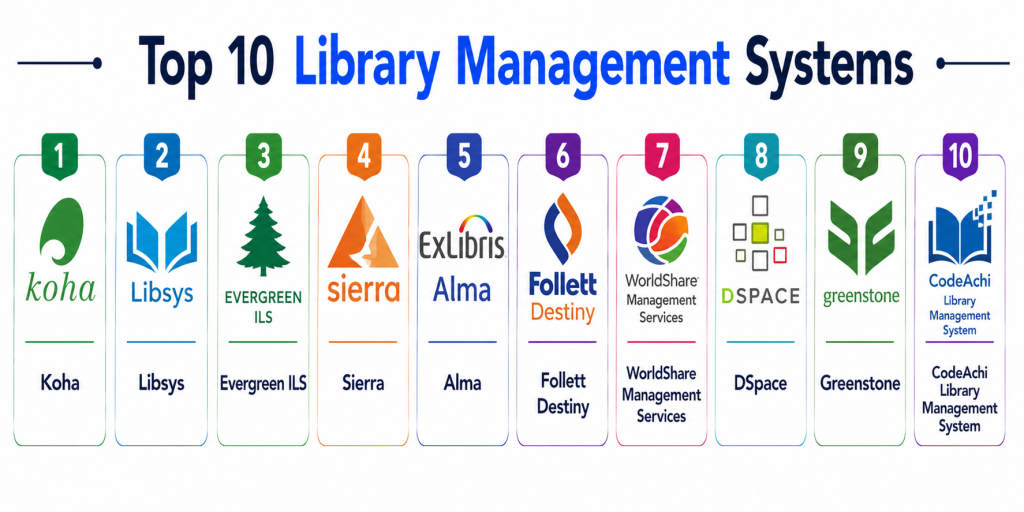
Top 10 Library Management Systems
#1 — Koha
Short description: Koha is a widely used open-source library management system offering full automation and flexibility for libraries of all sizes.
Key Features
- Cataloging and circulation
- OPAC search system
- Acquisition management
- Reporting and analytics
- Multi-branch support
Pros
- Open-source and free
- Highly customizable
- Large community
Cons
- Requires technical setup
- Limited official support
- UI complexity
Platforms / Deployment
- Web
- Cloud Self-hosted
Security & Compliance
- Role-based access
- Not publicly stated
Integrations & Ecosystem
Supports integrations via APIs and plugins.
- APIs
- Library tools
Support & Community
Strong open-source community
#2 — Libsys
Short description: Libsys is a professional library automation software used by universities and enterprises.
Key Features
- Catalog management
- Circulation control
- RFID integration
- Digital resource management
- Reporting
Pros
- Enterprise-ready
- Strong database
- Scalable
Cons
- Expensive
- Complex setup
- Requires training
Platforms / Deployment
- Web
- Cloud On-premise
Security & Compliance
- Not publicly stated
Integrations & Ecosystem
Integrates with enterprise systems.
- APIs
- ERP
Support & Community
Enterprise support
#3 — SLIM21
Short description: SLIM21 is a popular integrated library system used in academic institutions.
Key Features
- Cataloging
- Circulation
- Acquisition
- Reporting
- Digital resource management
Pros
- Reliable
- Easy to use
- Good performance
Cons
- Limited advanced features
- Smaller ecosystem
- UI limitations
Platforms / Deployment
- Web
- On-premise
Security & Compliance
- Not publicly stated
Integrations & Ecosystem
Supports integrations via APIs.
- APIs
- Library tools
Support & Community
Good support
#4 — Alma
Short description: Alma is a cloud-based library services platform designed for academic institutions.
Key Features
- Unified resource management
- Digital library support
- Analytics and reporting
- Workflow automation
- Integration capabilities
Pros
- Cloud-native
- Scalable
- Strong analytics
Cons
- Expensive
- Complex
- Learning curve
Platforms / Deployment
- Web
- Cloud
Security & Compliance
- Not publicly stated
Integrations & Ecosystem
Integrates with academic systems.
- LMS
- APIs
Support & Community
Enterprise support
#5 — Sierra
Short description: Sierra is an integrated library system focused on performance and scalability.
Key Features
- Catalog management
- Circulation tracking
- Reporting
- Digital resource support
- Workflow automation
Pros
- High performance
- Scalable
- Reliable
Cons
- Expensive
- Complex setup
- Limited flexibility
Platforms / Deployment
- Web
- Cloud On-premise
Security & Compliance
- Not publicly stated
Integrations & Ecosystem
Supports integration with library tools.
- APIs
- Systems
Support & Community
Enterprise support
#6 — Evergreen
Short description: Evergreen is an open-source library system designed for large-scale library networks.
Key Features
- Cataloging
- Circulation
- OPAC
- Reporting
- Multi-branch support
Pros
- Open-source
- Scalable
- Flexible
Cons
- Technical setup required
- Limited UI
- Smaller ecosystem
Platforms / Deployment
- Web
- Self-hosted
Security & Compliance
- Not publicly stated
Integrations & Ecosystem
Supports integrations via APIs.
- APIs
- Plugins
Support & Community
Open-source community
#7 — Follett Destiny
Short description: Follett Destiny is a library management system designed for schools and educational institutions.
Key Features
- Cataloging
- Circulation
- Digital resources
- Reporting
- Student access
Pros
- Education-focused
- Easy to use
- Scalable
Cons
- Limited enterprise features
- Pricing
- Smaller ecosystem
Platforms / Deployment
- Web
- Cloud
Security & Compliance
- Not publicly stated
Integrations & Ecosystem
Integrates with school systems.
- LMS
- APIs
Support & Community
Good support
#8 — WorldShare Management Services
Short description: WorldShare is a cloud-based library platform focused on collaboration and resource sharing.
Key Features
- Resource sharing
- Cataloging
- Circulation
- Analytics
- Cloud access
Pros
- Cloud-based
- Collaborative features
- Scalable
Cons
- Complex
- Pricing
- Learning curve
Platforms / Deployment
- Web
- Cloud
Security & Compliance
- Not publicly stated
Integrations & Ecosystem
Supports integration with global systems.
- APIs
- Library networks
Support & Community
Enterprise support
#9 — DSpace
Short description: DSpace is an open-source platform for managing digital libraries and research repositories.
Key Features
- Digital repository
- Metadata management
- Search and discovery
- Content storage
- Access control
Pros
- Open-source
- Strong digital support
- Flexible
Cons
- Technical setup required
- Limited traditional LMS features
- Smaller ecosystem
Platforms / Deployment
- Web
- Self-hosted
Security & Compliance
- Not publicly stated
Integrations & Ecosystem
Supports APIs and integrations.
- APIs
- Research tools
Support & Community
Open-source community
#10 — Greenstone
Short description: Greenstone is a digital library software for building and distributing digital collections.
Key Features
- Digital library creation
- Metadata management
- Search tools
- Multi-language support
- Content distribution
Pros
- Open-source
- Flexible
- Digital-focused
Cons
- Limited physical library features
- Setup complexity
- Smaller ecosystem
Platforms / Deployment
- Web Desktop
- Self-hosted
Security & Compliance
- Not publicly stated
Integrations & Ecosystem
Supports integrations via plugins.
- APIs
- Tools
Support & Community
Open-source support
Comparison Table Top 10
| Tool Name | Best For | Platform Supported | Deployment | Standout Feature | Public Rating |
|---|---|---|---|---|---|
| Koha | Open-source libraries | Web | Cloud Self-hosted | Free and flexible | N/A |
| Libsys | Enterprises | Web | Cloud On-premise | RFID support | N/A |
| SLIM21 | Academic libraries | Web | On-premise | Reliability | N/A |
| Alma | Universities | Web | Cloud | Unified platform | N/A |
| Sierra | Large libraries | Web | Cloud On-premise | Performance | N/A |
| Evergreen | Library networks | Web | Self-hosted | Scalability | N/A |
| Follett Destiny | Schools | Web | Cloud | Education-focused | N/A |
| WorldShare | Collaboration | Web | Cloud | Resource sharing | N/A |
| DSpace | Digital libraries | Web | Self-hosted | Repository system | N/A |
| Greenstone | Digital content | Web Desktop | Self-hosted | Digital collections | N/A |
Evaluation & Scoring of Library Management Systems
| Tool Name | Core | Ease | Integrations | Security | Performance | Support | Value | Weighted Total |
|---|---|---|---|---|---|---|---|---|
| Koha | 9 | 7 | 8 | 7 | 8 | 7 | 10 | 8.4 |
| Libsys | 9 | 6 | 8 | 8 | 9 | 8 | 6 | 8.0 |
| SLIM21 | 8 | 8 | 7 | 7 | 8 | 7 | 8 | 7.9 |
| Alma | 9 | 7 | 9 | 8 | 9 | 8 | 6 | 8.2 |
| Sierra | 9 | 6 | 8 | 8 | 9 | 8 | 6 | 8.0 |
| Evergreen | 8 | 7 | 7 | 7 | 8 | 7 | 9 | 7.9 |
| Follett Destiny | 8 | 9 | 7 | 7 | 8 | 7 | 8 | 8.0 |
| WorldShare | 9 | 7 | 9 | 8 | 9 | 8 | 6 | 8.2 |
| DSpace | 8 | 7 | 7 | 7 | 8 | 7 | 9 | 7.9 |
| Greenstone | 7 | 7 | 6 | 7 | 7 | 6 | 9 | 7.4 |
Scores are comparative and help evaluate tools based on features, usability, and scalability.
Which Library Management System Is Right for You
Solo / Small Library
Koha or Greenstone are affordable and flexible.
SMB / Schools
Follett Destiny and SLIM21 offer good usability.
Mid-Market Institutions
Evergreen and Alma provide balanced features.
Enterprise / Universities
Libsys, Sierra, and WorldShare are ideal.
Budget vs Premium
Koha is budget-friendly, Alma is premium.
Feature Depth vs Ease of Use
Alma for depth, Follett for simplicity.
Integrations & Scalability
WorldShare and Alma are strong options.
Security & Compliance Needs
Enterprise tools provide stronger controls.
Frequently Asked Questions
1. What is a library management system
It is software used to manage library operations such as cataloging, borrowing, and user management. It automates daily tasks and improves efficiency.
2. Why are these systems important
They reduce manual work and improve accuracy. Libraries can manage large collections easily. This enhances user experience.
3. How do library systems work
They store data about books and users. They track issue and return transactions. They also provide search and reporting features.
4. Are these systems suitable for schools
Yes, many systems are designed specifically for schools. They help manage student access and resources efficiently.
5. How much do they cost
Costs vary depending on features and scale. Open-source tools are free, while enterprise solutions are expensive.
6. Do they support digital libraries
Yes, many systems support e-books and digital resources. This enables remote access.
7. How long does implementation take
It can take from a few days to weeks. It depends on complexity and customization.
8. What are common mistakes
Choosing a tool without scalability is a common mistake. Poor data migration can also cause issues.
9. Are these systems secure
Most systems include access control and authentication. Security varies by provider.
10. Are there alternatives
Manual systems or spreadsheets are alternatives. However, they lack automation and scalability.
Conclusion
Library Management Systems have become essential for modern libraries to efficiently manage resources, users, and operations in an increasingly digital environment. These tools streamline cataloging, automate circulation, and provide real-time insights, significantly improving both librarian productivity and user experience. From open-source solutions like Koha to enterprise platforms like Alma and WorldShare, each tool offers unique strengths depending on scale and requirements. The right choice depends on your library size, budget, and need for digital capabilities rather than a single universal solution. Institutions should prioritize scalability, integration, and usability when selecting a system. A practical next step is to shortlist a few tools, run pilot implementations, and evaluate how well they align with your operational workflows and long-term goals.
This blog clearly explains library management systems and how they improve book tracking and library operations efficiently.
Very informative article. Library management systems are really helping libraries become more organized, digital, and user-friendly 👍