Introduction
Visitor Management Software (VMS) is a digital system used to register, track, manage, and monitor visitors entering offices, buildings, factories, hospitals, and other secure facilities. It replaces traditional paper logbooks with automated, secure, and real-time visitor tracking systems.
In modern workplaces, visitor management is a critical part of physical security and compliance operations. These tools ensure that only authorized visitors are allowed entry, while maintaining detailed audit logs for safety and legal requirements.
Visitor management systems are widely used in corporate offices, co-working spaces, healthcare facilities, educational institutions, manufacturing plants, and government buildings.
Common use cases include:
- Visitor check-in and check-out
- Identity verification and badge printing
- Host notifications and approvals
- Security screening and access control
- Visitor analytics and reporting
Key evaluation criteria:
- Ease of visitor registration process
- Security and identity verification features
- Integration with access control systems
- Badge printing and check-in automation
- Cloud vs on-prem deployment options
- Real-time notifications and alerts
- Data privacy and compliance support
- User experience and scalability
Best for: Enterprises, corporate offices, hospitals, co-working spaces, and high-security facilities.
Not ideal for: Small businesses with very low visitor traffic or manual-only entry systems.
Key Trends in Visitor Management Software
- Shift toward touchless and QR-based check-in systems
- Integration with access control and CCTV systems
- Growth of cloud-based visitor platforms
- Adoption of mobile-first visitor registration
- Use of AI-based identity verification
- Expansion of pre-registration and appointment scheduling
- Strong focus on data privacy and compliance (GDPR-ready systems)
- Integration with HR and workplace management systems
- Real-time visitor analytics dashboards
- Contactless health screening and safety checks
How We Selected These Tools (Methodology)
- Evaluated global adoption across enterprises and offices
- Assessed security and identity verification capabilities
- Reviewed ease of visitor check-in experience
- Considered integration with access control systems
- Included both enterprise-grade and SMB-friendly tools
- Analyzed cloud vs on-prem deployment flexibility
- Focused on real-world workplace usage
- Balanced modern SaaS and legacy visitor systems
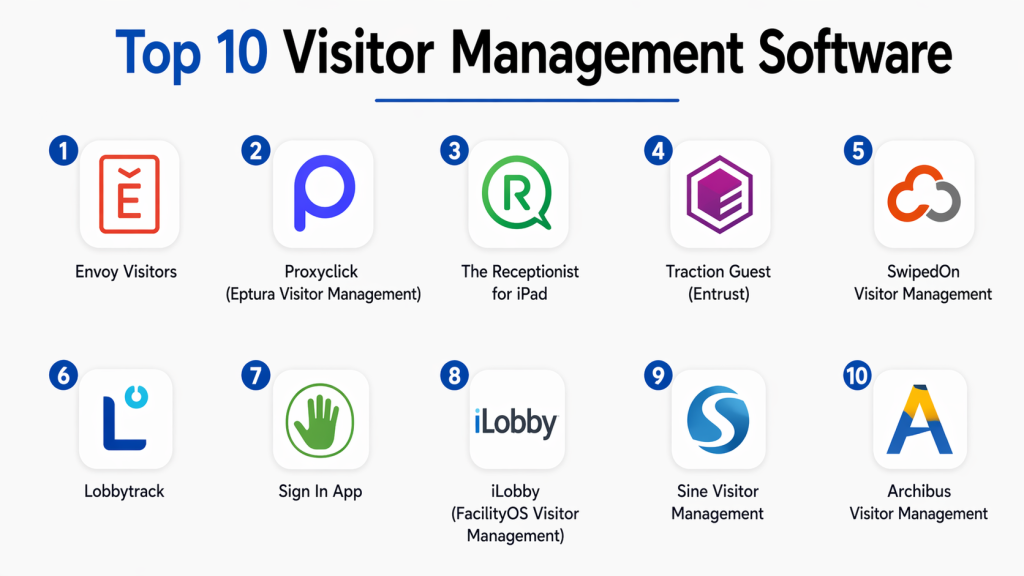
Top 10 Visitor Management Software
#1 — Envoy Visitors
Short description: A modern visitor management platform that streamlines office check-ins, automates notifications, and integrates with workplace security systems for seamless visitor tracking.
Key Features
- Touchless visitor check-in
- Pre-registration system
- Host notifications
- Badge printing
- Visitor analytics
Pros
- Very easy to use
- Modern UI experience
Cons
- Subscription-based pricing
- Limited offline functionality
Platforms / Deployment
Cloud / iOS / Android
Security & Compliance
GDPR-compliant data handling
Integrations & Ecosystem
Works with Slack, Google Workspace, access control systems
Support & Community
Strong enterprise support
#2 — Proxyclick (Eptura Visitor Management)
Short description: A global visitor management system designed for enterprise environments with strong compliance, security, and multi-location management features.
Key Features
- Visitor pre-registration
- ID verification
- Multi-site visitor tracking
- Compliance workflows
- Real-time notifications
Pros
- Strong enterprise focus
- Highly scalable
Cons
- Complex setup
- Higher pricing tier
Platforms / Deployment
Cloud
Security & Compliance
Enterprise-grade compliance (GDPR-ready)
Integrations & Ecosystem
Works with HR and access control systems
Support & Community
Strong global enterprise support
#3 — The Receptionist for iPad
Short description: A simple and effective visitor management app designed for iPad-based check-in systems in offices and reception areas.
Key Features
- iPad-based check-in
- Visitor badge printing
- Host notifications
- Visitor logs
- Custom branding
Pros
- Easy setup
- Affordable for SMBs
Cons
- Hardware dependency (iPad)
- Limited enterprise scalability
Platforms / Deployment
iOS / Cloud
Security & Compliance
Not publicly stated
Integrations & Ecosystem
Basic integrations with office tools
Support & Community
Good SMB support
#4 — Traction Guest (Entrust)
Short description: A powerful enterprise visitor management system focused on security, compliance, and large-scale visitor operations.
Key Features
- Identity verification
- Visitor screening
- Multi-location support
- Real-time alerts
- Compliance tracking
Pros
- Strong security features
- Enterprise-grade scalability
Cons
- Expensive
- Complex configuration
Platforms / Deployment
Cloud
Security & Compliance
High-level enterprise security
Integrations & Ecosystem
Works with access control systems and enterprise tools
Support & Community
Strong enterprise support
#5 — SwipedOn Visitor Management
Short description: A user-friendly visitor management platform designed for small and mid-sized businesses with simple check-in and tracking features.
Key Features
- Touchless check-in
- Visitor tracking
- Host notifications
- Badge printing
- Pre-registration
Pros
- Easy to deploy
- Clean interface
Cons
- Limited advanced features
- SMB-focused
Platforms / Deployment
Cloud
Security & Compliance
GDPR-compliant
Integrations & Ecosystem
Works with Slack and Microsoft Teams
Support & Community
Strong SMB support
#6 — Lobbytrack
Short description: A flexible visitor management system offering kiosk-based check-ins, security screening, and visitor tracking features for organizations.
Key Features
- Visitor check-in kiosk
- Badge printing
- Security screening
- Visitor logs
- Multi-location support
Pros
- Flexible deployment
- Strong customization
Cons
- UI feels outdated
- Setup complexity
Platforms / Deployment
Cloud / On-prem
Security & Compliance
Not publicly stated
Integrations & Ecosystem
Supports access control integrations
Support & Community
Moderate support
#7 — Sign In App
Short description: A simple cloud-based visitor management system designed for fast check-ins, compliance tracking, and workplace safety.
Key Features
- QR code check-in
- Visitor registration
- Emergency evacuation lists
- Host notifications
- Badge printing
Pros
- Very easy to use
- Fast deployment
Cons
- Limited enterprise features
- Basic analytics
Platforms / Deployment
Cloud / Mobile
Security & Compliance
GDPR-compliant
Integrations & Ecosystem
Works with Microsoft Teams
Support & Community
Good SMB support
#8 — iLobby (FacilityOS Visitor Management)
Short description: An enterprise-grade visitor management platform designed for high-security facilities with advanced compliance and screening features.
Key Features
- Identity verification
- Visitor screening
- Compliance workflows
- Multi-site management
- Real-time alerts
Pros
- Strong security focus
- Enterprise scalability
Cons
- Complex setup
- High cost
Platforms / Deployment
Cloud
Security & Compliance
Enterprise-grade compliance
Integrations & Ecosystem
Works with access control systems
Support & Community
Strong enterprise support
#9 — Sine Visitor Management
Short description: A workplace visitor management platform focused on safety, compliance, and contractor management.
Key Features
- Visitor pre-registration
- Contractor management
- Emergency evacuation tools
- Real-time alerts
- Access control integration
Pros
- Strong safety features
- Good scalability
Cons
- Pricing complexity
- Setup learning curve
Platforms / Deployment
Cloud
Security & Compliance
GDPR-compliant
Integrations & Ecosystem
Works with security and HR systems
Support & Community
Strong enterprise support
#10 — Archibus Visitor Management
Short description: A workplace management platform with integrated visitor management features designed for large enterprise environments.
Key Features
- Visitor tracking
- Space and facility management
- Access control integration
- Pre-registration system
- Reporting tools
Pros
- Strong enterprise features
- Integrated workplace system
Cons
- Complex system
- High cost
Platforms / Deployment
Cloud / On-prem
Security & Compliance
Enterprise-grade compliance
Integrations & Ecosystem
Works with facility management systems
Support & Community
Strong enterprise support
Comparison Table (Top 10)
| Tool Name | Best For | Platform(s) Supported | Deployment | Standout Feature | Public Rating |
|---|---|---|---|---|---|
| Envoy | Modern offices | Multi-platform | Cloud | Touchless check-in | N/A |
| Proxyclick | Enterprises | Multi-platform | Cloud | Compliance workflows | N/A |
| Receptionist | SMB offices | iOS | Cloud | iPad check-in | N/A |
| Traction Guest | High security | Multi-platform | Cloud | Identity verification | N/A |
| SwipedOn | SMB businesses | Multi-platform | Cloud | Simple UI | N/A |
| Lobbytrack | Flexible setups | Multi-platform | Hybrid | Custom workflows | N/A |
| Sign In App | Offices | Multi-platform | Cloud | QR check-in | N/A |
| iLobby | Secure facilities | Multi-platform | Cloud | Advanced screening | N/A |
| Sine | Safety-focused orgs | Multi-platform | Cloud | Contractor management | N/A |
| Archibus | Large enterprises | Multi-platform | Hybrid | Workplace integration | N/A |
Evaluation & Scoring of Visitor Management Software
| Tool Name | Core | Ease | Integrations | Security | Performance | Support | Value | Weighted Total |
|---|---|---|---|---|---|---|---|---|
| Envoy | 9 | 9 | 9 | 9 | 9 | 9 | 8 | 8.8 |
| Proxyclick | 10 | 8 | 10 | 10 | 9 | 9 | 7 | 8.8 |
| Receptionist | 8 | 9 | 8 | 8 | 8 | 8 | 9 | 8.2 |
| Traction Guest | 10 | 7 | 9 | 10 | 9 | 9 | 7 | 8.6 |
| SwipedOn | 8 | 9 | 8 | 8 | 8 | 8 | 9 | 8.3 |
| Lobbytrack | 8 | 7 | 8 | 8 | 8 | 8 | 8 | 7.9 |
| Sign In App | 8 | 9 | 8 | 8 | 8 | 8 | 9 | 8.3 |
| iLobby | 10 | 7 | 9 | 10 | 9 | 9 | 7 | 8.6 |
| Sine | 9 | 8 | 9 | 9 | 9 | 9 | 8 | 8.6 |
| Archibus | 9 | 7 | 9 | 10 | 9 | 9 | 7 | 8.4 |
Frequently Asked Questions (FAQs)
1. What is visitor management software?
It is a digital system used to track and manage visitors entering a facility. It replaces paper logbooks with automated check-in, security screening, and visitor tracking features.
2. Why is visitor management important?
It improves security, ensures compliance, and provides real-time visibility of who is inside a building at any time.
3. Where is visitor management software used?
It is used in offices, hospitals, schools, factories, government buildings, and co-working spaces.
4. Can visitor management systems print badges?
Yes, most systems support visitor badge printing with details like name, photo, and visit purpose.
5. Is visitor data stored securely?
Yes, modern systems use encrypted cloud storage and compliance standards like GDPR to protect visitor data.
6. Can visitors pre-register?
Yes, many systems allow hosts to pre-register visitors before arrival for faster check-in.
7. Does it integrate with access control systems?
Yes, most platforms integrate with door access systems and security infrastructure.
8. Can it send notifications to hosts?
Yes, hosts receive instant alerts when their visitors arrive.
9. Is it cloud-based?
Most modern visitor management systems are cloud-based, but some also support on-premise deployment.
10. What is the best visitor management software?
Envoy, Proxyclick, and iLobby are among the most widely used depending on business size and security needs.
Conclusion
Visitor Management Software has become a critical part of modern workplace security and compliance. It ensures safe, efficient, and automated visitor tracking while improving the overall experience for both visitors and hosts. There is no single best solution for all organizations. Envoy and SwipedOn are great for modern offices, Proxyclick and iLobby are ideal for enterprise-grade security, while Receptionist is perfect for small businesses. The right choice depends on your security requirements, workplace size, and integration needs. Focus on ease of use, security features, and scalability when selecting a platform.