Introduction
Digital Forensics Tools are specialized solutions used to collect, preserve, analyze, and report digital evidence from computers, mobile devices, networks, and cloud environments. These tools play a critical role in cybersecurity investigations, incident response, legal cases, and compliance audits by ensuring that evidence is handled in a forensically sound and legally defensible manner.
As cyber threats grow more sophisticated, organizations need robust forensic capabilities to understand attack vectors, trace malicious activity, and support remediation efforts. Modern digital forensics tools go beyond disk imaging—they now support memory analysis, mobile forensics, cloud forensics, and automated investigation workflows.
Common Use Cases
- Investigating cyber incidents and data breaches
- Recovering deleted or hidden data
- Analyzing malware and attack behavior
- Supporting legal and compliance investigations
- Conducting insider threat investigations
What Buyers Should Evaluate
- Evidence acquisition and integrity validation
- Support for multiple data sources (disk, memory, mobile, cloud)
- Ease of use and automation capabilities
- Reporting and legal defensibility
- Performance and scalability
- Integration with security and incident response tools
- Support for different file systems and formats
- Community and vendor support
- Cost vs value
Best for: Digital forensics investigators, SOC teams, law enforcement agencies, and organizations handling incident response.
Not ideal for: Teams without forensic expertise or those needing only basic monitoring tools.
Key Trends in Digital Forensics Tools
- Automation of forensic workflows and evidence analysis
- AI-driven investigation and pattern recognition
- Expansion into cloud and SaaS forensics
- Memory forensics and live analysis capabilities
- Integration with incident response and XDR platforms
- Support for mobile device and IoT forensics
- Real-time forensic data collection
- Enhanced reporting for legal compliance
- Open-source tools gaining traction alongside enterprise solutions
- Focus on scalability for large data volumes
How We Selected These Tools (Methodology)
- Strong industry adoption and credibility
- Proven forensic analysis capabilities across multiple data sources
- Support for modern environments (cloud, mobile, memory)
- Integration with incident response and security tools
- Availability of automation and reporting features
- Suitability for enterprise and investigative use cases
- Strong documentation and community/vendor support
- Balance between commercial and open-source tools
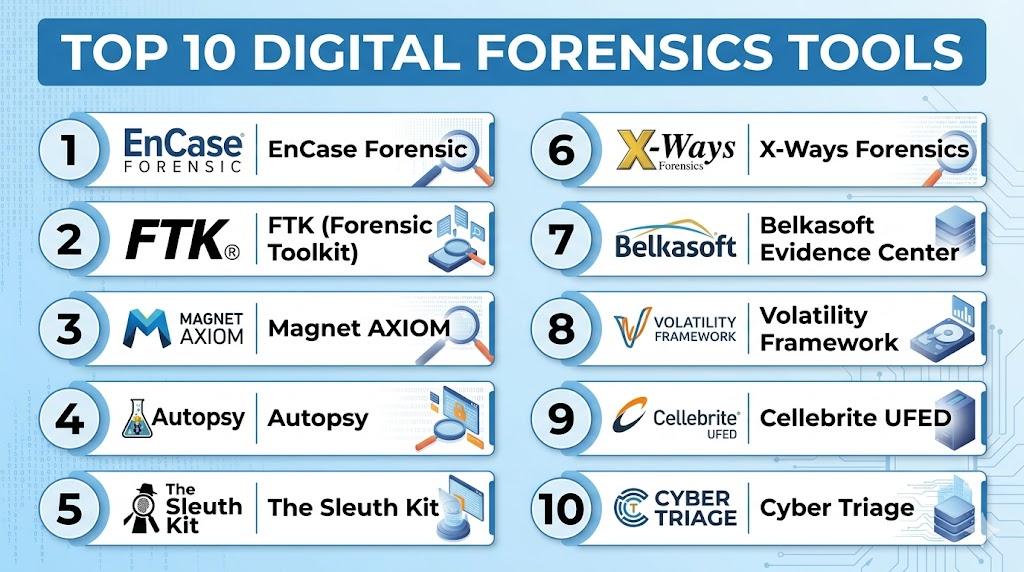
Top 10 Digital Forensics Tools
#1 — EnCase Forensic
Short description: A widely used enterprise forensic tool for deep disk analysis and evidence collection.
Key Features
- Disk imaging and analysis
- Evidence preservation
- File recovery
- Reporting tools
- Multi-platform support
Pros
- Industry-standard tool
- Strong legal acceptance
Cons
- Complex interface
- Premium pricing
Platforms / Deployment
- Windows
Security & Compliance
- Evidence integrity features
- Not publicly stated
Integrations & Ecosystem
- Security tools
- APIs
Support & Community
Enterprise support and training resources.
#2 — FTK (Forensic Toolkit)
Short description: A powerful forensic analysis tool known for speed and indexing capabilities.
Key Features
- Data indexing
- Disk analysis
- File recovery
- Email analysis
- Reporting
Pros
- Fast processing
- Strong search capabilities
Cons
- Resource-intensive
- Complex setup
Platforms / Deployment
- Windows
Security & Compliance
- Not publicly stated
Integrations & Ecosystem
- APIs
- Security tools
Support & Community
Strong vendor support.
#3 — Magnet AXIOM
Short description: A modern digital forensics platform supporting computers, mobile devices, and cloud data.
Key Features
- Multi-source analysis
- Mobile and cloud forensics
- Artifact analysis
- Reporting
- Automation
Pros
- Easy to use
- Broad data coverage
Cons
- Premium pricing
- Requires training
Platforms / Deployment
- Windows
Security & Compliance
- Not publicly stated
Integrations & Ecosystem
- APIs
- Security tools
Support & Community
Strong support and documentation.
#4 — Autopsy
Short description: An open-source digital forensics platform built on The Sleuth Kit.
Key Features
- Disk analysis
- File recovery
- Keyword search
- Timeline analysis
- Plugin support
Pros
- Free and open-source
- Active community
Cons
- Limited advanced features
- Requires expertise
Platforms / Deployment
- Windows / Linux
Security & Compliance
- Not publicly stated
Integrations & Ecosystem
- Plugins
- APIs
Support & Community
Strong open-source community.
#5 — The Sleuth Kit
Short description: A command-line forensic toolkit for analyzing disk images and file systems.
Key Features
- File system analysis
- Disk image analysis
- Data recovery
- Command-line tools
- Integration with Autopsy
Pros
- Lightweight
- Highly flexible
Cons
- Not user-friendly
- Requires expertise
Platforms / Deployment
- Windows / Linux / macOS
Security & Compliance
- Not publicly stated
Integrations & Ecosystem
- Open-source tools
- APIs
Support & Community
Active community support.
#6 — X-Ways Forensics
Short description: A fast and efficient forensic tool known for its performance and low resource usage.
Key Features
- Disk analysis
- File recovery
- Data visualization
- Reporting
- Multi-file system support
Pros
- Lightweight
- High performance
Cons
- Steep learning curve
- Limited UI simplicity
Platforms / Deployment
- Windows
Security & Compliance
- Not publicly stated
Integrations & Ecosystem
- APIs
- Plugins
Support & Community
Vendor support available.
#7 — Belkasoft Evidence Center
Short description: A digital forensics tool focusing on comprehensive data extraction and analysis.
Key Features
- Multi-source data collection
- Memory analysis
- Mobile forensics
- Cloud data analysis
- Reporting
Pros
- Broad capabilities
- Easy interface
Cons
- Premium pricing
- Requires training
Platforms / Deployment
- Windows
Security & Compliance
- Not publicly stated
Integrations & Ecosystem
- APIs
- Security tools
Support & Community
Vendor support available.
#8 — Volatility Framework
Short description: An open-source tool for memory forensics and analysis.
Key Features
- Memory analysis
- Malware detection
- Process analysis
- Plugin architecture
- Open-source flexibility
Pros
- Powerful memory analysis
- Free and open-source
Cons
- Command-line interface
- Requires expertise
Platforms / Deployment
- Windows / Linux / macOS
Security & Compliance
- Not publicly stated
Integrations & Ecosystem
- Plugins
- APIs
Support & Community
Strong open-source community.
#9 — Cellebrite UFED
Short description: A leading mobile forensics tool for extracting data from smartphones and devices.
Key Features
- Mobile data extraction
- App data analysis
- Reporting
- Device support
- Automation
Pros
- Strong mobile capabilities
- Widely used in law enforcement
Cons
- Expensive
- Limited outside mobile
Platforms / Deployment
- Windows
Security & Compliance
- Not publicly stated
Integrations & Ecosystem
- APIs
- Forensic tools
Support & Community
Enterprise support.
#10 — Cyber Triage
Short description: A forensic tool designed for incident response and rapid investigations.
Key Features
- Incident response
- Evidence collection
- Malware analysis
- Automation
- Reporting
Pros
- Fast analysis
- Easy to use
Cons
- Limited advanced features
- Narrow focus
Platforms / Deployment
- Windows
Security & Compliance
- Not publicly stated
Integrations & Ecosystem
- APIs
- Security tools
Support & Community
Good vendor support.
Comparison Table (Top 10)
| Tool Name | Best For | Platform(s) Supported | Deployment | Standout Feature | Public Rating |
|---|---|---|---|---|---|
| EnCase | Enterprise | Windows | Local | Legal acceptance | N/A |
| FTK | Investigations | Windows | Local | Fast indexing | N/A |
| Magnet AXIOM | Multi-source | Windows | Local | Cloud + mobile | N/A |
| Autopsy | Open-source | Win/Linux | Local | Free usage | N/A |
| Sleuth Kit | Experts | Multi | Local | Command-line power | N/A |
| X-Ways | Performance | Windows | Local | Lightweight | N/A |
| Belkasoft | Multi-source | Windows | Local | Data extraction | N/A |
| Volatility | Memory | Multi | Local | Memory forensics | N/A |
| Cellebrite | Mobile | Windows | Local | Mobile analysis | N/A |
| Cyber Triage | IR teams | Windows | Local | Fast response | N/A |
Evaluation & Scoring of Digital Forensics Tools
| Tool Name | Core (25%) | Ease (15%) | Integrations (15%) | Security (10%) | Performance (10%) | Support (10%) | Value (15%) | Weighted Total |
|---|---|---|---|---|---|---|---|---|
| EnCase | 9 | 7 | 8 | 9 | 8 | 8 | 7 | 8.2 |
| FTK | 9 | 7 | 8 | 9 | 9 | 8 | 7 | 8.3 |
| Magnet AXIOM | 9 | 8 | 8 | 8 | 8 | 8 | 7 | 8.2 |
| Autopsy | 7 | 7 | 7 | 7 | 7 | 8 | 9 | 7.5 |
| Sleuth Kit | 7 | 6 | 7 | 7 | 8 | 8 | 9 | 7.4 |
| X-Ways | 8 | 6 | 7 | 8 | 9 | 7 | 8 | 7.8 |
| Belkasoft | 8 | 8 | 7 | 8 | 8 | 7 | 7 | 7.8 |
| Volatility | 8 | 6 | 7 | 8 | 8 | 8 | 9 | 7.9 |
| Cellebrite | 9 | 8 | 7 | 9 | 8 | 8 | 6 | 8.0 |
| Cyber Triage | 7 | 9 | 7 | 7 | 8 | 7 | 8 | 7.6 |
How to interpret scores:
- Scores are comparative across tools
- Higher scores indicate stronger capabilities
- Enterprise tools excel in depth and compliance
- Open-source tools provide high value but require expertise
- Choose based on investigation needs
Which Digital Forensics Tool Is Right for You?
Solo / Freelancer
Use Autopsy or Volatility for cost-effective analysis.
SMB
Use Cyber Triage or Belkasoft for ease of use.
Mid-Market
Use Magnet AXIOM or X-Ways Forensics.
Enterprise
Use EnCase, FTK, or Cellebrite.
Budget vs Premium
- Budget: Autopsy, Sleuth Kit
- Premium: EnCase, Cellebrite
Feature Depth vs Ease of Use
- Deep features: EnCase
- Ease of use: Magnet AXIOM
Integrations & Scalability
Best: FTK, Magnet AXIOM
Security & Compliance Needs
Best: EnCase, Cellebrite
Frequently Asked Questions (FAQs)
1. What are digital forensics tools?
They help collect and analyze digital evidence.
2. Why are they important?
They support investigations and incident response.
3. Do they support cloud data?
Modern tools support cloud environments.
4. Are open-source tools reliable?
Yes, but require expertise.
5. Can they recover deleted files?
Yes, that is a core feature.
6. Are they difficult to use?
Some tools require training.
7. Do they integrate with SIEM?
Yes, many tools support integrations.
8. Are they expensive?
Pricing varies widely.
9. Who should use them?
Security teams and investigators.
10. What is the biggest benefit?
Accurate investigation and evidence analysis.
Conclusion
Digital Forensics Tools are essential for understanding and responding to cyber incidents in today’s complex digital environments. They enable organizations to collect reliable evidence, uncover attack patterns, and support legal and compliance requirements. As cyber threats evolve, the need for advanced forensic capabilities—spanning endpoints, memory, mobile, and cloud—continues to grow. While enterprise tools provide comprehensive features and legal defensibility, open-source solutions offer flexibility and cost advantages for skilled teams. The best approach is to evaluate your investigation requirements, shortlist a few tools, and test their effectiveness in real-world scenarios to ensure they align with your operational and security needs.