Introduction
Terminal emulators are software applications that provide a command-line interface to interact with an operating system. They allow developers, system administrators, and power users to execute commands, manage servers, automate workflows, and access system-level functions efficiently.
Modern terminal emulators go beyond basic command execution. They offer features like tabs, split panes, GPU acceleration, theming, scripting, and integrations with development tools. With the rise of DevOps, cloud computing, and remote development, terminals have become a critical part of daily workflows.
Common use cases include remote server access, automation scripts, software development, system administration, and debugging.
What buyers should evaluate:
- Performance and responsiveness
- Cross-platform compatibility
- Customization and theming options
- Support for tabs and split panes
- GPU acceleration capabilities
- Integration with shells and tools
- Security features like SSH support
- Ease of configuration
- Community and plugin ecosystem
- Stability for long-running sessions
Best for: Developers, DevOps engineers, system administrators, cloud engineers, and advanced users.
Not ideal for: Users who rely primarily on graphical interfaces and do not use command-line tools.
Key Trends in Terminal Emulators
- GPU acceleration for faster rendering
- Cross-platform terminal environments
- Integration with cloud and remote development tools
- Advanced customization and theming
- Built-in SSH and remote session support
- Support for multiplexing and split views
- Plugin ecosystems and extensibility
- Improved Unicode and font rendering
- Integration with modern shells like Zsh and Fish
- Lightweight and minimal resource usage
How We Selected These Tools
- Popularity and adoption among developers
- Performance and responsiveness
- Feature richness and customization
- Cross-platform support
- Integration with modern development workflows
- Stability and reliability
- Community support and updates
- Ease of setup and configuration
- Scalability for professional use
- Real-world usage across industries
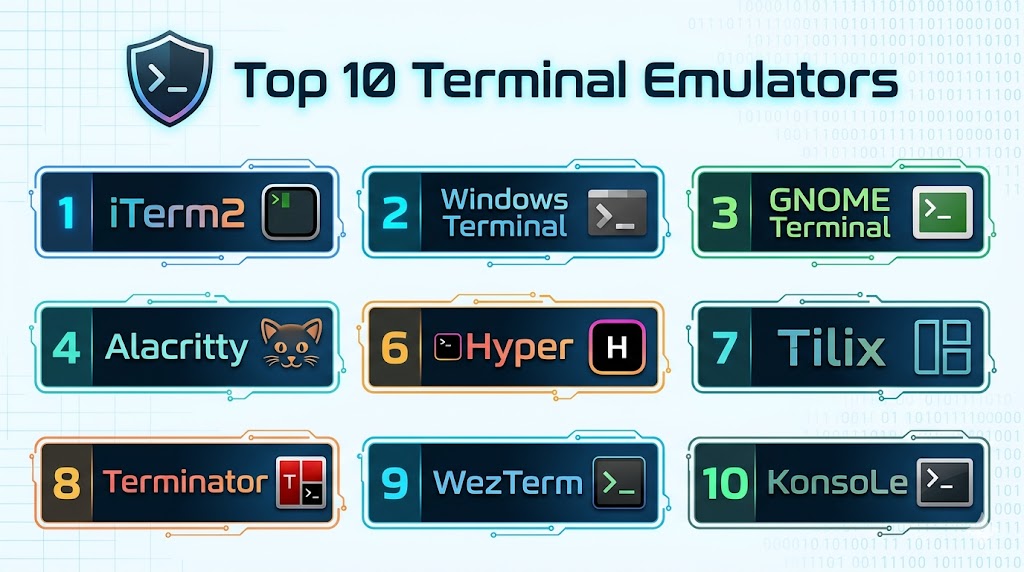
Top 10 Terminal Emulators
1. iTerm2
Short description:
iTerm2 is a powerful terminal emulator for macOS with advanced features and customization options. It is widely used by developers and DevOps professionals. It provides a modern and flexible terminal experience. It is ideal for macOS users.
Key Features
- Split panes
- Search functionality
- Custom profiles
- Scripting support
- Advanced key bindings
- Paste history
- Hotkey window
Pros
- Highly customizable
- Feature-rich
- Stable
Cons
- macOS only
- Complex configuration
- Learning curve
Platforms / Deployment
macOS
Deployment: Desktop
Security & Compliance
Supports secure shell integrations
Integrations & Ecosystem
Integrates with development and shell tools.
- Zsh
- Bash
- SSH
- APIs
- Dev tools
- Plugins
Support & Community
Strong community support
2. Windows Terminal
Short description:
Windows Terminal is a modern terminal emulator developed by Microsoft. It supports multiple shells and tabs. It provides a clean and customizable interface. It is ideal for Windows users.
Key Features
- Tabs and panes
- Multiple shell support
- GPU rendering
- Custom themes
- Unicode support
- CLI integration
- Profiles
Pros
- Modern UI
- Fast performance
- Native Windows integration
Cons
- Windows only
- Limited advanced features
- Still evolving
Platforms / Deployment
Windows
Deployment: Desktop
Security & Compliance
Supports secure shell usage
Integrations & Ecosystem
Integrates with Windows tools.
- PowerShell
- WSL
- Azure
- Dev tools
- APIs
- Shell environments
Support & Community
Strong Microsoft ecosystem
3. GNOME Terminal
Short description:
GNOME Terminal is the default terminal emulator for many Linux distributions. It is simple and reliable. It provides essential features for daily use. It is ideal for Linux users.
Key Features
- Tabs support
- Profiles
- Custom themes
- Keyboard shortcuts
- Unicode support
- CLI tools
- Integration with GNOME
Pros
- Lightweight
- Easy to use
- Stable
Cons
- Limited advanced features
- Basic customization
- Less modern UI
Platforms / Deployment
Linux
Deployment: Desktop
Security & Compliance
Supports SSH and secure access
Integrations & Ecosystem
Integrates with Linux ecosystem.
- Bash
- Zsh
- Dev tools
- APIs
- Shell environments
- System tools
Support & Community
Large Linux community
4. Alacritty
Short description:
Alacritty is a GPU-accelerated terminal emulator focused on performance. It is minimal and fast. It is widely used by power users. It is ideal for high-performance workflows.
Key Features
- GPU acceleration
- Minimal design
- Cross-platform support
- Configuration files
- Unicode support
- High performance
- CLI tools
Pros
- Extremely fast
- Lightweight
- Modern design
Cons
- Limited features
- No tabs
- Configuration complexity
Platforms / Deployment
Windows / macOS / Linux
Deployment: Desktop
Security & Compliance
Not publicly stated
Integrations & Ecosystem
Integrates with shell and dev tools.
- Bash
- Zsh
- Dev tools
- APIs
- Shell environments
- Plugins
Support & Community
Active community
5. Kitty
Short description:
Kitty is a fast, feature-rich terminal emulator with GPU acceleration. It supports advanced layouts and scripting. It is ideal for power users. It provides a modern terminal experience.
Key Features
- GPU rendering
- Tabs and splits
- Scripting support
- Remote control
- Unicode support
- Layout management
- High performance
Pros
- Feature-rich
- Fast
- Highly customizable
Cons
- Complex configuration
- Learning curve
- Less beginner-friendly
Platforms / Deployment
Windows / macOS / Linux
Deployment: Desktop
Security & Compliance
Not publicly stated
Integrations & Ecosystem
Integrates with advanced workflows.
- Shells
- Dev tools
- APIs
- Plugins
- Automation tools
- System tools
Support & Community
Strong community
6. Hyper
Short description:
Hyper is a terminal emulator built on web technologies. It focuses on extensibility and plugins. It provides a modern UI. It is ideal for developers who prefer customization.
Key Features
- Plugin system
- Custom themes
- Cross-platform support
- Web-based UI
- Tabs support
- CLI integration
- Custom configuration
Pros
- Highly customizable
- Modern UI
- Easy plugin installation
Cons
- Performance overhead
- Resource-heavy
- Stability issues
Platforms / Deployment
Windows / macOS / Linux
Deployment: Desktop
Security & Compliance
Not publicly stated
Integrations & Ecosystem
Integrates with developer tools.
- Plugins
- Dev tools
- APIs
- Shell environments
- Extensions
- Frameworks
Support & Community
Active community
7. Tilix
Short description:
Tilix is a tiling terminal emulator for Linux that supports multiple layouts. It is designed for productivity. It is ideal for multitasking users.
Key Features
- Tiling layouts
- Split panes
- Profiles
- Drag-and-drop
- CLI integration
- Custom themes
- Keyboard shortcuts
Pros
- Great for multitasking
- Flexible layouts
- Lightweight
Cons
- Linux only
- Limited ecosystem
- Basic UI
Platforms / Deployment
Linux
Deployment: Desktop
Security & Compliance
Not publicly stated
Integrations & Ecosystem
Integrates with Linux tools.
- Bash
- Zsh
- Dev tools
- APIs
- Shell environments
- System tools
Support & Community
Growing community
8. Terminator
Short description:
Terminator is a Linux terminal emulator focused on productivity and multi-pane workflows. It is widely used by system administrators. It is ideal for heavy multitasking.
Key Features
- Split panes
- Tabs support
- Custom layouts
- Keyboard shortcuts
- CLI integration
- Profiles
- Plugin support
Pros
- Great for multitasking
- Easy to use
- Stable
Cons
- Linux only
- Limited modern features
- UI outdated
Platforms / Deployment
Linux
Deployment: Desktop
Security & Compliance
Not publicly stated
Integrations & Ecosystem
Integrates with Linux workflows.
- Bash
- Zsh
- Dev tools
- APIs
- Shell environments
- System tools
Support & Community
Active community
9. WezTerm
Short description:
WezTerm is a modern terminal emulator with GPU acceleration and advanced features. It supports multiplexing and scripting. It is ideal for advanced users.
Key Features
- GPU acceleration
- Multiplexing
- Tabs and splits
- Cross-platform
- Configuration
- Unicode support
- Remote connections
Pros
- Feature-rich
- High performance
- Flexible
Cons
- Complex setup
- Learning curve
- Smaller community
Platforms / Deployment
Windows / macOS / Linux
Deployment: Desktop
Security & Compliance
Not publicly stated
Integrations & Ecosystem
Integrates with advanced workflows.
- Shells
- Dev tools
- APIs
- Plugins
- Remote systems
- Automation tools
Support & Community
Growing ecosystem
10. Konsole
Short description:
Konsole is the default terminal emulator for KDE environments. It is stable and customizable. It is widely used by Linux users. It is ideal for KDE users.
Key Features
- Tabs support
- Profiles
- Custom themes
- Unicode support
- CLI tools
- Integration with KDE
- Split views
Pros
- Stable
- Easy to use
- Good integration
Cons
- Limited advanced features
- KDE dependency
- Basic UI
Platforms / Deployment
Linux
Deployment: Desktop
Security & Compliance
Supports secure shell usage
Integrations & Ecosystem
Integrates with KDE ecosystem.
- Bash
- Zsh
- Dev tools
- APIs
- Shell environments
- System tools
Support & Community
Strong KDE community
Comparison Table
| Tool Name | Best For | Platform(s) Supported | Deployment | Standout Feature | Public Rating |
|---|---|---|---|---|---|
| iTerm2 | macOS users | macOS | Desktop | Advanced features | N/A |
| Windows Terminal | Windows users | Windows | Desktop | Modern UI | N/A |
| GNOME Terminal | Linux users | Linux | Desktop | Simplicity | N/A |
| Alacritty | Performance | Cross-platform | Desktop | GPU speed | N/A |
| Kitty | Power users | Cross-platform | Desktop | Advanced layouts | N/A |
| Hyper | Customization | Cross-platform | Desktop | Plugin system | N/A |
| Tilix | Multitasking | Linux | Desktop | Tiling layouts | N/A |
| Terminator | Multi-pane | Linux | Desktop | Split panes | N/A |
| WezTerm | Advanced use | Cross-platform | Desktop | Multiplexing | N/A |
| Konsole | KDE users | Linux | Desktop | KDE integration | N/A |
Evaluation & Scoring of Terminal Emulators
| Tool Name | Core | Ease | Integrations | Security | Performance | Support | Value | Weighted Total |
|---|---|---|---|---|---|---|---|---|
| iTerm2 | 9 | 8 | 9 | 8 | 9 | 9 | 9 | 8.9 |
| Windows Terminal | 9 | 9 | 9 | 8 | 9 | 9 | 9 | 9.0 |
| GNOME Terminal | 7 | 10 | 7 | 7 | 8 | 9 | 10 | 8.3 |
| Alacritty | 8 | 7 | 7 | 7 | 10 | 8 | 9 | 8.4 |
| Kitty | 9 | 7 | 8 | 7 | 9 | 8 | 9 | 8.5 |
| Hyper | 7 | 8 | 9 | 7 | 6 | 8 | 8 | 7.6 |
| Tilix | 7 | 8 | 7 | 7 | 8 | 7 | 9 | 7.8 |
| Terminator | 7 | 8 | 7 | 7 | 8 | 8 | 9 | 7.9 |
| WezTerm | 9 | 7 | 8 | 7 | 9 | 8 | 9 | 8.5 |
| Konsole | 7 | 9 | 7 | 7 | 8 | 8 | 9 | 8.0 |
Scores are comparative and reflect performance, usability, and ecosystem strength. The best terminal depends on your workflow and platform.
Which Terminal Emulator Is Right for You
Solo / Freelancer
Use Windows Terminal, iTerm2, or GNOME Terminal for simplicity and ease of use.
SMB
Yarn-like tools? Actually wrong domain; instead use Kitty or Tilix for productivity.
Mid-Market
WezTerm and Alacritty provide performance and flexibility.
Enterprise
Combine iTerm2, Windows Terminal, and advanced tools like Kitty for scalability.
Budget vs Premium
Most terminal emulators are free and open-source.
Feature Depth vs Ease of Use
GNOME Terminal is simple, while Kitty offers advanced features.
Integrations & Scalability
WezTerm and iTerm2 scale well for advanced workflows.
Security & Compliance Needs
Use terminals with strong SSH and encryption support.
Frequently Asked Questions
1. What is a terminal emulator
A terminal emulator is a program that allows users to interact with a system using commands. It provides a command-line interface. It is essential for developers and system administrators.
2. Why use a terminal
Terminals allow faster and more efficient workflows. They enable automation and scripting. They provide deeper system access.
3. Are terminal emulators secure
Most support secure protocols like SSH. Security depends on configuration. Always follow best practices.
4. Which terminal is fastest
Alacritty and Kitty are known for high performance. GPU acceleration improves speed. Performance depends on system.
5. Can I customize terminals
Yes, most terminals support themes and configuration. Customization improves usability. It varies by tool.
6. Do terminals support multiple tabs
Yes, many terminals support tabs and split panes. This improves productivity. Features vary by tool.
7. Are they free
Most terminal emulators are free. Some enterprise features may be paid. Open-source options are common.
8. Can I use them for remote servers
Yes, terminals support SSH for remote access. This is a common use case. It is widely used.
9. Which terminal is best for beginners
Windows Terminal and GNOME Terminal are easy to use. They provide simple interfaces. Ideal for beginners.
10. How do I choose the right terminal
Consider your OS, workflow, and features. Test different options. Choose what fits your needs.
Conclusion
Terminal emulators remain one of the most essential tools for developers, DevOps engineers, and system administrators. They provide a direct and efficient way to interact with systems, automate workflows, and manage infrastructure. Modern terminals have evolved far beyond basic command-line interfaces, offering features like GPU acceleration, split panes, and deep customization to enhance productivity. The ecosystem includes a wide range of tools, from beginner-friendly options like Windows Terminal and GNOME Terminal to advanced solutions like Kitty, WezTerm, and Alacritty. Each tool serves a specific purpose, whether it is performance optimization, customization, or enterprise-level workflows. Choosing the right terminal depends on your operating system, technical expertise, and daily workflow requirements. There is no single best terminal emulator for everyone. A practical approach is to try a few tools, evaluate their performance and features, and select the one that aligns with your workflow. Investing time in configuring your terminal environment can significantly improve efficiency and overall developer experience.
The article is useful, but startup performance is another factor. A slow-launching terminal can be surprisingly frustrating when you open sessions frequently throughout the day.