Introduction
Password Vault Consumer Apps are digital tools that securely store, manage, and autofill passwords, login credentials, and sensitive information. Instead of remembering dozens of passwords, users rely on a single master password or biometric authentication to access an encrypted vault containing all their credentials.
With the increasing number of online accounts and rising cybersecurity threats, password vaults have become essential for personal digital safety. Modern solutions now offer zero-trust security models, end-to-end encryption, biometric authentication, dark web monitoring, and identity protection features, ensuring both convenience and strong protection against breaches.
Common use cases include:
- Secure storage of passwords and credentials
- Auto-filling login details across websites and apps
- Generating strong, unique passwords
- Storing sensitive data (notes, documents, payment details)
- Monitoring compromised credentials
Key evaluation criteria:
- Encryption standards and security architecture
- Ease of use and user interface
- Cross-platform support
- Autofill and password generation capabilities
- Integration with browsers and apps
- Multi-factor authentication support
- Pricing and value
- Customer support and reliability
Best for: Individuals, families, and professionals managing multiple online accounts and prioritizing digital security.
Not ideal for: Users who rarely use digital services or prefer manual password management.
Key Trends in Password Vault Consumer Apps
- Zero-knowledge architecture: Providers cannot access user data
- Biometric authentication: Fingerprint and face unlock
- Passwordless login support: Passkeys and authentication tokens
- Dark web monitoring: Alerts for compromised credentials
- Cross-device synchronization: Seamless access across devices
- Secure sharing: Sharing credentials safely with family or teams
- AI-based security alerts: Detecting weak or reused passwords
- Browser integration: Native autofill and extensions
- Encrypted storage: Protection for notes, documents, and payment data
- Multi-device ecosystem: Integration with mobile, desktop, and browsers
How We Evaluated Password Vault Consumer Apps (Methodology)
- Assessed market adoption and trustworthiness
- Evaluated security architecture (encryption, zero-knowledge)
- Reviewed autofill and password generation capabilities
- Analyzed integration with browsers and devices
- Measured performance and reliability
- Compared ease of use and onboarding
- Evaluated security features like MFA and alerts
- Considered pricing and accessibility
- Reviewed support and ecosystem strength
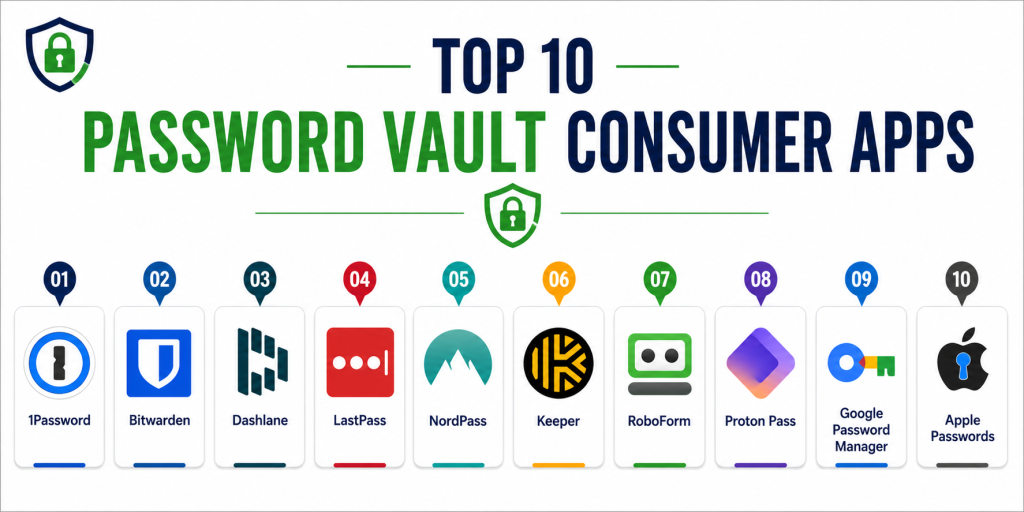
Top 10 Password Vault Consumer Apps
#1 — 1Password
Short description: 1Password is a premium password manager known for its strong security architecture and user-friendly interface. It offers encrypted storage, password generation, and secure sharing features. Suitable for individuals and families. It supports cross-platform usage and integrations. Known for reliability and ease of use. Ideal for users seeking a balance of security and usability.
Key Features
- Password storage
- Secure sharing
- Autofill
- Password generator
- Biometric authentication
- Watchtower security alerts
Pros
- Excellent security model
- Clean user interface
Cons
- Subscription-based
- No free plan
Platforms / Deployment
Windows / macOS / Linux / iOS / Android / Web
Cloud
Security & Compliance
End-to-end encryption, zero-knowledge, MFA
Integrations & Ecosystem
Integrates with browsers and productivity tools.
- Chrome, Firefox, Safari
- APIs
Support & Community
Strong documentation and support.
#2 — Bitwarden
Short description: Bitwarden is an open-source password manager offering strong encryption and flexible deployment options. It is popular for its free plan and transparency.
Key Features
- Password storage
- Autofill
- Password generator
- Secure sharing
- Self-hosting option
- Cross-platform sync
Pros
- Free plan available
- Open-source transparency
Cons
- UI less polished
- Limited advanced features
Platforms / Deployment
Windows / macOS / Linux / iOS / Android / Web
Cloud / Self-hosted
Security & Compliance
End-to-end encryption, zero-knowledge, MFA
Integrations & Ecosystem
Supports browser extensions and APIs.
Support & Community
Strong open-source community.
#3 — Dashlane
Short description: Dashlane is a premium password manager with advanced features like dark web monitoring and VPN. It offers a modern interface and strong security tools.
Key Features
- Password storage
- Autofill
- Dark web monitoring
- VPN
- Password generator
- Security dashboard
Pros
- Advanced security features
- User-friendly interface
Cons
- Higher cost
- Limited free plan
Platforms / Deployment
Web / Mobile
Cloud
Security & Compliance
Encryption, zero-knowledge, MFA
Integrations & Ecosystem
Integrates with browsers and security tools.
Support & Community
Good support.
#4 — LastPass
Short description: LastPass is a widely used password manager offering basic and advanced password management features. It is suitable for individuals and families.
Key Features
- Password storage
- Autofill
- Password generator
- Secure notes
- Sharing
Pros
- Easy to use
- Strong feature set
Cons
- Security concerns in past
- Limited free plan
Platforms / Deployment
Web / Mobile
Cloud
Security & Compliance
Encryption, MFA
Integrations & Ecosystem
Supports browser integrations.
Support & Community
Large user base.
#5 — NordPass
Short description: NordPass is a password manager developed by the team behind NordVPN. It focuses on simplicity and security.
Key Features
- Password storage
- Autofill
- Password generator
- Secure sharing
- Breach monitoring
Pros
- Easy to use
- Strong security
Cons
- Limited advanced features
- Premium pricing
Platforms / Deployment
Windows / macOS / Linux / iOS / Android
Cloud
Security & Compliance
Encryption, zero-knowledge, MFA
Integrations & Ecosystem
Supports browser extensions.
Support & Community
Good support.
#6 — Keeper
Short description: Keeper is a security-focused password manager offering encrypted storage and advanced protection features. Suitable for security-conscious users.
Key Features
- Password storage
- Secure file storage
- Breach monitoring
- MFA
- Encryption
Pros
- Strong security
- Enterprise-grade features
Cons
- Higher cost
- Complex setup
Platforms / Deployment
Web / Mobile / Desktop
Cloud
Security & Compliance
Encryption, zero-knowledge, MFA
Integrations & Ecosystem
Supports integrations with enterprise tools.
Support & Community
Strong support.
#7 — RoboForm
Short description: RoboForm is a long-standing password manager known for its form-filling capabilities. It offers reliable password storage and autofill.
Key Features
- Password storage
- Autofill forms
- Password generator
- Sync
- Secure sharing
Pros
- Strong autofill
- Affordable
Cons
- Outdated UI
- Limited advanced features
Platforms / Deployment
Windows / macOS / iOS / Android / Web
Cloud
Security & Compliance
Encryption, MFA
Integrations & Ecosystem
Supports browser integrations.
Support & Community
Moderate support.
#8 — Proton Pass
Short description: Proton Pass is a privacy-focused password manager from Proton. It offers strong encryption and privacy-first features.
Key Features
- Password storage
- Autofill
- Encryption
- Secure sharing
- Privacy tools
Pros
- Privacy-focused
- Secure architecture
Cons
- Newer product
- Limited features
Platforms / Deployment
Web / Mobile
Cloud
Security & Compliance
End-to-end encryption, zero-knowledge
Integrations & Ecosystem
Integrates with Proton ecosystem.
Support & Community
Growing community.
#9 — Google Password Manager
Short description: Google Password Manager is built into Chrome and Android. It offers basic password storage and autofill features.
Key Features
- Password storage
- Autofill
- Sync across devices
- Security alerts
Pros
- Free and built-in
- Easy to use
Cons
- Limited advanced features
- Ecosystem dependency
Platforms / Deployment
Web / Android
Cloud
Security & Compliance
Encryption, MFA
Integrations & Ecosystem
Integrated with Google ecosystem.
Support & Community
Strong ecosystem support.
#10 — Apple Passwords
Short description: Apple Passwords is integrated into iOS and macOS, offering secure password storage and autofill within Apple devices.
Key Features
- Password storage
- Autofill
- Sync via iCloud
- Security alerts
Pros
- Seamless Apple integration
- Free to use
Cons
- Limited to Apple ecosystem
- Basic features
Platforms / Deployment
iOS / macOS
Cloud
Security & Compliance
Encryption, biometric authentication
Integrations & Ecosystem
Integrated with Apple ecosystem.
Support & Community
Strong ecosystem support.
Comparison Table
| Tool Name | Best For | Platform(s) Supported | Deployment | Standout Feature | Public Rating |
|---|---|---|---|---|---|
| 1Password | Premium users | All platforms | Cloud | Security alerts | N/A |
| Bitwarden | Open-source users | All platforms | Hybrid | Free plan | N/A |
| Dashlane | Security features | Web, Mobile | Cloud | Dark web monitoring | N/A |
| LastPass | General users | Web, Mobile | Cloud | Ease of use | N/A |
| NordPass | Simplicity | All platforms | Cloud | Clean UI | N/A |
| Keeper | Security-focused | All platforms | Cloud | Advanced protection | N/A |
| RoboForm | Autofill | All platforms | Cloud | Form filling | N/A |
| Proton Pass | Privacy users | Web, Mobile | Cloud | Privacy focus | N/A |
| Google Password Manager | Beginners | Web, Android | Cloud | Built-in | N/A |
| Apple Passwords | Apple users | iOS, macOS | Cloud | Ecosystem integration | N/A |
Evaluation & Scoring of Password Vault Consumer Apps
| Tool Name | Core | Ease | Integrations | Security | Performance | Support | Value | Weighted Total |
|---|---|---|---|---|---|---|---|---|
| 1Password | 9 | 9 | 9 | 10 | 9 | 9 | 8 | 9.1 |
| Bitwarden | 9 | 8 | 8 | 10 | 9 | 8 | 10 | 9.0 |
| Dashlane | 9 | 9 | 8 | 9 | 9 | 8 | 8 | 8.7 |
| LastPass | 8 | 9 | 8 | 8 | 8 | 8 | 8 | 8.2 |
| NordPass | 8 | 9 | 7 | 9 | 8 | 8 | 8 | 8.3 |
| Keeper | 9 | 7 | 8 | 10 | 9 | 9 | 7 | 8.6 |
| RoboForm | 8 | 8 | 7 | 8 | 8 | 7 | 9 | 8.1 |
| Proton Pass | 8 | 8 | 7 | 9 | 8 | 7 | 9 | 8.2 |
| Google PM | 7 | 9 | 7 | 8 | 8 | 7 | 10 | 8.0 |
| Apple Passwords | 7 | 9 | 7 | 9 | 8 | 7 | 10 | 8.1 |
How to interpret scores:
- Higher scores indicate stronger overall security and usability
- Premium tools excel in features and protection
- Free tools provide great value but limited advanced features
- Choose based on security needs and ecosystem preference
Which Password Vault Consumer App Is Right for You?
Solo / Beginners
Google Password Manager or Apple Passwords for simplicity
SMB / Everyday Users
Bitwarden or NordPass for balance
Advanced Users
1Password or Dashlane for features
Enterprise / Security-Focused
Keeper for advanced security
Budget vs Premium
Budget: Bitwarden, Google
Premium: 1Password, Dashlane
Feature Depth vs Ease of Use
Feature-rich: Keeper, Dashlane
User-friendly: NordPass, Google
Integrations & Scalability
Best: 1Password, Bitwarden
Moderate: Proton Pass
Security & Compliance Needs
High: 1Password, Keeper
Moderate: Free tools
Frequently Asked Questions (FAQs)
1. What are password vault apps?
They are apps that store and manage passwords securely. They encrypt data. They simplify login management. They improve security. They reduce password fatigue.
2. Are password managers safe?
Yes, most use strong encryption and zero-knowledge architecture. Security depends on the provider. Use MFA. Protect your master password.
3. Are these apps free?
Some apps offer free plans. Premium features require subscriptions. Choose based on needs.
4. Can they generate passwords?
Yes, most apps generate strong passwords. This improves security. It reduces reuse.
5. Do they support multiple devices?
Yes, most apps sync across devices. This ensures access anywhere.
6. What is zero-knowledge security?
It means the provider cannot access your data. Only you have access. It improves privacy.
7. Can passwords be shared securely?
Yes, many apps allow secure sharing. This is useful for families and teams.
8. What happens if I forget my master password?
Recovery depends on the provider. Some offer recovery options. Others do not.
9. Are these apps worth it?
Yes, they improve security and convenience. They reduce risks. They are essential tools.
10. Which app is best?
It depends on your needs. Choose based on security, usability, and ecosystem.
Conclusion
Password Vault Consumer Apps have become essential tools for managing digital identities securely in an increasingly connected world. With features like encryption, autofill, password generation, and breach monitoring, these platforms significantly reduce the risk of cyber threats while improving convenience. Premium tools such as 1Password and Dashlane provide advanced security features, while options like Bitwarden and Google Password Manager offer excellent value for everyday users. The best password manager ultimately depends on your security needs, budget, and ecosystem preference. Rather than choosing based on features alone, it is advisable to shortlist two or three apps, test their usability, and evaluate how well they integrate with your devices and workflows. A well-chosen password vault app can greatly enhance your digital security, reduce password fatigue, and protect your online identity.
Nice comparison showing how password vault apps support secure authentication and better online privacy management workflows.
Informative comparison explaining the role of password management tools in improving cybersecurity and protecting sensitive online account information effectively.