Introduction
Developer portal software is a centralized platform that provides developers with everything they need to discover, understand, test, and integrate APIs, SDKs, and services. It typically includes documentation, code samples, sandbox environments, authentication tools, and analytics dashboards.
In modern software ecosystems, developer portals play a critical role in accelerating API adoption, reducing integration time, and improving developer experience. They act as a self-service hub where internal teams, partners, and external developers can onboard without heavy support dependency.
Common use cases include API onboarding, partner integrations, internal platform engineering, microservices discovery, and developer experience improvement.
What buyers should evaluate:
- API documentation quality and automation
- Developer onboarding experience
- Sandbox and testing capabilities
- API key and access management
- Integration with API gateways
- Customization and branding
- Analytics and usage tracking
- Security and authentication
- Scalability and performance
- Developer experience and usability
Best for: API teams, platform engineers, DevOps teams, SaaS companies, and enterprises building developer ecosystems.
Not ideal for: Teams without APIs or integration needs, or very small projects that do not require structured developer onboarding.
Key Trends in Developer Portal Software
- Shift toward self-service API onboarding and automation
- Integration with API management platforms
- AI-assisted documentation and developer support
- Built-in sandbox environments for testing APIs
- Growing focus on developer experience design
- Centralized API catalogs and discovery tools
- Integration with CI/CD and DevOps pipelines
- Multi-channel developer engagement features
- Increased demand for analytics and usage insights
- Cloud-native and scalable portal architectures
How We Selected These Tools
- Strong adoption in API and platform engineering ecosystems
- Feature completeness for documentation, testing, and onboarding
- Integration with API gateways and developer workflows
- Scalability for enterprise and cloud environments
- Ease of use for developers and teams
- Security and access control capabilities
- Customization and branding flexibility
- Active development and ecosystem support
- Community and documentation quality
- Suitability for both internal and external developer portals
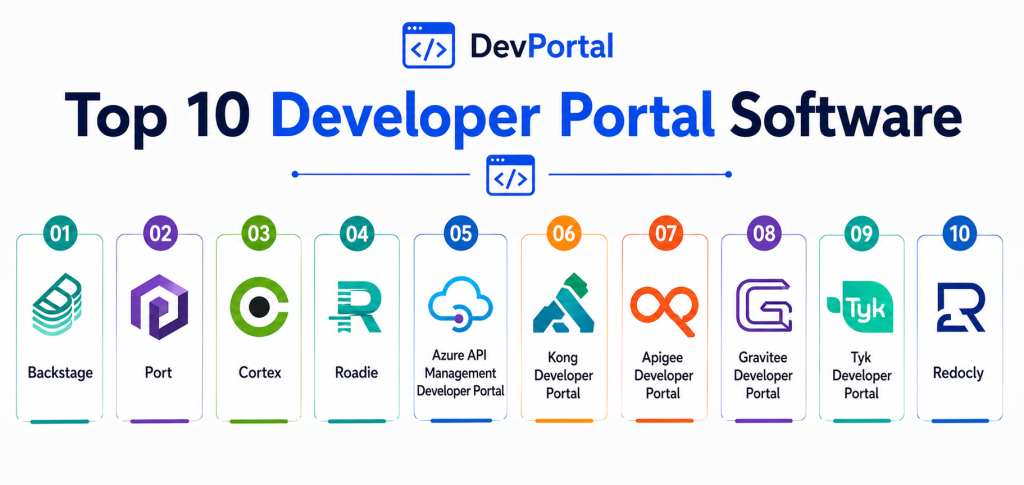
Top 10 Developer Portal Software
1. Backstage
Short description:
Backstage is an open-source developer portal platform designed for internal developer experience. It centralizes services, APIs, and documentation in one place. It is highly customizable and backed by a strong community. It is ideal for platform engineering teams.
Key Features
- Service catalog
- Plugin-based architecture
- API documentation
- Developer dashboards
- CI/CD integration
- Self-service tools
- Custom workflows
Pros
- Open-source and flexible
- Strong ecosystem
- Highly customizable
Cons
- Requires setup and maintenance
- Needs technical expertise
- Initial complexity
Platforms / Deployment
Cloud / Self-hosted
Deployment: Self-hosted
Security & Compliance
Role-based access control supported, details vary
Integrations & Ecosystem
Backstage integrates with modern DevOps tools and workflows.
- Kubernetes
- CI/CD tools
- Cloud platforms
- APIs
- Monitoring tools
- Developer tools
Support & Community
Very strong open-source community
2. Azure API Management Developer Portal
Short description:
Azure API Management includes a fully customizable developer portal for publishing APIs. It allows developers to discover, test, and consume APIs easily. It is deeply integrated with Azure services. It is ideal for organizations using Microsoft cloud.
Key Features
- API documentation
- Interactive testing
- API key management
- Custom branding
- Analytics
- Role-based access
- Integration with Azure
Pros
- Strong Microsoft integration
- Scalable
- Enterprise-ready
Cons
- Requires Azure ecosystem
- Pricing complexity
- Learning curve
Platforms / Deployment
Cloud
Deployment: SaaS
Security & Compliance
Enterprise security features supported
Integrations & Ecosystem
Integrates with Azure and cloud services.
- Azure services
- API gateways
- DevOps tools
- Cloud platforms
- Identity systems
- Analytics tools
Support & Community
Enterprise-level support
3. Kong Developer Portal
Short description:
Kong Developer Portal is part of Kong’s API management platform. It provides a branded portal for API discovery and onboarding. It supports documentation, authentication, and analytics. It is best for API-driven organizations.
Key Features
- API catalog
- Documentation
- Access control
- Analytics
- Custom branding
- Developer onboarding
- Gateway integration
Pros
- Strong API management integration
- Customizable
- Scalable
Cons
- Requires Kong ecosystem
- Setup complexity
- Paid features
Platforms / Deployment
Cloud / Hybrid
Deployment: SaaS and self-hosted
Security & Compliance
Supports authentication and access controls
Integrations & Ecosystem
Works with API gateways and services.
- Kong Gateway
- Microservices
- DevOps tools
- APIs
- Cloud systems
- Monitoring tools
Support & Community
Strong enterprise support
4. Apigee Developer Portal
Short description:
Apigee provides a developer portal as part of its API management suite. It allows teams to publish APIs and manage developer access. It supports analytics and monetization. It is ideal for enterprises using Google Cloud.
Key Features
- API publishing
- Developer onboarding
- Analytics
- Monetization tools
- Access control
- Documentation
- Customization
Pros
- Enterprise-grade
- Strong analytics
- Google Cloud integration
Cons
- Expensive
- Complex setup
- Requires expertise
Platforms / Deployment
Cloud
Deployment: SaaS
Security & Compliance
Enterprise security features available
Integrations & Ecosystem
Integrates with Google Cloud and APIs.
- Google Cloud
- API gateways
- DevOps tools
- Analytics platforms
- Identity systems
- Cloud services
Support & Community
Strong enterprise ecosystem
5. Gravitee Developer Portal
Short description:
Gravitee offers a developer portal as part of its API management platform. It focuses on API discovery, documentation, and access control. It supports both open-source and enterprise deployments. It is ideal for flexible API ecosystems.
Key Features
- API catalog
- Documentation
- Access management
- Analytics
- Custom workflows
- Open-source option
- Gateway integration
Pros
- Flexible deployment
- Open-source availability
- Good customization
Cons
- Smaller ecosystem
- Requires setup
- Limited enterprise features
Platforms / Deployment
Cloud / Self-hosted
Deployment: Hybrid
Security & Compliance
Access control and authentication supported
Integrations & Ecosystem
Integrates with API and DevOps tools.
- API gateways
- DevOps tools
- Cloud platforms
- Microservices
- Monitoring tools
- Identity systems
Support & Community
Growing community
6. Tyk Developer Portal
Short description:
Tyk provides a developer portal with API management capabilities. It enables API publishing, testing, and access control. It is designed for flexibility and performance. It is ideal for organizations needing open and scalable solutions.
Key Features
- API documentation
- Developer onboarding
- Access control
- Analytics
- Gateway integration
- Custom branding
- Open-source option
Pros
- Flexible deployment
- Strong performance
- Open-source option
Cons
- Requires configuration
- Smaller ecosystem
- Learning curve
Platforms / Deployment
Cloud / Self-hosted
Deployment: Hybrid
Security & Compliance
Authentication and access control supported
Integrations & Ecosystem
Integrates with API and cloud tools.
- API gateways
- DevOps tools
- Cloud platforms
- Identity systems
- Monitoring tools
- APIs
Support & Community
Active community
7. Stoplight Platform
Short description:
Stoplight is a developer portal platform focused on API design and documentation. It helps teams create interactive documentation and improve developer experience. It is widely used by API-first companies. It is ideal for documentation-focused workflows.
Key Features
- API design tools
- Documentation
- Mock servers
- Testing tools
- Collaboration features
- Version control
- Developer workflows
Pros
- Strong documentation tools
- Easy to use
- Good collaboration
Cons
- Limited full portal features
- Paid plans required
- Smaller ecosystem
Platforms / Deployment
Cloud
Deployment: SaaS
Security & Compliance
Not publicly stated
Integrations & Ecosystem
Integrates with API development tools.
- GitHub
- CI/CD tools
- APIs
- DevOps tools
- Collaboration tools
- Version control
Support & Community
Good documentation
8. Redocly
Short description:
Redocly is a developer portal platform focused on API documentation and developer experience. It provides tools for building branded portals and managing API docs. It is ideal for teams prioritizing documentation quality.
Key Features
- API documentation
- Developer portals
- Branding tools
- Versioning
- API reference
- Custom workflows
- CLI tools
Pros
- Excellent documentation
- Developer-friendly
- Flexible
Cons
- Limited full API management
- Requires setup
- Paid plans
Platforms / Deployment
Cloud / Self-hosted
Deployment: Hybrid
Security & Compliance
Not publicly stated
Integrations & Ecosystem
Works with API development tools.
- OpenAPI
- CI/CD
- Git
- DevOps tools
- APIs
- Documentation systems
Support & Community
Strong developer community
9. Postman API Network
Short description:
Postman provides a developer portal through its API network. It allows teams to publish APIs, share collections, and collaborate. It is widely used by developers. It is ideal for API testing and sharing.
Key Features
- API collections
- Documentation
- Collaboration
- Testing tools
- Mock servers
- Monitoring
- Sharing
Pros
- Developer-friendly
- Easy to use
- Strong collaboration
Cons
- Not a full portal platform
- Limited branding
- Requires Postman ecosystem
Platforms / Deployment
Web / Windows / macOS / Linux
Deployment: Cloud and desktop
Security & Compliance
Not publicly stated
Integrations & Ecosystem
Integrates with development tools.
- APIs
- DevOps tools
- Testing tools
- Collaboration platforms
- CI/CD
- Cloud tools
Support & Community
Very strong developer community
10. ReadMe
Short description:
ReadMe is a developer portal platform designed to create interactive documentation and onboarding experiences. It focuses on developer experience and engagement. It is ideal for SaaS companies building public APIs.
Key Features
- Interactive documentation
- API explorer
- Developer onboarding
- Analytics
- Custom branding
- Versioning
- Collaboration
Pros
- Excellent UX
- Easy onboarding
- Strong documentation
Cons
- Paid platform
- Limited API management
- Smaller ecosystem
Platforms / Deployment
Cloud
Deployment: SaaS
Security & Compliance
Not publicly stated
Integrations & Ecosystem
Integrates with API and SaaS tools.
- APIs
- DevOps tools
- Analytics tools
- Cloud platforms
- Documentation tools
- Developer tools
Support & Community
Strong support and documentation
Comparison Table
| Tool Name | Best For | Platform Supported | Deployment | Standout Feature | Public Rating |
|---|---|---|---|---|---|
| Backstage | Internal portals | Multi-platform | Self-hosted | Plugin ecosystem | N/A |
| Azure API Management | Enterprise APIs | Cloud | SaaS | Microsoft integration | N/A |
| Kong | API platforms | Multi-platform | Hybrid | Gateway integration | N/A |
| Apigee | Enterprise | Cloud | SaaS | Analytics and monetization | N/A |
| Gravitee | Flexible APIs | Multi-platform | Hybrid | Open-source | N/A |
| Tyk | Open solutions | Multi-platform | Hybrid | Performance | N/A |
| Stoplight | Documentation | Cloud | SaaS | API design tools | N/A |
| Redocly | Documentation | Multi-platform | Hybrid | Developer experience | N/A |
| Postman | API sharing | Multi-platform | Hybrid | Collaboration | N/A |
| ReadMe | SaaS APIs | Cloud | SaaS | UX-focused portal | N/A |
Evaluation & Scoring of Developer Portal Software
| Tool Name | Core | Ease | Integrations | Security | Performance | Support | Value | Weighted Total |
|---|---|---|---|---|---|---|---|---|
| Backstage | 9 | 7 | 9 | 8 | 9 | 9 | 9 | 8.7 |
| Azure APIM | 9 | 8 | 10 | 9 | 9 | 9 | 8 | 9.0 |
| Kong | 8 | 7 | 9 | 8 | 9 | 8 | 8 | 8.4 |
| Apigee | 9 | 6 | 10 | 9 | 9 | 9 | 7 | 8.7 |
| Gravitee | 8 | 7 | 8 | 8 | 8 | 8 | 8 | 8.0 |
| Tyk | 8 | 7 | 8 | 8 | 8 | 8 | 8 | 8.0 |
| Stoplight | 7 | 9 | 8 | 7 | 8 | 8 | 8 | 7.9 |
| Redocly | 7 | 9 | 8 | 7 | 8 | 8 | 8 | 7.9 |
| Postman | 8 | 9 | 9 | 7 | 8 | 9 | 8 | 8.3 |
| ReadMe | 8 | 9 | 8 | 7 | 8 | 8 | 7 | 8.0 |
Scores are comparative and help evaluate strengths across usability, integrations, and performance. The best tool depends on whether you need full API management or just documentation and onboarding.
Which Developer Portal Software Is Right for You
Solo / Freelancer
Use Postman or ReadMe for simple API documentation and sharing. These tools are easy to start with and require minimal setup.
SMB
Stoplight and Redocly are great for teams focused on documentation and developer experience.
Mid-Market
Kong, Tyk, and Gravitee provide a balance of API management and portal capabilities.
Enterprise
Azure API Management and Apigee are best for large organizations needing scalability, security, and integration.
Budget vs Premium
Open-source tools like Backstage and Tyk provide flexibility, while enterprise tools offer advanced features.
Feature Depth vs Ease of Use
Backstage offers deep customization, while ReadMe and Stoplight prioritize ease of use.
Integrations & Scalability
Azure and Apigee lead in integrations and scalability for enterprise environments.
Security & Compliance Needs
Enterprise platforms provide stronger security controls and governance.
Frequently Asked Questions
1. What is developer portal software
Developer portal software is a platform that provides documentation, tools, and resources for developers to use APIs and services. It helps simplify integration and onboarding. It is widely used in API-driven ecosystems.
2. Why is it important
It improves developer experience and reduces onboarding time. It helps organizations scale API adoption. It also reduces support workload.
3. What features should I look for
Look for documentation, sandbox testing, API management, analytics, and security features. These are essential for effective portals.
4. Is it only for APIs
Mostly yes, but it can also include SDKs and developer tools. It supports broader developer ecosystems.
5. Can small teams use it
Yes, lightweight tools are available for small teams. They help organize APIs and documentation.
6. Is it difficult to implement
Some tools require setup and expertise. Others are easier with cloud-based deployment. Complexity depends on the platform.
7. Does it improve developer productivity
Yes, it reduces time spent searching for documentation and troubleshooting. It enables faster integration.
8. Can it integrate with DevOps tools
Yes, most tools integrate with CI/CD and monitoring systems. This improves workflow efficiency.
9. Are these tools secure
Most include authentication and access control features. Enterprise tools offer stronger security.
10. How do I choose the right tool
Identify your needs, budget, and technical expertise. Compare features and test tools before deciding.
Conclusion
Developer portal software has become essential for organizations building API-driven platforms and digital ecosystems. It provides a centralized hub for documentation, onboarding, testing, and integration, significantly improving developer experience and reducing time to adoption. As APIs continue to drive modern software architecture, these portals play a key role in enabling scalability and efficiency. From open-source solutions like Backstage to enterprise platforms like Azure API Management and Apigee, the market offers a wide range of options. Some tools focus on documentation and usability, while others provide full API lifecycle management. Choosing the right tool depends on your organization’s technical maturity, infrastructure, and integration needs. There is no universal solution for every scenario. Start by identifying your priorities, whether that is developer experience, scalability, or governance. Then shortlist a few tools and test them in real workflows to validate performance and usability before making a final decision.
This article explains developer portal software in simple language and helps readers understand API management and developer support tools easily.