Introduction
Sales Force Automation SFA tools help businesses automate and streamline sales processes such as lead management, pipeline tracking, forecasting, and reporting. In simple terms, these tools reduce manual work for sales teams and allow them to focus more on closing deals rather than administrative tasks.
Modern sales teams spend a significant portion of time on non-selling activities like data entry and reporting. SFA tools solve this by automating repetitive tasks, centralizing customer data, and providing AI-driven insights, improving productivity and sales performance.
Common use cases include:
- Lead and contact management
- Sales pipeline tracking
- Forecasting and reporting
- Task automation and follow-ups
- Performance analytics
Key evaluation criteria:
- Lead and pipeline management capabilities
- Automation and workflow features
- Integration with CRM and other tools
- AI and analytics capabilities
- Ease of use and adoption
- Scalability for growing teams
- Security and compliance
- Pricing and ROI
Best for: Sales teams, startups, SMBs, enterprises, and organizations with structured sales processes.
Not ideal for: Businesses with no dedicated sales team or very simple sales workflows.
Key Trends in Sales Force Automation Tools
- AI-driven sales forecasting and insights improving decision-making
- Automation of repetitive sales tasks such as follow-ups and data entry
- Cloud-based CRM platforms with built-in SFA capabilities
- Integration with marketing, support, and finance tools
- Real-time pipeline visibility and dashboards
- Mobile-first sales tools for field teams
- Predictive analytics for deal prioritization
- No-code workflow automation for sales processes
- Unified customer data platforms
- Focus on personalization and customer engagement
How We Selected These Tools
- Market adoption and industry popularity
- Coverage of core SFA features
- Automation and AI capabilities
- Integration ecosystem
- Ease of use and onboarding
- Scalability across business sizes
- Security and compliance readiness
- Customer support and reliability
Top 10 Sales Force Automation Tools
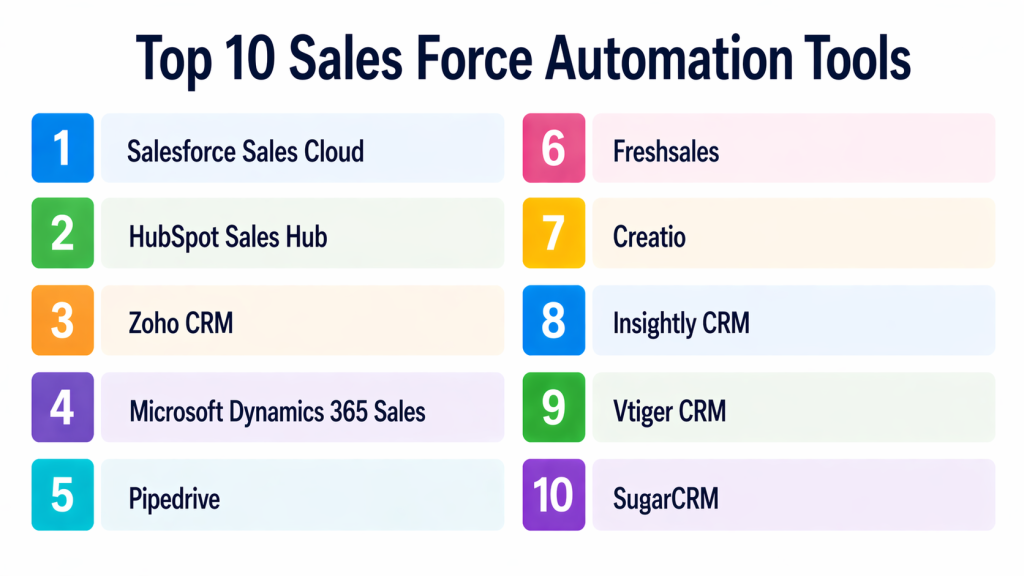
1 — Salesforce Sales Cloud
Short description:
Salesforce Sales Cloud is one of the most widely used SFA platforms globally. It offers comprehensive sales automation, AI-driven insights, and deep customization. It is designed for enterprises and large teams. It provides a complete sales ecosystem.
Key Features
- Lead and opportunity management
- AI-driven forecasting
- Workflow automation
- Reporting and dashboards
- Custom pipelines
Pros
- Highly scalable
- Advanced AI capabilities
Cons
- Expensive
- Complex setup
Platforms / Deployment
Web, Mobile
Cloud
Security & Compliance
Encryption, SSO, audit logs
Integrations & Ecosystem
Salesforce integrates with thousands of business tools and apps.
- CRM ecosystem
- Marketing tools
- APIs
Support & Community
Large global community and enterprise support.
2 — HubSpot Sales Hub
Short description:
HubSpot Sales Hub is a user-friendly SFA tool designed for growing businesses. It provides automation, CRM integration, and pipeline management. It is ideal for SMBs. It offers a free entry-level plan.
Key Features
- Lead tracking
- Email automation
- Pipeline management
- Reporting
- Workflow automation
Pros
- Easy to use
- Free plan available
Cons
- Limited advanced features
- Cost increases with scaling
Platforms / Deployment
Web, Mobile
Cloud
Security & Compliance
Encryption, access control
Integrations & Ecosystem
- Marketing tools
- CRM integrations
- APIs
Support & Community
Strong community and support.
3 — Zoho CRM
Short description:
Zoho CRM is a flexible and cost-effective SFA solution for SMBs and mid-market businesses. It offers automation, analytics, and customization. It supports multiple communication channels. It is widely used.
Key Features
- Lead management
- Workflow automation
- AI assistant
- Reporting
- Omnichannel communication
Pros
- Affordable
- Highly customizable
Cons
- Learning curve
- UI complexity
Platforms / Deployment
Web, Mobile
Cloud
Security & Compliance
Encryption, access control
Integrations & Ecosystem
- Zoho ecosystem
- Third-party apps
Support & Community
Good support.
4 — Microsoft Dynamics 365 Sales
Short description:
Microsoft Dynamics 365 Sales is an enterprise SFA solution integrated with Microsoft ecosystem. It offers automation, AI insights, and analytics. It is ideal for enterprises. It provides strong integration.
Key Features
- Sales automation
- AI insights
- Pipeline management
- Reporting
- Integration with Microsoft tools
Pros
- Strong Microsoft integration
- Enterprise-grade
Cons
- Expensive
- Complex setup
Platforms / Deployment
Web, Mobile
Cloud
Security & Compliance
Encryption, compliance
Integrations & Ecosystem
- Office 365
- Power BI
- Teams
Support & Community
Enterprise support.
5 — Pipedrive
Short description:
Pipedrive is a simple and visual SFA tool designed for small businesses. It offers pipeline management and automation. It is easy to use. It focuses on sales productivity.
Key Features
- Visual pipeline
- Automation
- Reporting
- Email tracking
- AI assistant
Pros
- Very intuitive
- Easy setup
Cons
- Limited advanced features
- Less enterprise capability
Platforms / Deployment
Web, Mobile
Cloud
Security & Compliance
Encryption, access control
Integrations & Ecosystem
- CRM tools
- APIs
Support & Community
Good support.
6 — Freshsales
Short description:
Freshsales is a modern SFA tool from Freshworks. It offers automation, communication tools, and AI insights. It is suitable for SMBs. It combines CRM and communication.
Key Features
- Lead management
- Automation
- Built-in communication
- AI insights
- Reporting
Pros
- All-in-one platform
- Affordable
Cons
- Limited enterprise features
- Customization limits
Platforms / Deployment
Web, Mobile
Cloud
Security & Compliance
Encryption, access control
Integrations & Ecosystem
- CRM tools
- Communication tools
Support & Community
Good support.
7 — Copper
Short description:
Copper is a CRM and SFA tool designed for Google Workspace users. It integrates seamlessly with Gmail and Google apps. It is easy to use. It is ideal for small teams.
Key Features
- Lead tracking
- Automation
- Email integration
- Reporting
- Pipeline management
Pros
- Google integration
- Easy to use
Cons
- Limited advanced features
- Not ideal for large enterprises
Platforms / Deployment
Web
Cloud
Security & Compliance
Encryption, access control
Integrations & Ecosystem
- Google Workspace
- APIs
Support & Community
Good support.
8 — Close CRM
Short description:
Close CRM is a sales-focused SFA tool designed for inside sales teams. It offers automation and communication features. It is suitable for SMBs. It focuses on productivity.
Key Features
- Lead management
- Automation
- Calling and email
- Reporting
- Pipeline tracking
Pros
- Strong communication tools
- Easy to use
Cons
- Limited enterprise features
- Smaller ecosystem
Platforms / Deployment
Web
Cloud
Security & Compliance
Encryption, access control
Integrations & Ecosystem
- CRM tools
- APIs
Support & Community
Good support.
9 — Salesmate
Short description:
Salesmate is a growing SFA platform offering automation and CRM capabilities. It is designed for SMBs. It provides strong automation features. It is easy to use.
Key Features
- Lead management
- Automation
- Reporting
- Pipeline tracking
- Communication tools
Pros
- Affordable
- Easy setup
Cons
- Limited enterprise features
- Growing ecosystem
Platforms / Deployment
Web, Mobile
Cloud
Security & Compliance
Encryption, access control
Integrations & Ecosystem
- CRM tools
- APIs
Support & Community
Good support.
10 — Creatio
Short description:
Creatio is a no-code CRM and SFA platform designed for enterprises. It offers automation and customization. It is highly flexible. It is ideal for complex workflows.
Key Features
- Workflow automation
- Lead management
- Reporting
- No-code customization
- Analytics
Pros
- Highly customizable
- No-code platform
Cons
- Complex setup
- Requires training
Platforms / Deployment
Web
Cloud
Security & Compliance
Encryption, compliance
Integrations & Ecosystem
- CRM systems
- APIs
Support & Community
Enterprise support.
Comparison Table
| Tool Name | Best For | Platforms Supported | Deployment | Standout Feature | Public Rating |
|---|---|---|---|---|---|
| Salesforce | Enterprise | Web, Mobile | Cloud | AI automation | N/A |
| HubSpot | SMB | Web, Mobile | Cloud | Ease of use | N/A |
| Zoho CRM | SMB | Web, Mobile | Cloud | Customization | N/A |
| Microsoft Dynamics | Enterprise | Web, Mobile | Cloud | Microsoft integration | N/A |
| Pipedrive | SMB | Web, Mobile | Cloud | Visual pipeline | N/A |
| Freshsales | SMB | Web, Mobile | Cloud | Built-in communication | N/A |
| Copper | SMB | Web | Cloud | Google integration | N/A |
| Close | SMB | Web | Cloud | Communication tools | N/A |
| Salesmate | SMB | Web, Mobile | Cloud | Affordability | N/A |
| Creatio | Enterprise | Web | Cloud | No-code automation | N/A |
Evaluation and Scoring of SFA Tools
| Tool Name | Core 25% | Ease 15% | Integrations 15% | Security 10% | Performance 10% | Support 10% | Value 15% | Weighted Total |
|---|---|---|---|---|---|---|---|---|
| Salesforce | 9 | 6 | 10 | 9 | 9 | 9 | 6 | 8.5 |
| HubSpot | 8 | 9 | 9 | 8 | 8 | 8 | 9 | 8.5 |
| Zoho | 8 | 8 | 8 | 8 | 8 | 8 | 9 | 8.2 |
| Microsoft | 9 | 6 | 9 | 9 | 9 | 8 | 6 | 8.2 |
| Pipedrive | 7 | 9 | 7 | 8 | 8 | 8 | 9 | 8.0 |
| Freshsales | 8 | 8 | 8 | 8 | 8 | 8 | 9 | 8.1 |
| Copper | 7 | 9 | 7 | 8 | 7 | 7 | 8 | 7.7 |
| Close | 7 | 8 | 7 | 8 | 7 | 7 | 8 | 7.6 |
| Salesmate | 7 | 8 | 7 | 8 | 7 | 7 | 9 | 7.8 |
| Creatio | 9 | 6 | 9 | 9 | 9 | 8 | 7 | 8.3 |
These scores are comparative and help evaluate tools based on multiple criteria.
Which SFA Tool Is Right for You
Solo / Freelancer
Pipedrive or HubSpot are ideal.
SMB
Zoho CRM, Freshsales, and HubSpot are best.
Mid-Market
Salesmate and Pipedrive offer balance.
Enterprise
Salesforce, Microsoft Dynamics, and Creatio are top choices.
Budget vs Premium
Zoho is budget-friendly, Salesforce is premium.
Feature Depth vs Ease of Use
HubSpot is easy, Salesforce is advanced.
Integrations and Scalability
Salesforce and Microsoft excel.
Security and Compliance Needs
Salesforce and Creatio are strong.
Frequently Asked Questions
1. What is Sales Force Automation?
SFA automates sales tasks like lead tracking, forecasting, and reporting. It improves efficiency. It reduces manual work.
2. Why do businesses use SFA tools?
They improve productivity and accuracy. They reduce manual tasks. They help sales teams focus on selling.
3. Are SFA tools the same as CRM?
SFA is often part of CRM systems. CRM is broader. SFA focuses on automation.
4. Do SFA tools use AI?
Yes, many tools use AI for forecasting and insights. This improves decision-making. It increases efficiency.
5. Are they suitable for small businesses?
Yes, many tools are designed for SMBs. They are affordable. They are easy to use.
6. Can they integrate with other tools?
Yes, integration is a key feature. It ensures smooth workflows. It improves data accuracy.
7. Do they require training?
Some tools require training. Others are easy to use. Vendors provide support.
8. What are common challenges?
Implementation complexity and cost are common. Data accuracy is also important. Planning helps.
9. Can startups use SFA tools?
Yes, tools like HubSpot and Zoho are ideal. They offer flexibility. They support growth.
10. Which SFA tool is best?
There is no single best tool. It depends on needs. Testing tools is recommended.
Conclusion
Sales Force Automation tools have become essential for businesses aiming to improve sales efficiency and drive revenue growth in competitive markets. These platforms automate repetitive tasks, centralize customer data, and provide actionable insights, allowing sales teams to focus on high-value activities.
Enterprise solutions like Salesforce, Microsoft Dynamics, and Creatio offer advanced capabilities and scalability for complex sales operations. For mid-sized businesses, Freshsales and Zoho CRM provide a strong balance between automation and usability. Startups and small businesses can benefit from tools like HubSpot and Pipedrive, which are easy to use and cost-effective. The right tool depends on your sales process complexity, team size, and integration needs. It is important to evaluate automation, analytics, and scalability before making a decision. Running a pilot can help validate usability and performance. A well-implemented SFA system improves productivity, reduces errors, and accelerates deal closures.