Introduction
Terminology Management Tools help teams create, manage, approve, and reuse standard business terms across languages, departments, products, and content channels. These tools are especially important for companies that publish technical documentation, software UI text, legal content, healthcare material, marketing assets, training content, and multilingual product information.
Instead of letting every translator, writer, or reviewer use different words for the same concept, terminology tools keep approved terms in one controlled system. This improves consistency, reduces translation errors, protects brand voice, and helps teams avoid confusion across global content.
Common use cases include:
- Multilingual glossary management
- Product terminology standardization
- Legal and compliance term control
- Technical documentation consistency
- Software localization terminology
- Brand and marketing language control
- Translation memory and glossary alignment
Buyers should evaluate:
- Termbase and glossary management
- Approval workflows
- Multilingual term support
- Integration with CAT, TMS, CMS, and localization platforms
- Search and filtering
- Role-based permissions
- Import and export options
- AI-assisted term extraction
- Reporting and audit visibility
- Ease of use for translators, writers, and reviewers
Best for: Terminology Management Tools are best for localization managers, translators, technical writers, content teams, product teams, legal teams, language service providers, and enterprises that need consistent language across markets. Not ideal for: very small teams with only occasional translation needs, businesses with limited terminology complexity, or users who only need a simple spreadsheet glossary for a small project.
Key Trends in Terminology Management Tools
- AI-assisted term extraction is becoming more useful: Teams increasingly want tools that can scan documents, translation memories, websites, and product content to suggest important terms automatically.
- Terminology is moving closer to content operations: Termbases are no longer only for translators; they are also used by writers, marketers, product teams, support teams, and legal reviewers.
- Multilingual consistency is a major priority: Companies want approved terms to stay consistent across product interfaces, documentation, campaigns, and customer support content.
- Integration with TMS and CAT tools is essential: Terminology tools are most valuable when translators and reviewers can access approved terms directly inside their daily workflow.
- Governance and approval workflows matter more: Enterprises need term ownership, approval stages, version history, reviewer roles, and audit visibility.
- Brand terminology is becoming strategic: Product names, feature names, slogans, legal terms, and industry-specific language must be controlled to protect brand clarity.
- Cloud-based terminology platforms are growing: Distributed teams need web access, collaboration, permission controls, and centralized updates.
- Terminology quality affects AI output: Clean termbases help machine translation and AI-assisted content tools produce more consistent and reliable results.
- Cross-functional access is increasing: More businesses want terminology tools that are easy for non-linguists to use, not just professional translators.
- Security expectations are rising: Buyers increasingly check SSO, RBAC, audit logs, encryption, and enterprise access controls before choosing terminology platforms.
How We Selected These Tools Methodology
The tools below were selected to represent a practical mix of dedicated terminology platforms, CAT tool termbases, TMS glossaries, and enterprise terminology solutions. The goal is to help buyers compare tools for different team sizes, use cases, and localization maturity levels.
Selection criteria included:
- Market recognition among translators, localization teams, enterprises, and language service providers.
- Terminology feature depth, including termbases, glossaries, definitions, metadata, approvals, and multilingual entries.
- Workflow fit for translators, writers, reviewers, legal teams, product teams, and localization managers.
- Integration ecosystem, including CAT tools, TMS platforms, CMS systems, APIs, and translation workflows.
- Ease of use for both linguistic experts and non-technical business users.
- Governance strength, including permissions, approval flows, versioning, and audit visibility.
- Scalability across languages, teams, departments, and content types.
- Import and export flexibility for spreadsheets, TBX-style files, translation systems, and existing glossaries.
- Support and documentation for onboarding, administration, and daily terminology operations.
- Value for money based on buyer fit, feature depth, and operational usefulness.
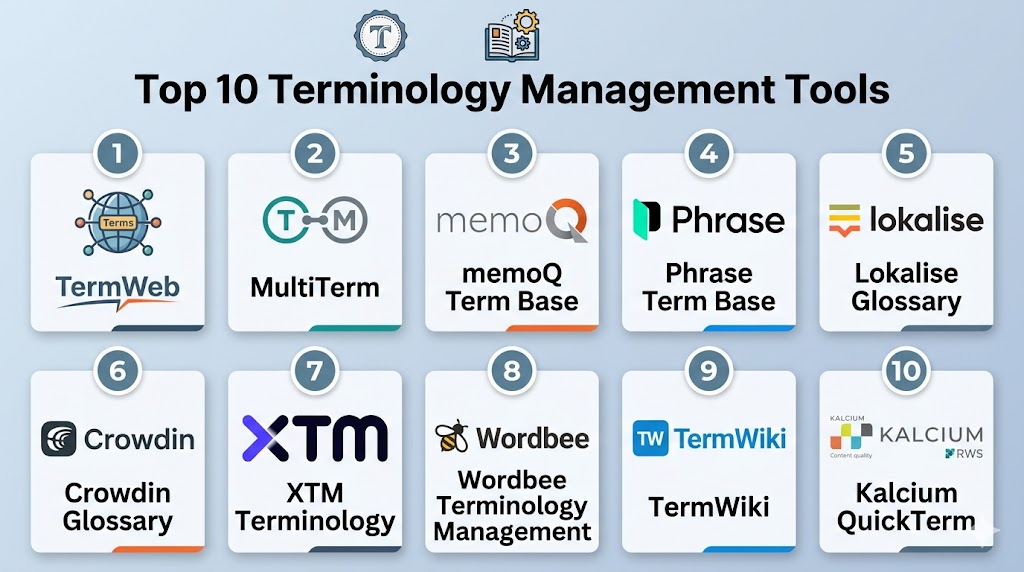
Top 10 Terminology Management Tools
#1 — TermWeb
Short description: TermWeb is a dedicated terminology management platform designed for enterprises, language teams, and organizations that need structured term governance. It supports multilingual termbases, approval workflows, metadata, search, collaboration, and integration with translation environments. It is especially useful for teams that treat terminology as a controlled business asset.
Key Features
- Centralized multilingual terminology database.
- Term approval and review workflows.
- Metadata fields for definitions, domains, usage notes, and context.
- Search and filtering for translators and business users.
- Import and export options for terminology migration.
- Role-based access and collaboration features.
- Integration possibilities with translation and content workflows.
Pros
- Strong dedicated terminology management depth.
- Good fit for enterprise governance and multilingual terminology programs.
- Useful for cross-functional terminology access beyond translation teams.
Cons
- May be more advanced than small teams need.
- Setup requires terminology planning and ownership rules.
- Buyers should validate integration fit with their current translation stack.
Platforms / Deployment
Web / Cloud
Deployment options may vary by configuration.
Security & Compliance
Role-based access and enterprise controls may be available depending on configuration. Buyers should verify SSO, encryption, audit logs, and certifications directly.
SOC 2, ISO 27001, HIPAA: Not publicly stated.
Integrations & Ecosystem
TermWeb is designed to fit terminology-heavy environments where approved terms need to flow into translation, writing, and content workflows. It can support both language specialists and business users.
- Translation workflow integrations
- CAT and TMS terminology access
- Import and export workflows
- Enterprise terminology databases
- Content and documentation workflows
- API or connector-based extensions where available
Support & Community
TermWeb is relevant for organizations with mature terminology needs. Support, onboarding, and implementation guidance may vary by vendor engagement and deployment model.
#2 — RWS MultiTerm
Short description: RWS MultiTerm is a well-known terminology management tool used with the RWS Trados ecosystem. It helps translators, enterprises, and language service providers create and manage multilingual termbases with definitions, usage notes, and structured term metadata. It is especially useful for professional translation teams already using Trados workflows.
Key Features
- Multilingual termbase creation and management.
- Structured term entries with definitions and metadata.
- Integration with RWS Trados translation workflows.
- Term recognition during translation.
- Import and export support for terminology resources.
- Search and lookup for translators and reviewers.
- Support for professional language operations.
Pros
- Strong fit for Trados users and professional translators.
- Mature terminology management capabilities.
- Useful for agencies and enterprises with established translation workflows.
Cons
- Best value comes when used inside the broader RWS ecosystem.
- May feel complex for non-linguist business users.
- Smaller teams may prefer simpler cloud glossary tools.
Platforms / Deployment
Windows / Web options may vary
Desktop / Cloud / Hybrid depending on product configuration.
Security & Compliance
Enterprise access and security options may vary by product and deployment. Buyers should verify SSO, audit logs, encryption, and certifications directly.
SOC 2, ISO 27001, HIPAA: Not publicly stated.
Integrations & Ecosystem
MultiTerm is strongest when used with RWS Trados and professional translation workflows. It helps translators apply approved terminology during translation and review.
- RWS Trados translation workflows
- Translation memory environments
- Termbase import and export
- Professional translator workflows
- Agency terminology processes
- Enterprise language operations
Support & Community
RWS MultiTerm has strong recognition among professional translators and language service providers. Documentation, training, partner resources, and support options are available through the RWS ecosystem.
#3 — memoQ Term Base
Short description: memoQ Term Base is the terminology management capability inside the memoQ translation environment. It helps teams manage approved terms, definitions, usage notes, forbidden terms, and multilingual equivalents. It is especially useful for translation agencies, enterprises, and professional linguists already using memoQ.
Key Features
- Multilingual termbase management.
- Term recognition inside translation workflows.
- Support for definitions, metadata, and usage notes.
- Forbidden term management.
- Term approval and review support depending on workflow.
- Import and export for terminology resources.
- Integration with memoQ translation memory and QA workflows.
Pros
- Strong fit for memoQ users and professional translation teams.
- Useful for terminology consistency during translation and review.
- Good combination of terminology, translation memory, and QA.
Cons
- Best suited for teams already using memoQ.
- May be less ideal as a standalone business terminology portal.
- Setup requires terminology discipline and clear ownership.
Platforms / Deployment
Web / Windows
Cloud / Self-hosted / Hybrid options may vary by product and configuration.
Security & Compliance
Enterprise security controls may be available depending on deployment and plan. Buyers should verify SSO, audit logs, encryption, and certifications directly.
SOC 2, ISO 27001, HIPAA: Not publicly stated.
Integrations & Ecosystem
memoQ Term Base works best inside memoQ translation and review workflows. It supports terminology consistency across translation memory, quality checks, and project delivery.
- memoQ translation workflows
- Translation memory integration
- QA and terminology validation
- File-based translation projects
- Agency and vendor workflows
- Enterprise language operations
Support & Community
memoQ has a strong user base among translators, agencies, and enterprise language teams. Documentation, training, and support options are available, though support levels may vary.
#4 — Phrase Term Base
Short description: Phrase Term Base helps localization teams manage approved terms inside the broader Phrase localization platform. It supports terminology consistency across software strings, product content, documentation, and multilingual workflows. It is especially useful for product and engineering teams that want terminology connected to continuous localization.
Key Features
- Termbase management for localization projects.
- Approved and restricted terminology support.
- Integration with translation workflows.
- Term suggestions during translation and review.
- Support for multilingual product terminology.
- Collaboration between translators, reviewers, and localization managers.
- Connection with broader Phrase automation and localization features.
Pros
- Strong fit for software and product localization teams.
- Terminology is connected directly to translation workflows.
- Good option for teams using Phrase as their localization platform.
Cons
- Less suitable if the team only needs standalone terminology management.
- Value depends on broader Phrase platform adoption.
- Advanced governance needs should be verified during evaluation.
Platforms / Deployment
Web / Cloud
Developer workflows may connect with Windows / macOS / Linux environments through APIs and integrations.
Security & Compliance
SSO/SAML, role-based access, and enterprise controls may be available depending on plan. Specific certifications should be verified directly.
SOC 2, ISO 27001, HIPAA: Not publicly stated.
Integrations & Ecosystem
Phrase Term Base fits teams that want terminology to work inside translation, product localization, and release workflows. It is especially helpful when developers, translators, and reviewers collaborate continuously.
- Phrase localization workflows
- Developer integrations
- Translation memory workflows
- API and automation support
- CMS and documentation workflows
- Reviewer collaboration
Support & Community
Phrase provides documentation, onboarding resources, and support options. Its ecosystem is strong among SaaS, product localization, and enterprise language operations teams.
#5 — Lokalise Glossary
Short description: Lokalise Glossary helps teams manage approved terms and translation guidance inside the Lokalise localization platform. It supports product, app, website, and software localization teams that need consistent terminology across languages. It is especially useful for SaaS and mobile teams using Lokalise for continuous localization.
Key Features
- Glossary management for localization projects.
- Approved term guidance for translators and reviewers.
- Support for multilingual product terminology.
- Integration with translation memory and QA workflows.
- Collaboration between developers, designers, translators, and reviewers.
- In-context localization support.
- Workflow automation inside Lokalise projects.
Pros
- Easy to use for product and design-led teams.
- Good fit for software and app localization.
- Terminology support is built into daily localization workflows.
Cons
- Not a standalone terminology portal for all business departments.
- Best value comes when already using Lokalise.
- Complex enterprise terminology governance may require additional validation.
Platforms / Deployment
Web / Cloud
Developer workflows may connect through APIs and integrations.
Security & Compliance
SSO, MFA, role-based access, and enterprise controls may be available depending on plan. Buyers should verify certifications, audit logs, and encryption directly.
SOC 2, ISO 27001, HIPAA: Not publicly stated.
Integrations & Ecosystem
Lokalise Glossary works well when terminology needs to support product UI, design, app strings, and continuous localization. It helps translators use the right terms inside active projects.
- Lokalise localization workflows
- Design collaboration workflows
- Git and repository integrations
- API automation
- Mobile app localization
- CMS and content workflows
Support & Community
Lokalise provides documentation, onboarding resources, and customer support options. It has strong recognition among SaaS, mobile app, and product localization teams.
#6 — Crowdin Glossary
Short description: Crowdin Glossary helps software teams, open-source projects, documentation teams, and businesses manage approved terms inside Crowdin localization workflows. It supports multilingual glossary entries, translator guidance, consistency checks, and collaborative translation. It is especially useful for developer-led and community localization projects.
Key Features
- Glossary management for localization projects.
- Multilingual term entries and definitions.
- Term suggestions during translation.
- Support for community and contributor workflows.
- Integration with translation memory and QA checks.
- Developer integrations and repository workflows.
- Collaboration across translators, reviewers, and project owners.
Pros
- Strong fit for software and community localization.
- Easy to connect terminology with translation workflows.
- Useful for open-source and documentation-heavy teams.
Cons
- Not designed as a standalone enterprise terminology portal.
- Community workflows need strong moderation and review.
- Governance depth depends on plan and configuration.
Platforms / Deployment
Web / Cloud
Developer workflows may connect with Windows / macOS / Linux environments through integrations and APIs.
Security & Compliance
Project permissions, role controls, and enterprise security options may be available depending on plan. Buyers should verify SSO, audit logs, encryption, and compliance documentation directly.
SOC 2, ISO 27001, HIPAA: Not publicly stated.
Integrations & Ecosystem
Crowdin Glossary is valuable for teams that want terminology to support software, documentation, and community translation workflows. It helps contributors use approved language consistently.
- Crowdin localization workflows
- Git repository integrations
- API automation
- Documentation platform workflows
- Community translation workflows
- Machine translation integrations
Support & Community
Crowdin has strong visibility among software teams, open-source projects, and developer-led localization communities. Documentation and support options are available for business and enterprise users.
#7 — XTM Terminology
Short description: XTM Terminology is part of the XTM Cloud translation management environment and supports enterprise terminology management across multilingual localization programs. It helps teams enforce approved terms, manage terminology assets, and connect termbases with translation workflows. It is especially useful for organizations running structured enterprise localization operations.
Key Features
- Multilingual terminology management.
- Termbase support inside enterprise translation workflows.
- Terminology validation during translation and review.
- Integration with translation memory and QA workflows.
- Workflow and project governance.
- Support for vendor and reviewer collaboration.
- Reporting and operational visibility.
Pros
- Strong fit for enterprise localization programs.
- Terminology works inside broader translation workflows.
- Useful for teams managing many languages and vendors.
Cons
- May require implementation planning.
- Smaller teams may find it more complex than needed.
- Best value comes when using XTM as the main localization platform.
Platforms / Deployment
Web / Cloud
Hybrid possibilities may vary by enterprise configuration.
Security & Compliance
Enterprise security features may include role management, administrative governance, and access controls. Buyers should verify SSO, audit logs, encryption, and compliance documentation directly.
SOC 2, ISO 27001, HIPAA: Not publicly stated.
Integrations & Ecosystem
XTM Terminology fits enterprise localization environments where terminology must be part of structured translation, review, and vendor workflows.
- XTM Cloud localization workflows
- Translation memory systems
- Machine translation integrations
- API-based automation
- Vendor collaboration
- Enterprise content workflows
Support & Community
XTM Cloud provides enterprise support and onboarding resources. It is strongest for localization operations teams, language managers, and enterprises with mature translation programs.
#8 — Wordbee Terminology Management
Short description: Wordbee Terminology Management supports terminology control inside the Wordbee translation management and business workflow platform. It helps teams manage glossaries, approved terms, translation memory, project workflows, and collaboration. It is especially useful for language service providers and businesses that need terminology connected to translation project operations.
Key Features
- Glossary and terminology management.
- Termbase support across translation projects.
- Translation memory and QA workflow connections.
- Project and vendor collaboration.
- Business workflow support for language service providers.
- Reporting and project visibility.
- Multilingual terminology management.
Pros
- Good fit for language service providers and translation operations.
- Terminology connects with project management workflows.
- Useful for managing clients, vendors, and multilingual content.
Cons
- May be more platform than small teams need.
- Interface and setup should be tested for team fit.
- Enterprise security and compliance details should be verified directly.
Platforms / Deployment
Web / Cloud
Security & Compliance
Role-based access and enterprise controls may be available depending on plan. Buyers should verify SSO, audit logs, encryption, and certifications directly.
SOC 2, ISO 27001, HIPAA: Not publicly stated.
Integrations & Ecosystem
Wordbee Terminology Management works best when terminology must support translation production, vendor workflows, client management, and project delivery.
- Wordbee translation workflows
- Translation memory systems
- QA and glossary workflows
- Vendor collaboration
- Client project management
- Business process automation
Support & Community
Wordbee provides documentation, onboarding, and support resources. Its strongest fit is among language service providers, translation teams, and businesses needing workflow-connected terminology.
#9 — TermWiki
Short description: TermWiki is a terminology and glossary platform focused on collaborative term management and multilingual terminology sharing. It is useful for teams that want a more accessible terminology environment for collecting, organizing, and referencing approved terms. It may fit teams that need a lightweight or collaborative terminology knowledge base.
Key Features
- Multilingual terminology and glossary management.
- Collaborative term contribution and editing.
- Term definitions and contextual information.
- Search and browsing for terminology access.
- Support for terminology knowledge sharing.
- Useful for language and content teams.
- Can support reference-style terminology workflows.
Pros
- Useful for collaborative terminology sharing.
- Accessible for non-technical users.
- Practical for teams building terminology knowledge bases.
Cons
- May not offer the same enterprise workflow depth as dedicated platforms.
- Integration depth should be validated.
- Not ideal for complex translation production environments without additional tools.
Platforms / Deployment
Web / Cloud
Security & Compliance
Not publicly stated.
Integrations & Ecosystem
TermWiki is most useful when terminology needs to be collected, organized, and shared as a reference resource. It may be used alongside translation and content workflows depending on team needs.
- Collaborative glossary workflows
- Multilingual terminology databases
- Content team reference workflows
- Translator lookup workflows
- Knowledge-sharing processes
- Business terminology documentation
Support & Community
Support and community strength may vary. Buyers should validate documentation, onboarding help, and long-term platform fit before adopting it for critical terminology governance.
#10 — Kalcium QuickTerm
Short description: Kalcium QuickTerm is a terminology management solution designed for organizations that need structured terminology governance, term approval, and multilingual consistency. It supports termbase workflows, collaboration, and integration with translation environments. It is especially useful for enterprises and language teams that need controlled terminology processes.
Key Features
- Centralized terminology management.
- Multilingual termbase support.
- Approval and governance workflows.
- Search and lookup for users.
- Metadata and usage guidance.
- Integration with translation workflows.
- Role-based terminology collaboration.
Pros
- Strong fit for structured terminology governance.
- Useful for enterprises with multilingual terminology needs.
- Supports collaboration between terminology owners and language teams.
Cons
- May require implementation and process planning.
- Smaller teams may prefer simpler glossary tools.
- Security and integration details should be verified directly.
Platforms / Deployment
Web / Cloud
Deployment options may vary by configuration.
Security & Compliance
Enterprise access controls may be available depending on configuration. Buyers should verify SSO, audit logs, encryption, and certifications directly.
SOC 2, ISO 27001, HIPAA: Not publicly stated.
Integrations & Ecosystem
Kalcium QuickTerm fits organizations that need terminology governance across translation, writing, and business content workflows. It is useful when teams need controlled term approval and access.
- Translation workflow integrations
- Enterprise terminology databases
- Term approval workflows
- Content and documentation processes
- Translator lookup workflows
- Multilingual business terminology
Support & Community
Kalcium QuickTerm is most relevant for organizations with structured terminology programs. Support and implementation guidance may vary by vendor engagement and deployment model.
Comparison Table
| Tool Name | Best For | Platform Supported | Deployment | Standout Feature | Public Rating |
|---|---|---|---|---|---|
| TermWeb | Enterprise terminology governance | Web | Cloud | Dedicated multilingual terminology management | N/A |
| RWS MultiTerm | Trados users and professional translators | Windows / Web varies | Desktop / Cloud / Hybrid varies | Mature termbase management for translation workflows | N/A |
| memoQ Term Base | memoQ users and agencies | Web, Windows | Cloud / Self-hosted / Hybrid varies | Terminology integrated with memoQ translation and QA | N/A |
| Phrase Term Base | Product localization teams | Web, developer workflows | Cloud | Termbase connected to continuous localization | N/A |
| Lokalise Glossary | SaaS and app localization teams | Web, developer workflows | Cloud | Simple glossary support inside product localization workflows | N/A |
| Crowdin Glossary | Software and community localization | Web, developer workflows | Cloud | Glossary support for collaborative localization | N/A |
| XTM Terminology | Enterprise localization operations | Web | Cloud | Terminology inside structured enterprise TMS workflows | N/A |
| Wordbee Terminology Management | Language service providers | Web | Cloud | Terminology connected to translation business workflows | N/A |
| TermWiki | Collaborative terminology sharing | Web | Cloud | Accessible terminology knowledge sharing | N/A |
| Kalcium QuickTerm | Structured terminology governance | Web | Cloud varies | Controlled term approval and governance workflows | N/A |
Evaluation & Scoring of Terminology Management Tools
The scoring below is comparative and practical. It is not an official rating and should not be treated as a universal ranking. Scores are based on terminology depth, usability, integrations, security posture, workflow fit, support maturity, and buyer value.
| Tool Name | Core | Ease | Integrations | Security | Performance | Support | Value | Weighted Total |
|---|---|---|---|---|---|---|---|---|
| TermWeb | 9 | 7 | 8 | 7 | 8 | 8 | 7 | 7.95 |
| RWS MultiTerm | 9 | 6 | 8 | 7 | 8 | 8 | 7 | 7.75 |
| memoQ Term Base | 8 | 7 | 8 | 7 | 8 | 8 | 8 | 7.75 |
| Phrase Term Base | 8 | 8 | 9 | 8 | 8 | 8 | 8 | 8.15 |
| Lokalise Glossary | 7 | 9 | 9 | 8 | 8 | 8 | 8 | 8.00 |
| Crowdin Glossary | 7 | 8 | 9 | 7 | 8 | 8 | 9 | 7.95 |
| XTM Terminology | 9 | 7 | 8 | 8 | 8 | 8 | 7 | 7.95 |
| Wordbee Terminology Management | 8 | 7 | 8 | 7 | 8 | 8 | 8 | 7.75 |
| TermWiki | 7 | 8 | 6 | 6 | 7 | 6 | 8 | 7.00 |
| Kalcium QuickTerm | 8 | 7 | 7 | 7 | 8 | 7 | 7 | 7.35 |
These scores are intended to help buyers shortlist tools, not choose blindly. A dedicated terminology platform may be best for enterprise governance, while a built-in glossary may be better for teams already using a TMS. Product teams may prefer Phrase, Lokalise, or Crowdin because terminology stays inside localization workflows. Professional translators may prefer RWS MultiTerm or memoQ Term Base because they integrate deeply with translation environments.
Which Terminology Management Tool Is Right for You?
Solo / Freelancer
Solo translators and freelance reviewers should prioritize tools that work well with their translation environment. If you already use Trados, RWS MultiTerm is a strong fit. If you use memoQ, memoQ Term Base is practical because terminology appears directly inside translation workflows.
Freelancers who work with client glossaries may also use simpler glossary workflows inside platforms like Crowdin, Lokalise, or Phrase when clients provide access. The main goal is to avoid inconsistent translations, forbidden terms, and terminology mistakes before delivery.
SMB
SMBs should look for tools that are easy to adopt and do not require heavy terminology governance. If the company already uses a localization platform, the built-in glossary or termbase is often the best starting point.
Good options include Lokalise Glossary, Crowdin Glossary, Phrase Term Base, and Wordbee Terminology Management depending on the workflow. SMBs should prioritize simple term creation, reviewer approval, and easy translator access.
Mid-Market
Mid-market companies usually need stronger terminology governance across products, documentation, marketing, and support content. They may have multiple reviewers, regional teams, and content owners involved in terminology decisions.
Good options include Phrase Term Base, XTM Terminology, TermWeb, Wordbee Terminology Management, and memoQ Term Base. These tools can help standardize product names, technical terms, brand language, and multilingual equivalents.
Enterprise
Enterprises need controlled terminology processes, role-based access, approval workflows, auditability, and integration with translation and content systems. They often manage terminology across many departments, regions, and external vendors.
Good options include TermWeb, Kalcium QuickTerm, XTM Terminology, RWS MultiTerm, and Phrase Term Base. Enterprises should evaluate governance depth, metadata flexibility, security, integration options, and support for large multilingual termbases.
Budget vs Premium
Budget-focused teams can start with built-in glossary tools inside their existing TMS or CAT platform. Lokalise Glossary, Crowdin Glossary, memoQ Term Base, and Phrase Term Base may be efficient if the team already uses those systems.
Premium buyers should consider dedicated terminology platforms like TermWeb or Kalcium QuickTerm when terminology needs to be governed across departments, not just translation projects. Enterprise buyers should also evaluate workflow control, access permissions, and long-term scalability.
Feature Depth vs Ease of Use
If ease of use is the priority, Lokalise Glossary, Crowdin Glossary, and Phrase Term Base are practical for product and localization teams. These tools keep terminology close to daily translation work.
If feature depth is more important, TermWeb, RWS MultiTerm, memoQ Term Base, XTM Terminology, and Kalcium QuickTerm may be better. These tools are stronger for structured terminology governance, metadata, and professional language operations.
Integrations & Scalability
Teams should choose terminology tools that integrate with their existing translation and content workflows. A termbase is most useful when translators, reviewers, writers, and product teams can access it without leaving their normal tools.
Strong workflow-connected options include Phrase Term Base, Lokalise Glossary, Crowdin Glossary, memoQ Term Base, RWS MultiTerm, and XTM Terminology. Dedicated platforms like TermWeb and Kalcium QuickTerm are better when terminology must scale across multiple departments and systems.
Security & Compliance Needs
Security-sensitive teams should review SSO, MFA, RBAC, audit logs, encryption, data retention, and vendor access controls. Terminology can include confidential product names, legal phrases, internal processes, and unreleased feature information, so governance matters.
Enterprise buyers should shortlist TermWeb, Kalcium QuickTerm, XTM Terminology, Phrase Term Base, and RWS MultiTerm depending on their translation ecosystem. Security and compliance claims should always be verified directly before purchase.
Frequently Asked Questions FAQs
1. What is a Terminology Management Tool?
A Terminology Management Tool helps teams store, organize, approve, and reuse important business terms.
It keeps product names, technical words, legal phrases, and brand language consistent across content and languages.
These tools are especially useful for translation, documentation, marketing, and product teams.
The goal is to reduce confusion and improve content quality.
2. How is terminology management different from a glossary?
A glossary is usually a list of terms and definitions.
Terminology management is a more structured process that includes approvals, metadata, multilingual equivalents, usage notes, and governance.
A terminology tool helps teams control how terms are created, reviewed, updated, and used.
It is more scalable than a simple spreadsheet glossary.
3. Who needs terminology management software?
Localization teams, translators, technical writers, product teams, legal teams, marketing teams, and enterprises often need terminology software.
It is useful when many people create or translate content and need to use the same approved terms.
It is also important for companies with complex products, regulated content, or multilingual operations.
Small teams may only need a simple glossary if their terminology needs are limited.
4. What features should buyers look for?
Buyers should look for termbase management, multilingual entries, definitions, approval workflows, role controls, search, and import/export options.
Integration with CAT tools, TMS platforms, CMS systems, and documentation workflows is also important.
Advanced teams may need metadata fields, term ownership, audit history, and AI-assisted term extraction.
The best feature set depends on team size and terminology complexity.
5. Can terminology tools improve translation quality?
Yes, terminology tools can significantly improve translation quality by ensuring approved words are used consistently.
They help translators avoid wrong terms, outdated product names, and inconsistent language across projects.
They also support better review workflows because reviewers can compare translations against approved terms.
This reduces rework and improves multilingual content consistency.
6. Are built-in TMS glossaries enough?
Built-in TMS glossaries are often enough for small and mid-sized localization teams.
They work well when terminology only needs to support translation projects inside one platform.
However, enterprises may need dedicated terminology tools for approval workflows, metadata, cross-department access, and governance.
The right choice depends on whether terminology is a simple project aid or a business-wide asset.
7. What is a termbase?
A termbase is a structured database of approved terms, definitions, translations, usage notes, and related metadata.
It can include preferred terms, forbidden terms, product names, abbreviations, context, and examples.
Translators and reviewers use termbases to keep language consistent across projects.
Termbases are more organized and scalable than basic word lists.
8. Can AI help with terminology management?
AI can help identify candidate terms from documents, websites, translation memories, or product content.
It can also suggest term relationships, possible definitions, and terminology inconsistencies.
However, human approval is still important because terminology decisions affect brand, legal meaning, and product clarity.
AI is best used as assistance, not as the final authority.
9. What is the biggest mistake in terminology management?
The biggest mistake is creating a glossary but not maintaining it.
Outdated terms, duplicate entries, missing definitions, and unclear ownership can reduce trust in the termbase.
Another mistake is making terminology rules too complicated for writers and translators to follow.
Successful terminology management needs ownership, review cycles, and easy access.
10. How should a team start with terminology management?
Start by collecting the most important product, brand, legal, and technical terms.
Define owners, approval rules, preferred translations, forbidden terms, and usage notes.
Then connect the termbase to translation, writing, and review workflows so people actually use it.
Begin with high-impact terms first, then expand the terminology program over time.
Conclusion
Terminology Management Tools help organizations keep language consistent, accurate, and trusted across teams and markets.
They are especially valuable for companies that manage multilingual content, technical documentation, software localization, legal language, or complex product terminology.
Dedicated tools like TermWeb and Kalcium QuickTerm are strong for enterprise terminology governance.
RWS MultiTerm and memoQ Term Base are useful for professional translators, agencies, and language service providers.
Phrase Term Base, Lokalise Glossary, Crowdin Glossary, and XTM Terminology work well when terminology needs to stay connected to localization workflows.
Wordbee Terminology Management is useful for translation operations, while TermWiki can support collaborative terminology sharing.
The best tool depends on your existing translation stack, governance needs, team size, and content complexity.
Simple and clear blog explaining how terminology tools store, manage, and standardize important terms across languages efficiently.