Introduction
Citation & Reference Managers help students, researchers, academics, writers, librarians, and knowledge workers collect, organize, cite, annotate, and manage research sources. These tools make it easier to store journal articles, books, PDFs, web pages, reports, conference papers, and other references in one searchable library.
Instead of manually typing citations and bibliographies, reference managers can generate citations in different styles, insert references into documents, organize sources by folders or tags, and help users manage research notes. They are especially valuable for academic writing, literature reviews, theses, dissertations, research papers, books, policy reports, and technical documentation.
Common use cases include:
- Academic paper writing
- Thesis and dissertation research
- Literature review management
- PDF organization and annotation
- Citation and bibliography generation
- Collaborative research projects
- Journal article and book reference tracking
Buyers should evaluate:
- Citation style support
- Word processor integration
- PDF storage and annotation
- Web capture and browser extension quality
- Library organization features
- Collaboration and sharing
- Import and export options
- Cloud sync and backup
- Privacy and data ownership
- Pricing and storage limits
Best for: Citation & Reference Managers are best for students, researchers, professors, academic writers, librarians, legal researchers, policy analysts, scientific teams, and anyone managing many sources for writing or research. Not ideal for: users who only need one or two simple citations occasionally, writers who do not manage research sources, or teams that need full research project management rather than citation and reference organization.
Key Trends in Citation & Reference Managers
- Cloud syncing is now expected: Researchers increasingly need access to their references, PDFs, notes, and annotations across laptops, tablets, browsers, and shared workspaces.
- PDF annotation is becoming central: Users want to highlight, comment, extract notes, and search PDF libraries without switching between many tools.
- Collaborative research workflows are growing: Research teams need shared libraries, group folders, shared citations, and controlled access for co-authors.
- Browser capture remains important: Fast web clipping from journals, databases, library catalogs, and websites is a major productivity feature.
- Open-source and data ownership matter: Many researchers prefer tools that allow local libraries, open formats, and flexible export options.
- Word processor integration is critical: Users need reliable citation insertion and bibliography generation inside document writing tools.
- Metadata quality is a key challenge: Imported references can contain wrong titles, missing author names, duplicate entries, or incomplete publication details.
- AI-assisted research workflows are emerging: Some tools are adding smarter search, recommendations, summarization, and reading assistance, but human verification remains essential.
- Institutional access influences tool choice: Universities, libraries, and research organizations may provide access to specific reference managers.
- Cross-format export is still important: Researchers often need BibTeX, RIS, CSL, and other formats for journals, publishers, repositories, and writing platforms.
How We Selected These Tools Methodology
The tools below were selected to represent a practical mix of academic reference managers, cloud-based citation tools, open-source options, institutional tools, and writer-friendly citation platforms. The goal is to help users compare options based on research workflow, writing environment, collaboration needs, and budget.
Selection criteria included:
- Citation and bibliography support across common academic and professional styles.
- Reference library organization, including folders, tags, search, notes, and duplicate management.
- PDF management, including storage, annotation, reading, and metadata extraction.
- Word processor integration, including citation insertion and bibliography generation.
- Browser capture quality for journals, databases, websites, and library catalogs.
- Collaboration features, including shared libraries, group projects, and research team workflows.
- Import and export flexibility, including BibTeX, RIS, and common reference formats.
- Ease of use for students, researchers, librarians, and professional writers.
- Security and privacy posture, including data control, account management, and institutional use.
- Value for money, based on core features, storage needs, and long-term research workflow fit.
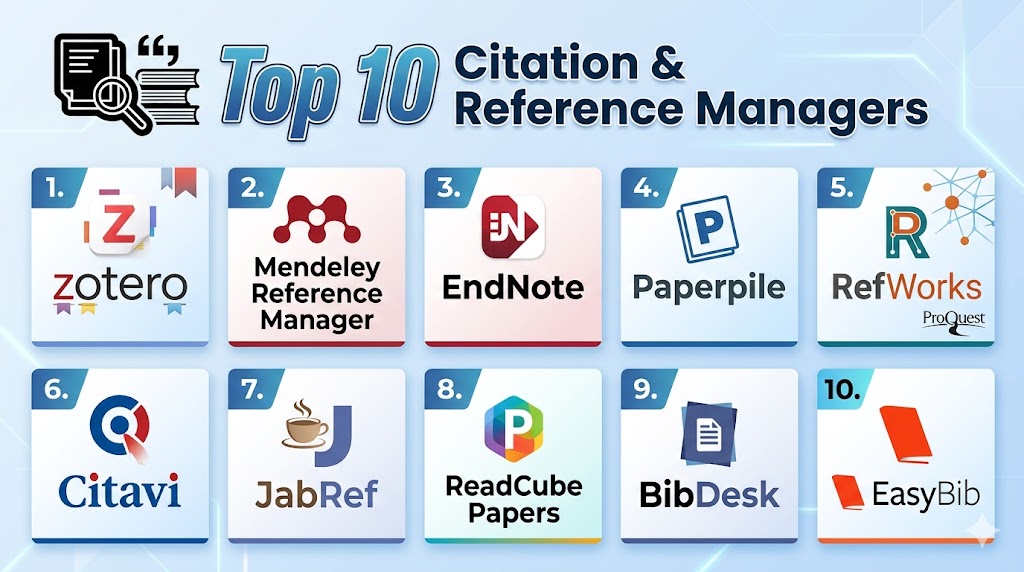
Top 10 Citation & Reference Managers
#1 — Zotero
Short description: Zotero is a widely used reference manager known for strong web capture, open-source roots, flexible organization, PDF management, and citation support. It helps users collect references from browsers, organize research libraries, annotate PDFs, and cite sources in documents. It is especially useful for students, researchers, academics, and users who value flexibility and data control.
Key Features
- Reference collection and library organization.
- Browser-based source capture.
- Citation and bibliography generation.
- PDF storage, reading, and annotation.
- Tags, collections, notes, and search.
- Group libraries for collaboration.
- Import and export support for common citation formats.
Pros
- Strong free core functionality.
- Flexible and researcher-friendly workflow.
- Good fit for academic writing, literature reviews, and collaborative research.
Cons
- Cloud storage limits may require upgrades for large PDF libraries.
- Some users may need time to learn advanced organization features.
- Metadata imports still need manual checking.
Platforms / Deployment
Web / Windows / macOS / Linux / iOS
Cloud sync / Desktop
Security & Compliance
Account-based sync and library sharing are available. Buyers and institutions should verify data handling, privacy, retention, and compliance requirements directly.
SOC 2, ISO 27001, HIPAA: Not publicly stated.
Integrations & Ecosystem
Zotero has a strong academic ecosystem and works well across browser-based research, PDF reading, citation workflows, and document writing.
- Browser connector
- Word processor citation plugins
- PDF annotation workflows
- Group library sharing
- BibTeX and RIS export
- Academic database capture
Support & Community
Zotero has a strong community, extensive documentation, user forums, and broad academic recognition. It is widely used by students, researchers, librarians, and open-source-friendly academic teams.
#2 — Mendeley Reference Manager
Short description: Mendeley Reference Manager helps researchers manage references, PDFs, citations, and research libraries in a cloud-connected environment. It supports source organization, PDF reading, annotation, citation insertion, and bibliography generation. It is especially useful for researchers who want a familiar academic reference workflow with cloud sync.
Key Features
- Reference library management.
- PDF storage and annotation.
- Citation and bibliography generation.
- Word processor citation support.
- Cloud syncing across devices.
- Search and organization tools.
- Import support for common reference formats.
Pros
- Useful for researchers managing many PDFs.
- Cloud sync helps access libraries across devices.
- Familiar workflow for academic writing and citation management.
Cons
- Some users may prefer more open or locally controlled options.
- Workflow and interface changes may require adjustment.
- Storage and account limits should be reviewed.
Platforms / Deployment
Web / Windows / macOS / Linux
Cloud / Desktop
Security & Compliance
Account-based cloud storage and syncing are available. Users should verify privacy, data handling, and institutional requirements directly.
SOC 2, ISO 27001, HIPAA: Not publicly stated.
Integrations & Ecosystem
Mendeley fits academic writing workflows where users need PDF organization, citation insertion, and cloud access to research libraries.
- Word processor citation tools
- PDF reading and annotation
- Reference import workflows
- Cloud library sync
- Academic database exports
- Research writing workflows
Support & Community
Mendeley provides documentation and help resources. It has broad recognition among academic researchers, students, and research institutions.
#3 — EndNote
Short description: EndNote is a long-established reference management tool used by universities, research institutions, academics, and professional researchers. It offers powerful citation management, library organization, document integration, collaboration, and reference formatting features. It is especially useful for users who need advanced citation workflows and institutional support.
Key Features
- Advanced reference library management.
- Citation and bibliography generation.
- Large citation style support.
- Word processor integration.
- PDF management and organization.
- Library sharing and collaboration features.
- Import and export support for research databases.
Pros
- Strong fit for academic institutions and serious researchers.
- Mature citation and bibliography workflows.
- Useful for large, complex research libraries.
Cons
- Can feel complex for beginners.
- Cost may be higher than free or lightweight tools.
- Interface and workflow may require learning.
Platforms / Deployment
Web / Windows / macOS
Cloud / Desktop
Security & Compliance
Institutional and account-based access may be available depending on licensing. Buyers should verify privacy, security controls, data handling, and compliance documentation directly.
SOC 2, ISO 27001, HIPAA: Not publicly stated.
Integrations & Ecosystem
EndNote works well in academic and institutional environments where citation accuracy, style support, and long-term research library management are priorities.
- Word processor citation integration
- Research database import workflows
- PDF management
- Library sharing
- Citation style management
- Institutional research workflows
Support & Community
EndNote has strong institutional recognition, documentation, training resources, and support options. It is widely used in universities, research organizations, and professional academic writing workflows.
#4 — Paperpile
Short description: Paperpile is a cloud-based reference manager designed for researchers who prefer a simple, browser-friendly workflow. It focuses on easy source collection, PDF organization, citation generation, and integration with online writing workflows. It is especially useful for users who work heavily in browser-based research and document environments.
Key Features
- Cloud-based reference management.
- Browser extension for source capture.
- PDF organization and annotation support.
- Citation and bibliography generation.
- Google Docs-style writing workflow support.
- Shared library and collaboration features may be available.
- Import and export support for common reference formats.
Pros
- Clean and easy-to-use interface.
- Strong fit for browser-first researchers.
- Convenient for online document writing workflows.
Cons
- Less ideal for users who prefer fully local desktop libraries.
- Advanced institutional workflows should be validated.
- Pricing and storage should be reviewed for large libraries.
Platforms / Deployment
Web / Browser-based / iOS / Android options may vary
Cloud
Security & Compliance
Cloud account and storage controls are available depending on plan. Buyers should verify privacy, data handling, retention, and compliance documentation directly.
SOC 2, ISO 27001, HIPAA: Not publicly stated.
Integrations & Ecosystem
Paperpile is strongest for researchers who work primarily in browsers and online documents. It simplifies capture, organization, and citation insertion.
- Browser extension
- Online document citation workflows
- PDF library management
- Cloud sync
- Reference import and export
- Shared research workflows
Support & Community
Paperpile provides documentation and support resources. It is recognized among researchers who prefer lightweight, cloud-first reference management.
#5 — RefWorks
Short description: RefWorks is a web-based reference manager commonly used in academic and library environments. It helps users collect references, organize research, generate citations, and create bibliographies. It is especially useful for students and researchers at institutions that provide access through libraries.
Key Features
- Web-based reference library management.
- Citation and bibliography generation.
- Folder and organization tools.
- Import from research databases.
- Word processor citation support.
- Collaboration and sharing features.
- Institutional access support.
Pros
- Strong fit for universities and libraries.
- Web-based access is convenient for students.
- Useful for basic and structured citation workflows.
Cons
- Best value often depends on institutional access.
- Users may prefer more flexible PDF management elsewhere.
- Interface and workflow should be tested for personal preference.
Platforms / Deployment
Web / Cloud
Security & Compliance
Institutional access and account-based controls may be available. Buyers should verify security, privacy, and compliance documentation directly with the provider or institution.
SOC 2, ISO 27001, HIPAA: Not publicly stated.
Integrations & Ecosystem
RefWorks fits academic library environments where students and researchers need a managed citation tool supported by the institution.
- Library database imports
- Word processor citation workflows
- Shared reference libraries
- Web-based research organization
- Bibliography generation
- Institutional research workflows
Support & Community
RefWorks support often depends on institutional library resources, vendor documentation, and academic training materials. It is useful where universities provide onboarding and guidance.
#6 — Citavi
Short description: Citavi is a reference management and knowledge organization tool used by students, researchers, and academic teams. It combines citation management with task planning, knowledge organization, notes, and research structuring. It is especially useful for users who want to manage both references and research ideas in one workflow.
Key Features
- Reference library management.
- Citation and bibliography generation.
- Knowledge organization and note management.
- Task planning for research projects.
- PDF annotation and source organization.
- Word processor integration.
- Collaboration features may be available depending on plan.
Pros
- Strong for structured research planning.
- Useful for thesis, dissertation, and long-form academic work.
- Combines references, notes, and research tasks.
Cons
- May feel more complex than basic citation tools.
- Platform availability should be checked for user workflow.
- Best value comes when users need knowledge organization, not just citations.
Platforms / Deployment
Windows / Web options may vary
Cloud / Desktop depending on configuration
Security & Compliance
Account and cloud features may vary by plan. Buyers should verify privacy, storage, access controls, and compliance documentation directly.
SOC 2, ISO 27001, HIPAA: Not publicly stated.
Integrations & Ecosystem
Citavi works well for users who want research planning and citation management in one environment. It is particularly helpful for complex academic projects.
- Word processor citation workflows
- PDF annotation
- Knowledge item organization
- Research task planning
- Reference imports
- Long-form writing support
Support & Community
Citavi provides documentation, support resources, and training materials. It has recognition among academic users, especially those managing complex writing and research projects.
#7 — JabRef
Short description: JabRef is an open-source reference manager focused on BibTeX and BibLaTeX workflows. It is popular with researchers, students, and technical users who work with LaTeX, academic writing, and structured bibliographic databases. It is especially useful for users who want local control and open-source reference management.
Key Features
- BibTeX and BibLaTeX reference management.
- Local library control.
- Search and organization tools.
- Import and export support.
- Duplicate detection and cleanup support.
- Integration with LaTeX-based writing workflows.
- Open-source development model.
Pros
- Strong fit for LaTeX and BibTeX users.
- Free and open-source.
- Good local control over bibliographic data.
Cons
- Less beginner-friendly for non-technical users.
- Cloud collaboration features are limited compared with cloud platforms.
- Best suited for users comfortable with bibliographic formats.
Platforms / Deployment
Windows / macOS / Linux
Desktop / Open-source
Security & Compliance
Local data control is possible depending on setup. Formal enterprise security and compliance claims are not publicly stated here.
SOC 2, ISO 27001, HIPAA: Not publicly stated.
Integrations & Ecosystem
JabRef is strongest in academic and technical writing workflows where users rely on BibTeX, BibLaTeX, and LaTeX-based writing systems.
- BibTeX workflows
- LaTeX writing environments
- Local reference libraries
- Import and export workflows
- Academic metadata cleanup
- Open-source research workflows
Support & Community
JabRef has an open-source community, documentation, and user support resources. It is popular among technical researchers, LaTeX users, and open-source-friendly academics.
#8 — ReadCube Papers
Short description: ReadCube Papers is a reference manager and research library platform focused on PDF organization, reading, annotation, discovery, and citation workflows. It helps researchers manage article libraries, organize PDFs, and work across devices. It is especially useful for users who want a polished research reading and PDF management experience.
Key Features
- Reference library management.
- PDF storage, reading, and annotation.
- Citation and bibliography support.
- Search and organization tools.
- Cloud syncing across devices.
- Research discovery and recommendation features may be available.
- Collaboration and sharing options may vary.
Pros
- Strong PDF reading and organization experience.
- Useful for researchers with large article libraries.
- Good fit for users who read and annotate frequently.
Cons
- Pricing and storage should be reviewed carefully.
- Users focused only on citations may prefer simpler tools.
- Institutional needs should be validated before rollout.
Platforms / Deployment
Web / Windows / macOS / iOS / Android
Cloud / Desktop
Security & Compliance
Cloud account and storage features are available depending on plan. Buyers should verify data handling, retention, privacy, and compliance documentation directly.
SOC 2, ISO 27001, HIPAA: Not publicly stated.
Integrations & Ecosystem
ReadCube Papers fits research workflows where PDF reading, annotation, and organization are as important as citation generation.
- PDF library workflows
- Citation and bibliography workflows
- Cloud sync
- Research discovery support
- Desktop and mobile reading
- Shared research libraries where available
Support & Community
ReadCube Papers provides support resources and documentation. It is recognized among researchers who prioritize PDF management and reading workflows.
#9 — BibDesk
Short description: BibDesk is a reference manager for macOS users who work with BibTeX databases and academic writing workflows. It helps users organize references, manage bibliographic data, and support citation workflows with LaTeX-based writing. It is especially useful for Mac users who prefer local, lightweight, BibTeX-focused reference management.
Key Features
- BibTeX database management.
- Local reference organization.
- Search and filtering tools.
- PDF and file linking support.
- Metadata editing and cleanup.
- LaTeX workflow support.
- Lightweight macOS-focused experience.
Pros
- Good fit for Mac-based BibTeX users.
- Lightweight and locally controlled.
- Useful for technical and academic writing workflows.
Cons
- Limited to macOS.
- Not ideal for users who need modern cloud collaboration.
- Less suitable for non-technical users who prefer visual cloud tools.
Platforms / Deployment
macOS
Desktop
Security & Compliance
Local data control is possible depending on user setup. Formal enterprise compliance claims are not publicly stated.
SOC 2, ISO 27001, HIPAA: Not publicly stated.
Integrations & Ecosystem
BibDesk works well for users who manage BibTeX references locally and write in LaTeX-based environments. It is best for focused academic workflows rather than broad cloud collaboration.
- BibTeX workflows
- LaTeX writing support
- Local reference libraries
- PDF file linking
- Metadata editing
- Mac-based academic workflows
Support & Community
BibDesk has community documentation and long-standing recognition among Mac users working with BibTeX. Support is more community-oriented than enterprise-style.
#10 — EasyBib
Short description: EasyBib is a citation tool designed for students and casual academic users who need quick citation generation. It helps create citations and bibliographies in common styles with a simple web-based workflow. It is especially useful for users who need basic citation help rather than a full research library manager.
Key Features
- Citation generation for common source types.
- Bibliography creation support.
- Simple web-based interface.
- Style formatting support.
- Useful for students and quick assignments.
- Basic source entry workflows.
- Writing and citation support may vary by plan.
Pros
- Easy for beginners and students.
- Good for quick citation creation.
- Simple workflow for basic academic assignments.
Cons
- Not a full reference management platform.
- Limited research library and PDF management depth.
- Not ideal for long-term academic research projects.
Platforms / Deployment
Web / Cloud
Security & Compliance
Not publicly stated.
Integrations & Ecosystem
EasyBib is best for quick citation creation and simple bibliography tasks. It is not designed to replace full reference managers for serious research libraries.
- Web-based citation creation
- Student writing workflows
- Bibliography generation
- Basic academic source formatting
- Quick assignment support
- Simple reference entry
Support & Community
EasyBib is widely recognized among students and educators for quick citation generation. Support resources may vary by plan and product access.
Comparison Table
| Tool Name | Best For | Platform Supported | Deployment | Standout Feature | Public Rating |
|---|---|---|---|---|---|
| Zotero | Students, researchers, and open-source-friendly users | Web, Windows, macOS, Linux, iOS | Desktop / Cloud sync | Strong web capture and flexible research library management | N/A |
| Mendeley Reference Manager | Researchers managing PDF libraries | Web, Windows, macOS, Linux | Desktop / Cloud | Cloud-connected PDF and citation workflows | N/A |
| EndNote | Institutions and advanced academic researchers | Web, Windows, macOS | Desktop / Cloud | Mature citation and bibliography management | N/A |
| Paperpile | Browser-first researchers | Web, mobile options vary | Cloud | Simple online citation and PDF workflow | N/A |
| RefWorks | Library-supported academic users | Web | Cloud | Institution-friendly citation management | N/A |
| Citavi | Structured academic research projects | Windows / Web varies | Desktop / Cloud varies | Reference management with knowledge organization | N/A |
| JabRef | LaTeX and BibTeX users | Windows, macOS, Linux | Desktop / Open-source | Open-source BibTeX reference management | N/A |
| ReadCube Papers | PDF-heavy research workflows | Web, Windows, macOS, iOS, Android | Desktop / Cloud | Strong PDF reading and annotation experience | N/A |
| BibDesk | Mac-based BibTeX users | macOS | Desktop | Lightweight local BibTeX management | N/A |
| EasyBib | Quick student citations | Web | Cloud | Simple citation generation for beginners | N/A |
Evaluation & Scoring of Citation & Reference Managers
The scoring below is comparative and practical. It is not an official rating and should not be treated as a universal ranking. Scores are based on reference management depth, ease of use, integrations, security posture, performance, support maturity, and buyer value.
| Tool Name | Core | Ease | Integrations | Security | Performance | Support | Value | Weighted Total |
|---|---|---|---|---|---|---|---|---|
| Zotero | 9 | 8 | 9 | 8 | 8 | 8 | 10 | 8.75 |
| Mendeley Reference Manager | 8 | 8 | 8 | 7 | 8 | 8 | 8 | 7.95 |
| EndNote | 10 | 7 | 9 | 8 | 8 | 9 | 7 | 8.45 |
| Paperpile | 8 | 9 | 8 | 7 | 8 | 7 | 8 | 8.00 |
| RefWorks | 8 | 8 | 7 | 8 | 7 | 8 | 7 | 7.60 |
| Citavi | 9 | 7 | 8 | 7 | 8 | 8 | 7 | 7.85 |
| JabRef | 8 | 7 | 8 | 8 | 8 | 7 | 10 | 8.05 |
| ReadCube Papers | 8 | 8 | 7 | 7 | 8 | 7 | 7 | 7.50 |
| BibDesk | 7 | 7 | 7 | 8 | 8 | 6 | 9 | 7.45 |
| EasyBib | 5 | 9 | 5 | 6 | 7 | 6 | 8 | 6.45 |
These scores are designed to support shortlisting, not to choose one universal winner. Zotero is a strong all-around option for many academic users, while EndNote is stronger for advanced institutional workflows. JabRef and BibDesk are excellent for BibTeX-focused users, while Paperpile is useful for browser-first researchers. EasyBib is best for simple citations, not complex research library management.
Which Citation & Reference Manager Is Right for You?
Solo / Freelancer
Solo researchers, independent writers, consultants, and freelance academics should prioritize ease of use, citation style support, PDF handling, and export flexibility. They need a tool that keeps references organized without adding unnecessary complexity.
Good options include Zotero, Paperpile, Mendeley Reference Manager, JabRef, and ReadCube Papers depending on workflow. Zotero is strong for flexible research management, Paperpile is useful for browser-first workflows, and JabRef is ideal for BibTeX users.
If the user mainly needs simple citations for occasional writing, EasyBib may be enough.
SMB
Small research teams, content teams, education companies, and consulting groups should look for collaboration, cloud sync, easy citation workflows, and shared reference libraries. They may not need enterprise-level reference infrastructure, but they do need consistent source organization.
Good options include Zotero, Paperpile, Mendeley Reference Manager, RefWorks, and ReadCube Papers. These tools can help teams manage shared libraries, PDFs, and citation workflows.
SMBs should check storage limits, collaboration options, user access, and export flexibility before choosing.
Mid-Market
Mid-market organizations often need stronger collaboration, research organization, and support for many users. They may manage policy reports, scientific research, technical documents, white papers, and internal knowledge resources.
Good options include EndNote, Zotero, RefWorks, Citavi, and ReadCube Papers. These tools can support more structured workflows across writers, researchers, analysts, and reviewers.
Mid-market buyers should validate citation style needs, library sharing, access controls, PDF workflows, and word processor compatibility.
Enterprise
Enterprise and institutional users need security, licensing, administration, support, collaboration, and long-term library management. Universities, research organizations, legal teams, healthcare research teams, and policy institutions may also need centralized support and training.
Good options include EndNote, RefWorks, Zotero, Citavi, and ReadCube Papers depending on institutional requirements. EndNote and RefWorks may be especially relevant where institutions already provide access and support.
Enterprise buyers should evaluate admin controls, training resources, privacy requirements, support models, and compatibility with existing research systems.
Budget vs Premium
Budget-focused users should evaluate Zotero, JabRef, BibDesk, and EasyBib. Zotero is strong for general research management, while JabRef and BibDesk are excellent for BibTeX-focused users. EasyBib is useful for basic citations but not full reference management.
Premium buyers should evaluate EndNote, Paperpile, ReadCube Papers, Citavi, and institutional tools such as RefWorks when they need advanced workflows, storage, collaboration, or formal support.
The best value depends on whether the user needs a long-term research library or only quick citation generation.
Feature Depth vs Ease of Use
If feature depth is the priority, EndNote, Zotero, Citavi, JabRef, and ReadCube Papers are strong candidates. These tools support deeper organization, PDF workflows, citation management, and research structure.
If ease of use is more important, Paperpile, EasyBib, Mendeley Reference Manager, and Zotero may be easier starting points. Browser-first tools often reduce setup time for students and casual researchers.
Users should avoid choosing only by popularity. The right tool should match the writing environment, citation style, research volume, and collaboration needs.
Integrations & Scalability
Reference managers are most useful when they integrate with word processors, browsers, academic databases, PDF workflows, and citation export formats. Buyers should test the exact writing tools and databases they use.
Strong integration-focused options include Zotero, EndNote, Paperpile, Mendeley Reference Manager, and RefWorks. Technical users working with LaTeX may prefer JabRef or BibDesk.
Scalability depends on library size, PDF storage, collaboration needs, citation style complexity, and long-term export flexibility.
Security & Compliance Needs
Security-sensitive users should review where references and PDFs are stored, how cloud sync works, who can access shared libraries, and whether data can be exported or deleted. Research libraries may contain unpublished papers, grant materials, private notes, or confidential project sources.
Enterprise and institutional users should evaluate EndNote, RefWorks, Zotero, Citavi, and ReadCube Papers depending on security and administration needs. Do not assume compliance certifications unless the vendor or institution confirms them directly.
For legal, healthcare, government, or confidential research, run a privacy and data handling review before storing sensitive PDFs or notes.
Frequently Asked Questions FAQs
1. What is a Citation & Reference Manager?
A Citation & Reference Manager helps users collect, organize, cite, and manage research sources.
It can store books, journal articles, PDFs, reports, websites, and other references in one library.
Most tools can generate citations and bibliographies in different styles.
They are useful for academic writing, research papers, theses, reports, and literature reviews.
2. Why should I use a reference manager instead of manual citations?
Manual citations take time and can easily contain formatting errors.
A reference manager helps insert citations, create bibliographies, organize sources, and update citation styles more efficiently.
It also keeps research sources searchable and reusable for future projects.
This is especially helpful for long documents with many references.
3. Which reference manager is best for students?
Students often benefit from Zotero, Mendeley Reference Manager, Paperpile, RefWorks, and EasyBib.
Zotero is strong for long-term research organization, while EasyBib is useful for quick citation generation.
Paperpile may be convenient for browser-first workflows, and RefWorks may be available through institutions.
The best choice depends on assignment complexity and required citation style.
4. Which reference manager is best for researchers?
Researchers should evaluate Zotero, EndNote, Mendeley Reference Manager, Citavi, ReadCube Papers, and JabRef.
Zotero is flexible and widely used, while EndNote is strong for advanced academic workflows.
JabRef is useful for BibTeX and LaTeX users, and ReadCube Papers is strong for PDF-heavy research libraries.
The best tool depends on research discipline, writing environment, and collaboration needs.
5. Do reference managers support different citation styles?
Yes, most reference managers support many citation styles used in academic and professional writing.
Common styles may include author-date, numeric, footnote, journal-specific, and discipline-specific formats.
However, users should always check generated citations for accuracy before submission.
Citation style support may vary by tool and document workflow.
6. Can reference managers manage PDFs?
Many reference managers can store, organize, annotate, search, and link PDFs to references.
Tools like Zotero, Mendeley Reference Manager, ReadCube Papers, EndNote, and Paperpile are commonly used for PDF workflows.
PDF storage limits and annotation features vary by platform.
Users with large PDF libraries should check storage and sync options carefully.
7. Which tool is best for LaTeX and BibTeX users?
JabRef and BibDesk are strong options for BibTeX-focused users.
Zotero can also support BibTeX export workflows and may work well for users who need both general reference management and LaTeX compatibility.
Technical researchers should test export quality and citation workflow before choosing.
The best choice depends on operating system, writing editor, and library structure.
8. Are free reference managers good enough?
Yes, free reference managers can be excellent for many users.
Zotero, JabRef, and BibDesk are strong options depending on workflow and platform.
However, users may need paid storage, institutional tools, or premium platforms for large PDF libraries, collaboration, or formal support.
The best free tool depends on whether you need general research management, BibTeX workflows, or simple citations.
9. What is the biggest mistake when using a reference manager?
The biggest mistake is trusting imported metadata without checking it.
References can import with wrong author names, missing page numbers, incorrect titles, or duplicate entries.
Users should clean records before inserting citations into important documents.
A reference manager saves time, but citation accuracy still needs human review.
10. How should I choose the right citation manager?
Start by identifying your writing workflow, citation style needs, operating system, PDF volume, and collaboration requirements.
Then test two or three tools with real sources, PDFs, and a sample document.
Check browser capture, word processor integration, export options, and ease of organizing references.
The best citation manager is the one that fits your research process and keeps your sources accurate.
Conclusion
Citation & Reference Managers help researchers, students, writers, and institutions organize sources and create accurate citations more efficiently. They reduce manual citation work, improve bibliography consistency, and make research libraries easier to search and reuse.
Zotero is a strong all-around option for many users, especially those who value flexibility and broad academic support. EndNote is powerful for advanced academic and institutional workflows, while Mendeley Reference Manager is useful for PDF-focused research.
Paperpile is practical for browser-first researchers, and RefWorks can be helpful in library-supported academic environments. Citavi is strong for structured research planning, while ReadCube Papers is valuable for reading and managing PDF-heavy libraries.
JabRef and BibDesk are excellent for BibTeX and LaTeX users, while EasyBib is suitable for quick citation generation.
Very informative post that shows how reference managers save time, organize research, and ensure accurate citations in academic writing work.