Introduction
Call Recording & QA Tools help businesses record, review, analyze, and improve customer conversations across phone, VoIP, contact center, sales, and support channels. These platforms are used to monitor service quality, train agents, confirm compliance, review customer complaints, and identify patterns in real conversations.
Modern call recording is no longer only about storing audio files. Buyers now expect searchable transcripts, AI summaries, automated quality scoring, sentiment analysis, coaching workflows, compliance controls, and integrations with CRM, help desk, and contact center platforms.
Real-world use cases include:
- Recording customer support and sales calls
- Reviewing agent performance through QA scorecards
- Training new employees using real conversations
- Detecting compliance risks in regulated industries
- Understanding customer objections, complaints, and sentiment
Buyer evaluation criteria should include:
- Recording reliability
- QA scorecard flexibility
- AI transcription accuracy
- Compliance and consent controls
- CRM and help desk integrations
- Coaching workflow depth
- Search and reporting quality
- Data retention and access controls
- Ease of onboarding
- Total cost and scalability
Best for: Contact centers, sales teams, support teams, BPOs, financial services, healthcare service teams, SaaS companies, and enterprises that need structured call review, agent coaching, compliance monitoring, and customer conversation analytics.
Not ideal for: Very small teams with low call volume, businesses that only need basic call storage, or companies that already have simple built-in call recording and do not need QA workflows, analytics, coaching, or compliance reporting.
Key Trends in Call Recording & QA Tools
- AI-powered QA automation: Teams are moving from manual call sampling to automated review across larger call volumes.
- Real-time coaching: Supervisors increasingly want live prompts, alerts, and guidance during active calls.
- Conversation intelligence: Call recording tools now include transcripts, summaries, sentiment, keyword tracking, and topic analysis.
- Compliance-first recording: Consent management, redaction, pause-and-resume recording, and retention controls are becoming more important.
- Omnichannel quality monitoring: Buyers want voice, chat, email, video, and digital interactions reviewed in one workflow.
- CRM-connected insights: Teams expect recordings and QA notes to connect with customer records, deals, tickets, and workflows.
- Agent performance dashboards: Managers want clear visibility into coaching needs, call quality, customer satisfaction, and script adherence.
- Cloud-first deployment: Most modern buyers prefer cloud-based platforms with faster setup and easier scaling.
- AI summaries and searchable transcripts: Teams want faster call review without listening to every full recording.
- Flexible pricing models: Vendors may price by user, call volume, recording storage, AI usage, or enterprise package.
How We Selected These Tools
The tools in this list were selected using practical buyer-focused evaluation logic:
- Strong market presence in call recording, QA, contact center, or conversation intelligence
- Feature completeness across recording, scoring, analytics, coaching, and reporting
- Fit for different business sizes, including SMB, mid-market, and enterprise
- Support for modern AI features such as transcription, summaries, and automated scoring
- Integration strength with CRM, help desk, contact center, and productivity tools
- Security posture signals such as access controls, audit logs, encryption, and retention settings
- Ease of use for agents, supervisors, QA analysts, and administrators
- Scalability for high call volume and distributed teams
- Reporting depth for performance management and compliance monitoring
- Overall buyer value based on usability, flexibility, and operational impact
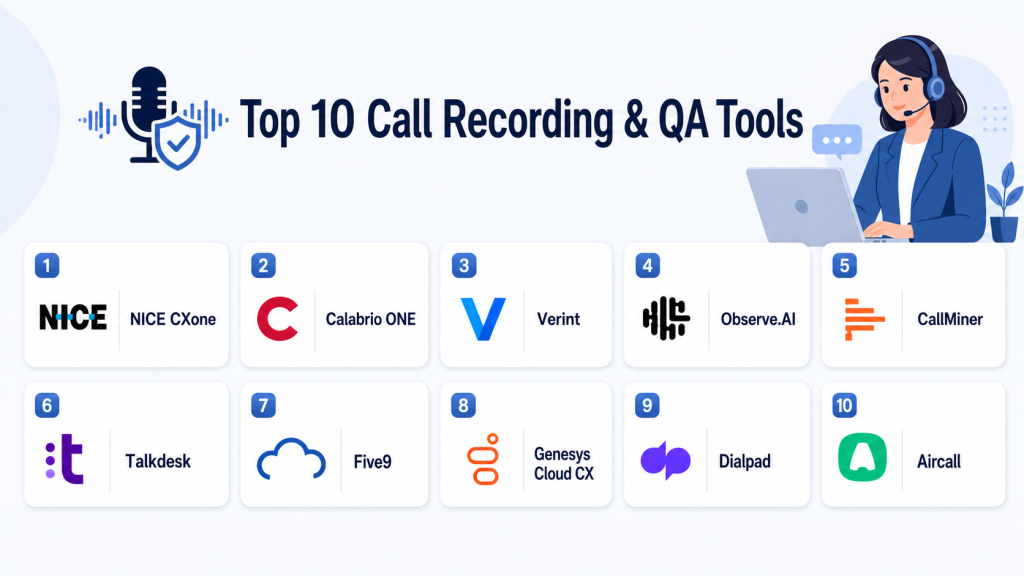
Top 10 Call Recording & QA Tools
#1 — NICE CXone
Short description: NICE CXone is an enterprise-grade customer experience and contact center platform with strong call recording, QA, analytics, workforce engagement, and AI capabilities. It is designed for large organizations that need reliable recording, structured evaluation workflows, compliance controls, and deep operational visibility. It is especially useful for contact centers that want call recording and QA inside a broader customer experience suite.
Key Features
- Omnichannel interaction recording
- Quality management and evaluation workflows
- AI-assisted analytics and conversation insights
- Workforce engagement and performance management
- Supervisor dashboards and coaching tools
- Compliance-focused recording controls
- Broad contact center ecosystem
Pros
- Strong fit for enterprise contact centers
- Combines recording, QA, analytics, and workforce tools
- Scales well for large and distributed teams
Cons
- May be complex for smaller teams
- Implementation can require planning and training
- Pricing may be higher for advanced modules
Platforms / Deployment
Cloud / Hybrid
Web-based platform
Mobile and desktop access may vary by package
Security & Compliance
Enterprise-grade access controls, encryption, role-based permissions, and audit capabilities may be available. Specific certifications and compliance coverage should be verified directly. If not contractually confirmed, use “Not publicly stated.”
Integrations & Ecosystem
NICE CXone integrates with contact center, CRM, workforce, reporting, and customer engagement systems. It is best suited for organizations that want a broad operational ecosystem instead of a standalone recorder.
- CRM systems
- Workforce management tools
- Analytics platforms
- Contact center telephony
- Customer engagement systems
- API-based workflows
Support & Community
NICE typically provides enterprise support, onboarding resources, documentation, training, and professional services. Support level may vary by contract and deployment scope.
#2 — Calabrio ONE
Short description: Calabrio ONE is a workforce engagement and quality management platform focused on call recording, QA, analytics, workforce management, and agent coaching. It is built for contact centers that want structured scorecards, performance insights, and better visibility into customer interactions. It is a strong choice for teams that want call recording connected with workforce optimization.
Key Features
- Call recording and interaction capture
- QA scorecards and evaluation workflows
- Automated quality management capabilities
- Speech and text analytics
- Workforce management and scheduling
- Coaching and performance dashboards
- Reporting for supervisors and QA teams
Pros
- Strong combination of recording, QA, and workforce tools
- Useful for formal quality programs
- Helps supervisors identify coaching opportunities
Cons
- Full value may require multiple modules
- Advanced workflows may need configuration
- Smaller teams may not need the full platform
Platforms / Deployment
Cloud / Hybrid
Web-based platform
Deployment options may vary by environment
Security & Compliance
Security controls may include role-based access, encryption, and administrative controls. Specific compliance certifications and regulatory coverage should be validated directly.
Integrations & Ecosystem
Calabrio ONE fits well into contact center and workforce engagement environments. It helps teams connect quality management with scheduling, analytics, and performance improvement.
- Contact center platforms
- Workforce management systems
- CRM tools
- Reporting workflows
- Telephony systems
- APIs and data exports
Support & Community
Calabrio provides documentation, onboarding support, customer success resources, and implementation assistance. Support level may depend on selected package and customer agreement.
#3 — Verint
Short description: Verint is an enterprise customer engagement and workforce engagement platform used for call recording, quality management, analytics, compliance, and workforce optimization. It is best suited for larger organizations with complex QA programs, regulated workflows, and high call volumes. Verint is often chosen when call recording is part of a broader customer experience and compliance strategy.
Key Features
- Enterprise call recording
- Quality management workflows
- Speech analytics and interaction insights
- Workforce engagement tools
- Compliance and risk monitoring support
- Coaching and performance improvement features
- Advanced reporting and analytics
Pros
- Strong enterprise functionality
- Suitable for complex and regulated environments
- Deep analytics and workforce engagement capabilities
Cons
- May require significant implementation planning
- Can be more than small teams need
- Pricing and packaging may be complex
Platforms / Deployment
Cloud / Hybrid / Varies
Web-based enterprise platform
Deployment options may vary by customer environment
Security & Compliance
Verint is commonly used in enterprise and regulated environments, but exact security and compliance details should be validated directly. Not publicly stated for unverified certifications.
Integrations & Ecosystem
Verint integrates across contact center, workforce, analytics, compliance, and enterprise customer engagement workflows. It is best for organizations that need governance and operational depth.
- Contact center systems
- CRM platforms
- Workforce management tools
- BI and analytics tools
- Compliance workflows
- Enterprise APIs
Support & Community
Verint provides enterprise support, documentation, implementation services, and customer success resources. Support experience may vary by region, product scope, and contract.
#4 — Observe.AI
Short description: Observe.AI is an AI-focused contact center platform built around automated QA, conversation intelligence, agent coaching, and performance analytics. It helps teams review more calls using AI instead of relying only on manual sampling. It is especially useful for support and contact center teams that want faster insights and scalable quality monitoring.
Key Features
- AI-powered transcription and call analysis
- Automated QA scoring
- Agent coaching insights
- Sentiment and topic detection
- Conversation search and tagging
- Supervisor dashboards
- Compliance and risk monitoring support
Pros
- Strong AI-first approach to QA automation
- Helps reduce manual review workload
- Good fit for teams with large call volumes
Cons
- AI accuracy should be tested with real calls
- Requires careful scorecard setup
- Value depends on call volume and QA maturity
Platforms / Deployment
Cloud
Web-based platform
Integrations vary by contact center environment
Security & Compliance
Security controls may include access management, encryption, and administrative features. Specific certifications and compliance coverage should be verified directly.
Integrations & Ecosystem
Observe.AI connects with contact center and business systems to help QA teams analyze conversations, score calls, and trigger coaching actions.
- Contact center platforms
- CRM systems
- Help desk tools
- Reporting workflows
- Coaching workflows
- API-based integrations
Support & Community
Observe.AI provides onboarding, documentation, customer success resources, and support options. Support depth may vary by plan and customer size.
#5 — CallMiner
Short description: CallMiner is a conversation intelligence and speech analytics platform used for call analysis, compliance monitoring, quality assurance, and customer experience improvement. It is a strong option for organizations that want to extract insights from large volumes of recorded conversations. It is especially useful for compliance-heavy teams and customer experience leaders.
Key Features
- Speech analytics and conversation intelligence
- Call transcription and search
- QA and performance monitoring
- Compliance and risk detection support
- Sentiment and topic analysis
- Trend identification across conversations
- Reporting dashboards for managers
Pros
- Strong analytics depth
- Useful for compliance and customer insight programs
- Helps identify patterns across large call volumes
Cons
- May require analytics expertise
- Not always the simplest choice for small teams
- Tuning and implementation can take time
Platforms / Deployment
Cloud / Varies
Web-based analytics platform
Deployment details may vary by customer environment
Security & Compliance
CallMiner is used by enterprises and regulated teams, but exact certifications and security controls should be verified directly. Not publicly stated for details that cannot be confirmed.
Integrations & Ecosystem
CallMiner is often connected with contact center, CRM, compliance, and analytics workflows. Its main strength is turning voice and text conversations into measurable insight.
- Contact center systems
- CRM platforms
- Compliance workflows
- BI and reporting tools
- Data export options
- APIs and connectors
Support & Community
CallMiner provides enterprise support, documentation, training resources, and implementation services. Support experience may vary by package and agreement.
#6 — Talkdesk
Short description: Talkdesk is a cloud contact center platform with call recording, quality management, AI, analytics, automation, and customer engagement features. It is well suited for mid-market and enterprise teams that want recording and QA inside a modern cloud contact center. It is practical for teams that need usability, scalability, and strong integrations.
Key Features
- Cloud contact center recording
- Quality management workflows
- AI-assisted analytics
- Call monitoring and coaching support
- Customer experience dashboards
- CRM and help desk integrations
- Omnichannel engagement options
Pros
- Modern and user-friendly cloud contact center
- Strong fit for support and service teams
- Good integration ecosystem
Cons
- Advanced QA features may require specific modules
- Costs can increase with add-ons
- Larger deployments may need configuration support
Platforms / Deployment
Cloud
Web-based platform
Desktop and mobile access may vary by plan
Security & Compliance
Talkdesk offers enterprise-oriented security and administration capabilities. Buyers should validate SSO, role-based access, audit logs, encryption, retention, and compliance requirements directly.
Integrations & Ecosystem
Talkdesk connects with CRM, support, workflow, and productivity tools. It works well for businesses that want contact center operations linked with customer data.
- Salesforce
- Zendesk
- Microsoft ecosystem
- Service tools
- Workforce and analytics systems
- APIs and marketplace integrations
Support & Community
Talkdesk offers documentation, onboarding resources, customer support, and training materials. Support level may vary by plan and contract.
#7 — Five9
Short description: Five9 is a cloud contact center platform offering call recording, quality management, workforce engagement, analytics, automation, and AI capabilities. It is commonly used by high-volume contact centers that need scalable voice operations and supervisor visibility. It works best for organizations that want recording and QA inside a complete cloud contact center environment.
Key Features
- Call recording and monitoring
- Quality management tools
- Cloud contact center routing
- Workforce engagement capabilities
- AI and automation support
- Reporting and dashboards
- CRM and service integrations
Pros
- Strong for high-volume contact centers
- Combines telephony, recording, QA, and analytics
- Scales well for growing teams
Cons
- May be too broad for basic recording needs
- Advanced features may depend on package
- Implementation planning is important
Platforms / Deployment
Cloud
Web-based contact center platform
Desktop and agent tools may vary by deployment
Security & Compliance
Five9 provides business and enterprise security controls, but buyers should verify exact compliance needs, access settings, retention rules, and audit capabilities.
Integrations & Ecosystem
Five9 connects contact center operations with customer records, reporting systems, and service workflows. It is often used by teams standardizing customer communication.
- CRM platforms
- Help desk systems
- Workforce management tools
- Analytics tools
- Automation workflows
- APIs and partner integrations
Support & Community
Five9 offers documentation, onboarding assistance, customer support, and professional services. Support depth may depend on plan and deployment complexity.
#8 — Genesys Cloud CX
Short description: Genesys Cloud CX is a cloud customer experience platform with call recording, quality management, workforce engagement, AI, analytics, routing, and omnichannel capabilities. It is a strong choice for organizations that need scalable contact center operations with structured QA. It is especially useful for teams that manage customer interactions across multiple channels.
Key Features
- Cloud-based call recording
- Quality management workflows
- Workforce engagement features
- AI-powered customer experience tools
- Omnichannel routing and engagement
- Reporting and analytics dashboards
- Broad integration ecosystem
Pros
- Strong customer experience platform
- Good fit for omnichannel contact centers
- Scalable for enterprise and mid-market teams
Cons
- May be complex for basic QA needs
- Advanced modules may require extra licensing
- Implementation should be planned carefully
Platforms / Deployment
Cloud
Web-based platform
Mobile and desktop options may vary by use case
Security & Compliance
Genesys Cloud CX includes enterprise administration and security capabilities. Buyers should validate SSO, MFA, RBAC, encryption, audit logs, and compliance requirements for their specific package.
Integrations & Ecosystem
Genesys Cloud CX integrates with CRM, workforce, analytics, support, and communication systems. It is suitable for organizations that want an integrated customer experience platform.
- CRM systems
- Workforce engagement tools
- Analytics platforms
- Customer support tools
- Messaging and voice channels
- APIs and app marketplace options
Support & Community
Genesys provides documentation, training, support, partner services, and onboarding options. Support level may vary by contract and region.
#9 — Dialpad
Short description: Dialpad is a cloud communications and contact center platform with call recording, AI transcription, call summaries, analytics, coaching, and customer engagement features. It is a strong option for SMB and mid-market teams that want phone, meetings, sales, and support workflows in one platform. Its AI capabilities make call review faster and easier for managers.
Key Features
- Cloud call recording
- AI transcription and summaries
- Sentiment and conversation insights
- Business phone and contact center features
- Coaching and supervisor tools
- Searchable call history
- CRM and productivity integrations
Pros
- Easy to use and quick to adopt
- Good fit for SMB and mid-market teams
- Strong AI call review features
Cons
- May not match deeper enterprise QA platforms
- Advanced features may depend on plan
- Compliance needs should be validated carefully
Platforms / Deployment
Cloud
Web / Windows / macOS / iOS / Android
Security & Compliance
Dialpad supports business security and administrative features, but buyers should verify SSO, audit logs, encryption, retention, and compliance coverage for their selected plan.
Integrations & Ecosystem
Dialpad works well for teams that want communication, call recording, and customer data connected. It is useful for sales, support, and productivity workflows.
- Salesforce
- HubSpot
- Zendesk
- Google Workspace
- Microsoft ecosystem
- Slack and productivity tools
Support & Community
Dialpad provides help documentation, onboarding resources, and support options. Support level may vary by customer size and plan.
#10 — Aircall
Short description: Aircall is a cloud phone and call center platform with call recording, call monitoring, analytics, coaching-friendly workflows, and CRM integrations. It is popular with SMB and mid-market sales and support teams that want simple setup and practical call visibility. It is best for teams that need usable recording without complex enterprise QA implementation.
Key Features
- Cloud call recording
- Call monitoring and supervision
- Call tagging and notes
- Analytics and reporting dashboards
- CRM and help desk integrations
- Team collaboration workflows
- Fast setup for sales and support teams
Pros
- Simple and practical for SMB teams
- Strong CRM and help desk integration focus
- Faster to deploy than many enterprise suites
Cons
- Less advanced for deep enterprise QA
- AI and analytics depth may vary by plan
- Regulated teams should validate compliance fit
Platforms / Deployment
Cloud
Web / Windows / macOS / iOS / Android
Security & Compliance
Aircall includes business communication security features, but buyers should validate retention, access controls, encryption, and compliance requirements directly.
Integrations & Ecosystem
Aircall is integration-friendly and fits well into sales and support workflows. It is often selected by teams that want fast deployment and simple user adoption.
- Salesforce
- HubSpot
- Zendesk
- Intercom
- Slack
- Help desk and productivity tools
Support & Community
Aircall provides documentation, onboarding resources, support options, and a strong SaaS ecosystem. Support level may vary by plan and business size.
Comparison Table
| Tool Name | Best For | Platform(s) Supported | Deployment | Standout Feature | Public Rating |
|---|---|---|---|---|---|
| NICE CXone | Enterprise contact centers | Web-based | Cloud / Hybrid | Enterprise recording and QA ecosystem | N/A |
| Calabrio ONE | Workforce engagement and QA teams | Web-based | Cloud / Hybrid | QA plus workforce optimization | N/A |
| Verint | Large regulated enterprises | Web-based | Cloud / Hybrid / Varies | Enterprise analytics and compliance workflows | N/A |
| Observe.AI | AI-powered QA automation | Web-based | Cloud | Automated QA and coaching intelligence | N/A |
| CallMiner | Speech analytics and compliance teams | Web-based | Cloud / Varies | Deep conversation analytics | N/A |
| Talkdesk | Cloud contact centers | Web-based | Cloud | Modern CCaaS with QA workflows | N/A |
| Five9 | High-volume contact centers | Web-based | Cloud | Scalable contact center recording | N/A |
| Genesys Cloud CX | Omnichannel CX teams | Web-based | Cloud | Broad customer experience ecosystem | N/A |
| Dialpad | SMB and mid-market teams | Web, Windows, macOS, iOS, Android | Cloud | AI transcription and summaries | N/A |
| Aircall | Sales and support SMBs | Web, Windows, macOS, iOS, Android | Cloud | Simple recording with CRM integrations | N/A |
Evaluation & Scoring of Call Recording & QA Tools
| Tool Name | Core (25%) | Ease (15%) | Integrations (15%) | Security (10%) | Performance (10%) | Support (10%) | Value (15%) | Weighted Total (0–10) |
|---|---|---|---|---|---|---|---|---|
| NICE CXone | 10 | 7 | 9 | 9 | 9 | 9 | 7 | 8.65 |
| Calabrio ONE | 9 | 8 | 8 | 8 | 8 | 8 | 8 | 8.25 |
| Verint | 10 | 7 | 8 | 9 | 9 | 8 | 7 | 8.35 |
| Observe.AI | 9 | 8 | 8 | 8 | 8 | 8 | 8 | 8.25 |
| CallMiner | 9 | 7 | 8 | 8 | 9 | 8 | 7 | 8.05 |
| Talkdesk | 8 | 9 | 9 | 8 | 8 | 8 | 8 | 8.30 |
| Five9 | 8 | 8 | 9 | 8 | 9 | 8 | 7 | 8.10 |
| Genesys Cloud CX | 9 | 8 | 9 | 9 | 9 | 8 | 7 | 8.45 |
| Dialpad | 8 | 9 | 8 | 8 | 8 | 8 | 9 | 8.30 |
| Aircall | 7 | 9 | 9 | 7 | 8 | 8 | 9 | 8.05 |
These scores are comparative, not absolute. A higher score usually means the tool is stronger across recording, QA, integrations, scalability, and operational maturity. Enterprise tools often score higher in depth and security, while SMB-focused tools may score higher in usability and value. Buyers should use this table as a shortlist guide, then validate each tool with real call samples, integrations, and compliance requirements.
Which Call Recording & QA Tools Tool Is Right for You?
Solo / Freelancer
Solo users usually do not need a full QA platform. A simple cloud phone system with call recording may be enough. Dialpad or Aircall can be practical if you need easy call capture, searchable records, mobile access, and basic customer history. Enterprise-grade platforms may be unnecessary unless client or compliance needs demand deeper controls.
SMB
SMBs should focus on fast setup, simple administration, CRM integrations, and practical reporting. Aircall and Dialpad are strong choices for sales and support teams that want recording without heavy implementation. Talkdesk may be a better fit when the SMB is building a more structured contact center. Observe.AI can be useful if the team already has enough call volume to benefit from automated QA.
Mid-Market
Mid-market teams usually need more structured QA workflows, supervisor dashboards, coaching processes, and better reporting. Talkdesk, Five9, Genesys Cloud CX, Observe.AI, and Calabrio ONE are strong options to evaluate. The right choice depends on whether the company wants an all-in-one contact center platform or a specialized QA and conversation intelligence layer.
Enterprise
Enterprises should prioritize scalability, governance, compliance, retention policies, role-based access, advanced reporting, and implementation support. NICE CXone, Verint, Genesys Cloud CX, Calabrio ONE, Five9, and CallMiner are strong enterprise candidates. Large teams should run pilots with real call volume and involve IT, compliance, legal, security, operations, and QA stakeholders.
Budget vs Premium
Budget-focused teams should start with tools that are easier to deploy and manage, such as Aircall or Dialpad. These platforms provide useful recording and integrations without requiring a complex contact center transformation. Premium buyers should evaluate NICE CXone, Verint, Genesys Cloud CX, Calabrio ONE, CallMiner, or Five9 when they need enterprise-grade QA, analytics, compliance, and workforce capabilities.
Feature Depth vs Ease of Use
If ease of use is the top priority, Dialpad, Aircall, and Talkdesk are practical starting points. If feature depth is more important, NICE CXone, Verint, Calabrio ONE, Genesys Cloud CX, and CallMiner offer broader enterprise capabilities. Observe.AI is a strong option for teams that specifically want AI-powered QA automation and coaching insights.
Integrations & Scalability
Sales teams should prioritize CRM integrations. Support teams should prioritize help desk and ticketing integrations. Contact centers should prioritize telephony, workforce management, analytics, and reporting integrations. Enterprises should also evaluate APIs, data exports, identity provider support, permission controls, and data governance.
Security & Compliance Needs
Regulated businesses should validate consent workflows, data retention, call redaction, encryption, audit logs, access permissions, and data residency. Finance, healthcare, insurance, and BPO teams should not rely only on product demos. Security and legal teams should review the vendor’s documentation, contract terms, and deployment model before purchase.
Frequently Asked Questions
1. What are Call Recording & QA Tools?
Call Recording & QA Tools record customer conversations and help teams review, score, analyze, and improve them.
They are used by support, sales, contact center, compliance, and training teams.
Modern tools often include transcripts, AI summaries, QA scorecards, analytics, and coaching workflows.
2. Why do businesses need Call Recording & QA Tools?
Businesses use these tools to improve customer service, train agents, monitor compliance, and understand customer conversations.
They help managers find performance gaps and coach teams with real examples.
They also support documentation when disputes, escalations, or regulatory reviews occur.
3. How much do Call Recording & QA Tools cost?
Pricing usually depends on users, call volume, recording storage, AI features, and enterprise requirements.
Some tools are priced as standalone QA platforms, while others are part of a larger contact center suite.
Because pricing varies widely, buyers should request vendor quotes based on actual usage.
4. What features should buyers look for first?
Buyers should start with reliable recording, playback, search, tagging, retention controls, and access permissions.
After that, they should evaluate QA scorecards, AI transcription, coaching, reporting, and integrations.
The best feature set depends on team size, call volume, compliance needs, and customer support goals.
5. Are AI features important in Call Recording & QA Tools?
AI features are becoming very useful for transcription, summaries, sentiment analysis, topic detection, and automated scoring.
They help supervisors review more conversations without manually listening to every call.
However, teams should test AI accuracy using their own calls, accents, terminology, and workflows.
6. Are Call Recording & QA Tools secure?
Many reputable tools include security features such as encryption, role-based access, audit logs, and retention settings.
However, security controls vary by vendor, plan, and deployment model.
Buyers should validate compliance, data residency, user permissions, and audit requirements before final selection.
7. How long does implementation take?
Implementation time depends on the tool, integrations, call volume, compliance review, and QA workflow complexity.
Simple cloud phone systems may deploy quickly, while enterprise platforms require more planning.
Teams should prepare scorecards, permissions, retention policies, and integration requirements before rollout.
8. Can these tools integrate with CRM and help desk platforms?
Yes, many tools integrate with CRM, help desk, contact center, and productivity platforms.
These integrations help attach recordings to customer records, tickets, deals, and coaching workflows.
Buyers should confirm whether integrations are native, API-based, or require custom setup.
9. What mistakes should buyers avoid?
Buyers should avoid choosing a tool only because it records calls.
They should also evaluate QA workflows, reporting, compliance controls, integrations, and ease of use.
Another common mistake is adopting AI scoring without testing it against real conversations and business rules.
10. What are alternatives to dedicated Call Recording & QA Tools?
Alternatives include built-in phone system recording, meeting recording tools, CRM call logs, and manual QA spreadsheets.
These options may work for very small teams with simple needs.
Dedicated QA tools are better when teams need scalable coaching, compliance monitoring, analytics, and structured performance review.
Conclusion
Call Recording & QA Tools are now essential for teams that want better customer conversations, stronger agent performance, and more reliable compliance processes.They help businesses move beyond basic audio storage and create structured workflows for review, coaching, analytics, and risk monitoring. Enterprise contact centers may prefer NICE CXone, Verint, Genesys Cloud CX, Calabrio ONE, Five9, or CallMiner for scale and depth. AI-focused teams may evaluate Observe.AI when automated scoring and coaching intelligence are major priorities. SMB and mid-market teams may find Dialpad, Aircall, or Talkdesk easier to deploy and manage. The best choice depends on call volume, team size, compliance needs, integration requirements, and budget. Before choosing a platform, shortlist two or three tools that match your workflow and business goals. Run a pilot with real calls, test integrations, review security requirements, and compare total cost before scaling.
This blog clearly explains call recording and QA tools with useful insights for improving customer service quality.
I feel like compliance is a big factor here. Recording calls across regions requires careful handling of consent and data privacy regulations.