Introduction
Certificate Management Tools are platforms that help organizations manage the lifecycle of digital certificates (SSL/TLS)—including issuance, deployment, renewal, monitoring, and revocation. These certificates are critical for securing communication between systems, encrypting data, and establishing trust across applications, websites, and APIs.
In modern IT environments, especially with cloud computing, microservices, and zero-trust architectures, managing certificates manually is no longer practical. Expired or misconfigured certificates can lead to outages, security vulnerabilities, and compliance issues. Certificate management tools automate these processes, ensuring continuous security and operational reliability.
Real-World Use Cases
- Managing SSL/TLS certificates for websites and APIs
- Automating certificate issuance and renewal
- Monitoring certificate expiration to prevent outages
- Securing internal communications in microservices
- Ensuring compliance with security standards
What Buyers Should Evaluate
- Certificate lifecycle automation (issuance, renewal, revocation)
- Integration with cloud platforms and DevOps tools
- Support for public and private certificate authorities
- Scalability for large environments
- Monitoring and alerting capabilities
- Security features and compliance support
- Ease of deployment and management
- API and automation capabilities
Best for: DevOps teams, security engineers, IT administrators, and enterprises managing large numbers of certificates across cloud and on-prem environments.
Not ideal for: Small websites or projects with minimal certificate needs where basic tools may suffice.
Key Trends in Certificate Management Tools
- Automation of certificate lifecycle management
- Adoption of zero-trust security models
- Integration with cloud-native environments
- Increased use of private certificate authorities
- Real-time monitoring and alerting
- API-driven certificate management
- Compliance and audit-focused features
- Integration with DevSecOps pipelines
- Expansion of multi-cloud support
- Reduction of manual certificate handling
How We Selected These Tools (Methodology)
- Strong adoption across enterprises and DevOps teams
- Comprehensive certificate lifecycle management features
- Integration with cloud and DevOps ecosystems
- Proven reliability and scalability
- Security and compliance capabilities
- Support for automation and APIs
- Active vendor support and development
- Balance between enterprise and flexible solutions
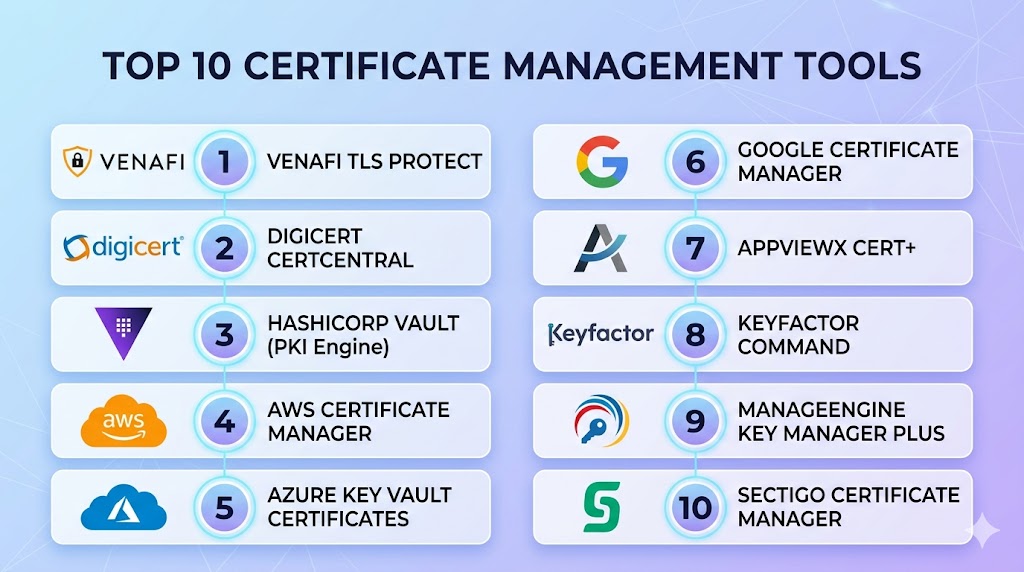
Top 10 Certificate Management Tools
#1 — Venafi TLS Protect
Short description: An enterprise-grade platform for managing machine identities and certificates at scale.
Key Features
- Certificate discovery and inventory
- Automated lifecycle management
- Policy enforcement
- Risk analysis and reporting
- Multi-cloud support
Pros
- Enterprise-grade scalability
- Strong security and compliance
Cons
- Expensive
- Complex setup
Platforms / Deployment
Web
Cloud / Hybrid
Security & Compliance
Encryption, policy enforcement, audit logs
Not publicly stated
Integrations & Ecosystem
- Cloud platforms
- DevOps tools
- Security systems
Support & Community
Enterprise support available.
#2 — DigiCert CertCentral
Short description: A centralized platform for managing SSL/TLS certificates and digital trust solutions.
Key Features
- Certificate issuance and renewal
- Centralized management
- Automation tools
- Reporting and analytics
- Multi-domain support
Pros
- Easy to use
- Strong trust infrastructure
Cons
- Paid solution
- Limited customization
Platforms / Deployment
Web
Cloud
Security & Compliance
Encryption, certificate validation
Not publicly stated
Integrations & Ecosystem
- Web servers
- Cloud platforms
Support & Community
Strong vendor support.
#3 — HashiCorp Vault (PKI Engine)
Short description: A flexible platform that includes certificate management through its PKI secrets engine.
Key Features
- Dynamic certificate generation
- Private CA support
- Secret management integration
- Access control policies
- API-driven automation
Pros
- Highly flexible
- Strong security features
Cons
- Complex configuration
- Learning curve
Platforms / Deployment
Windows / macOS / Linux
Cloud / Self-hosted / Hybrid
Security & Compliance
Encryption, RBAC, audit logs
Not publicly stated
Integrations & Ecosystem
- Kubernetes
- Cloud platforms
- CI/CD tools
Support & Community
Strong open-source and enterprise support.
#4 — AWS Certificate Manager
Short description: A managed service for provisioning and managing SSL/TLS certificates in AWS.
Key Features
- Automated certificate provisioning
- Renewal automation
- Integration with AWS services
- Public and private CA support
- Monitoring
Pros
- Fully managed
- Seamless AWS integration
Cons
- Limited outside AWS
- Vendor dependency
Platforms / Deployment
Web
Cloud
Security & Compliance
IAM, encryption
Not publicly stated
Integrations & Ecosystem
- AWS services
- Load balancers
- Cloud infrastructure
Support & Community
Enterprise support.
#5 — Azure Key Vault Certificates
Short description: A certificate management solution integrated with Azure Key Vault.
Key Features
- Certificate storage and management
- Integration with Azure services
- Key management
- Access control
- Automation
Pros
- Strong Azure integration
- Enterprise-ready
Cons
- Azure dependency
- Configuration complexity
Platforms / Deployment
Web
Cloud
Security & Compliance
Encryption, RBAC
Not publicly stated
Integrations & Ecosystem
- Azure services
- DevOps tools
Support & Community
Strong enterprise support.
#6 — Google Certificate Manager
Short description: A service for managing SSL/TLS certificates within Google Cloud.
Key Features
- Certificate provisioning
- Integration with load balancers
- Monitoring
- Automation
- Cloud-native support
Pros
- Easy integration with GCP
- Scalable
Cons
- Limited outside GCP
- Pricing considerations
Platforms / Deployment
Web
Cloud
Security & Compliance
Encryption
Not publicly stated
Integrations & Ecosystem
- Google Cloud services
- Kubernetes
Support & Community
Enterprise support.
#7 — AppViewX CERT+
Short description: A certificate lifecycle management platform for enterprise environments.
Key Features
- Certificate discovery
- Lifecycle automation
- Risk monitoring
- Compliance reporting
- Multi-cloud support
Pros
- Strong automation
- Enterprise focus
Cons
- Complex setup
- Pricing
Platforms / Deployment
Web
Cloud / Hybrid
Security & Compliance
Policy enforcement, audit logs
Not publicly stated
Integrations & Ecosystem
- DevOps tools
- Cloud platforms
Support & Community
Enterprise support.
#8 — Keyfactor Command
Short description: A platform for managing PKI and digital certificates across environments.
Key Features
- Certificate lifecycle management
- PKI automation
- Policy enforcement
- Reporting tools
- Multi-environment support
Pros
- Strong PKI capabilities
- Scalable
Cons
- Complex setup
- Enterprise pricing
Platforms / Deployment
Web
Cloud / Hybrid
Security & Compliance
Encryption, audit logs
Not publicly stated
Integrations & Ecosystem
- DevOps tools
- PKI systems
Support & Community
Enterprise support.
#9 — ManageEngine Key Manager Plus
Short description: A certificate and key management solution for enterprises.
Key Features
- Certificate lifecycle management
- Key management
- Discovery tools
- Compliance reporting
- Automation
Pros
- Comprehensive features
- User-friendly interface
Cons
- Resource-intensive
- Licensing costs
Platforms / Deployment
Windows / Linux
Self-hosted
Security & Compliance
Encryption, audit logs
Not publicly stated
Integrations & Ecosystem
- Enterprise systems
- DevOps tools
Support & Community
Strong vendor support.
#10 — Sectigo Certificate Manager
Short description: A platform for managing digital certificates and identities.
Key Features
- Certificate lifecycle management
- Automation
- Reporting
- Multi-domain support
- Compliance tools
Pros
- Easy deployment
- Good automation
Cons
- Paid solution
- Limited customization
Platforms / Deployment
Web
Cloud
Security & Compliance
Encryption, compliance features
Not publicly stated
Integrations & Ecosystem
- Web platforms
- DevOps tools
Support & Community
Vendor support available.
Comparison Table (Top 10)
| Tool Name | Best For | Platform(s) Supported | Deployment | Standout Feature | Public Rating |
|---|---|---|---|---|---|
| Venafi | Enterprise | Web | Hybrid | Machine identity | N/A |
| DigiCert | SMB/Enterprise | Web | Cloud | Trust platform | N/A |
| Vault | DevSecOps | Multi-OS | Hybrid | PKI engine | N/A |
| AWS ACM | AWS users | Web | Cloud | Auto renewal | N/A |
| Azure KV | Azure users | Web | Cloud | Key mgmt | N/A |
| Google CM | GCP users | Web | Cloud | Cloud-native | N/A |
| AppViewX | Enterprise | Web | Hybrid | Automation | N/A |
| Keyfactor | PKI teams | Web | Hybrid | PKI mgmt | N/A |
| ManageEngine | Enterprises | Multi-OS | Self-hosted | Discovery | N/A |
| Sectigo | SMB/Enterprise | Web | Cloud | Lifecycle mgmt | N/A |
Evaluation & Scoring of Certificate Management Tools
| Tool Name | Core | Ease | Integrations | Security | Performance | Support | Value | Weighted Total |
|---|---|---|---|---|---|---|---|---|
| Venafi | 10 | 7 | 9 | 10 | 9 | 9 | 7 | 9.0 |
| DigiCert | 9 | 9 | 8 | 9 | 9 | 9 | 7 | 8.8 |
| Vault | 9 | 7 | 9 | 10 | 9 | 9 | 8 | 8.9 |
| AWS ACM | 9 | 9 | 9 | 9 | 9 | 9 | 8 | 9.0 |
| Azure KV | 9 | 8 | 9 | 9 | 9 | 9 | 8 | 8.8 |
| Google CM | 9 | 8 | 8 | 9 | 9 | 8 | 8 | 8.6 |
| AppViewX | 9 | 7 | 8 | 9 | 9 | 8 | 7 | 8.4 |
| Keyfactor | 9 | 7 | 8 | 9 | 9 | 8 | 7 | 8.4 |
| ManageEngine | 8 | 8 | 7 | 8 | 8 | 8 | 8 | 8.0 |
| Sectigo | 8 | 8 | 7 | 8 | 8 | 8 | 8 | 8.0 |
How to interpret scores:
These scores provide a comparative overview of each tool’s strengths. Higher scores indicate a better balance of features, security, and usability. However, enterprise tools may score higher in security while cloud-native tools excel in ease of use and automation.
Which Certificate Management Tools Tool Is Right for You?
Solo / Freelancer
Cloud-native tools like AWS Certificate Manager are simple and effective.
SMB
DigiCert and Sectigo offer easy deployment and management.
Mid-Market
Azure Key Vault and Google Certificate Manager provide scalability.
Enterprise
Venafi, Keyfactor, and AppViewX excel in large-scale environments.
Budget vs Premium
- Budget: Cloud-native tools
- Premium: Venafi, Keyfactor
Feature Depth vs Ease of Use
- Feature-rich: Venafi
- Easy-to-use: AWS Certificate Manager
Integrations & Scalability
- Best integrations: Vault
- Scalable: Venafi
Security & Compliance Needs
- Strong security: Venafi, Keyfactor
- Moderate: DigiCert
Frequently Asked Questions (FAQs)
What is a certificate management tool?
It manages the lifecycle of SSL/TLS certificates.
Why are these tools important?
They prevent outages and improve security.
Are they cloud-based?
Many are cloud-based, but some support self-hosting.
Do they support automation?
Yes, automation is a key feature.
Can they integrate with DevOps tools?
Yes, most modern tools support integration.
Are they secure?
They use encryption and access controls.
Do they support certificate renewal?
Yes, automated renewal is common.
Can small teams use them?
Yes, especially cloud-native tools.
What is the best tool overall?
Depends on your environment and needs.
Do they support compliance requirements?
Yes, many include compliance features.
Conclusion
Certificate Management Tools are essential for maintaining secure communication and avoiding disruptions caused by expired or mismanaged certificates. From enterprise-grade platforms like Venafi and Keyfactor to cloud-native solutions like AWS Certificate Manager, each tool offers unique strengths tailored to different environments. As organizations adopt multi-cloud and zero-trust architectures, automated certificate management becomes increasingly critical. The best approach is to evaluate your infrastructure, shortlist suitable tools, and test them within your environment to ensure they meet your security and operational requirements. A well-chosen certificate management solution can significantly enhance security, compliance, and reliability across your systems.