Introduction
IT Service Management (ITSM) tools are software platforms that help organizations design, deliver, manage, and improve IT services across the business. In simple terms, they enable IT teams to handle everything from support tickets and incidents to system changes and asset tracking in a structured and efficient way.
Modern businesses rely heavily on IT systems, so even small disruptions can impact productivity and revenue. ITSM tools provide a centralized system to manage requests, automate workflows, and ensure consistent service delivery, making them essential for digital operations.
Common use cases include:
- Incident and problem management
- IT helpdesk and service request handling
- Change and release management
- Asset and configuration management
- Employee onboarding and access requests
Key evaluation criteria buyers should consider:
- Incident, problem, and change management features
- Automation and workflow capabilities
- Ease of use and onboarding
- Integration with DevOps, monitoring, and business tools
- Scalability and performance reliability
- Security and compliance readiness
- Reporting and analytics
- Customization and flexibility
- Total cost of ownership
Best for: IT teams, enterprises, SaaS companies, managed service providers, and organizations managing complex IT infrastructure.
Not ideal for: Small teams with minimal IT processes or businesses that only need basic ticketing tools without ITIL-based workflows.
Key Trends in IT Service Management (ITSM) Tools
- AI-powered ticket classification and auto-routing
- Predictive analytics for proactive issue resolution
- Integration of virtual agents and chatbots
- Shift toward enterprise service management (ESM) beyond IT
- No-code workflow automation for faster deployment
- Cloud-native ITSM platforms replacing on-prem systems
- Increased focus on employee experience (EX)
- Unified dashboards for real-time service visibility
- API-first platforms for integration flexibility
- Strong emphasis on compliance and governance
How We Selected These Tools (Methodology)
- Market adoption and industry recognition
- Feature completeness aligned with ITIL practices
- Reliability and performance indicators
- Security and compliance readiness
- Integration ecosystem and extensibility
- Usability across technical and non-technical teams
- Scalability from SMB to enterprise environments
- Innovation in automation and AI capabilities
- Customer support, documentation, and community strength
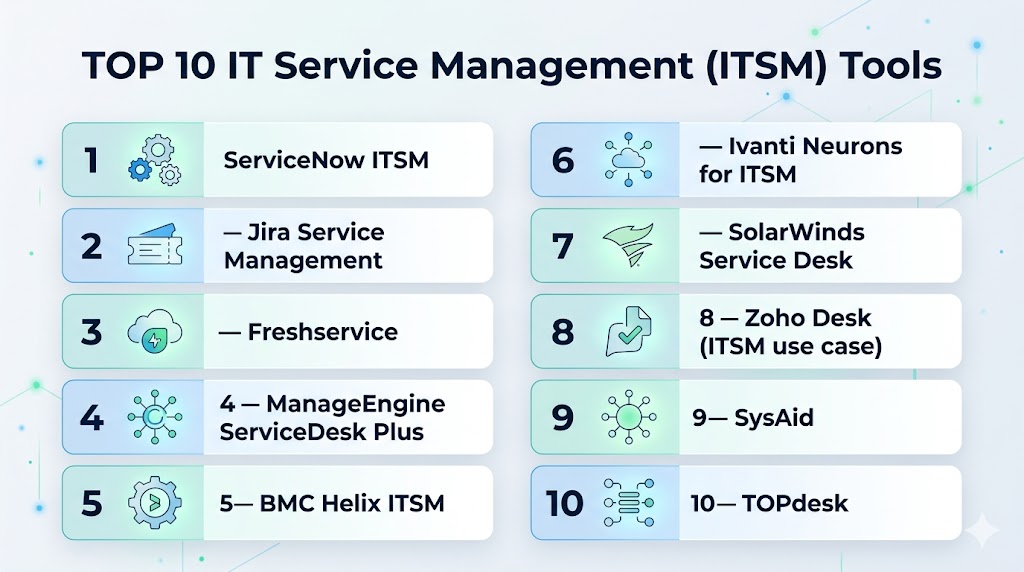
Top 10 IT Service Management (ITSM) Tools
#1 — ServiceNow ITSM
Short description: A leading enterprise ITSM platform offering end-to-end service management with automation and AI capabilities.
Key Features
- Incident, problem, and change management
- Asset and configuration management
- AI-powered automation
- Service catalog
- Workflow automation
- Reporting and analytics
Pros
- Highly scalable enterprise solution
- Strong automation and AI features
Cons
- Expensive
- Complex implementation
Platforms / Deployment
Web / Cloud
Security & Compliance
SSO, encryption, GDPR. Other details not publicly stated.
Integrations & Ecosystem
Extensive enterprise integrations and APIs.
- CRM systems
- DevOps tools
- APIs
- Automation platforms
Support & Community
Enterprise-grade support with strong documentation.
#2 — Jira Service Management
Short description: An ITSM platform designed for DevOps and agile teams with strong workflow automation.
Key Features
- Incident and request management
- Change management
- SLA tracking
- Automation workflows
- Knowledge base integration
- DevOps integration
Pros
- Deep integration with development tools
- Highly customizable workflows
Cons
- Learning curve
- Complex setup
Platforms / Deployment
Cloud / Self-hosted
Security & Compliance
SSO, MFA, encryption. Other details not publicly stated.
Integrations & Ecosystem
- DevOps tools
- APIs
- Collaboration platforms
Support & Community
Large community and extensive documentation.
#3 — Freshservice
Short description: A modern ITSM platform offering automation, AI, and a user-friendly interface.
Key Features
- Incident management
- Asset management
- Workflow automation
- Service catalog
- AI capabilities
- Reporting tools
Pros
- Easy to use
- Strong automation features
Cons
- Limited deep customization
- Pricing scales with features
Platforms / Deployment
Cloud
Security & Compliance
Encryption, SSO. Other details not publicly stated.
Integrations & Ecosystem
- IT tools
- APIs
- Monitoring systems
Support & Community
Strong onboarding and support.
#4 — ManageEngine ServiceDesk Plus
Short description: A comprehensive ITSM solution with strong asset management and workflow automation.
Key Features
- Ticketing system
- Asset management
- Change management
- SLA tracking
- Reporting tools
- Workflow automation
Pros
- Feature-rich
- Good value
Cons
- UI may feel outdated
- Setup complexity
Platforms / Deployment
Cloud / On-premise
Security & Compliance
Encryption, RBAC. Other details not publicly stated.
Integrations & Ecosystem
- IT tools
- APIs
- Monitoring systems
Support & Community
Reliable enterprise support.
#5 — BMC Helix ITSM
Short description: An enterprise-grade ITSM platform with AI-driven automation and predictive capabilities.
Key Features
- Incident and problem management
- AI automation
- Change management
- Service catalog
- Asset management
- Analytics
Pros
- Strong AI capabilities
- Enterprise scalability
Cons
- High cost
- Complex deployment
Platforms / Deployment
Cloud / Hybrid
Security & Compliance
Encryption, SSO. Other details not publicly stated.
Integrations & Ecosystem
- Enterprise systems
- APIs
- DevOps tools
Support & Community
Enterprise-level support services.
#6 — Ivanti Neurons for ITSM
Short description: A modern ITSM platform focusing on automation and proactive service management.
Key Features
- Incident management
- Automation workflows
- AI-powered insights
- Asset management
- Service catalog
- Analytics
Pros
- Strong automation
- Good scalability
Cons
- Complex configuration
- Limited SMB focus
Platforms / Deployment
Cloud
Security & Compliance
Encryption, RBAC. Other details not publicly stated.
Integrations & Ecosystem
- APIs
- IT tools
- Automation platforms
Support & Community
Enterprise-grade support.
#7 — SolarWinds Service Desk
Short description: A cloud-based ITSM tool focused on ease of use, automation, and service delivery efficiency.
Key Features
- Incident management
- Asset management
- Service catalog
- Workflow automation
- Reporting tools
- SLA management
Pros
- Easy to implement
- Good reporting
Cons
- Limited advanced customization
- UI complexity
Platforms / Deployment
Cloud
Security & Compliance
Encryption, GDPR. Other details not publicly stated.
Integrations & Ecosystem
- Monitoring tools
- APIs
- IT systems
Support & Community
Reliable support and documentation.
#8 — Zoho Desk (ITSM use case)
Short description: A flexible support platform that can be adapted for ITSM workflows in smaller teams.
Key Features
- Ticket management
- Workflow automation
- Knowledge base
- Reporting tools
- Omnichannel support
- AI assistant
Pros
- Affordable
- Easy to use
Cons
- Limited ITIL depth
- Not enterprise-focused
Platforms / Deployment
Web / Cloud
Security & Compliance
Encryption, GDPR. Other details not publicly stated.
Integrations & Ecosystem
- CRM tools
- APIs
- Zoho ecosystem
Support & Community
Strong documentation and support.
#9 — SysAid
Short description: An ITSM platform offering automation, asset management, and service desk capabilities.
Key Features
- Incident management
- Asset management
- Automation workflows
- Reporting tools
- Service catalog
- SLA tracking
Pros
- Strong ITSM features
- Flexible deployment
Cons
- UI can be complex
- Limited modern UX
Platforms / Deployment
Cloud / On-premise
Security & Compliance
Encryption, RBAC. Other details not publicly stated.
Integrations & Ecosystem
- IT tools
- APIs
- Monitoring systems
Support & Community
Reliable support services.
#10 — TOPdesk
Short description: A service management platform focusing on ITSM and enterprise service management.
Key Features
- Incident management
- Change management
- Asset management
- Self-service portal
- Workflow automation
- Reporting
Pros
- Strong ITIL alignment
- Good usability
Cons
- Limited advanced AI features
- Customization constraints
Platforms / Deployment
Cloud / On-premise
Security & Compliance
Encryption, GDPR. Other details not publicly stated.
Integrations & Ecosystem
- APIs
- IT tools
- Business applications
Support & Community
Strong support and onboarding.
Comparison Table (Top 10)
| Tool Name | Best For | Platform(s) Supported | Deployment | Standout Feature | Public Rating |
|---|---|---|---|---|---|
| ServiceNow ITSM | Enterprises | Web | Cloud | Full ITSM suite | N/A |
| Jira Service Management | DevOps teams | Web | Cloud/On-prem | DevOps integration | N/A |
| Freshservice | SMB–Enterprise | Web | Cloud | Ease of use | N/A |
| ServiceDesk Plus | IT teams | Web | Cloud/On-prem | Asset management | N/A |
| BMC Helix ITSM | Enterprises | Web | Cloud/Hybrid | AI automation | N/A |
| Ivanti Neurons | Enterprises | Web | Cloud | Automation focus | N/A |
| SolarWinds Service Desk | SMB–Enterprise | Web | Cloud | Reporting | N/A |
| Zoho Desk | SMB | Web | Cloud | Affordability | N/A |
| SysAid | IT teams | Web | Cloud/On-prem | Flexible deployment | N/A |
| TOPdesk | Enterprises | Web | Cloud/On-prem | ITIL alignment | N/A |
Evaluation & Scoring of ITSM Tools
| Tool Name | Core (25%) | Ease (15%) | Integrations (15%) | Security (10%) | Performance (10%) | Support (10%) | Value (15%) | Weighted Total (0–10) |
|---|---|---|---|---|---|---|---|---|
| ServiceNow | 10 | 6 | 10 | 10 | 9 | 9 | 6 | 8.7 |
| Jira Service Management | 9 | 7 | 9 | 9 | 9 | 8 | 7 | 8.5 |
| Freshservice | 8 | 9 | 8 | 8 | 8 | 8 | 8 | 8.3 |
| ServiceDesk Plus | 8 | 7 | 8 | 8 | 8 | 7 | 8 | 7.9 |
| BMC Helix | 9 | 6 | 9 | 9 | 9 | 8 | 6 | 8.2 |
| Ivanti Neurons | 8 | 7 | 8 | 8 | 8 | 8 | 7 | 7.9 |
| SolarWinds | 8 | 8 | 8 | 8 | 8 | 7 | 7 | 7.9 |
| Zoho Desk | 7 | 9 | 7 | 8 | 8 | 7 | 9 | 8.1 |
| SysAid | 7 | 7 | 7 | 7 | 7 | 7 | 7 | 7.0 |
| TOPdesk | 8 | 8 | 7 | 8 | 8 | 8 | 7 | 7.8 |
Interpretation:
These scores are comparative and reflect how each tool performs across critical ITSM criteria. Enterprise platforms typically lead in feature depth and security, while SMB-focused tools perform better in usability and cost efficiency. Always align tool selection with your operational needs rather than relying solely on rankings.
Which ITSM Tool Is Right for You?
Solo / Freelancer
Use lightweight tools like Zoho Desk or basic ticketing systems instead of full ITSM platforms.
SMB
Freshservice and SolarWinds Service Desk offer strong usability and essential ITSM features.
Mid-Market
Jira Service Management and ManageEngine ServiceDesk Plus provide scalability with manageable complexity.
Enterprise
ServiceNow and BMC Helix ITSM are best for advanced automation, governance, and large-scale operations.
Budget vs Premium
- Budget: Zoho Desk, Freshservice
- Premium: ServiceNow, BMC Helix
Feature Depth vs Ease of Use
- Feature-rich: ServiceNow, BMC
- Easy to use: Freshservice
Integrations & Scalability
Best options: Jira, ServiceNow, Ivanti
Security & Compliance Needs
Enterprises should prioritize platforms with strong compliance capabilities and governance features.
Frequently Asked Questions (FAQs)
What is ITSM?
ITSM is the practice of managing IT services from design to delivery and support to meet business goals.
What are ITSM tools used for?
They are used to manage incidents, service requests, changes, and IT assets efficiently.
What is ITIL in ITSM?
ITIL is a framework that defines best practices for IT service management processes.
How much do ITSM tools cost?
Pricing varies based on features, users, and deployment models.
Are ITSM tools only for large enterprises?
No, many tools are designed for SMBs as well.
What features should I look for?
Incident management, automation, reporting, integrations, and scalability.
Can ITSM tools integrate with DevOps tools?
Yes, most modern ITSM platforms support DevOps integrations.
Are ITSM tools secure?
Most offer encryption and access control, but security features vary.
Can ITSM tools automate workflows?
Yes, automation is a core capability in modern ITSM tools.
Can I switch ITSM platforms later?
Yes, but migration may require planning and effort.
Conclusion
IT Service Management tools play a critical role in ensuring reliable, efficient, and scalable IT operations across modern organizations. They help standardize processes, automate repetitive tasks, and improve service delivery while aligning IT with business goals. Enterprise solutions offer deep functionality, governance, and scalability, while smaller tools focus on usability and faster implementation. The right choice depends on your organization’s size, complexity, and technical maturity. Instead of selecting based on popularity alone, focus on how well the platform fits your workflows, integrations, and long-term strategy. Start by shortlisting a few tools, testing them in real scenarios, and validating their performance before making a final decision.