If your Japan Post Bank Debit Card (ゆうちょデビット) fails during an online purchase and the reason says “Exceeded the per-transaction limit”, the issue is often not the card itself, but the shopping limits configured in Yucho Debit Member WEB. Japan Post Bank states that Yucho Debit can be used at Visa merchants, including internet shopping, but some transactions are blocked when the configured limit is too low. (Japan Post Bank)
This article consolidates the full troubleshooting flow: how to register for ゆうちょデビット会員WEB, where to change your limits, what numbers to enter, and what to check before retrying a large payment. All limit values and menu paths below are based on Japan Post Bank’s official FAQs and registration guides. (よくあるご質問 | 株式会社ゆうちょ銀行)
1) Why the transaction fails
Japan Post Bank’s FAQ says Yucho Debit may not work at a store or online for three major reasons: insufficient account balance, exceeding the debit usage limit, or the merchant not accepting that type of debit transaction. The bank specifically says Yucho Debit has configurable limits for per transaction, per day, and per month, and those settings should be checked in ゆうちょデビット会員WEB. (よくあるご質問 | 株式会社ゆうちょ銀行)
That means a payment can fail even when:
- your bank balance is enough, but
- your single transaction limit, daily limit, or monthly limit is set lower than the purchase amount. (よくあるご質問 | 株式会社ゆうちょ銀行)
A very common example is a high-value online purchase. If your card is still on a low default limit such as ¥100,000 per transaction and you try to pay ¥399,800, the bank will reject it until you raise the limit in Member WEB. (よくあるご質問 | 株式会社ゆうちょ銀行)
2) Where to change the limit
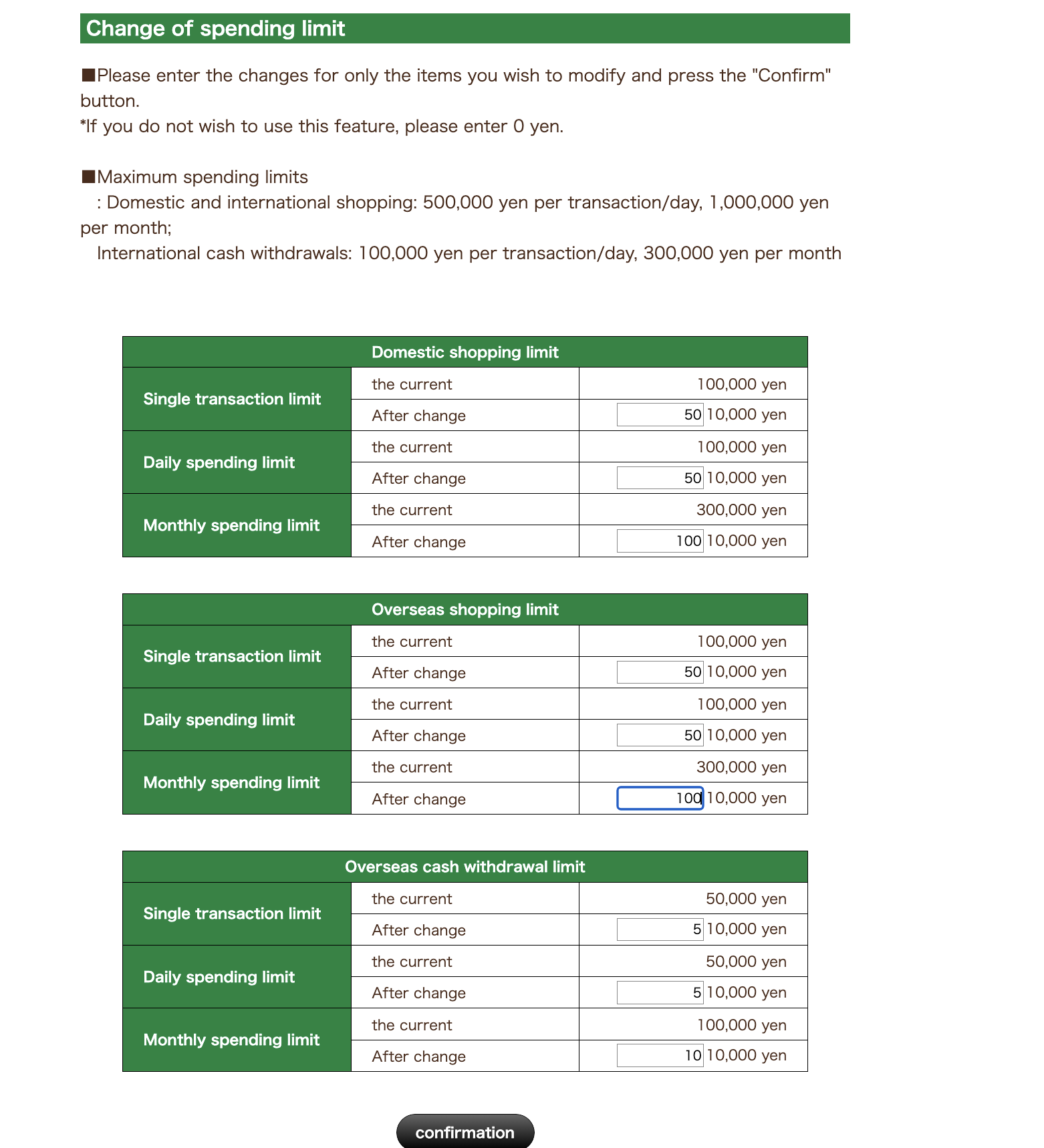
Japan Post Bank’s official FAQ is very clear: Yucho Debit usage limits are checked and changed in ゆうちょデビット会員WEB using this menu path:
各種変更 → 利用限度額変更
(Various Changes → Change Usage Limit) (よくあるご質問 | 株式会社ゆうちょ銀行)
The same FAQ says you can review and change limits for:
- Domestic shopping
- Overseas shopping
- Overseas cash withdrawals (よくあるご質問 | 株式会社ゆうちょ銀行)
3) The official maximum limits
According to Japan Post Bank’s official FAQ, the configurable range is:
For domestic shopping and overseas shopping:
- Per transaction: up to ¥500,000
- Per day: up to ¥500,000
- Per month: up to ¥1,000,000
For overseas cash withdrawals:
- Per transaction: up to ¥100,000
- Per day: up to ¥100,000
- Per month: up to ¥300,000 (よくあるご質問 | 株式会社ゆうちょ銀行)
On the Member WEB screen, these values are entered in 10,000-yen units. So:
10= ¥100,00030= ¥300,00050= ¥500,000100= ¥1,000,000 (よくあるご質問 | 株式会社ゆうちょ銀行)
4) What numbers to enter for a large online payment
For a purchase around ¥399,800, the safest practical setup is:
For Domestic shopping:
- Single transaction limit: 50
- Daily spending limit: 50
- Monthly spending limit: 100
For Overseas shopping:
- Single transaction limit: 50
- Daily spending limit: 50
- Monthly spending limit: 100
This corresponds to:
- ¥500,000 single
- ¥500,000 daily
- ¥1,000,000 monthly (よくあるご質問 | 株式会社ゆうちょ銀行)
Why raise both domestic and overseas shopping? Officially, the bank lets you set both categories separately. In practice, some online merchants or payment paths can behave differently, so raising both shopping categories helps avoid another decline. That second point is a practical troubleshooting tip, not a published bank rule. The official part is that both domestic and overseas shopping limits exist and can be changed in Member WEB. (よくあるご質問 | 株式会社ゆうちょ銀行)
One important clarification: do not confuse shopping limits with overseas cash withdrawal limits. Cash withdrawal settings are for ATM cash access abroad, not normal online shopping. Japan Post Bank treats these as separate limit categories. (よくあるご質問 | 株式会社ゆうちょ銀行)
5) How to register for Yucho Debit Member WEB
If you have not used Member WEB before, Japan Post Bank provides an official registration flow for ゆうちょデビット会員WEB. Their guide shows that you start from the Yucho Debit Member WEB registration page, complete phone or SMS authentication using the number registered during application, and then finish the registration. The guide also states that if there is a mismatch with the number used during application, you may need to contact the Yucho Debit Desk. (Japan Post Bank)
Japan Post Bank’s materials also explain that after you register, Member WEB is used for:
- checking transaction history,
- changing usage limits,
- confirming cashback-related information, and
- managing certain card settings. (Japan Post Bank)
A practical point: if you receive a temporary registration email with a completion URL, that link is typically time-limited. Japan Post Bank’s registration guide says the completion link is valid only for the stated validity period, so if it expires you need to restart registration. (Japan Post Bank)
6) What if the screen says “Usage limit change completed” but it does not seem reflected?
If the site says the change is complete, that generally means the request was accepted in Member WEB. Japan Post Bank officially documents the change flow and official max values, but I could not find an official page that clearly states an exact minute-by-minute reflection SLA for Yucho Debit shopping-limit changes. (よくあるご質問 | 株式会社ゆうちょ銀行)
A useful practical checklist is:
- Log out of Member WEB fully.
- Log back in.
- Open 各種変更 → 利用限度額変更 again.
- Confirm that the new values are shown on the page.
- Retry the payment.
In one real troubleshooting case, the change showed as completed first, and only after revisiting the limit screen did the updated values become obvious. Treat that as a practical tip rather than an official timing guarantee.
7) Do not confuse this with Yucho Direct transfer limits
This is an important distinction. Japan Post Bank’s “about 2 days” review period applies to Yucho Direct transfer-limit increases, not to Yucho Debit card shopping limits. The official Yucho Direct FAQ says raising the 1-day transfer limit may require about 2 days of review. That is a different service and different type of limit. (よくあるご質問 | 株式会社ゆうちょ銀行)
So if you are changing limits inside ゆうちょデビット会員WEB, do not assume the Yucho Direct transfer-limit timeline applies. The two settings are separate. (よくあるご質問 | 株式会社ゆうちょ銀行)
8) When you should call support
If your card still fails after:
- confirming enough account balance,
- raising the single, daily, and monthly shopping limits, and
- rechecking the saved values in Member WEB,
then the next step is to contact the Yucho Debit Desk. Japan Post Bank lists the support number for Yucho Debit as 0120-715-255, with reception hours of 9:00–17:00, excluding the New Year closure period noted by the bank. (Japan Post Bank)
Support is especially useful when:
- the site says the limit change is complete but payment still fails,
- you suspect the merchant’s payment path is handling the card differently,
- your registered phone number is not being accepted during Member WEB registration, or
- you are unsure whether the transaction is being blocked for a security reason rather than a limit reason. (Japan Post Bank)
9) Security tips you should follow
Japan Post Bank warns customers not to enter sensitive information through suspicious email or SMS links, and recommends opening the correct site directly or from a saved bookmark/favorite. The bank also publishes a list of official messages and contact sources so customers can verify whether a communication is genuine. (Japan Post Bank)
For Yucho Debit specifically, the bank says:
- check the usage notification emails you receive,
- contact the bank immediately if you see an unfamiliar transaction,
- and use Member WEB to stop card usage if you suspect fraud. The bank also states that Yucho Debit is monitored for fraudulent use and that compensation may be available in unauthorized-use cases, depending on circumstances. (よくあるご質問 | 株式会社ゆうちょ銀行)
Final takeaway
If your Japan Post Bank Debit Card is declined with “Exceeded the per-transaction limit”, the fix is usually straightforward:
- register or log in to ゆうちょデビット会員WEB,
- go to 各種変更 → 利用限度額変更,
- raise the single, daily, and monthly shopping limits high enough for your purchase,
- confirm the saved values,
- then retry the payment. (よくあるご質問 | 株式会社ゆうちょ銀行)
For a large purchase, many users will solve the issue by raising shopping limits closer to the official maximums of ¥500,000 per transaction/day and ¥1,000,000 per month. If that still does not work, call the Yucho Debit Desk during support hours. (よくあるご質問 | 株式会社ゆうちょ銀行)