Introduction
Incident Reporting (Safety) Tools are software platforms used to record, manage, and analyze workplace incidents such as injuries, hazards, near misses, and compliance issues. These tools replace manual reporting methods with structured workflows, helping organizations respond faster and improve safety outcomes.
Modern workplaces demand more than just basic reporting. Companies now focus on proactive safety management, real-time visibility, and data-driven decision-making. With increasing operational complexity and stricter compliance expectations, having a centralized system is essential for minimizing risks and ensuring accountability.
Real-world use cases:
- Manufacturing units tracking injuries and unsafe conditions
- Construction sites managing field safety incidents
- Hospitals recording patient and staff-related incidents
- Corporate offices handling workplace safety events
- Logistics companies monitoring operational risks
What buyers should evaluate:
- Ease of incident reporting (mobile and offline support)
- Workflow automation and escalation processes
- Compliance tracking and audit readiness
- Reporting dashboards and analytics
- Integration with HR, ERP, and EHS systems
- Customization and scalability
- Security and data protection
- User adoption and training needs
Best for: Safety managers, compliance teams, HR departments, and operations leaders across industries like construction, manufacturing, healthcare, and logistics.
Not ideal for: Small teams with minimal safety requirements or organizations that can manage with simple documentation methods.
Key Trends in Incident Reporting (Safety) Tools
- AI-based root cause analysis for faster insights
- Mobile-first reporting for on-site workers
- Real-time alerts and automated workflows
- Integration with connected devices and sensors
- Stronger compliance and audit capabilities
- Cloud-based deployment for scalability
- Improved UI/UX for higher adoption rates
- Advanced analytics dashboards
- API-driven integrations with enterprise systems
- Flexible subscription-based pricing models
How We Selected These Tools (Methodology)
- Evaluated market adoption and credibility
- Assessed feature depth and usability
- Reviewed incident reporting and analytics capabilities
- Considered security and compliance readiness
- Analyzed integration capabilities and APIs
- Checked scalability for different business sizes
- Evaluated customer support and onboarding
- Balanced enterprise and SMB solutions
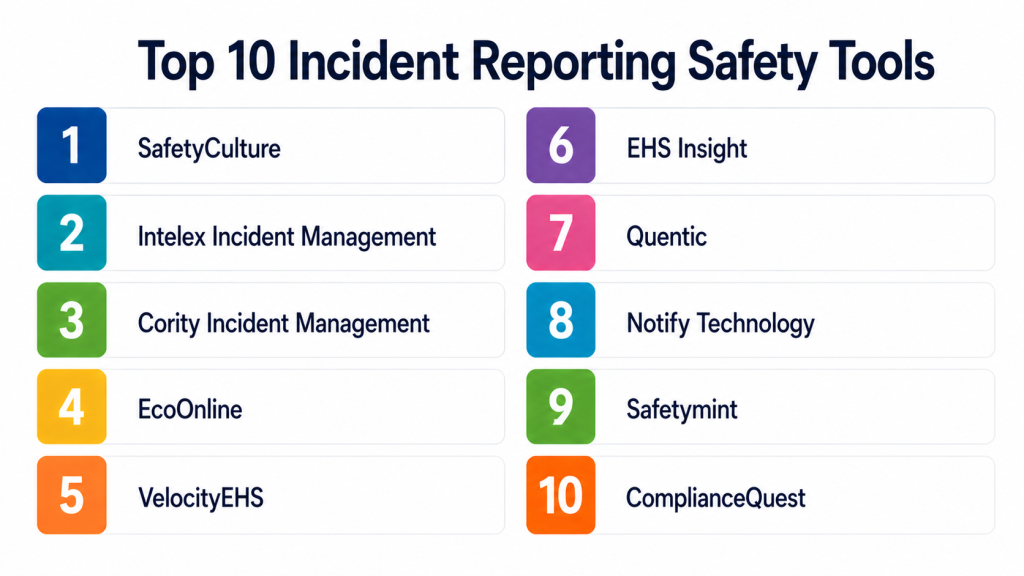
Top 10 Incident Reporting (Safety) Tools
#1 — Intelex
Short description:
A comprehensive EHS platform built for large organizations needing advanced incident reporting, compliance management, and analytics.
Key Features
- Incident and near-miss reporting
- Advanced analytics dashboards
- Compliance and audit tracking
- Mobile reporting
- Workflow customization
- Risk assessment tools
Pros
- Highly customizable
- Strong enterprise scalability
- Detailed reporting capabilities
Cons
- Complex implementation
- Steep learning curve
- Pricing not transparent
Platforms / Deployment
Web / iOS / Android
Cloud / Hybrid
Security & Compliance
SSO/SAML, RBAC, audit logs
SOC 2, GDPR (varies)
Integrations & Ecosystem
Supports enterprise integrations and APIs.
- SAP
- Oracle
- Microsoft tools
- APIs
Support & Community
Enterprise-level onboarding and support.
#2 — SafetyCulture
Short description:
A user-friendly, mobile-first platform widely used for inspections and incident reporting.
Key Features
- Mobile reporting
- Inspection checklists
- Real-time alerts
- Offline capability
- Analytics dashboards
Pros
- Easy to use
- Fast deployment
- Strong mobile experience
Cons
- Limited customization
- Basic analytics for large teams
- Fewer advanced enterprise features
Platforms / Deployment
Web / iOS / Android
Cloud
Security & Compliance
MFA, encryption, RBAC
GDPR compliant
Integrations & Ecosystem
Supports integrations with common tools.
- Collaboration tools
- Automation tools
- APIs
Support & Community
Strong documentation and large user base.
#3 — VelocityEHS
Short description:
A cloud-based safety platform focused on compliance, incident tracking, and risk management.
Key Features
- Incident reporting
- Risk assessments
- Compliance management
- Analytics dashboards
- Workflow automation
Pros
- Strong compliance features
- Scalable solution
- Good reporting tools
Cons
- Interface may feel outdated
- Customization may require assistance
- Pricing varies
Platforms / Deployment
Web
Cloud
Security & Compliance
SSO, encryption
Not publicly stated
Integrations & Ecosystem
Supports enterprise integrations.
- ERP systems
- HR systems
- APIs
Support & Community
Professional onboarding support.
#4 — Cority
Short description:
An enterprise-grade EHS platform offering robust incident reporting, analytics, and compliance management.
Key Features
- Incident workflows
- Compliance tracking
- Risk management
- Data analytics
- Mobile access
Pros
- Comprehensive capabilities
- Strong analytics
- Scalable
Cons
- Complex setup
- Requires training
- Higher cost
Platforms / Deployment
Web / Mobile
Cloud
Security & Compliance
SSO, RBAC
Not publicly stated
Integrations & Ecosystem
Supports enterprise integrations.
- SAP
- Microsoft tools
- APIs
Support & Community
Enterprise-level support.
#5 — EcoOnline
Short description:
A safety platform focused on chemical safety and incident reporting for industrial environments.
Key Features
- Incident reporting
- Chemical safety tools
- Risk assessments
- Compliance tracking
- Reporting dashboards
Pros
- Industry-focused features
- Easy compliance tracking
- User-friendly
Cons
- Limited general features
- Smaller ecosystem
- Customization limitations
Platforms / Deployment
Web
Cloud
Security & Compliance
Not publicly stated
Integrations & Ecosystem
Basic integrations available.
- APIs
- Data export
Support & Community
Standard support.
#6 — Safesite
Short description:
A simple and effective tool designed for small teams and field operations.
Key Features
- Incident reporting
- Safety inspections
- Hazard tracking
- Mobile app
- Alerts
Pros
- Easy to use
- Quick setup
- Mobile-friendly
Cons
- Limited advanced features
- Basic analytics
- Not ideal for large enterprises
Platforms / Deployment
Web / iOS / Android
Cloud
Security & Compliance
Not publicly stated
Integrations & Ecosystem
Limited integrations.
- APIs
- Export tools
Support & Community
Good support for small teams.
#7 — Donesafe
Short description:
A modern safety platform with strong automation and flexible incident management workflows.
Key Features
- Incident workflows
- Automation
- Risk tracking
- Compliance tools
- Analytics
Pros
- Modern interface
- Strong automation
- Flexible workflows
Cons
- Learning curve
- Pricing not transparent
- Setup effort required
Platforms / Deployment
Web
Cloud
Security & Compliance
SSO, encryption
Not publicly stated
Integrations & Ecosystem
Supports integrations.
- APIs
- HR tools
- ERP systems
Support & Community
Strong onboarding and support.
#8 — Resolver
Short description:
An enterprise risk and incident management platform focused on investigation and analytics.
Key Features
- Incident tracking
- Risk management
- Investigation workflows
- Analytics
- Reporting
Pros
- Strong risk management
- Detailed insights
- Enterprise capabilities
Cons
- Complex interface
- Higher cost
- Longer implementation
Platforms / Deployment
Web
Cloud
Security & Compliance
Not publicly stated
Integrations & Ecosystem
Supports enterprise integrations.
- APIs
- Business systems
Support & Community
Enterprise support.
#9 — Origami Risk
Short description:
A platform designed for incident reporting and risk management, especially in insurance-driven environments.
Key Features
- Incident reporting
- Claims management
- Risk analytics
- Workflow automation
- Dashboards
Pros
- Strong analytics
- Scalable
- Industry-specific features
Cons
- Niche focus
- Complex setup
- Pricing varies
Platforms / Deployment
Web
Cloud
Security & Compliance
Not publicly stated
Integrations & Ecosystem
Supports integrations.
- APIs
- Data systems
Support & Community
Professional support.
#10 — Benchmark Gensuite
Short description:
A comprehensive EHS platform offering incident reporting, compliance tracking, and operational risk management.
Key Features
- Incident tracking
- Compliance tools
- Risk management
- Mobile reporting
- Analytics
Pros
- Comprehensive solution
- Strong compliance capabilities
- Scalable
Cons
- Complex interface
- Requires training
- Higher cost
Platforms / Deployment
Web / Mobile
Cloud
Security & Compliance
SSO, RBAC
Not publicly stated
Integrations & Ecosystem
Supports enterprise integrations.
- SAP
- APIs
- Business tools
Support & Community
Enterprise onboarding and support.
Comparison Table
| Tool Name | Best For | Platform(s) Supported | Deployment | Standout Feature | Public Rating |
|---|---|---|---|---|---|
| Intelex | Enterprise EHS | Web, Mobile | Cloud/Hybrid | Deep customization | N/A |
| SafetyCulture | SMB & Mobile teams | Web, Mobile | Cloud | Mobile-first reporting | N/A |
| VelocityEHS | Compliance-heavy orgs | Web | Cloud | Compliance tracking | N/A |
| Cority | Large enterprises | Web, Mobile | Cloud | Advanced analytics | N/A |
| EcoOnline | Industrial safety | Web | Cloud | Industry focus | N/A |
| Safesite | SMBs | Web, Mobile | Cloud | Ease of use | N/A |
| Donesafe | Modern teams | Web | Cloud | Automation workflows | N/A |
| Resolver | Enterprise risk teams | Web | Cloud | Investigation tools | N/A |
| Origami Risk | Insurance & risk | Web | Cloud | Claims integration | N/A |
| Benchmark Gensuite | Enterprise EHS | Web, Mobile | Cloud | Compliance suite | N/A |
Evaluation & Scoring of Incident Reporting (Safety) Tools
| Tool Name | Core (25%) | Ease (15%) | Integrations (15%) | Security (10%) | Performance (10%) | Support (10%) | Value (15%) | Weighted Total |
|---|---|---|---|---|---|---|---|---|
| Intelex | 9 | 6 | 8 | 8 | 8 | 8 | 6 | 7.7 |
| SafetyCulture | 7 | 9 | 7 | 7 | 8 | 8 | 9 | 8.0 |
| VelocityEHS | 8 | 7 | 7 | 7 | 8 | 7 | 7 | 7.4 |
| Cority | 9 | 6 | 8 | 7 | 8 | 8 | 6 | 7.6 |
| EcoOnline | 7 | 8 | 6 | 6 | 7 | 7 | 7 | 7.0 |
| Safesite | 6 | 9 | 6 | 6 | 7 | 7 | 9 | 7.4 |
| Donesafe | 8 | 7 | 7 | 7 | 8 | 8 | 7 | 7.6 |
| Resolver | 8 | 6 | 7 | 7 | 8 | 7 | 6 | 7.2 |
| Origami Risk | 8 | 6 | 7 | 7 | 8 | 7 | 6 | 7.2 |
| Benchmark Gensuite | 9 | 6 | 8 | 7 | 8 | 8 | 6 | 7.6 |
How to interpret scores:
- Scores are comparative, not absolute
- Higher scores indicate stronger overall performance
- Ease matters more for SMBs, while features and security matter for enterprises
- Use this as a shortlist guide, not a final decision
Which Incident Reporting (Safety) Tools Tool Is Right for You?
Solo / Freelancer
- Choose simple tools like Safesite
- Focus on ease of use and affordability
SMB
- SafetyCulture or Safesite
- Prioritize quick setup and mobile access
Mid-Market
- Donesafe or VelocityEHS
- Balance between features and usability
Enterprise
- Intelex, Cority, Benchmark Gensuite
- Focus on compliance, integrations, and scalability
Budget vs Premium
- Budget: Safesite, SafetyCulture
- Premium: Intelex, Cority
Feature Depth vs Ease of Use
- Advanced features: Intelex, Resolver
- Easy to use: SafetyCulture, Safesite
Integrations & Scalability
- High needs: Intelex, Cority
- Moderate: Donesafe
Security & Compliance Needs
- High: VelocityEHS, Benchmark Gensuite
- Moderate: SafetyCulture
Frequently Asked Questions (FAQs) (numbring )
Q1: What is an incident reporting tool?
It is software used to record and manage workplace incidents, helping improve safety and compliance.
Q2: Are these tools suitable for small businesses?
Yes, many tools are designed for small teams with simple features and easy setup.
Q3: Do these tools support mobile reporting?
Most modern tools offer mobile apps for real-time reporting in the field.
Q4: How long does implementation take?
It depends on complexity, ranging from quick setup to longer deployments for enterprise systems.
Q5: Are these tools secure?
Most include encryption and access controls, but features vary by provider.
Q6: Can these tools integrate with other systems?
Yes, many support integration with HR, ERP, and other business systems.
Q7: What are common mistakes when selecting a tool?
Choosing overly complex tools, ignoring usability, and not planning integrations.
Q8: Can I migrate data from another system?
Yes, but migration effort depends on the tool and data structure.
Q9: Do these tools support compliance requirements?
Most tools include compliance tracking and audit features.
Q10: Are there free versions available?
Some tools offer limited free plans, but full features usually require paid subscriptions.
Conclusion
Incident Reporting (Safety) Tools are essential for improving workplace safety, reducing risks, and maintaining compliance across industries. They provide structured workflows, real-time reporting, and actionable insights that help organizations respond quickly and prevent future incidents. The right tool depends on your organization’s size, industry, and operational needs. Smaller teams benefit from simple, easy-to-use platforms, while larger enterprises require advanced features, integrations, and scalability. It is important to focus on usability, adoption, and long-term value rather than just feature lists. Testing a few shortlisted tools in real scenarios can provide better clarity before making a decision. There is no one-size-fits-all solution. The best approach is to evaluate your requirements, compare options carefully, and select a tool that aligns with your safety goals and workflows. Start by shortlisting a few tools, run a pilot, and validate integrations and security before finalizing your choice.