Introduction
Load balancers are critical infrastructure components that distribute incoming network traffic across multiple servers. In simple terms, they ensure that no single server gets overwhelmed, improving application availability, performance, and reliability.
As modern applications move toward cloud-native architectures, microservices, and high-traffic environments, load balancing has become essential for maintaining uptime and delivering seamless user experiences. Whether it’s a web application, API backend, or enterprise system, load balancers help ensure consistent performance under varying loads.
Common use cases include:
- Distributing traffic across web servers for high availability
- Scaling applications during peak traffic
- Improving API performance and response times
- Ensuring redundancy and failover in infrastructure
- Managing traffic across multiple regions or data centers
What buyers should evaluate:
- Traffic distribution algorithms
- Layer 4 vs Layer 7 capabilities
- Scalability and performance
- Security features such as SSL termination and WAF support
- Integration with cloud and DevOps tools
- Monitoring and analytics
- Ease of configuration and automation
- Deployment flexibility
Best for: DevOps teams, cloud architects, IT administrators, SaaS platforms, and enterprises handling high-traffic applications.
Not ideal for: Small static websites or applications with minimal traffic where basic hosting solutions are sufficient.
Key Trends in Load Balancers
- Cloud-native load balancing: Increasing use of managed cloud services for scalability and ease of use
- Application-layer intelligence: Advanced routing based on content, headers, and user behavior
- Integration with Kubernetes: Native support for container orchestration environments
- AI-driven traffic optimization: Predictive routing based on usage patterns
- Security integration: Built-in DDoS protection and web application firewall features
- Global load balancing: Traffic distribution across regions for better latency
- Edge computing support: Load balancing closer to end users
- Automation and Infrastructure as Code: Integration with modern DevOps workflows
- Zero Trust networking alignment: Secure traffic routing with identity-based controls
How We Selected These Tools (Methodology)
- Evaluated industry adoption and enterprise usage
- Assessed performance and scalability capabilities
- Reviewed feature completeness across L4 and L7 balancing
- Considered security and traffic management features
- Analyzed integration ecosystem with cloud platforms
- Included tools for different deployment models
- Balanced managed services and self-hosted solutions
- Evaluated ease of configuration and automation
- Considered community and enterprise support availability
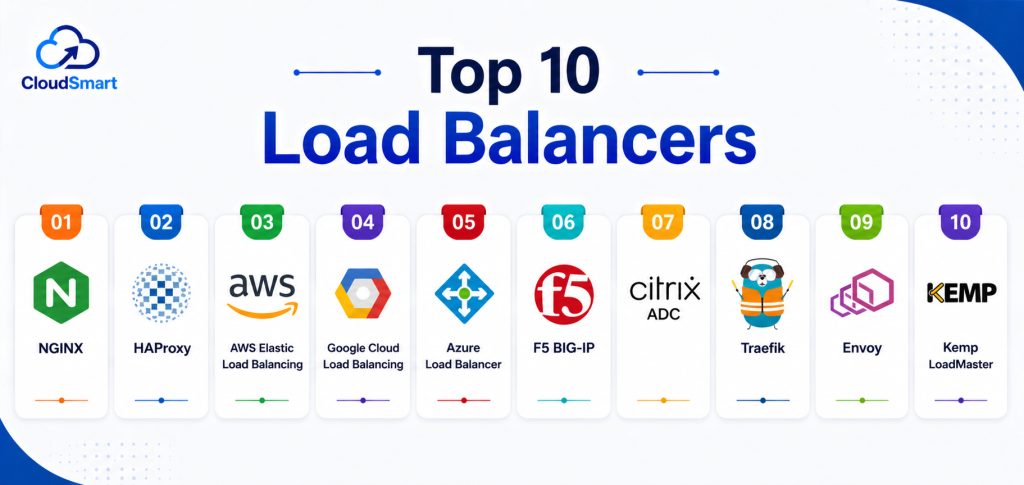
Top 10 Load Balancers
#1 — NGINX
Short description: A widely used open-source load balancer and web server known for high performance and flexibility. Suitable for developers and enterprises.
Key Features
- Layer 7 load balancing
- Reverse proxy capabilities
- SSL termination
- Caching support
- High concurrency handling
- Custom configuration
Pros
- High performance and scalability
- Strong open-source ecosystem
Cons
- Requires configuration expertise
- Advanced features need paid version
Platforms / Deployment
Linux / Windows
Self-hosted
Security & Compliance
SSL/TLS support, access control
Certifications: Not publicly stated
Integrations & Ecosystem
NGINX integrates well with modern infrastructure and DevOps pipelines.
- Docker
- Kubernetes
- CI/CD tools
Support & Community
Large global community with extensive documentation.
#2 — HAProxy
Short description: A reliable open-source load balancer known for speed and advanced traffic routing.
Key Features
- Layer 4 and Layer 7 support
- High availability and failover
- Advanced routing rules
- SSL termination
- Detailed logging
Pros
- Extremely fast and efficient
- Highly configurable
Cons
- Steep learning curve
- Limited UI
Platforms / Deployment
Linux / Windows
Self-hosted
Security & Compliance
SSL/TLS support
Not publicly stated certifications
Integrations & Ecosystem
- Kubernetes
- Docker
- Monitoring tools
Support & Community
Strong community support and documentation.
#3 — AWS Elastic Load Balancing
Short description: A managed cloud load balancing service that automatically distributes traffic across AWS resources.
Key Features
- Auto-scaling integration
- Layer 4 and Layer 7 support
- Health checks
- SSL termination
- Multi-AZ support
Pros
- Fully managed service
- Seamless AWS integration
Cons
- Vendor lock-in
- Costs can increase with scale
Platforms / Deployment
Cloud
Cloud-managed
Security & Compliance
IAM integration, encryption
Certifications: Not publicly stated
Integrations & Ecosystem
- EC2
- Lambda
- Kubernetes
Support & Community
Enterprise support with extensive documentation.
#4 — Google Cloud Load Balancing
Short description: A global load balancing service designed for high-performance applications on Google Cloud.
Key Features
- Global traffic distribution
- Auto-scaling support
- Layer 7 routing
- SSL termination
- DDoS protection
Pros
- Global infrastructure
- High performance
Cons
- Requires cloud expertise
- Pricing complexity
Platforms / Deployment
Cloud
Cloud-managed
Security & Compliance
Encryption and access control
Not publicly stated certifications
Integrations & Ecosystem
- GKE
- Compute Engine
- Cloud CDN
Support & Community
Strong enterprise support and documentation.
#5 — Azure Load Balancer
Short description: A Microsoft-managed load balancing service for distributing traffic across Azure resources.
Key Features
- Layer 4 load balancing
- High availability
- Health probes
- Integration with Azure services
- Scalable architecture
Pros
- Deep Azure integration
- Reliable performance
Cons
- Limited Layer 7 features
- Requires Azure ecosystem
Platforms / Deployment
Cloud
Cloud-managed
Security & Compliance
Azure security controls
Not publicly stated certifications
Integrations & Ecosystem
- Azure VMs
- Kubernetes
- Azure Monitor
Support & Community
Enterprise support with strong documentation.
#6 — F5 BIG-IP
Short description: An enterprise-grade load balancer offering advanced traffic management and security features.
Key Features
- Application delivery control
- SSL offloading
- Advanced routing
- Security features
- Analytics
Pros
- Highly scalable
- Enterprise-grade security
Cons
- Expensive
- Complex setup
Platforms / Deployment
Hardware / Virtual
Hybrid
Security & Compliance
Advanced security controls
Not publicly stated certifications
Integrations & Ecosystem
- Enterprise systems
- Cloud platforms
Support & Community
Professional enterprise support.
#7 — Traefik
Short description: A modern load balancer designed for microservices and containerized environments.
Key Features
- Dynamic configuration
- Kubernetes integration
- Automatic service discovery
- SSL support
- Middleware support
Pros
- Cloud-native design
- Easy integration with containers
Cons
- Limited traditional features
- Smaller ecosystem
Platforms / Deployment
Cross-platform
Cloud / Self-hosted
Security & Compliance
SSL support
Not publicly stated certifications
Integrations & Ecosystem
- Docker
- Kubernetes
- Prometheus
Support & Community
Growing open-source community.
#8 — Citrix ADC
Short description: An enterprise application delivery controller providing load balancing and optimization.
Key Features
- Traffic management
- Application optimization
- Security features
- Analytics
- High availability
Pros
- Strong enterprise capabilities
- Reliable performance
Cons
- Expensive
- Complex deployment
Platforms / Deployment
Hybrid
Cloud / On-prem
Security & Compliance
Advanced security features
Not publicly stated certifications
Integrations & Ecosystem
- Enterprise systems
- Cloud platforms
Support & Community
Enterprise support available.
#9 — Envoy
Short description: A high-performance proxy and load balancer designed for cloud-native applications.
Key Features
- Layer 7 proxy
- Service mesh support
- Observability
- Dynamic configuration
- High performance
Pros
- Ideal for microservices
- Strong observability
Cons
- Complex setup
- Requires expertise
Platforms / Deployment
Cross-platform
Self-hosted
Security & Compliance
TLS support
Not publicly stated certifications
Integrations & Ecosystem
- Kubernetes
- Istio
- Prometheus
Support & Community
Strong open-source community.
#10 — Kemp LoadMaster
Short description: A flexible load balancing solution offering both virtual and hardware deployment options.
Key Features
- Layer 7 load balancing
- SSL offloading
- Traffic optimization
- High availability
- Easy deployment
Pros
- User-friendly interface
- Flexible deployment
Cons
- Limited advanced features
- Smaller ecosystem
Platforms / Deployment
Hardware / Virtual
Hybrid
Security & Compliance
SSL support
Not publicly stated certifications
Integrations & Ecosystem
- Cloud platforms
- Enterprise tools
Support & Community
Good vendor support with documentation.
Comparison Table
| Tool Name | Best For | Platform(s) Supported | Deployment | Standout Feature | Public Rating |
|---|---|---|---|---|---|
| NGINX | Developers | Linux/Windows | Self-hosted | High performance | N/A |
| HAProxy | High traffic | Linux/Windows | Self-hosted | Speed | N/A |
| AWS ELB | Cloud users | Cloud | Cloud | Auto-scaling | N/A |
| Google Load Balancing | Global apps | Cloud | Cloud | Global routing | N/A |
| Azure Load Balancer | Azure users | Cloud | Cloud | Integration | N/A |
| F5 BIG-IP | Enterprises | Hybrid | Hybrid | Advanced control | N/A |
| Traefik | Microservices | Cross-platform | Hybrid | Dynamic config | N/A |
| Citrix ADC | Enterprises | Hybrid | Hybrid | Optimization | N/A |
| Envoy | Cloud-native | Cross-platform | Self-hosted | Service mesh | N/A |
| Kemp LoadMaster | SMB | Hybrid | Hybrid | Ease of use | N/A |
Evaluation & Scoring of Load Balancers
| Tool Name | Core (25%) | Ease (15%) | Integrations (15%) | Security (10%) | Performance (10%) | Support (10%) | Value (15%) | Weighted Total |
|---|---|---|---|---|---|---|---|---|
| NGINX | 9 | 7 | 8 | 7 | 9 | 8 | 9 | 8.3 |
| HAProxy | 9 | 6 | 7 | 7 | 9 | 8 | 9 | 8.1 |
| AWS ELB | 9 | 8 | 9 | 8 | 9 | 9 | 7 | 8.6 |
| Google LB | 9 | 8 | 9 | 8 | 9 | 9 | 7 | 8.6 |
| Azure LB | 8 | 7 | 9 | 8 | 8 | 9 | 7 | 8.0 |
| F5 BIG-IP | 10 | 6 | 9 | 9 | 10 | 9 | 6 | 8.7 |
| Traefik | 8 | 8 | 8 | 7 | 8 | 7 | 9 | 8.0 |
| Citrix ADC | 9 | 6 | 8 | 9 | 9 | 9 | 6 | 8.3 |
| Envoy | 9 | 6 | 9 | 8 | 9 | 8 | 8 | 8.3 |
| Kemp | 8 | 8 | 7 | 7 | 8 | 8 | 8 | 7.9 |
How to interpret the scores:
These scores provide a comparative view across tools based on common enterprise and developer needs. Higher scores indicate stronger overall capabilities, but the right tool depends on your environment and priorities. Enterprise tools often excel in performance and security, while open-source options offer strong value. Ease of use may vary depending on technical expertise. Always validate tools with real workloads before final selection.
Which Load Balancer Is Right for You?
Solo / Freelancer
NGINX or Traefik are good choices due to flexibility and low cost.
SMB
Kemp LoadMaster or HAProxy provide a balance of performance and usability.
Mid-Market
AWS ELB or Azure Load Balancer offer scalability and integration.
Enterprise
F5 BIG-IP and Citrix ADC provide advanced features and security.
Budget vs Premium
Open-source tools are cost-effective, while enterprise tools offer deeper capabilities.
Feature Depth vs Ease of Use
Simple tools prioritize usability, while enterprise tools offer advanced configurations.
Integrations & Scalability
Cloud-native tools offer better scalability and integrations.
Security & Compliance Needs
Enterprise-grade solutions provide stronger security and compliance features.
Frequently Asked Questions (FAQs)
1. What is a load balancer?
A load balancer distributes incoming network traffic across multiple servers. It ensures no single server becomes overloaded. This improves performance, reliability, and uptime.
2. What are the types of load balancers?
There are Layer 4 and Layer 7 load balancers. Layer 4 operates at the transport level, while Layer 7 works at the application level. Each serves different use cases.
3. Why are load balancers important?
They improve application availability and performance. They also provide redundancy and failover. Without them, systems can crash under heavy traffic.
4. Can load balancers improve security?
Yes, many include features like SSL termination and DDoS protection. They help secure traffic and reduce exposure to threats. Advanced tools offer additional controls.
5. Are cloud load balancers better than self-hosted ones?
Cloud load balancers offer scalability and ease of use. Self-hosted options provide more control and customization. The choice depends on your needs.
6. Do load balancers support microservices?
Yes, many modern load balancers integrate with container platforms. They are essential for managing microservices traffic. Tools like Envoy and Traefik are built for this.
7. How do load balancers handle failures?
They use health checks to detect failing servers. Traffic is automatically redirected to healthy instances. This ensures continuous service availability.
8. What is SSL termination?
SSL termination is when the load balancer decrypts incoming traffic. This reduces load on backend servers. It also improves performance.
9. Can load balancers be used for APIs?
Yes, they are commonly used to manage API traffic. They ensure consistent performance and availability. Many support advanced API routing.
10. What are common mistakes when using load balancers?
Common mistakes include misconfiguration and lack of monitoring. Ignoring health checks can lead to failures. Proper setup is critical for performance.
Conclusion
Load balancers are a foundational component of modern application infrastructure, enabling high availability, scalability, and performance across distributed systems. From open-source solutions like NGINX and HAProxy to enterprise-grade platforms such as F5 BIG-IP and Citrix ADC, organizations have a wide range of options based on their needs. Cloud-based services like AWS, Google Cloud, and Azure simplify deployment and scaling, while self-hosted tools provide flexibility and control. The right choice depends on factors such as traffic volume, deployment model, integration requirements, and security expectations. Smaller teams may prioritize simplicity and cost, while enterprises focus on advanced features and reliability. No single solution fits all scenarios, so it is essential to evaluate tools based on real workloads and operational needs. A practical approach is to shortlist a few options, test them in your environment, and validate performance and compatibility. This ensures a reliable, scalable, and future-ready load balancing strategy.