Introduction
Web design software refers to tools used to create, design, and prototype websites, focusing on layout, user interface (UI), user experience (UX), and visual elements. These tools range from visual design platforms and prototyping tools to code-based editors, helping designers and developers build modern, responsive websites efficiently.
Today, web design is not just about aesthetics—it involves usability, performance, and seamless user experiences. Modern web design tools combine design, collaboration, and development workflows into a single ecosystem, enabling teams to create high-quality digital products faster.
Common Use Cases
- UI/UX design and prototyping
- Website layout and visual design
- Responsive design and testing
- Collaboration between designers and developers
- Design system creation and management
What Buyers Should Evaluate
- Design flexibility and control
- Collaboration features
- Prototyping and interaction capabilities
- Code support (HTML, CSS, JS)
- Integration with development tools
- Ease of use
- Performance and scalability
- Pricing and licensing
Best for: Web designers, UI/UX professionals, developers, agencies, and product teams building modern web experiences.
Not ideal for: Users looking only for simple website builders without design or prototyping needs.
Key Trends in Web Design Software
- AI-powered design and layout generation
- Real-time collaboration and cloud-based workflows
- Integration of design and development environments
- No-code and low-code design tools
- Advanced prototyping and interaction design
- Design systems and reusable components
- Cross-platform and responsive design tools
- API-first ecosystems
- Automation of repetitive design tasks
- Increased focus on accessibility and performance
How We Selected These Tools (Methodology)
- Industry adoption and popularity
- Feature completeness (design, prototyping, collaboration)
- Ease of use for designers and developers
- Performance and reliability
- Integration ecosystem
- Scalability for teams and enterprises
- Security considerations
- Support and community strength
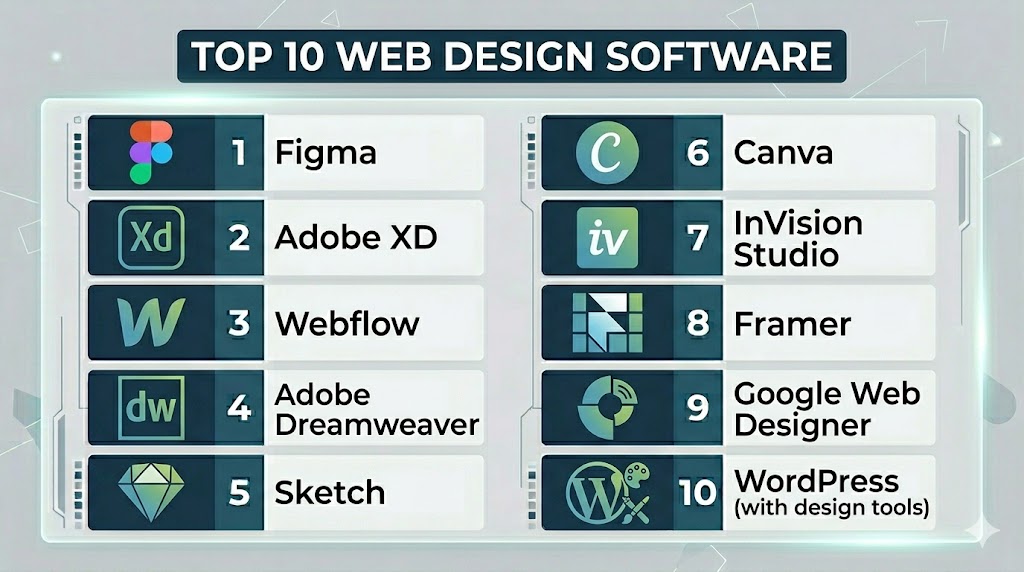
Top 10 Web Design Software
#1 — Figma
Short description: A cloud-based design tool for UI/UX design, prototyping, and collaboration.
Key Features
- Real-time collaboration
- Prototyping tools
- Design systems
- Component libraries
- Cloud-based workflows
- Version control
Pros
- Excellent collaboration
- Easy to use
Cons
- Requires internet connection
- Limited offline capabilities
Platforms / Deployment
- Web / macOS / Windows
- Cloud
Security & Compliance
- SSO, RBAC
- Other: Not publicly stated
Integrations & Ecosystem
Figma integrates with design and development tools.
- APIs
- Developer tools
- Collaboration platforms
Support & Community
Large global community with extensive resources.
#2 — Adobe XD
Short description: A UI/UX design and prototyping tool for creating interactive web and mobile experiences.
Key Features
- Wireframing
- Prototyping
- Design systems
- Interactive animations
- Collaboration tools
Pros
- Smooth design workflow
- Strong integration with Adobe tools
Cons
- Limited advanced features
- Requires Adobe ecosystem
Platforms / Deployment
- Windows / macOS
- Cloud
Security & Compliance
- Not publicly stated
Integrations & Ecosystem
- Adobe Creative Cloud
- APIs
Support & Community
Strong documentation and support.
#3 — Webflow
Short description: A visual web design tool that combines design, CMS, and development capabilities.
Key Features
- Visual design editor
- CMS integration
- Responsive design
- Custom animations
- Hosting
Pros
- No-code development
- High design flexibility
Cons
- Learning curve
- Pricing complexity
Platforms / Deployment
- Web
- Cloud
Security & Compliance
- Not publicly stated
Integrations & Ecosystem
- APIs
- CMS tools
Support & Community
Strong community and tutorials.
#4 — Adobe Dreamweaver
Short description: A professional web design and development tool with code editing and visual design features.
Key Features
- Code editor (HTML, CSS, JS)
- Live preview
- Responsive design tools
- Templates
- Integration with Adobe tools
Pros
- Full control over code
- Powerful for developers
Cons
- Complex for beginners
- Requires coding knowledge
Platforms / Deployment
- Windows / macOS
- Local
Security & Compliance
- Not publicly stated
Integrations & Ecosystem
- Adobe ecosystem
- APIs
Support & Community
Strong professional support.
#5 — Sketch
Short description: A macOS-based design tool focused on UI/UX design and prototyping.
Key Features
- Vector design tools
- Prototyping
- Plugins ecosystem
- Design systems
- Collaboration tools
Pros
- Lightweight
- Strong plugin ecosystem
Cons
- macOS only
- Limited collaboration vs cloud tools
Platforms / Deployment
- macOS
- Local / Cloud
Security & Compliance
- Not publicly stated
Integrations & Ecosystem
- Plugins
- APIs
Support & Community
Strong design community.
#6 — Canva
Short description: A simple design tool for creating web visuals, mockups, and basic web layouts.
Key Features
- Drag-and-drop editor
- Templates
- Graphics and assets
- Collaboration tools
- AI design tools
Pros
- Extremely easy to use
- Fast design creation
Cons
- Limited advanced design features
- Not a full web design tool
Platforms / Deployment
- Web / Mobile
- Cloud
Security & Compliance
- Not publicly stated
Integrations & Ecosystem
- APIs
- Marketing tools
Support & Community
Large user base and tutorials.
#7 — InVision Studio
Short description: A prototyping and collaboration tool for designing interactive web experiences.
Key Features
- Prototyping
- Animation tools
- Collaboration
- Design systems
- Feedback tools
Pros
- Strong prototyping
- Collaboration features
Cons
- Limited updates
- Smaller ecosystem
Platforms / Deployment
- Windows / macOS
- Cloud
Security & Compliance
- Not publicly stated
Integrations & Ecosystem
- APIs
- Design tools
Support & Community
Moderate support.
#8 — Framer
Short description: A modern design tool combining prototyping and website creation.
Key Features
- Interactive design
- Prototyping
- Animation tools
- Visual editor
- Hosting
Pros
- Modern UI
- Strong animation features
Cons
- Learning curve
- Smaller ecosystem
Platforms / Deployment
- Web
- Cloud
Security & Compliance
- Not publicly stated
Integrations & Ecosystem
- APIs
- Design tools
Support & Community
Growing community.
#9 — Google Web Designer
Short description: A tool for creating interactive HTML5 content and web designs.
Key Features
- HTML5 design
- Animation tools
- Interactive elements
- Responsive workflows
- Visual editor
Pros
- Free to use
- Good for interactive content
Cons
- Limited full website design features
- Niche use cases
Platforms / Deployment
- Windows / macOS / Linux
- Local
Security & Compliance
- Not publicly stated
Integrations & Ecosystem
- Google tools
- APIs
Support & Community
Basic support available.
#10 — WordPress (with design tools)
Short description: A flexible platform with design plugins for creating custom web designs.
Key Features
- Themes and templates
- Plugin ecosystem
- Page builders
- SEO tools
- Customization
Pros
- Highly flexible
- Large ecosystem
Cons
- Requires setup
- Learning curve
Platforms / Deployment
- Web
- Cloud / Self-hosted
Security & Compliance
- Not publicly stated
Integrations & Ecosystem
- Plugins
- APIs
- CMS tools
Support & Community
Very large global community.
Comparison Table (Top 10)
| Tool Name | Best For | Platform(s) Supported | Deployment | Standout Feature | Public Rating |
|---|---|---|---|---|---|
| Figma | Collaboration | Web, Desktop | Cloud | Real-time design | N/A |
| Adobe XD | Prototyping | Desktop | Cloud | UI/UX workflows | N/A |
| Webflow | No-code design | Web | Cloud | Visual + CMS | N/A |
| Dreamweaver | Coding | Desktop | Local | Code editor | N/A |
| Sketch | UI design | macOS | Local/Cloud | Plugins | N/A |
| Canva | Beginners | Web/Mobile | Cloud | Templates | N/A |
| InVision | Prototyping | Desktop | Cloud | Collaboration | N/A |
| Framer | Interactive design | Web | Cloud | Animations | N/A |
| Google Web Designer | HTML5 design | Desktop | Local | Interactive content | N/A |
| WordPress | Flexibility | Web | Cloud/Self-hosted | Plugins | N/A |
Evaluation & Scoring of Web Design Software
| Tool Name | Core | Ease | Integrations | Security | Performance | Support | Value | Weighted Total |
|---|---|---|---|---|---|---|---|---|
| Figma | 9 | 9 | 9 | 7 | 9 | 9 | 8 | 8.6 |
| Adobe XD | 8 | 8 | 8 | 7 | 8 | 8 | 7 | 7.9 |
| Webflow | 9 | 6 | 8 | 7 | 9 | 8 | 7 | 8.0 |
| Dreamweaver | 8 | 5 | 7 | 7 | 8 | 7 | 6 | 7.2 |
| Sketch | 8 | 7 | 8 | 6 | 8 | 7 | 7 | 7.5 |
| Canva | 6 | 10 | 6 | 6 | 7 | 8 | 9 | 7.6 |
| InVision | 7 | 7 | 7 | 6 | 7 | 7 | 7 | 7.0 |
| Framer | 8 | 7 | 7 | 6 | 8 | 7 | 7 | 7.4 |
| Google Web Designer | 7 | 6 | 6 | 6 | 7 | 6 | 8 | 6.9 |
| WordPress | 9 | 6 | 9 | 7 | 9 | 9 | 8 | 8.3 |
How to interpret scores:
- Scores are relative benchmarks
- Higher scores indicate stronger overall capability
- Design-first tools prioritize UI/UX
- Developer tools offer more flexibility
- Choose based on your workflow
Which Web Design Software Is Right for You?
Solo / Freelancer
Use Canva or Figma for quick design and collaboration.
SMB
Figma or Webflow provide a balance of design and functionality.
Mid-Market
Webflow or Framer offer more advanced design and prototyping.
Enterprise
Figma, Adobe XD, and WordPress are best for scalability and collaboration.
Budget vs Premium
- Budget: Canva, Google Web Designer
- Premium: Adobe XD, Webflow
Feature Depth vs Ease of Use
- Deep features: Webflow, Dreamweaver
- Easy to use: Canva, Figma
Integrations & Scalability
- Strong integrations: Figma, WordPress
- Moderate: Canva, Framer
Security & Compliance Needs
Choose tools with strong collaboration controls and access management.
Frequently Asked Questions (FAQs)
What is web design software?
It is software used to design and create websites visually or through code.
Do I need coding skills?
Not always—many tools are no-code or low-code.
Which tool is best for beginners?
Canva and Figma are beginner-friendly.
Which tool is best for professionals?
Figma, Webflow, and Adobe XD are widely used.
Are these tools free?
Many offer free plans with limited features.
Can I collaborate with teams?
Yes, most modern tools support collaboration.
Do they support prototyping?
Yes, tools like Figma and Adobe XD do.
Are they SEO-friendly?
Some tools integrate with SEO workflows.
Can I switch tools later?
Yes, but migration may require effort.
Are they secure?
Security varies by platform.
Conclusion
Web design software is essential for creating modern, user-friendly websites. The right tool depends on your skills, goals, and workflow. Advanced platforms offer flexibility and deep design control, while simpler tools focus on speed and ease of use. It’s important to evaluate collaboration, prototyping, and integration features before choosing. No single tool fits all needs, so aligning the software with your design process is key. Start by testing a few tools and choose the one that enhances your productivity and creativity.