Introduction
Integration Platform as a Service (iPaaS) is a cloud-based solution that enables organizations to connect applications, data, and systems across different environments without complex coding. It acts as a centralized hub for integrating SaaS applications, on-premise systems, APIs, and data workflows.
As businesses increasingly rely on multiple tools and platforms, iPaaS solutions simplify integration by offering pre-built connectors, automation workflows, and data transformation capabilities. This reduces manual effort, improves efficiency, and ensures seamless communication between systems.
Common Use Cases
- Connecting SaaS applications (CRM, ERP, marketing tools)
- Automating business workflows
- Synchronizing data across systems
- Building API-driven integrations
- Managing hybrid cloud and on-premise environments
What Buyers Should Evaluate
- Connector library and supported applications
- Ease of use (no-code vs low-code)
- Workflow automation capabilities
- Data transformation and mapping
- Scalability and performance
- Security and compliance features
- Monitoring and error handling
- Pricing model and usage limits
Best for: Enterprises, SaaS companies, IT teams, and businesses managing multiple applications and data sources.
Not ideal for: Very small setups with minimal integrations or teams needing only simple automation tools.
Key Trends in iPaaS
- Growth of no-code and low-code integration platforms
- Increased adoption of AI-powered automation workflows
- Expansion of hybrid and multi-cloud integration support
- Focus on real-time data synchronization
- Rise of event-driven integrations
- Integration with API management platforms
- Enhanced security and compliance controls
- Development of industry-specific integration templates
- Shift toward self-service integration for business users
- Improved observability and analytics dashboards
How We Selected These Tools (Methodology)
- Market adoption and enterprise usage
- Breadth of integrations and connectors
- Feature completeness across integration lifecycle
- Performance and scalability signals
- Security and compliance capabilities
- Ease of use for both technical and non-technical users
- Ecosystem strength and extensibility
- Support and community availability
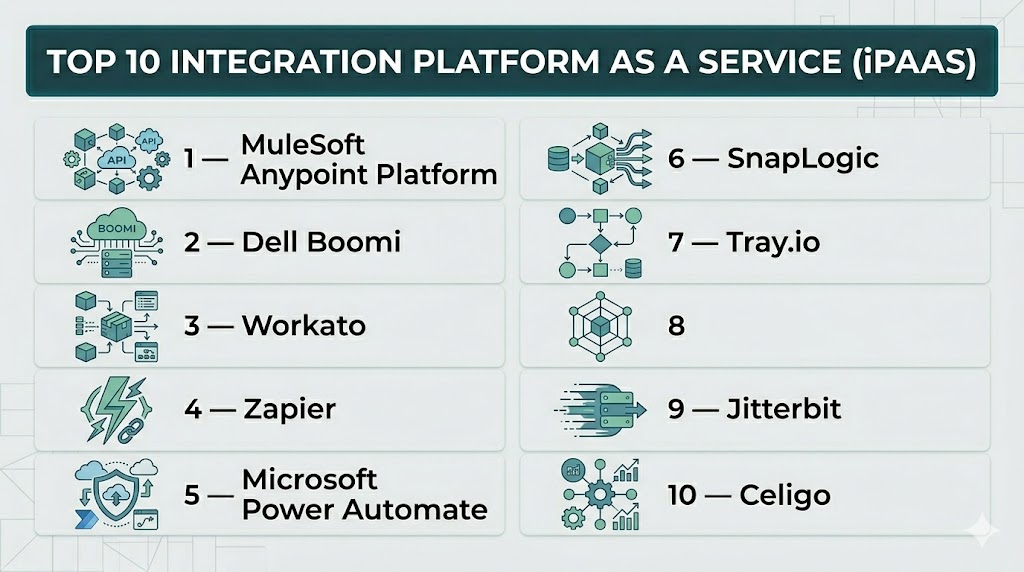
Top 10 Integration Platform as a Service (iPaaS)
#1 — MuleSoft Anypoint Platform
Short description: A leading enterprise iPaaS solution combining API management and integration capabilities.
Key Features
- API-led connectivity
- Data transformation tools
- Pre-built connectors
- Integration workflows
- Hybrid deployment
Pros
- Enterprise-grade capabilities
- Strong integration ecosystem
Cons
- Expensive
- Complex setup
Platforms / Deployment
Cloud / Hybrid
Security & Compliance
Enterprise-grade security
Integrations & Ecosystem
MuleSoft integrates with a wide range of enterprise systems and SaaS tools.
- CRM systems
- ERP platforms
- Databases
Support & Community
Strong enterprise support and documentation
#2 — Dell Boomi
Short description: A cloud-native integration platform known for its ease of use and strong connector library.
Key Features
- Drag-and-drop integration builder
- Pre-built connectors
- Data mapping
- Workflow automation
- Real-time integration
Pros
- User-friendly
- Fast implementation
Cons
- Pricing can scale quickly
- Limited customization
Platforms / Deployment
Cloud
Security & Compliance
Encryption, access control
Integrations & Ecosystem
- SaaS applications
- Databases
- APIs
Support & Community
Strong documentation and support
#3 — Workato
Short description: A no-code/low-code automation platform focused on business workflow integration.
Key Features
- Workflow automation
- Pre-built recipes
- API integrations
- Real-time triggers
- AI-powered automation
Pros
- Easy to use
- Strong automation capabilities
Cons
- Pricing based on usage
- Limited deep customization
Platforms / Deployment
Cloud
Security & Compliance
Encryption, access control
Integrations & Ecosystem
Workato connects with a wide range of SaaS applications and enterprise tools.
- CRM tools
- Marketing platforms
- Databases
Support & Community
Active community and support
#4 — Zapier
Short description: A widely used no-code integration platform for automating workflows between apps.
Key Features
- Workflow automation
- Pre-built integrations
- Trigger-based actions
- Multi-step workflows
- App marketplace
Pros
- Extremely easy to use
- Large integration ecosystem
Cons
- Limited enterprise features
- Can become expensive at scale
Platforms / Deployment
Cloud
Security & Compliance
Basic authentication
Integrations & Ecosystem
- Thousands of SaaS apps
- Automation tools
Support & Community
Large user base and extensive resources
#5 — Microsoft Power Automate
Short description: A low-code automation tool within the Microsoft ecosystem for building integrations and workflows.
Key Features
- Workflow automation
- Microsoft integrations
- AI builder
- Process automation
- Data connectors
Pros
- Strong Microsoft ecosystem integration
- User-friendly
Cons
- Limited outside Microsoft stack
- Licensing complexity
Platforms / Deployment
Cloud / Hybrid
Security & Compliance
Enterprise-grade security
Integrations & Ecosystem
- Microsoft 365
- Azure services
- Business apps
Support & Community
Strong enterprise support
#6 — SnapLogic
Short description: A modern integration platform focused on data and application integration.
Key Features
- Visual integration builder
- AI-powered workflows
- Data pipelines
- Pre-built connectors
- Real-time integration
Pros
- Strong data integration
- Scalable
Cons
- Complex setup
- Pricing varies
Platforms / Deployment
Cloud / Hybrid
Security & Compliance
Not publicly stated
Integrations & Ecosystem
- APIs
- Databases
- SaaS tools
Support & Community
Enterprise-level support
#7 — Tray.io
Short description: A flexible low-code integration platform designed for automation and API integrations.
Key Features
- Visual workflow builder
- API connectors
- Custom logic
- Automation tools
- Scalable architecture
Pros
- Highly flexible
- Good for developers
Cons
- Learning curve
- Pricing can be high
Platforms / Deployment
Cloud
Security & Compliance
Not publicly stated
Integrations & Ecosystem
Tray.io integrates with APIs and SaaS platforms for automation workflows.
- APIs
- SaaS tools
Support & Community
Good documentation and support
#8 — Informatica Intelligent Cloud Services (IICS)
Short description: A powerful enterprise iPaaS solution focused on data integration and governance.
Key Features
- Data integration
- Cloud data management
- Workflow automation
- Data quality tools
- Governance features
Pros
- Strong data capabilities
- Enterprise-ready
Cons
- Complex
- Expensive
Platforms / Deployment
Cloud
Security & Compliance
Enterprise-grade security
Integrations & Ecosystem
- Databases
- Enterprise systems
Support & Community
Enterprise support
#9 — Jitterbit
Short description: A flexible integration platform combining API integration and workflow automation.
Key Features
- API integration
- Workflow automation
- Data transformation
- Pre-built connectors
- Monitoring tools
Pros
- Balanced features
- Good scalability
Cons
- UI complexity
- Limited ecosystem compared to competitors
Platforms / Deployment
Cloud / Hybrid
Security & Compliance
Not publicly stated
Integrations & Ecosystem
- APIs
- SaaS platforms
Support & Community
Moderate support resources
#10 — Celigo
Short description: A user-friendly iPaaS platform designed for business process automation.
Key Features
- Integration templates
- Workflow automation
- Pre-built connectors
- Real-time data sync
- Monitoring tools
Pros
- Easy to use
- Fast deployment
Cons
- Limited advanced features
- Pricing varies
Platforms / Deployment
Cloud
Security & Compliance
Not publicly stated
Integrations & Ecosystem
Celigo integrates with popular business applications.
- ERP systems
- CRM tools
- eCommerce platforms
Support & Community
Good onboarding and support
Comparison Table (Top 10)
| Tool Name | Best For | Platform(s) Supported | Deployment | Standout Feature | Public Rating |
|---|---|---|---|---|---|
| MuleSoft | Enterprise | Web | Cloud/Hybrid | API-led connectivity | N/A |
| Boomi | SMB/Enterprise | Web | Cloud | Connector library | N/A |
| Workato | Automation | Web | Cloud | AI workflows | N/A |
| Zapier | Beginners | Web | Cloud | Ease of use | N/A |
| Power Automate | Microsoft users | Web | Cloud/Hybrid | MS integration | N/A |
| SnapLogic | Data integration | Web | Cloud/Hybrid | Data pipelines | N/A |
| Tray.io | Developers | Web | Cloud | Flexibility | N/A |
| Informatica | Data governance | Web | Cloud | Data quality | N/A |
| Jitterbit | API integration | Web | Cloud/Hybrid | Balanced features | N/A |
| Celigo | SMB | Web | Cloud | Templates | N/A |
Evaluation & Scoring of iPaaS Tools
| Tool Name | Core (25%) | Ease (15%) | Integrations (15%) | Security (10%) | Performance (10%) | Support (10%) | Value (15%) | Weighted Total |
|---|---|---|---|---|---|---|---|---|
| MuleSoft | 10 | 5 | 10 | 9 | 9 | 9 | 5 | 8.5 |
| Boomi | 9 | 8 | 9 | 8 | 8 | 8 | 7 | 8.3 |
| Workato | 9 | 9 | 9 | 8 | 8 | 8 | 7 | 8.5 |
| Zapier | 8 | 10 | 10 | 7 | 7 | 8 | 8 | 8.4 |
| Power Automate | 8 | 9 | 8 | 8 | 8 | 8 | 8 | 8.3 |
| SnapLogic | 9 | 7 | 9 | 8 | 8 | 8 | 7 | 8.2 |
| Tray.io | 9 | 7 | 9 | 7 | 8 | 7 | 7 | 8.0 |
| Informatica | 10 | 6 | 9 | 9 | 9 | 9 | 5 | 8.4 |
| Jitterbit | 8 | 7 | 8 | 7 | 8 | 7 | 7 | 7.7 |
| Celigo | 8 | 9 | 8 | 7 | 7 | 7 | 8 | 7.9 |
How to interpret scores:
- Enterprise tools score higher in capability but lower in ease
- No-code tools excel in usability and speed
- Choose based on integration complexity and team expertise
- Scores are comparative, not absolute
Which iPaaS Tool Is Right for You?
Solo / Freelancer
- Best: Zapier
- Simple automation and integrations
SMB
- Best: Celigo, Power Automate
- Balanced cost and usability
Mid-Market
- Best: Boomi, Workato
- Need scalability and automation
Enterprise
- Best: MuleSoft, Informatica
- Require governance and security
Budget vs Premium
- Budget: Zapier, Celigo
- Premium: MuleSoft, Informatica
Feature Depth vs Ease of Use
- Advanced: MuleSoft, SnapLogic
- Easy: Zapier, Workato
Integrations & Scalability
- Strong: MuleSoft, Boomi
- Moderate: SMB tools
Security & Compliance Needs
- Enterprise: MuleSoft, Informatica
- Basic: Zapier
Frequently Asked Questions (FAQs)
What is iPaaS?
It is a cloud platform used to integrate applications and automate workflows.
Why use iPaaS?
To simplify integrations and improve operational efficiency.
Is iPaaS suitable for small businesses?
Yes, especially no-code tools designed for ease of use.
How is iPaaS different from middleware?
iPaaS is cloud-based and more scalable compared to traditional middleware.
Can iPaaS handle real-time data?
Yes, many platforms support real-time integration.
Are these tools secure?
Most provide security features, especially enterprise platforms.
Do they require coding?
Many support no-code or low-code development.
Can iPaaS integrate APIs?
Yes, API integration is a core feature.
How scalable are iPaaS solutions?
They are designed to scale with business needs.
What are alternatives?
Custom integrations or middleware solutions.
Conclusion
iPaaS platforms are essential for connecting modern applications and automating complex workflows across systems. From simple no-code tools to enterprise-grade integration platforms, each solution serves different business needs. The right choice depends on your integration complexity, technical expertise, and scalability requirements. Focus on tools that offer strong connectors, automation, and monitoring capabilities. Start by testing a few platforms to find the best fit for your operations.