Introduction
Help Desk & Service Desk Software are platforms designed to manage customer support requests and internal IT service operations efficiently. A help desk focuses on handling customer queries and tickets, while a service desk extends into broader IT service management (ITSM), including asset management, workflows, and service delivery.
These tools are essential for modern organizations because they centralize communication, automate repetitive tasks, and improve response times. They help teams manage tickets across channels like email, chat, and phone while maintaining visibility into service performance.
Common use cases include:
- Customer support ticket management
- IT incident and problem management
- Employee service requests (HR, IT)
- Knowledge base and self-service portals
- SLA tracking and performance monitoring
Key evaluation criteria buyers should consider:
- Ticketing and automation capabilities
- Ease of use and onboarding
- Integration with CRM and IT tools
- Scalability and performance
- Security and compliance readiness
- Reporting and analytics
- Omnichannel support
- Customization and workflows
- Pricing and ROI
Best for: IT teams, customer support departments, SaaS companies, enterprises, and growing businesses handling high volumes of support requests.
Not ideal for: Very small teams with minimal support needs or businesses that only require basic email-based communication.
Key Trends in Help Desk & Service Desk Software
- AI-powered ticket automation and routing
- Self-service portals and knowledge bases
- Omnichannel support (email, chat, voice, social)
- Integration with DevOps and ITSM workflows
- Low-code workflow automation tools
- Predictive analytics for issue resolution
- Increased focus on employee experience (EX)
- Cloud-native service desk platforms
- Security-first architecture with access controls
- API-driven extensibility for custom workflows
How We Selected These Tools (Methodology)
- Market adoption and industry reputation
- Feature depth across help desk and ITSM capabilities
- Reliability and uptime performance
- Security and compliance indicators
- Integration ecosystem and extensibility
- Usability for both technical and non-technical teams
- Scalability across SMB and enterprise use cases
- Innovation in automation and AI features
- Customer support and documentation quality
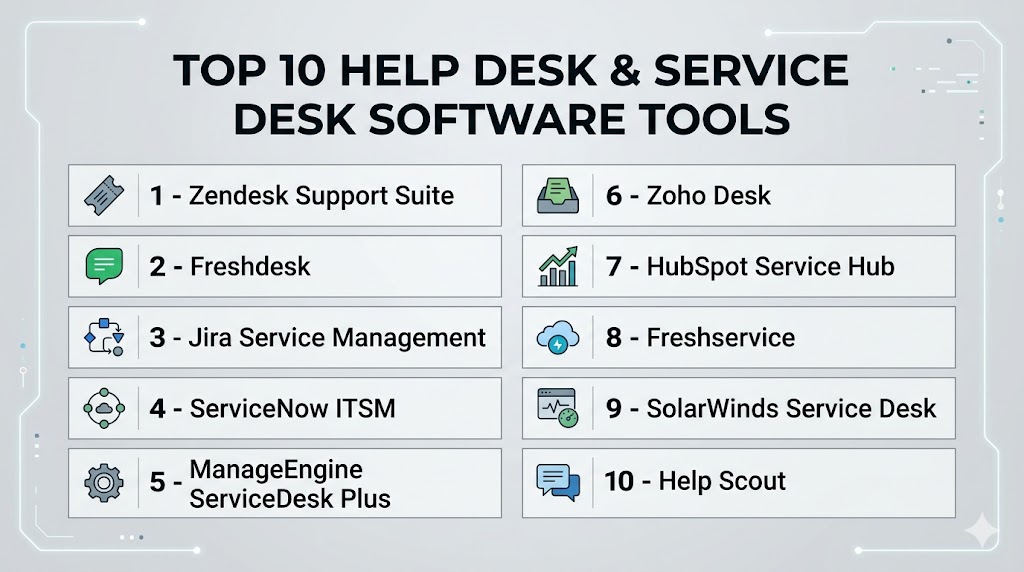
Top 10 Help Desk & Service Desk Software Tools
#1 — Zendesk Support Suite
Short description: A widely adopted customer support platform offering robust ticketing, automation, and omnichannel communication.
Key Features
- Advanced ticketing system
- Omnichannel support
- AI-powered automation
- Knowledge base management
- SLA tracking
- Analytics dashboards
Pros
- Highly scalable
- Strong ecosystem
Cons
- Expensive for small teams
- Complex configuration
Platforms / Deployment
Web / Cloud
Security & Compliance
SSO, encryption, GDPR. Other details not publicly stated.
Integrations & Ecosystem
Extensive integration ecosystem with business tools.
- CRM platforms
- Chat tools
- APIs
- Marketplace apps
Support & Community
Strong documentation and global support network.
#2 — Freshdesk
Short description: A user-friendly help desk solution focused on automation, AI, and omnichannel customer support.
Key Features
- Ticket management
- AI-powered automation
- Omnichannel support
- Knowledge base
- SLA management
- Reporting tools
Pros
- Easy to use
- Quick setup
Cons
- Advanced features cost extra
- Limited deep customization
Platforms / Deployment
Web / Cloud
Security & Compliance
Encryption, SSO. Other details not publicly stated.
Integrations & Ecosystem
- CRM systems
- Collaboration tools
- APIs
Support & Community
Strong onboarding and support resources.
#3 — Jira Service Management
Short description: A service desk platform designed for IT teams with strong workflow automation and DevOps integration.
Key Features
- Incident management
- SLA tracking
- Workflow automation
- Knowledge base integration
- Request management
- Change management
Pros
- Deep DevOps integration
- Highly customizable
Cons
- Learning curve
- Complex setup
Platforms / Deployment
Cloud / Self-hosted
Security & Compliance
SSO, MFA, encryption. Other details not publicly stated.
Integrations & Ecosystem
- DevOps tools
- APIs
- Project management tools
Support & Community
Large global community and strong documentation.
#4 — ServiceNow ITSM
Short description: Enterprise-grade service desk platform offering full IT service management capabilities.
Key Features
- Incident and problem management
- Asset management
- Workflow automation
- AI-powered insights
- Service catalog
- Reporting tools
Pros
- Comprehensive ITSM solution
- Highly scalable
Cons
- Expensive
- Requires implementation effort
Platforms / Deployment
Cloud
Security & Compliance
SSO, encryption, GDPR. Other details not publicly stated.
Integrations & Ecosystem
- Enterprise tools
- APIs
- Automation platforms
Support & Community
Enterprise-level support services.
#5 — ManageEngine ServiceDesk Plus
Short description: A comprehensive ITSM solution with strong help desk and asset management features.
Key Features
- Ticketing system
- Asset management
- SLA tracking
- Workflow automation
- Reporting tools
- Change management
Pros
- Good value for enterprises
- Feature-rich
Cons
- UI can feel outdated
- Setup complexity
Platforms / Deployment
Cloud / On-premise
Security & Compliance
Encryption, RBAC. Other details not publicly stated.
Integrations & Ecosystem
- IT tools
- APIs
- Monitoring systems
Support & Community
Reliable enterprise support.
#6 — Zoho Desk
Short description: A customer support platform designed for businesses of all sizes with strong automation and analytics.
Key Features
- Ticket management
- AI assistant
- Omnichannel support
- Workflow automation
- Reporting tools
- Knowledge base
Pros
- Affordable
- Easy to use
Cons
- Limited enterprise features
- UI customization constraints
Platforms / Deployment
Web / Cloud
Security & Compliance
Encryption, GDPR. Other details not publicly stated.
Integrations & Ecosystem
- Zoho ecosystem
- CRM tools
- APIs
Support & Community
Strong documentation and community.
#7 — HubSpot Service Hub
Short description: A service desk solution integrated with CRM, ideal for customer support and sales alignment.
Key Features
- Ticketing system
- CRM integration
- Automation workflows
- Knowledge base
- Reporting tools
- Customer feedback tools
Pros
- Strong CRM integration
- Easy onboarding
Cons
- Limited advanced ITSM features
- Pricing scales quickly
Platforms / Deployment
Web / Cloud
Security & Compliance
Encryption, SSO. Other details not publicly stated.
Integrations & Ecosystem
- CRM platform
- Marketing tools
- APIs
Support & Community
Good support and user-friendly documentation.
#8 — Freshservice
Short description: An IT service management platform with automation and AI-driven service desk capabilities.
Key Features
- Incident management
- Asset management
- Workflow automation
- AI features
- Service catalog
- Reporting tools
Pros
- Modern interface
- Strong automation
Cons
- Pricing can increase
- Limited customization
Platforms / Deployment
Cloud
Security & Compliance
Encryption, SSO. Other details not publicly stated.
Integrations & Ecosystem
- IT tools
- APIs
- Monitoring systems
Support & Community
Strong support ecosystem.
#9 — SolarWinds Service Desk
Short description: A cloud-based ITSM solution focused on service delivery, asset management, and automation.
Key Features
- Ticketing system
- Asset management
- Workflow automation
- Reporting tools
- Incident management
- Service catalog
Pros
- Strong ITSM features
- Good reporting
Cons
- UI can be complex
- Limited flexibility
Platforms / Deployment
Cloud
Security & Compliance
Encryption, GDPR. Other details not publicly stated.
Integrations & Ecosystem
- IT tools
- APIs
- Monitoring systems
Support & Community
Reliable support services.
#10 — Help Scout
Short description: A simple and user-friendly help desk platform focused on customer communication and support teams.
Key Features
- Shared inbox
- Ticket management
- Knowledge base
- Automation workflows
- Reporting tools
- Customer profiles
Pros
- Easy to use
- Clean interface
Cons
- Limited advanced features
- Not ideal for ITSM
Platforms / Deployment
Web / Cloud
Security & Compliance
Encryption. Other details not publicly stated.
Integrations & Ecosystem
- CRM tools
- APIs
- Email integrations
Support & Community
Strong customer support and onboarding.
Comparison Table (Top 10)
| Tool Name | Best For | Platform(s) Supported | Deployment | Standout Feature | Public Rating |
|---|---|---|---|---|---|
| Zendesk | Enterprises | Web | Cloud | Omnichannel support | N/A |
| Freshdesk | SMB–Enterprise | Web | Cloud | Ease of use | N/A |
| Jira Service Management | IT teams | Web | Cloud/On-prem | DevOps integration | N/A |
| ServiceNow ITSM | Enterprises | Web | Cloud | Full ITSM suite | N/A |
| ServiceDesk Plus | IT teams | Web | Cloud/On-prem | Asset management | N/A |
| Zoho Desk | SMB | Web | Cloud | Affordability | N/A |
| HubSpot Service Hub | CRM users | Web | Cloud | CRM integration | N/A |
| Freshservice | ITSM teams | Web | Cloud | Modern UI | N/A |
| SolarWinds Service Desk | IT teams | Web | Cloud | ITSM features | N/A |
| Help Scout | Small teams | Web | Cloud | Simplicity | N/A |
Evaluation & Scoring of Help Desk & Service Desk Software
| Tool Name | Core | Ease | Integrations | Security | Performance | Support | Value | Weighted Total |
|---|---|---|---|---|---|---|---|---|
| Zendesk | 10 | 7 | 9 | 9 | 9 | 9 | 6 | 8.6 |
| Freshdesk | 8 | 9 | 8 | 8 | 8 | 8 | 8 | 8.3 |
| Jira Service Management | 9 | 7 | 9 | 9 | 9 | 8 | 7 | 8.5 |
| ServiceNow | 10 | 6 | 10 | 10 | 9 | 9 | 6 | 8.7 |
| ServiceDesk Plus | 8 | 7 | 8 | 8 | 8 | 7 | 8 | 7.9 |
| Zoho Desk | 8 | 9 | 7 | 8 | 8 | 7 | 9 | 8.2 |
| HubSpot Service Hub | 7 | 9 | 8 | 8 | 8 | 8 | 8 | 8.1 |
| Freshservice | 8 | 8 | 8 | 8 | 8 | 8 | 7 | 8.0 |
| SolarWinds | 8 | 7 | 8 | 8 | 8 | 7 | 7 | 7.8 |
| Help Scout | 7 | 10 | 7 | 7 | 8 | 8 | 9 | 8.0 |
Interpretation:
These scores are comparative and help identify strengths across tools. Higher scores indicate better overall capability, but the best choice depends on your use case. Enterprise tools lead in features and scalability, while SMB tools excel in usability and value.
Which Help Desk & Service Desk Software Is Right for You?
Solo / Freelancer
Choose simple tools like Help Scout or Zoho Desk for easy ticket management.
SMB
Freshdesk and Zoho Desk provide the best balance of features and usability.
Mid-Market
Jira Service Management and Freshservice offer scalability with manageable complexity.
Enterprise
ServiceNow and Zendesk are ideal for large-scale operations with advanced needs.
Budget vs Premium
- Budget: Zoho Desk, Help Scout
- Premium: ServiceNow, Zendesk
Feature Depth vs Ease of Use
- Feature-heavy: ServiceNow, Jira
- Easy-to-use: Freshdesk, Help Scout
Integrations & Scalability
Best options: Zendesk, Jira, HubSpot
Security & Compliance Needs
Enterprises should prioritize platforms with strong identity and compliance capabilities like ServiceNow and Zendesk.
Frequently Asked Questions (FAQs)
What is help desk software?
It is a tool used to manage customer support requests through ticketing systems and communication channels.
What is the difference between help desk and service desk?
Help desk focuses on customer support, while service desk includes broader IT service management.
How much does help desk software cost?
Pricing varies based on features, users, and deployment models.
Can help desk software integrate with CRM tools?
Yes, most modern platforms support CRM integrations.
Is help desk software suitable for small businesses?
Yes, many tools are designed specifically for SMBs.
What features should I look for?
Ticketing, automation, reporting, integrations, and scalability.
Are these tools secure?
Most platforms offer encryption and access control, but details vary.
How scalable are these tools?
Cloud-based tools can scale easily with business growth.
Can I migrate between tools?
Yes, but it may require data migration and integration adjustments.
Do these tools support automation?
Yes, automation is a core feature in modern help desk platforms.
Conclusion
Help desk and service desk software have become essential tools for managing customer support and internal service operations efficiently. From simple ticketing systems to advanced ITSM platforms, these solutions help organizations streamline workflows, improve response times, and enhance overall service quality. While enterprise platforms provide deep functionality and scalability, smaller tools offer ease of use and faster implementation. The right choice ultimately depends on your organization’s size, technical requirements, and support complexity. Instead of choosing based on popularity alone, focus on how well the platform fits your workflows, integrations, and long-term goals. Start by shortlisting a few tools, testing their capabilities, and validating their performance before making a final decision.