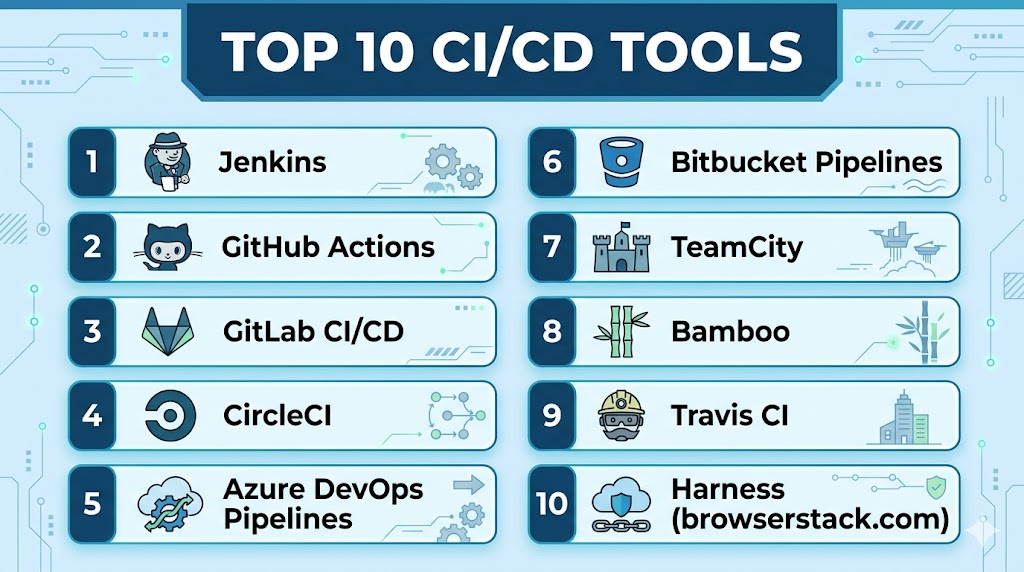
Introduction
CI/CD Tools help software teams automate code integration, testing, packaging, and deployment pipelines. Continuous Integration (CI) focuses on frequently merging code changes and validating builds, while Continuous Delivery/Deployment (CD) automates releases to staging or production environments.
As development cycles accelerate, manual release processes create delays, inconsistencies, and higher failure risk. CI/CD platforms enable faster shipping, safer releases, better collaboration, and repeatable workflows. They are now core components of DevOps, platform engineering, and cloud-native delivery strategies.
Common use cases include:
- Automated builds
- Unit and integration testing pipelines
- Container image creation
- Infrastructure deployments
- Multi-environment releases
- Blue/green or canary deployments
- Rollback automation
- Compliance checks in pipelines
Buyers should evaluate:
- Ease of pipeline creation
- SCM integrations
- Scalability and runners/agents
- Security controls and secrets management
- Cloud-native deployment support
- Speed and parallel execution
- Observability and logs
- Pricing model
- Self-hosted vs SaaS options
- Ecosystem integrations
Best for: Developers, DevOps teams, platform engineers, startups, enterprises, SaaS companies, and any organization shipping software regularly.
Not ideal for: Static businesses with no software delivery process, one-off scripts, or teams with no need for repeatable releases.
Key Trends in CI/CD Tools
- AI-assisted pipeline generation growing
- Security scanning shifting left into pipelines
- GitOps workflows expanding rapidly
- Ephemeral runners increasing adoption
- Policy-as-code controls rising
- Multi-cloud deployments becoming common
- Platform engineering portals integrating CI/CD
- Faster caching and incremental builds improving
- Supply chain security becoming mandatory
- Progressive delivery features expanding
How We Selected These Tools (Methodology)
These tools were selected based on:
- Market adoption and trust
- Pipeline flexibility
- Developer experience
- Security capabilities
- Scalability for teams
- Cloud and Kubernetes readiness
- Integration ecosystem
- Self-hosted and SaaS availability
- Support quality
- Long-term relevance
Top 10 CI/CD Tools
#1 — Jenkins
Short description:
One of the most widely known automation servers used for CI/CD pipelines across almost every industry.
Key Features
- Huge plugin ecosystem
- Pipeline as code
- Distributed agents
- Broad integrations
- Self-hosted flexibility
- Community plugins
- Multi-platform support
Pros
- Extremely flexible
- Massive ecosystem
- Strong enterprise history
Cons
- Requires maintenance effort
- Plugin sprawl can add complexity
- UI feels dated to some users
Platforms / Deployment
Windows / Linux / macOS
Self-hosted / Cloud / Hybrid
Security & Compliance
RBAC via plugins, secrets integrations, audit options vary.
Integrations & Ecosystem
Very broad ecosystem across SCM, cloud, testing, and deployment tools.
Support & Community
Huge global community.
#2 — GitHub Actions
Short description:
Integrated CI/CD platform built into GitHub for automating workflows directly from repositories.
Key Features
- Native GitHub integration
- YAML workflows
- Marketplace actions
- Hosted runners
- Self-hosted runners
- Secrets management
- Matrix builds
Pros
- Excellent GitHub workflow fit
- Fast onboarding
- Strong developer experience
Cons
- Best within GitHub ecosystem
- Usage costs can grow
- Complex workflows need discipline
Platforms / Deployment
Cloud / Hybrid
Security & Compliance
Secrets, permissions, OIDC, audit capabilities vary by plan.
Integrations & Ecosystem
Strong GitHub-centered marketplace ecosystem.
Support & Community
Large and fast-growing user base.
#3 — GitLab CI/CD
Short description:
Integrated DevOps platform combining source control, CI/CD, security, and planning capabilities.
Key Features
- Built-in CI/CD
- Auto DevOps options
- Self-hosted or SaaS
- Security scanning features
- Kubernetes integrations
- Review apps
- Unified DevOps workflows
Pros
- Strong all-in-one platform
- Great self-hosted option
- Broad DevSecOps capabilities
Cons
- Can be feature-dense
- Costs vary by tier
- Admin overhead for self-hosted setups
Platforms / Deployment
Cloud / Self-hosted / Hybrid
Security & Compliance
RBAC, secrets, scanning, audit capabilities vary by edition.
Integrations & Ecosystem
Strong end-to-end DevOps alignment.
Support & Community
Large enterprise and developer community.
#4 — CircleCI
Short description:
Cloud-first CI/CD platform known for speed, developer workflows, and scalable pipelines.
Key Features
- Fast builds
- Reusable configs
- Parallel execution
- Container workflows
- Orbs ecosystem
- Hosted runners
- Insights dashboards
Pros
- Strong pipeline speed
- Good developer usability
- Excellent for startups and SaaS teams
Cons
- Usage costs can scale upward
- Best value in cloud workflows
- Advanced enterprise needs vary
Platforms / Deployment
Cloud / Hybrid
Security & Compliance
Secrets controls, permissions, audit options vary.
Integrations & Ecosystem
Strong modern engineering ecosystem compatibility.
Support & Community
Commercial support with strong adoption.
#5 — Azure DevOps Pipelines
Short description:
Enterprise CI/CD solution integrated with broader planning, repos, and Microsoft ecosystems.
Key Features
- YAML pipelines
- Hosted agents
- Release pipelines
- Azure integrations
- Multi-platform builds
- Artifact management
- Enterprise governance
Pros
- Strong Microsoft ecosystem fit
- Broad enterprise capabilities
- Good hybrid enterprise support
Cons
- UI complexity for some users
- Best in aligned ecosystems
- Pricing tiers vary
Platforms / Deployment
Cloud / Self-hosted / Hybrid
Security & Compliance
RBAC, secrets, enterprise identity integration.
Integrations & Ecosystem
Strong Microsoft and enterprise tooling compatibility.
Support & Community
Strong enterprise support presence.
#6 — TeamCity
Short description:
CI/CD platform popular with engineering teams needing robust build pipelines and customization.
Key Features
- Powerful build pipelines
- Build chains
- Agent scaling
- Rich reporting
- Kotlin DSL options
- Test analytics
- Enterprise controls
Pros
- Strong build engineering depth
- Reliable enterprise option
- Good customization
Cons
- Commercial pricing tiers
- Smaller mindshare than leaders
- Requires admin planning
Platforms / Deployment
Windows / Linux
Cloud / Self-hosted / Hybrid
Security & Compliance
Permissions, audit controls vary by edition.
Integrations & Ecosystem
Strong engineering tool compatibility.
Support & Community
Commercial support model.
#7 — Bamboo
Short description:
CI/CD tool designed for teams already using Atlassian ecosystems and release workflows.
Key Features
- Build pipelines
- Deployment projects
- Jira integrations
- Bitbucket alignment
- Agent support
- Release controls
- Permissions model
Pros
- Great Atlassian fit
- Good traceability
- Useful release workflows
Cons
- Best in Atlassian environments
- Smaller modern momentum
- Commercial licensing
Platforms / Deployment
Self-hosted / Hybrid
Security & Compliance
RBAC, permissions, audit options vary.
Integrations & Ecosystem
Strong Jira and Bitbucket compatibility.
Support & Community
Commercial support available.
#8 — Argo CD
Short description:
GitOps-focused continuous delivery platform built for Kubernetes-native deployments.
Key Features
- GitOps workflows
- Kubernetes sync
- Drift detection
- Rollback support
- Declarative deployments
- Multi-cluster support
- UI and CLI controls
Pros
- Excellent Kubernetes CD tool
- Strong GitOps model
- Open-source popularity
Cons
- Focused mainly on Kubernetes delivery
- Requires GitOps maturity
- Not full CI by itself
Platforms / Deployment
Cloud / Self-hosted / Hybrid
Security & Compliance
RBAC, access controls, audit integrations vary.
Integrations & Ecosystem
Strong Kubernetes ecosystem relevance.
Support & Community
Large cloud-native community.
#9 — Spinnaker
Short description:
Advanced multi-cloud continuous delivery platform focused on progressive deployments.
Key Features
- Multi-cloud deployments
- Canary releases
- Rollbacks
- Pipeline orchestration
- Kubernetes support
- Deployment strategies
- Enterprise scale controls
Pros
- Strong progressive delivery
- Great multi-cloud capability
- Enterprise-grade deployment depth
Cons
- Operational complexity
- Best for mature teams
- Not ideal for small startups
Platforms / Deployment
Cloud / Self-hosted / Hybrid
Security & Compliance
RBAC, permissions, audit integrations vary.
Integrations & Ecosystem
Strong cloud deployment compatibility.
Support & Community
Strong technical community.
#10 — Bitbucket Pipelines
Short description:
Integrated CI/CD platform for teams using Bitbucket repositories and Atlassian workflows.
Key Features
- Native Bitbucket integration
- YAML pipelines
- Docker-friendly workflows
- Cloud runners
- Deployment environments
- Secrets support
- Atlassian ecosystem fit
Pros
- Easy for Bitbucket teams
- Simple onboarding
- Good SMB fit
Cons
- Best inside Bitbucket ecosystem
- Advanced enterprise depth varies
- Usage pricing can grow
Platforms / Deployment
Cloud
Security & Compliance
Secrets, permissions, audit features vary by plan.
Integrations & Ecosystem
Strong Atlassian ecosystem alignment.
Support & Community
Commercial support model.
Comparison Table (Top 10)
| Tool Name | Best For | Platform(s) Supported | Deployment | Standout Feature | Public Rating |
|---|---|---|---|---|---|
| Jenkins | Custom pipelines | Multi-platform | Hybrid | Plugin ecosystem | N/A |
| GitHub Actions | GitHub teams | Cloud | Hybrid | Native repo workflows | N/A |
| GitLab CI/CD | All-in-one DevOps | Multi-platform | Hybrid | Unified platform | N/A |
| CircleCI | Fast SaaS teams | Cloud | Cloud | Speed | N/A |
| Azure DevOps | Microsoft enterprises | Multi-platform | Hybrid | Enterprise governance | N/A |
| TeamCity | Build engineering | Multi-platform | Hybrid | Build chains | N/A |
| Bamboo | Atlassian teams | Multi-platform | Hybrid | Jira alignment | N/A |
| Argo CD | Kubernetes teams | Multi-platform | Hybrid | GitOps delivery | N/A |
| Spinnaker | Multi-cloud enterprises | Multi-platform | Hybrid | Progressive delivery | N/A |
| Bitbucket Pipelines | Bitbucket teams | Cloud | Cloud | Simplicity | N/A |
Evaluation & Scoring of CI/CD Tools
| Tool Name | Core | Ease | Integrations | Security | Performance | Support | Value | Weighted Total |
|---|---|---|---|---|---|---|---|---|
| Jenkins | 10 | 6 | 10 | 7 | 8 | 9 | 10 | 8.6 |
| GitHub Actions | 9 | 9 | 9 | 8 | 8 | 8 | 8 | 8.6 |
| GitLab CI/CD | 9 | 8 | 9 | 9 | 8 | 8 | 8 | 8.6 |
| CircleCI | 8 | 9 | 8 | 8 | 9 | 8 | 7 | 8.1 |
| Azure DevOps | 9 | 7 | 9 | 9 | 8 | 8 | 8 | 8.3 |
| TeamCity | 8 | 7 | 8 | 8 | 8 | 8 | 7 | 7.8 |
| Bamboo | 7 | 8 | 8 | 8 | 7 | 7 | 7 | 7.5 |
| Argo CD | 8 | 7 | 8 | 8 | 8 | 8 | 9 | 8.0 |
| Spinnaker | 9 | 5 | 8 | 8 | 8 | 7 | 7 | 7.5 |
| Bitbucket Pipelines | 7 | 8 | 7 | 8 | 8 | 7 | 8 | 7.6 |
These scores are comparative benchmarks. The best tool depends on your repo platform, deployment model, security needs, and team maturity.
Which CI/CD Tool Is Right for You?
Solo / Freelancer
Choose GitHub Actions, Bitbucket Pipelines, or Jenkins.
SMB
Choose GitHub Actions, CircleCI, GitLab CI/CD.
Mid-Market
Choose GitLab CI/CD, Azure DevOps, CircleCI.
Enterprise
Choose Jenkins, GitLab CI/CD, Azure DevOps, Spinnaker.
Budget vs Premium
Budget: Jenkins, Argo CD, GitHub starter tiers
Premium: Azure DevOps enterprise setups, TeamCity
Feature Depth vs Ease of Use
Depth: Jenkins, GitLab, Spinnaker
Ease: GitHub Actions, CircleCI, Bitbucket Pipelines
Integrations & Scalability
Strong options: Jenkins, GitLab, Azure DevOps.
Security & Compliance Needs
Strong choices: GitLab, Azure DevOps, enterprise Jenkins setups.
Frequently Asked Questions (FAQs)
1. What is CI/CD?
It automates building, testing, and deploying software.
2. Why use CI/CD tools?
They reduce manual errors and speed releases.
3. Which tool is best for GitHub users?
GitHub Actions is a natural fit.
4. Is Jenkins still relevant?
Yes, especially for custom enterprise pipelines.
5. What is GitOps?
Using Git as the source of truth for deployments.
6. Is Argo CD a CI tool?
Primarily continuous delivery for Kubernetes.
7. Can CI/CD improve security?
Yes, by automating scans and controls.
8. Which tool is easiest to start with?
GitHub Actions or CircleCI for many teams.
9. Should startups use enterprise tools?
Only if complexity justifies it.
10. What should I automate first?
Builds, tests, and repeatable deployments.
Conclusion
CI/CD Tools are now essential for modern software delivery, enabling faster releases, stronger quality control, and more reliable deployments. The best platform depends on your source control system, cloud strategy, security requirements, and operational maturity. Some teams need maximum flexibility, while others need simplicity or Kubernetes-native GitOps workflows. Speed, governance, and ecosystem fit should guide your decision. Shortlist two or three tools, automate your highest-value workflows first, and scale pipeline maturity over time.