Introduction
3D printing workflow software helps users manage the entire process of preparing, optimizing, and executing 3D prints. These tools bridge the gap between digital 3D models and physical objects by handling tasks like slicing, printer control, file repair, and workflow automation.
As 3D printing adoption grows across industries such as manufacturing, healthcare, education, and product design, workflow software has become essential for improving efficiency, reducing errors, and ensuring print quality. Modern solutions now include cloud-based management, remote monitoring, and AI-assisted print optimization.
Common use cases include:
- Preparing models for 3D printing (slicing and supports)
- Managing multiple printers in production environments
- Prototyping and product development
- Educational and hobbyist printing setups
- Industrial-scale additive manufacturing workflows
Key evaluation criteria:
- Slicing accuracy and customization
- Printer compatibility and support
- Workflow automation features
- Ease of use and setup
- File repair and optimization tools
- Remote monitoring and control
- Integration with CAD and modeling tools
- Performance and reliability
- Pricing and licensing flexibility
- Security and access controls
Best for: Engineers, product designers, manufacturers, hobbyists, and educators managing 3D printing processes.
Not ideal for: Users who only need basic modeling tools or do not work with physical 3D printing outputs.
Key Trends in 3D Printing Workflow Software
- AI-assisted slicing and print optimization
- Cloud-based printer management and monitoring
- Integration with CAD and PLM systems
- Automation of repetitive printing workflows
- Support for multi-material and multi-color printing
- Increased use of remote and distributed print farms
- Real-time analytics and performance tracking
- Improved file repair and mesh optimization tools
- Subscription-based and freemium pricing models
How We Selected These Tools (Methodology)
- Evaluated adoption across hobbyist and industrial users
- Assessed slicing accuracy and workflow capabilities
- Considered compatibility with major 3D printers
- Reviewed automation and batch processing features
- Examined integration with CAD and design tools
- Included both beginner-friendly and advanced tools
- Analyzed usability and interface design
- Prioritized actively maintained software
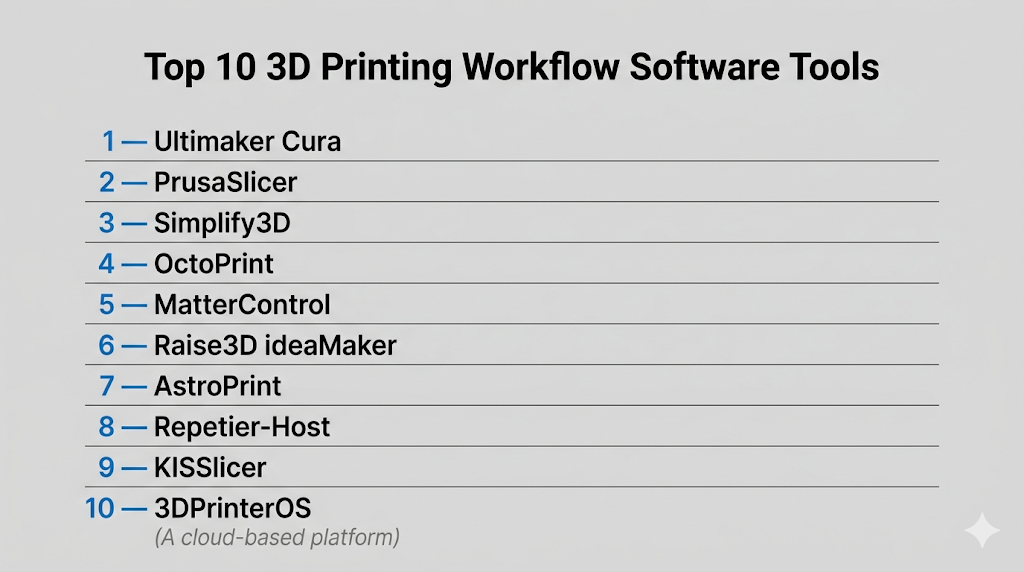
Top 10 3D Printing Workflow Software Tools
#1 — Ultimaker Cura
Short description: A widely used open-source slicing software suitable for beginners and professionals.
Key Features
- Advanced slicing engine
- Customizable print settings
- Extensive printer compatibility
- Plugin marketplace
- Support generation tools
Pros
- Free and easy to use
- Strong community support
Cons
- Can be slow with large files
- Limited enterprise features
Platforms / Deployment
Windows / macOS / Linux
Security & Compliance
Not publicly stated
Integrations & Ecosystem
Strong ecosystem with plugins and integrations.
- Plugin marketplace
- CAD file compatibility
- Cloud connectivity options
Support & Community
Large global community with extensive documentation.
#2 — PrusaSlicer
Short description: A powerful slicing tool optimized for precision and control, widely used by advanced users.
Key Features
- High-quality slicing
- Custom support generation
- Multi-material support
- Advanced print settings
Pros
- Highly customizable
- Excellent print quality
Cons
- Interface can be complex
- Best suited for experienced users
Platforms / Deployment
Windows / macOS / Linux
Security & Compliance
Not publicly stated
Integrations & Ecosystem
Designed for precision workflows.
- Printer integration
- File compatibility
- Plugin support
Support & Community
Strong community among enthusiasts and professionals.
#3 — Simplify3D
Short description: A premium slicing software focused on performance and control over print settings.
Key Features
- Advanced slicing control
- Custom supports
- Simulation preview
- Multi-part printing
Pros
- High performance
- Detailed control
Cons
- Paid software
- Limited updates compared to competitors
Platforms / Deployment
Windows / macOS / Linux
Security & Compliance
Not publicly stated
Integrations & Ecosystem
Focused on standalone workflows.
- File imports/exports
- Printer compatibility
Support & Community
Moderate community and documentation.
#4 — OctoPrint
Short description: An open-source platform for remote monitoring and control of 3D printers.
Key Features
- Remote printer control
- Real-time monitoring
- Plugin system
- Webcam integration
Pros
- Free and flexible
- Strong customization
Cons
- Requires setup
- Not a slicer
Platforms / Deployment
Web / Self-hosted
Security & Compliance
Not publicly stated
Integrations & Ecosystem
Highly extensible through plugins.
- Plugin ecosystem
- API access
- Hardware integrations
Support & Community
Active open-source community.
#5 — MatterControl
Short description: A complete 3D printing platform combining design, slicing, and printer control.
Key Features
- Integrated design tools
- Slicing engine
- Printer control
- Library management
Pros
- All-in-one solution
- Beginner-friendly
Cons
- Performance limitations
- Less advanced than specialized tools
Platforms / Deployment
Windows / macOS / Linux
Security & Compliance
Not publicly stated
Integrations & Ecosystem
Supports integrated workflows.
- File compatibility
- Printer integration
Support & Community
Moderate community support.
#6 — Raise3D ideaMaker
Short description: A professional slicing software with strong performance and customization options.
Key Features
- Advanced slicing
- Template-based workflows
- Multi-printer support
- Cloud features
Pros
- High performance
- Good UI
Cons
- Best optimized for specific printers
- Limited third-party plugins
Platforms / Deployment
Windows / macOS / Linux
Security & Compliance
Not publicly stated
Integrations & Ecosystem
Focused ecosystem around printing workflows.
- Printer integration
- File support
Support & Community
Growing professional user base.
#7 — AstroPrint
Short description: A cloud-based 3D printing management platform for remote workflows.
Key Features
- Cloud printing
- Remote monitoring
- File management
- Mobile access
Pros
- Easy remote access
- Cloud-based
Cons
- Internet dependency
- Limited offline features
Platforms / Deployment
Web / Cloud
Security & Compliance
Not publicly stated
Integrations & Ecosystem
Cloud-focused integrations.
- Mobile apps
- APIs
- Printer connectivity
Support & Community
Moderate support and documentation.
#8 — Repetier-Host
Short description: A reliable software for managing multiple 3D printers and slicing workflows.
Key Features
- Multi-printer control
- Slicing integration
- Remote access
- G-code editing
Pros
- Good for print farms
- Flexible
Cons
- UI feels outdated
- Setup complexity
Platforms / Deployment
Windows / macOS / Linux
Security & Compliance
Not publicly stated
Integrations & Ecosystem
Supports various slicing engines.
- Plugin support
- Printer integrations
Support & Community
Established community with guides.
#9 — KISSlicer
Short description: A lightweight slicing tool focused on simplicity and performance.
Key Features
- Fast slicing
- Custom supports
- Multi-head printing
- Simple interface
Pros
- Lightweight
- Efficient
Cons
- Limited features
- Less modern UI
Platforms / Deployment
Windows / macOS / Linux
Security & Compliance
Not publicly stated
Integrations & Ecosystem
Basic ecosystem.
- File compatibility
- Printer support
Support & Community
Smaller community.
#10 — 3DPrinterOS
Short description: A cloud-based platform for managing 3D printing workflows at scale.
Key Features
- Cloud management
- Printer monitoring
- User access control
- Workflow automation
Pros
- Scalable for organizations
- Centralized management
Cons
- Subscription model
- Requires internet
Platforms / Deployment
Web / Cloud
Security & Compliance
Not publicly stated
Integrations & Ecosystem
Designed for enterprise workflows.
- APIs
- Printer integrations
- Cloud tools
Support & Community
Focused on enterprise and education users.
Comparison Table (Top 10)
| Tool Name | Best For | Platform(s) Supported | Deployment | Standout Feature | Public Rating |
|---|---|---|---|---|---|
| Cura | Beginners | Win/macOS/Linux | Self-hosted | Free slicing | N/A |
| PrusaSlicer | Advanced users | Win/macOS/Linux | Self-hosted | Precision control | N/A |
| Simplify3D | Professionals | Win/macOS/Linux | Self-hosted | Advanced slicing | N/A |
| OctoPrint | Remote control | Web | Self-hosted | Monitoring | N/A |
| MatterControl | All-in-one | Win/macOS/Linux | Self-hosted | Integrated tools | N/A |
| ideaMaker | Professionals | Win/macOS/Linux | Self-hosted | Templates | N/A |
| AstroPrint | Remote users | Web | Cloud | Cloud printing | N/A |
| Repetier-Host | Print farms | Win/macOS/Linux | Self-hosted | Multi-printer | N/A |
| KISSlicer | Lightweight | Win/macOS/Linux | Self-hosted | Speed | N/A |
| 3DPrinterOS | Enterprises | Web | Cloud | Workflow automation | N/A |
Evaluation & Scoring of 3D Printing Workflow Software
| Tool Name | Core (25%) | Ease (15%) | Integrations (15%) | Security (10%) | Performance (10%) | Support (10%) | Value (15%) | Weighted Total |
|---|---|---|---|---|---|---|---|---|
| Cura | 9 | 9 | 8 | 5 | 8 | 9 | 10 | 8.7 |
| PrusaSlicer | 9 | 7 | 8 | 5 | 9 | 8 | 9 | 8.3 |
| Simplify3D | 9 | 7 | 7 | 5 | 9 | 7 | 6 | 7.8 |
| OctoPrint | 8 | 6 | 9 | 5 | 8 | 8 | 10 | 8.1 |
| MatterControl | 7 | 8 | 7 | 5 | 7 | 7 | 8 | 7.4 |
| ideaMaker | 8 | 8 | 7 | 5 | 8 | 7 | 8 | 7.8 |
| AstroPrint | 7 | 9 | 8 | 5 | 7 | 7 | 7 | 7.6 |
| Repetier-Host | 8 | 6 | 7 | 5 | 8 | 7 | 8 | 7.5 |
| KISSlicer | 6 | 8 | 6 | 5 | 7 | 6 | 9 | 7.0 |
| 3DPrinterOS | 8 | 7 | 8 | 6 | 8 | 7 | 7 | 7.7 |
How to interpret scores:
- Scores are comparative, not absolute
- Higher scores indicate balanced capabilities
- Some tools excel in niche use cases
- Choose based on your workflow needs
Which 3D Printing Workflow Software Is Right for You?
Solo / Freelancer
Cura and PrusaSlicer offer strong capabilities and ease of use.
SMB
MatterControl and ideaMaker provide balanced workflows.
Mid-Market
OctoPrint and Repetier-Host support multi-printer setups.
Enterprise
3DPrinterOS and AstroPrint enable scalable cloud workflows.
Budget vs Premium
- Budget: Cura, OctoPrint
- Premium: Simplify3D
Feature Depth vs Ease of Use
- Feature depth: PrusaSlicer, Simplify3D
- Ease of use: Cura, AstroPrint
Integrations & Scalability
- Strong: OctoPrint, 3DPrinterOS
- Moderate: Cura, MatterControl
Security & Compliance Needs
Cloud platforms require evaluation of access control and data policies.
Frequently Asked Questions (FAQs)
What is 3D printing workflow software?
It manages the process from model preparation to final printing.
Is slicing software necessary?
Yes, it converts models into printable instructions.
Are there free tools available?
Yes, Cura and PrusaSlicer are popular free options.
Can I manage multiple printers?
Yes, some tools support print farm management.
Is cloud printing safe?
It depends on platform security controls.
Can I use these tools offline?
Some tools support offline usage.
Do they support all printers?
Compatibility varies by tool.
How long does setup take?
Basic setup is quick; advanced workflows take longer.
Can I automate printing?
Yes, many tools support automation.
What are common mistakes?
Incorrect settings and poor model preparation.
Conclusion
3D printing workflow software is essential for turning digital designs into physical objects efficiently. From beginner-friendly slicers to enterprise-level platforms, the options vary widely in features and complexity