Introduction
Whiteboard collaboration tools are digital platforms that replicate the experience of a physical whiteboard—allowing teams to brainstorm, plan, and collaborate visually in real time from anywhere. These tools combine drawing canvases, sticky notes, diagrams, and multimedia elements into a shared workspace accessible across devices.
As remote and hybrid work continues to dominate modern workplaces, visual collaboration has become essential. Teams need a fast, intuitive way to share ideas, map workflows, and align without being physically present. Whiteboard tools fill this gap by enabling both real-time and asynchronous collaboration across distributed teams.
Common use cases include:
- Brainstorming sessions and ideation workshops
- Agile sprint planning and retrospectives
- Product roadmapping and UX wireframing
- Remote training and onboarding
- Strategic planning and mind mapping
Key evaluation criteria:
- Ease of use and onboarding
- Real-time collaboration performance
- Templates and visualization features
- Integrations with existing tools
- Security and compliance capabilities
- Scalability across teams
- Async collaboration support
- Pricing flexibility
- AI-assisted capabilities
- Cross-platform compatibility
Best for: Product teams, designers, marketers, consultants, educators, and distributed organizations that rely on visual collaboration.
Not ideal for: Teams focused primarily on document editing, structured task tracking, or text-heavy workflows where traditional document or project management tools may be more effective.
Key Trends in Whiteboard Collaboration Tools
- AI-assisted brainstorming: Tools now generate ideas, cluster notes, and summarize sessions automatically
- Multimodal collaboration: Integration of video, voice, and visual workspaces
- Deeper workflow integrations: Seamless connection with project and developer tools
- Enterprise-grade security: Stronger access control, encryption, and compliance support
- Async-first collaboration: Teams can contribute without being online at the same time
- Template-driven workflows: Pre-built templates for common business use cases
- Cross-platform interoperability: Easier import/export between tools
- Embedded collaboration: Whiteboards embedded inside other SaaS platforms
- Scalable performance: Handling large boards with thousands of elements efficiently
- Flexible pricing models: Freemium and usage-based pricing becoming standard
How We Selected These Tools (Methodology)
- Evaluated market adoption and brand recognition
- Assessed feature completeness across core use cases
- Considered performance and reliability signals
- Reviewed security posture indicators such as SSO and encryption
- Analyzed integration ecosystems and extensibility
- Ensured coverage across different team sizes and industries
- Compared ease of onboarding and usability
- Evaluated scalability for growing teams
- Considered innovation in AI and automation features
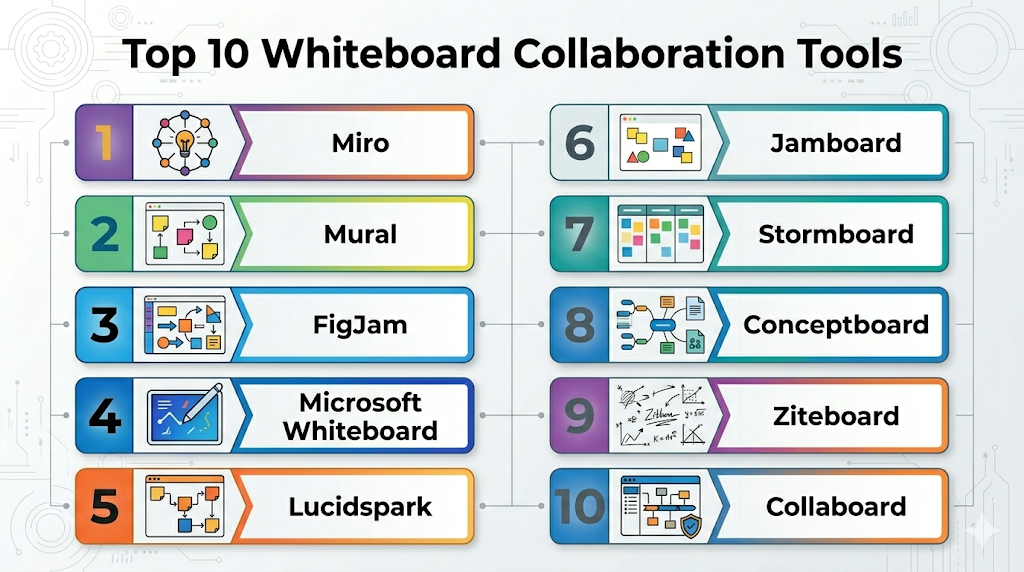
Top 10 Whiteboard Collaboration Tools
#1 — Miro
Short description: A widely adopted collaborative whiteboard platform used by distributed teams for brainstorming, planning, and workshops.
Key Features
- Infinite canvas with drag-and-drop elements
- Extensive template library
- Real-time multi-user collaboration
- AI-assisted idea clustering and summaries
- Presentation and facilitation tools
- Voting, timers, and workshops support
- Diagramming and wireframing capabilities
Pros
- Highly intuitive interface
- Large template ecosystem
- Scales well across teams
Cons
- Can feel overwhelming for new users
- Performance may slow on complex boards
Platforms / Deployment
Web / Windows / macOS / iOS / Android
Cloud
Security & Compliance
SSO/SAML, MFA, encryption, RBAC
SOC 2, GDPR
Integrations & Ecosystem
Miro integrates with a wide range of productivity and development tools.
- Slack
- Microsoft Teams
- Jira
- Google Workspace
- Zoom
Support & Community
Strong documentation, large user community, and enterprise-grade support options.
#2 — Mural
Short description: A visual collaboration platform designed for structured teamwork and facilitated workshops.
Key Features
- Structured brainstorming templates
- Facilitation tools like timers and voting
- Visual frameworks for workshops
- Role-based collaboration
- Diagramming features
- AI-assisted clustering
Pros
- Excellent for guided workshops
- Strong facilitation capabilities
Cons
- Slight learning curve
- Less flexible canvas compared to competitors
Platforms / Deployment
Web / Windows / macOS
Cloud
Security & Compliance
SSO, encryption
SOC 2
Integrations & Ecosystem
- Microsoft Teams
- Slack
- Jira
- Azure DevOps
Support & Community
Reliable enterprise support with structured onboarding resources.
#3 — FigJam
Short description: A collaborative whiteboard tool tailored for designers and product teams within the Figma ecosystem.
Key Features
- Seamless design workflow integration
- Interactive widgets and collaboration tools
- Real-time editing and feedback
- Diagramming and flowcharting
- Built-in audio chat
Pros
- Ideal for design-centric teams
- Clean and simple interface
Cons
- Limited enterprise-level features
- Less versatile outside design workflows
Platforms / Deployment
Web / Windows / macOS
Cloud
Security & Compliance
SSO, encryption
SOC 2
Integrations & Ecosystem
- Figma ecosystem
- Slack
- Jira
Support & Community
Strong community among designers with solid documentation.
#4 — Microsoft Whiteboard
Short description: A collaborative whiteboard tightly integrated into the Microsoft ecosystem.
Key Features
- Integration with Microsoft 365
- Real-time collaboration
- Sticky notes and drawing tools
- Built-in templates
- Cloud synchronization
Pros
- Easy for existing Microsoft users
- No additional cost in many plans
Cons
- Limited advanced functionality
- Fewer templates compared to competitors
Platforms / Deployment
Web / Windows / iOS / Android
Cloud
Security & Compliance
Enterprise-grade Microsoft security
GDPR, ISO standards
Integrations & Ecosystem
- Microsoft Teams
- OneDrive
- Outlook
Support & Community
Strong enterprise support backed by Microsoft ecosystem.
#5 — Lucidspark
Short description: A collaborative whiteboard tool focused on ideation and diagramming within the Lucid platform.
Key Features
- Freeform canvas with sticky notes
- Voting and collaboration tools
- Integration with diagramming workflows
- Templates for brainstorming
- Real-time collaboration
Pros
- Strong integration with diagramming tools
- Easy to use
Cons
- Limited standalone capabilities
- Best within its ecosystem
Platforms / Deployment
Web
Cloud
Security & Compliance
SSO, encryption
SOC 2
Integrations & Ecosystem
- Lucidchart
- Google Workspace
- Slack
Support & Community
Good documentation and responsive support.
#6 — Jamboard
Short description: A simple whiteboard tool designed for quick and lightweight collaboration.
Key Features
- Basic drawing and sticky notes
- Real-time collaboration
- Integration with productivity tools
- Cloud-based access
Pros
- Very easy to use
- Minimal learning curve
Cons
- Limited advanced features
- Not suitable for complex workflows
Platforms / Deployment
Web / iOS / Android
Cloud
Security & Compliance
Standard cloud security measures
GDPR
Integrations & Ecosystem
- Google Drive
- Google Meet
Support & Community
Basic support with limited community engagement.
#7 — Stormboard
Short description: A structured brainstorming platform with strong reporting capabilities.
Key Features
- Structured templates
- Built-in reporting and export features
- Real-time collaboration
- Metadata-enabled notes
Pros
- Excellent for structured ideation
- Strong reporting features
Cons
- Less flexible interface
- Smaller integration ecosystem
Platforms / Deployment
Web
Cloud
Security & Compliance
Not publicly stated
Integrations & Ecosystem
- Microsoft Teams
- Zapier
Support & Community
Moderate support with smaller user base.
#8 — Conceptboard
Short description: A visual collaboration tool focused on feedback and content review workflows.
Key Features
- Visual collaboration canvas
- Commenting and feedback tools
- File and document annotation
- Real-time collaboration
Pros
- Strong feedback capabilities
- Enterprise-friendly workflows
Cons
- Limited templates
- Interface not as modern
Platforms / Deployment
Web
Cloud
Security & Compliance
GDPR
Other details not publicly stated
Integrations & Ecosystem
- Jira
- Slack
Support & Community
Enterprise-oriented support with structured onboarding.
#9 — Ziteboard
Short description: A lightweight online whiteboard for quick collaboration sessions.
Key Features
- Real-time drawing
- Voice and video support
- Minimal interface
- Screen sharing
Pros
- Fast and lightweight
- Easy to start using
Cons
- Limited feature set
- Not ideal for scaling teams
Platforms / Deployment
Web
Cloud
Security & Compliance
Not publicly stated
Integrations & Ecosystem
Limited integrations available
Support & Community
Basic support and minimal community presence.
#10 — Collaboard
Short description: A whiteboard tool focused on privacy and compliance for organizations.
Key Features
- Infinite canvas
- Templates for collaboration
- Real-time teamwork features
- Privacy-focused architecture
Pros
- Strong privacy focus
- Suitable for regulated environments
Cons
- Smaller ecosystem
- Fewer advanced features
Platforms / Deployment
Web
Cloud / Self-hosted
Security & Compliance
GDPR
Other certifications not publicly stated
Integrations & Ecosystem
- Microsoft Teams
- Webhooks
Support & Community
Moderate support with growing adoption.
Comparison Table (Top 10)
| Tool Name | Best For | Platform(s) Supported | Deployment | Standout Feature | Public Rating |
|---|---|---|---|---|---|
| Miro | Enterprise teams | Web, Desktop, Mobile | Cloud | Template ecosystem | N/A |
| Mural | Workshops | Web, Desktop | Cloud | Facilitation tools | N/A |
| FigJam | Designers | Web, Desktop | Cloud | Design integration | N/A |
| Microsoft Whiteboard | Microsoft users | Web, Mobile | Cloud | Teams integration | N/A |
| Lucidspark | Diagramming | Web | Cloud | Lucid integration | N/A |
| Jamboard | Simple use | Web, Mobile | Cloud | Ease of use | N/A |
| Stormboard | Structured brainstorming | Web | Cloud | Reporting | N/A |
| Conceptboard | Feedback workflows | Web | Cloud | Annotation | N/A |
| Ziteboard | Lightweight use | Web | Cloud | Speed | N/A |
| Collaboard | Privacy-focused orgs | Web | Cloud/Self-hosted | GDPR focus | N/A |
Evaluation & Scoring of Whiteboard Collaboration Tools
| Tool Name | Core (25%) | Ease (15%) | Integrations (15%) | Security (10%) | Performance (10%) | Support (10%) | Value (15%) | Weighted Total |
|---|---|---|---|---|---|---|---|---|
| Miro | 9 | 8 | 9 | 8 | 8 | 8 | 7 | 8.3 |
| Mural | 8 | 7 | 8 | 8 | 8 | 8 | 7 | 7.8 |
| FigJam | 7 | 9 | 7 | 7 | 8 | 8 | 8 | 7.9 |
| Microsoft Whiteboard | 6 | 9 | 8 | 9 | 8 | 9 | 9 | 8.1 |
| Lucidspark | 7 | 8 | 8 | 8 | 8 | 8 | 7 | 7.8 |
| Jamboard | 5 | 10 | 7 | 8 | 7 | 7 | 9 | 7.6 |
| Stormboard | 7 | 7 | 6 | 6 | 7 | 7 | 7 | 6.9 |
| Conceptboard | 7 | 7 | 6 | 7 | 7 | 7 | 7 | 7.0 |
| Ziteboard | 5 | 9 | 4 | 5 | 7 | 6 | 8 | 6.6 |
| Collaboard | 6 | 7 | 6 | 8 | 7 | 7 | 7 | 7.0 |
How to interpret the scores:
- Scores are comparative, not absolute
- Higher totals indicate broader capability
- Lower scores may still fit niche needs
- Always align tool choice with your workflow
Which Whiteboard Collaboration Tools Tool Is Right for You?
Solo / Freelancer
Best options: FigJam, Jamboard, Ziteboard
Focus on simplicity, speed, and low cost.
SMB
Best options: Miro, Lucidspark
Balance between usability and functionality.
Mid-Market
Best options: Miro, Mural
Need structured collaboration and integrations.
Enterprise
Best options: Miro, Microsoft Whiteboard, Mural
Prioritize compliance, scalability, and control.
Budget vs Premium
- Budget: Jamboard, Ziteboard
- Premium: Miro, Mural
Feature Depth vs Ease of Use
- Feature-rich: Miro, Mural
- Easy-to-use: FigJam, Jamboard
Integrations & Scalability
- Strong ecosystems: Miro, Microsoft Whiteboard
- Limited ecosystems: Ziteboard, Stormboard
Security & Compliance Needs
- Strong security: Microsoft Whiteboard, Miro
- Privacy-focused: Collaboard
Frequently Asked Questions (FAQs)
What do whiteboard collaboration tools cost?
Pricing ranges from free plans to per-user subscriptions depending on features and team size.
Are these tools secure?
Most offer encryption and access controls. Enterprise tools provide advanced compliance features.
Can I use them offline?
Most tools are cloud-based. Offline capabilities vary.
Do they support large teams?
Yes, especially enterprise-grade platforms.
Are integrations necessary?
They improve productivity by connecting workflows across tools.
Can I migrate between tools?
Yes, but it may require manual adjustments.
What mistakes should I avoid?
Ignoring scalability, integrations, and user adoption.
Do these tools include AI features?
Many include AI for idea generation and summarization.
Are free plans sufficient?
For individuals and small teams, often yes.
What are alternatives?
Project management tools or document collaboration platforms.
Conclusion
Whiteboard collaboration tools have become essential for modern teams working across locations and time zones. They enable visual thinking, faster decision-making, and better alignment across departments.