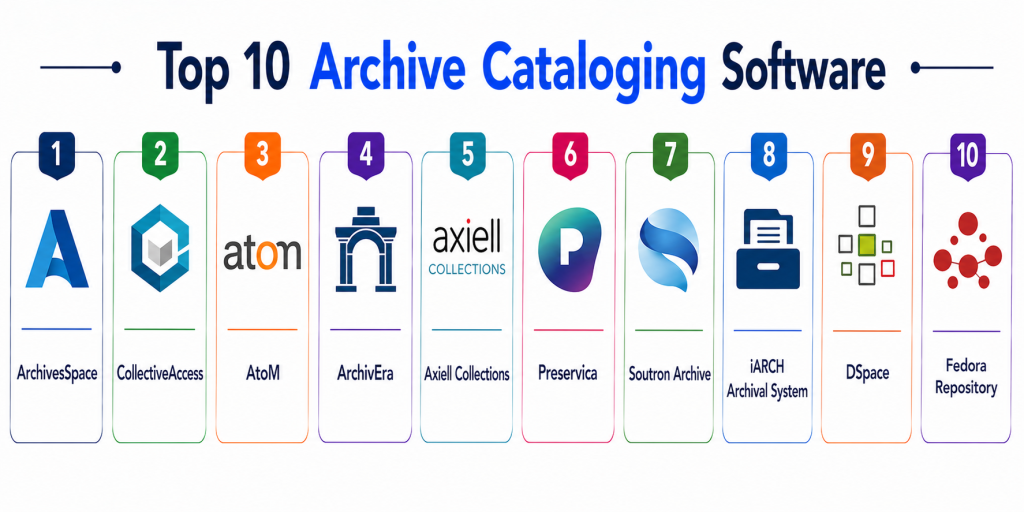
Introduction
Archive Cataloging Software refers to specialized platforms used to organize, describe, index, and retrieve archival materials such as documents, manuscripts, records, and digital assets. These systems enable archivists to create structured metadata, manage collections, and ensure long-term preservation and accessibility.
In modern archival environments, especially with growing volumes of digital records, manual cataloging is no longer sustainable. These tools provide metadata standards, indexing, search capabilities, and digital preservation workflows, making archives more accessible, searchable, and compliant with long-term retention needs.
Real-world use cases
- Cataloging historical documents and manuscripts
- Managing institutional archives and records
- Digitizing and indexing archival collections
- Supporting research and public access
- Ensuring compliance with data retention policies
What buyers should evaluate
- Metadata standards support
- Cataloging and classification flexibility
- Search and retrieval capabilities
- Digital preservation features
- Integration with DAM and library systems
- Scalability for large archives
- Access control and permissions
- Deployment model
Best for: Archives, libraries, museums, universities, government institutions, and research organizations.
Not ideal for: Small collections with minimal cataloging needs.
Key Trends in Archive Cataloging Software
- AI-assisted metadata tagging and classification
- Integration with digital asset management platforms
- Cloud-based archival systems for remote access
- Automated indexing and search optimization
- Support for multimedia and digital records
- Open-source archival platforms gaining adoption
- Enhanced compliance and audit-ready features
- Real-time collaboration across institutions
- Long-term digital preservation workflows
- Public-facing archive portals
How We Selected These Tools
- Evaluated adoption across archives and libraries
- Assessed cataloging and metadata capabilities
- Considered scalability for large collections
- Reviewed integration with DAM and library systems
- Analyzed usability for archivists and researchers
- Evaluated reporting and search functionality
- Considered deployment flexibility
- Assessed overall value and extensibility
Top 10 Archive Cataloging Software
#1 — ArchivesSpace
Short description: ArchivesSpace is an open-source archival management platform designed for managing manuscripts, records, and digital collections with strong metadata support.
Key Features
- Archival cataloging
- Metadata management
- Digital object support
- Public access interface
- Workflow management
Pros
- Open-source
- Designed for archivists
- Strong metadata standards
Cons
- Requires technical setup
- Limited UI flexibility
- Community-driven support
Platforms / Deployment
- Web
- Cloud Self-hosted
Security & Compliance
- Role-based access
- Not publicly stated
Integrations & Ecosystem
Integrates with archival and library tools.
- APIs
- Metadata standards
Support & Community
Active open-source community
#2 — CollectiveAccess
Short description: CollectiveAccess is a flexible open-source platform used to catalog and publish archival, museum, and cultural collections.
Key Features
- Metadata cataloging
- Custom workflows
- Batch import/export
- Reporting tools
- Digital publishing
Pros
- Highly customizable
- Open-source
- Supports metadata standards
Cons
- Technical setup required
- Complex configuration
- Limited official support
Platforms / Deployment
- Web
- Cloud Self-hosted
Security & Compliance
- Not publicly stated
Integrations & Ecosystem
Supports integration via APIs and plugins.
- APIs
- Data tools
Support & Community
Strong community support
#3 — ArchivEra
Short description: ArchivEra is a modern archival collection management system designed to centralize cataloging and improve accessibility.
Key Features
- Archival cataloging
- Digital asset management
- Workflow automation
- Access control
- Reporting
Pros
- Cloud-ready
- User-friendly
- Scalable
Cons
- Pricing
- Smaller ecosystem
- Limited customization
Platforms / Deployment
- Web
- Cloud
Security & Compliance
- Access control features
- Not publicly stated
Integrations & Ecosystem
Supports integrations with archival tools.
- APIs
- Data systems
Support & Community
Enterprise support
#4 — Axiell Collections
Short description: Axiell provides archive and collection management solutions for libraries, archives, and cultural institutions.
Key Features
- Cataloging
- Metadata management
- Reporting
- Digital asset support
- Workflow tools
Pros
- Enterprise-ready
- Scalable
- Reliable
Cons
- Expensive
- Complex setup
- Learning curve
Platforms / Deployment
- Web
- Cloud On-premise
Security & Compliance
- Not publicly stated
Integrations & Ecosystem
Integrates with archival systems.
- APIs
- Library systems
Support & Community
Enterprise support
#5 — Preservica
Short description: Preservica is a digital preservation platform designed to ensure long-term accessibility and integrity of archival content.
Key Features
- Digital preservation
- Automated format migration
- Metadata management
- Search and retrieval
- Audit trails
Pros
- Strong preservation capabilities
- Automated workflows
- Scalable
Cons
- Expensive
- Complex
- Learning curve
Platforms / Deployment
- Web
- Cloud
Security & Compliance
- Integrity checks and audit logs
- Not publicly stated
Integrations & Ecosystem
Supports integration with enterprise systems.
- APIs
- Cloud platforms
Support & Community
Enterprise support
#6 — Soutron Archive
Short description: Soutron Archive is a digital archive management system for organizing and showcasing multimedia collections.
Key Features
- Digital archive management
- Multimedia support
- Search tools
- Reporting
- Cloud access
Pros
- Strong multimedia support
- Cloud-based
- Easy access
Cons
- Limited advanced features
- Pricing
- Smaller ecosystem
Platforms / Deployment
- Web
- Cloud
Security & Compliance
- Not publicly stated
Integrations & Ecosystem
Supports integration with content systems.
- APIs
- CMS
Support & Community
Good support
#7 — iARCH Archival System
Short description: iARCH is designed to help organizations manage archival collections and preserve historical records efficiently.
Key Features
- Collection management
- Cataloging
- Preservation workflows
- Reporting
- Metadata management
Pros
- Specialized for archives
- Easy to manage collections
- Scalable
Cons
- Limited ecosystem
- Smaller vendor
- Pricing
Platforms / Deployment
- Web
- Cloud
Security & Compliance
- Not publicly stated
Integrations & Ecosystem
Supports integration via APIs.
- APIs
- Systems
Support & Community
Vendor support
#8 — DSpace
Short description: DSpace is an open-source repository platform widely used for managing digital archives and research outputs.
Key Features
- Digital repository
- Metadata management
- Search and discovery
- Access control
- Content storage
Pros
- Open-source
- Strong academic adoption
- Flexible
Cons
- Technical setup
- Limited traditional cataloging
- Smaller ecosystem
Platforms / Deployment
- Web
- Self-hosted
Security & Compliance
- Not publicly stated
Integrations & Ecosystem
Supports integration with research tools.
- APIs
- Academic systems
Support & Community
Strong open-source community
#9 — Fedora Repository
Short description: Fedora is a flexible digital repository platform for managing and preserving digital archival content.
Key Features
- Digital preservation
- Metadata management
- Scalability
- Content storage
- APIs
Pros
- Highly flexible
- Scalable
- Open-source
Cons
- Technical complexity
- Requires setup
- Learning curve
Platforms / Deployment
- Web
- Self-hosted
Security & Compliance
- Not publicly stated
Integrations & Ecosystem
Supports integrations via APIs.
- APIs
- Data tools
Support & Community
Open-source community
#10 — Arkivum
Short description: Arkivum is a digital archiving platform focused on long-term preservation and compliance-ready storage.
Key Features
- Data archiving
- Preservation workflows
- Search and retrieval
- Compliance support
- Secure storage
Pros
- Strong compliance features
- Long-term preservation
- Scalable
Cons
- Enterprise-focused
- Expensive
- Complex
Platforms / Deployment
- Web
- Cloud
Security & Compliance
- Data integrity and compliance controls
- Not publicly stated
Integrations & Ecosystem
Supports enterprise integrations.
- APIs
- Cloud systems
Support & Community
Enterprise support
Comparison Table Top 10
| Tool Name | Best For | Platform Supported | Deployment | Standout Feature | Public Rating |
|---|---|---|---|---|---|
| ArchivesSpace | Archives | Web | Cloud Self-hosted | Open-source archive mgmt | N/A |
| CollectiveAccess | Cultural collections | Web | Cloud Self-hosted | Custom metadata | N/A |
| ArchivEra | Modern archives | Web | Cloud | User-friendly cataloging | N/A |
| Axiell | Enterprise | Web | Cloud On-premise | Enterprise scalability | N/A |
| Preservica | Preservation | Web | Cloud | Digital preservation | N/A |
| Soutron | Multimedia archives | Web | Cloud | Digital archive portal | N/A |
| iARCH | Institutional archives | Web | Cloud | Archive workflows | N/A |
| DSpace | Academic archives | Web | Self-hosted | Repository system | N/A |
| Fedora | Digital preservation | Web | Self-hosted | Flexible repository | N/A |
| Arkivum | Compliance archives | Web | Cloud | Long-term storage | N/A |
Evaluation & Scoring of Archive Cataloging Software
| Tool Name | Core | Ease | Integrations | Security | Performance | Support | Value | Weighted Total |
|---|---|---|---|---|---|---|---|---|
| ArchivesSpace | 9 | 7 | 8 | 7 | 8 | 7 | 9 | 8.2 |
| CollectiveAccess | 9 | 6 | 8 | 7 | 8 | 7 | 9 | 8.1 |
| ArchivEra | 8 | 8 | 7 | 7 | 8 | 7 | 8 | 7.9 |
| Axiell | 9 | 6 | 9 | 8 | 9 | 8 | 6 | 8.1 |
| Preservica | 9 | 7 | 8 | 9 | 9 | 8 | 6 | 8.3 |
| Soutron | 8 | 8 | 7 | 7 | 8 | 7 | 7 | 7.7 |
| iARCH | 8 | 7 | 7 | 7 | 8 | 7 | 8 | 7.8 |
| DSpace | 8 | 7 | 7 | 7 | 8 | 7 | 9 | 7.9 |
| Fedora | 8 | 6 | 8 | 7 | 8 | 7 | 9 | 7.8 |
| Arkivum | 9 | 6 | 8 | 9 | 9 | 8 | 6 | 8.2 |
Scores are comparative and reflect usability, scalability, and archival capabilities.
Which Archive Cataloging Software Is Right for You
Solo / Small Archives
DSpace or CollectiveAccess are flexible and affordable.
SMB Institutions
ArchivEra and Soutron provide balanced features.
Mid-Market
ArchivesSpace and iARCH offer strong capabilities.
Enterprise
Axiell and Preservica are ideal.
Budget vs Premium
Open-source tools are budget-friendly, enterprise tools are premium.
Feature Depth vs Ease of Use
Preservica for depth, ArchivEra for simplicity.
Integrations & Scalability
Axiell and Arkivum are strong options.
Security & Compliance Needs
Enterprise tools provide stronger compliance capabilities.
Frequently Asked Questions
1. What is archive cataloging software
It is software used to organize, describe, and manage archival collections. It helps create searchable records. This improves accessibility.
2. Why is it important
It ensures structured storage and retrieval of historical data. It also supports preservation and compliance. This improves efficiency.
3. How does it work
It captures metadata and indexes content. It allows users to search and retrieve records easily. This improves usability.
4. Is it suitable for small archives
Yes, many tools are open-source and affordable. They are suitable for small institutions. They also scale with growth.
5. How much does it cost
Pricing varies widely. Open-source tools are free, while enterprise solutions are expensive. Costs depend on features.
6. Can it manage digital archives
Yes, most tools support digital assets and multimedia. This enables digitization and online access.
7. How long does implementation take
Implementation can take days to weeks. It depends on complexity and data size. Larger systems require more time.
8. What are common mistakes
Choosing tools without scalability is a common mistake. Poor metadata design can also cause issues.
9. Is it secure
Most tools include access control and encryption. Security varies by provider. Enterprises should evaluate compliance.
10. Are there alternatives
Manual systems or spreadsheets can be used. However, they lack automation and scalability.
Conclusion
Archive Cataloging Software plays a vital role in preserving and organizing historical and digital records while ensuring long-term accessibility and compliance. These tools enable institutions to move beyond manual processes by providing structured metadata management, powerful search capabilities, and scalable storage solutions. From open-source platforms like ArchivesSpace and CollectiveAccess to enterprise-grade solutions like Preservica and Axiell, each tool serves different needs depending on collection size and complexity. The best choice depends on factors such as budget, technical expertise, and preservation requirements rather than a one-size-fits-all approach. Organizations should prioritize scalability, integration, and usability when selecting a solution. A practical next step is to shortlist a few tools, test them with real archival data, and evaluate how well they align with long-term preservation and access goals.
Very informative comparison showing how archive cataloging tools help manage collections, records, and historical data efficiently.
Very informative article. Archive cataloging software is really important for organizing and preserving valuable records efficiently 👍