Introduction
Android app builders are platforms that allow users to create Android applications with little or no coding, using drag-and-drop interfaces, templates, and automation tools. These builders simplify development by handling backend logic, UI design, and deployment processes.
With the growing demand for mobile apps, Android app builders help businesses and individuals launch apps faster, reduce development costs, and scale efficiently. Many tools now support no-code and low-code development, making app creation accessible to beginners and professionals alike.
Some platforms even allow publishing directly to Google Play and integrating monetization features like ads without coding .
Common Use Cases
- Business apps and customer portals
- Content apps (news, blogs, media)
- E-commerce and service apps
- Internal tools and dashboards
- Rapid MVP and prototype development
What Buyers Should Evaluate
- Ease of use and learning curve
- Customization and flexibility
- Integration with APIs and services
- App performance and scalability
- Monetization features
- Publishing support (Google Play)
- Pricing and long-term value
Best for: Startups, freelancers, marketers, and businesses building Android apps quickly.
Not ideal for: Highly complex apps requiring deep custom development.
Key Trends in Android App Builders
- Rise of no-code and AI-powered app creation
- Cross-platform development (Android + iOS)
- Integration with cloud and backend services
- Visual programming interfaces
- Real-time app previews and testing
- Built-in monetization tools (ads, subscriptions)
- API-first architecture
- Faster deployment workflows
- Expansion of citizen development
- Increased focus on scalability and UX
How We Selected These Tools (Methodology)
- Popularity and market adoption
- Feature completeness (UI, logic, deployment)
- Ease of use for beginners and developers
- Integration ecosystem
- Scalability and performance
- Support and community
- Innovation in no-code/low-code
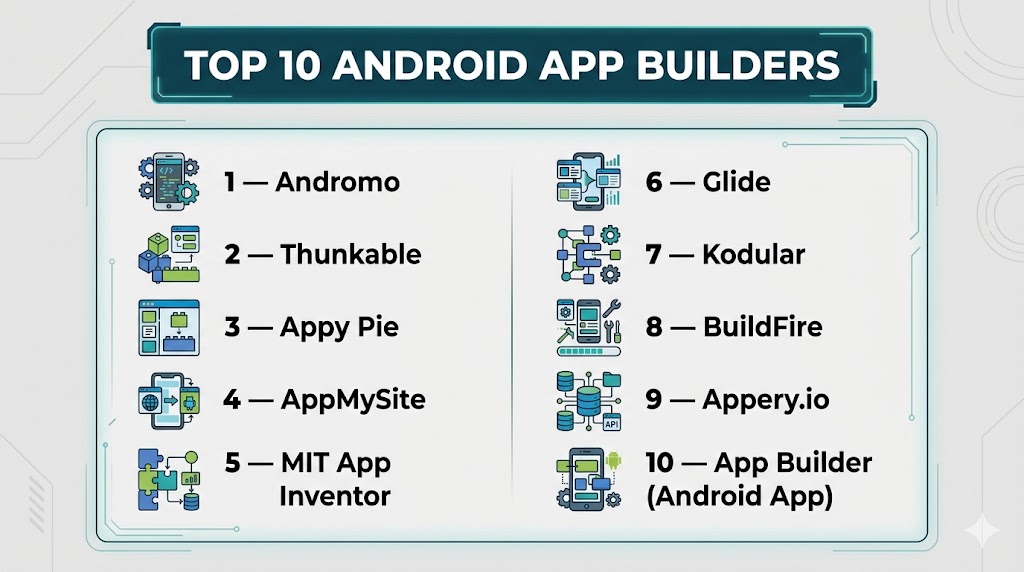
Top 10 Android App Builders
#1 — Andromo
Short description: A no-code platform for building Android apps with monetization features.
Key Features
- Drag-and-drop builder
- No coding required
- Ad monetization integration
- Templates
- App publishing support
Pros
- Beginner-friendly
- Built-in monetization
Cons
- Limited customization
- Paid plans
Platforms / Deployment
- Web
- Cloud
Integrations & Ecosystem
- Ad networks
- APIs
Support & Community
Good support and tutorials
#2 — Thunkable
Short description: A no-code builder for creating Android and iOS apps visually.
Key Features
- Drag-and-drop UI
- Logic blocks
- Cross-platform support
- API integration
- App publishing
Pros
- No coding required
- Cross-platform apps
Cons
- Limited advanced features
- Performance constraints
Platforms / Deployment
- Web
- Cloud
Support & Community
Strong beginner support
#3 — Appy Pie
Short description: A popular no-code app builder with AI-driven app creation.
Key Features
- Drag-and-drop builder
- AI app generation
- Templates
- Push notifications
- App publishing
Pros
- Easy to use
- Fast deployment
Cons
- Limited flexibility
- Subscription-based
#4 — AppMySite
Short description: A no-code platform for converting websites into Android apps.
Key Features
- Website-to-app conversion
- No coding required
- Fast publishing
- Real-time preview
- Push notifications
Pros
- Quick setup
- Ideal for businesses
Cons
- Limited customization
- Requires website
#5 — MIT App Inventor
Short description: A visual programming platform for building Android apps.
Key Features
- Drag-and-drop interface
- Block-based coding
- Educational tools
- Live testing
- Open-source
Pros
- Beginner-friendly
- Free to use
Cons
- Limited scalability
- Basic UI
#6 — Glide
Short description: A simple builder that creates apps from spreadsheets and data.
Key Features
- Spreadsheet-based apps
- Templates
- Mobile-friendly UI
- Data integration
- Fast deployment
Pros
- Extremely easy to use
- Quick setup
Cons
- Limited customization
- Not fully native
#7 — Kodular
Short description: A visual app builder similar to App Inventor with monetization support.
Key Features
- Drag-and-drop builder
- Monetization tools
- Extensions
- UI components
- Real-time testing
Pros
- Free platform
- Monetization support
Cons
- Limited advanced features
- UI limitations
#8 — BuildFire
Short description: A scalable app builder for businesses and enterprises.
Key Features
- Drag-and-drop builder
- Plugins marketplace
- Analytics
- Custom features
- App publishing
Pros
- Scalable
- Strong integrations
Cons
- Expensive
- Learning curve
#9 — Appery.io
Short description: A low-code platform for building Android apps with backend integration.
Key Features
- Drag-and-drop builder
- Cloud backend
- API integration
- Templates
- Cross-platform support
Pros
- Flexible
- Backend support
Cons
- Learning curve
- Pricing
#10 — App Builder (Android App)
Short description: A mobile-based tool for creating Android apps directly on your device.
Key Features
- Build apps on mobile
- No coding required for basic tasks
- JavaScript/Java support for advanced features
- APK export
- Ad integration
Pros
- Mobile-based development
- Easy to start
Cons
- Limited features
- Not ideal for complex apps
Comparison Table (Top 10)
| Tool Name | Best For | Platform(s) Supported | Deployment | Standout Feature | Public Rating |
|---|---|---|---|---|---|
| Andromo | Monetization apps | Web | Cloud | Ad integration | N/A |
| Thunkable | Beginners | Web | Cloud | No-code builder | N/A |
| Appy Pie | Quick apps | Web | Cloud | AI app creation | N/A |
| AppMySite | Website apps | Web | Cloud | Website-to-app | N/A |
| MIT App Inventor | Learning | Web | Cloud | Visual programming | N/A |
| Glide | Simple apps | Web | Cloud | Spreadsheet apps | N/A |
| Kodular | Free apps | Web | Cloud | Monetization tools | N/A |
| BuildFire | Businesses | Web | Cloud | Plugin ecosystem | N/A |
| Appery.io | Developers | Web | Cloud | Backend integration | N/A |
| App Builder | Mobile creation | Android | Local | Build on phone | N/A |
Evaluation & Scoring of Android App Builders
| Tool Name | Core | Ease | Integrations | Security | Performance | Support | Value | Weighted Total |
|---|---|---|---|---|---|---|---|---|
| Andromo | 8 | 9 | 7 | 6 | 8 | 7 | 8 | 7.9 |
| Thunkable | 8 | 9 | 7 | 6 | 7 | 8 | 8 | 7.8 |
| Appy Pie | 7 | 9 | 6 | 6 | 7 | 7 | 8 | 7.4 |
| AppMySite | 7 | 9 | 6 | 6 | 7 | 7 | 8 | 7.4 |
| MIT App Inventor | 7 | 10 | 5 | 6 | 6 | 8 | 9 | 7.3 |
| Glide | 7 | 10 | 6 | 6 | 7 | 7 | 9 | 7.5 |
| Kodular | 7 | 9 | 6 | 6 | 7 | 7 | 9 | 7.4 |
| BuildFire | 8 | 7 | 8 | 7 | 8 | 8 | 6 | 7.7 |
| Appery.io | 8 | 7 | 8 | 7 | 8 | 7 | 7 | 7.6 |
| App Builder | 6 | 9 | 5 | 5 | 6 | 6 | 8 | 6.8 |
Which Android App Builder Is Right for You?
Solo / Beginner
Use MIT App Inventor, Glide, or Thunkable for simplicity and learning.
SMB
Appy Pie or AppMySite offer fast deployment and ease of use.
Mid-Market
Andromo or Appery.io provide better features and flexibility.
Enterprise
BuildFire or advanced low-code platforms are ideal for scalability.
Budget vs Premium
- Budget: Kodular, MIT App Inventor
- Premium: BuildFire, Appery.io
Feature Depth vs Ease of Use
- Deep features: Appery.io, BuildFire
- Easy to use: Glide, Appy Pie
Integrations & Scalability
- Strong integrations: Appery.io, BuildFire
- Moderate: Appy Pie, Glide
Frequently Asked Questions (FAQs)
What are Android app builders?
They are tools that allow users to create Android apps without heavy coding.
Do I need coding skills?
Most tools require little or no coding.
Can I publish apps to Google Play?
Yes, most platforms support publishing.
Are they free?
Some offer free plans, while advanced features require payment.
Can I monetize apps?
Yes, many tools support ads and subscriptions.
Are they scalable?
Some tools support scalability, others are limited.
Can I build apps on mobile?
Yes, some tools allow mobile-based development
Do they support integrations?
Yes, most tools offer API integrations.
Are they secure?
Security varies by platform.
Can beginners use them?
Yes, many are designed for beginners.
Conclusion
Android app builders make it easy to create mobile apps without complex coding. The right platform depends on your goals, budget, and technical skills. Simple tools are ideal for beginners, while advanced platforms offer scalability and flexibility. It’s important to evaluate customization, integrations, and performance before choosing. No single tool fits all needs, so aligning with your project requirements is key. Start with a beginner-friendly platform and scale as your needs grow.