Introduction
Mind mapping tools are digital applications designed to help individuals and teams visually organize ideas, concepts, and information in a structured, hierarchical format. Starting from a central idea, users can branch out into subtopics, making it easier to brainstorm, plan, and understand complex relationships.
In today’s fast-paced and information-heavy work environments, mind mapping tools have become essential for improving clarity, productivity, and collaboration. Whether you’re planning a project, studying a subject, or developing a strategy, these tools enable structured thinking and better decision-making.
Common use cases include:
- Brainstorming and idea generation
- Project planning and task structuring
- Studying and note-taking
- Business strategy mapping
- Content planning and outlining
Key evaluation criteria:
- Ease of use and learning curve
- Visualization flexibility (layouts, themes)
- Collaboration capabilities
- Integration with productivity tools
- Export and sharing options
- Performance with large maps
- Cross-platform support
- AI-assisted features
- Offline access
- Pricing and scalability
Best for: Students, professionals, product managers, writers, consultants, and teams that rely on structured thinking and visual planning.
Not ideal for: Users who need linear document editing, complex data analysis, or heavy project tracking—where spreadsheets or project management tools may be more suitable.
Key Trends in Mind Mapping Tools
- AI-powered idea generation: Tools now assist with expanding nodes, summarizing concepts, and auto-structuring maps
- Real-time collaboration: Multiple users can co-edit maps simultaneously
- Cross-format visualization: Switching between mind maps, flowcharts, and outlines
- Cloud-first platforms: Easy access across devices with automatic syncing
- Template-driven workflows: Pre-built maps for productivity, education, and business use cases
- Integration ecosystems: Strong connections with note-taking and task management tools
- Mobile-first design: Optimized apps for on-the-go thinking
- Offline capabilities: Continued access without internet connectivity
- Presentation modes: Turning maps into slides or visual presentations
- Data linking: Connecting maps to external files and resources
How We Selected These Tools (Methodology)
- Evaluated market popularity and user adoption
- Assessed core mind mapping capabilities and flexibility
- Compared ease of use and onboarding experience
- Reviewed performance with large and complex maps
- Analyzed integration ecosystems and extensibility
- Considered security and data handling practices
- Evaluated cross-platform availability
- Included tools for different user segments (individuals to enterprise)
- Assessed innovation in AI and automation features
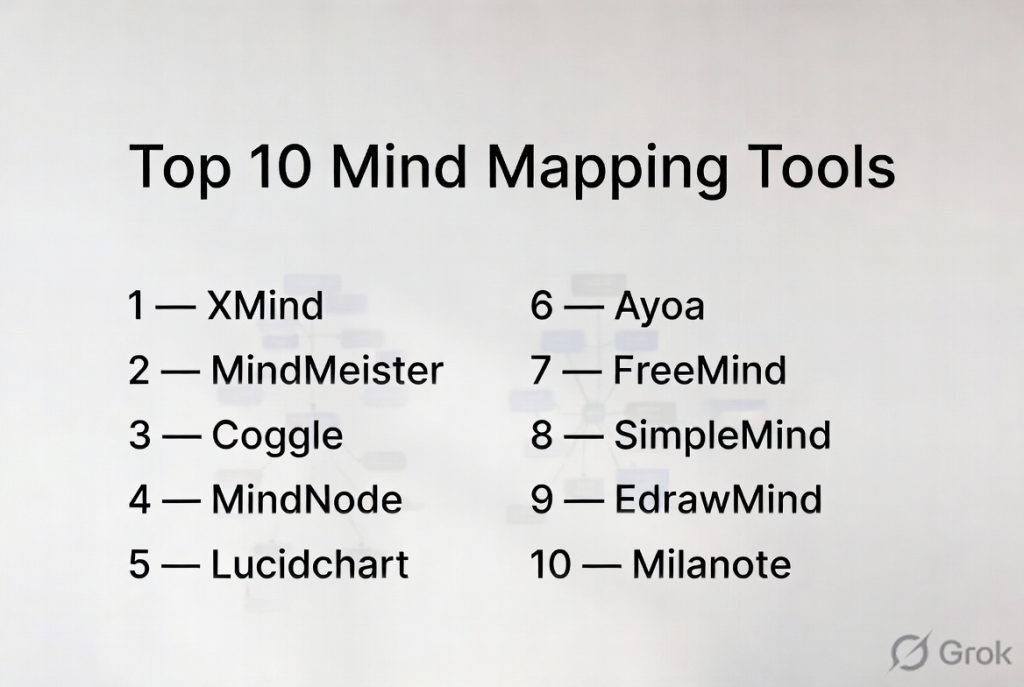
Top 10 Mind Mapping Tools
#1 — XMind
Short description: A widely used mind mapping tool known for its clean interface and powerful visualization capabilities.
Key Features
- Multiple map structures (tree, logic chart, org chart)
- Focus mode for distraction-free work
- Presentation mode
- Custom themes and styles
- Export to multiple formats
- Offline functionality
- Cross-platform sync
Pros
- Very easy to use
- Strong visualization options
- Works offline
Cons
- Limited collaboration features
- Advanced features require paid version
Platforms / Deployment
Web / Windows / macOS / Linux / iOS / Android
Cloud / Offline
Security & Compliance
Not publicly stated
Integrations & Ecosystem
XMind focuses more on standalone usage with limited integrations.
- Export to PDF and images
- File sharing options
Support & Community
Good documentation with an active user base.
#2 — MindMeister
Short description: A cloud-based mind mapping tool focused on real-time collaboration and team productivity.
Key Features
- Real-time collaboration
- Task management integration
- Custom themes
- Presentation mode
- Comments and discussions
- Version history
Pros
- Excellent for team collaboration
- Easy sharing and access
Cons
- Limited offline functionality
- Free plan restrictions
Platforms / Deployment
Web / iOS / Android
Cloud
Security & Compliance
Encryption, SSO
Other certifications not publicly stated
Integrations & Ecosystem
- MeisterTask
- Google Workspace
- Microsoft Teams
Support & Community
Strong support and onboarding resources.
#3 — Coggle
Short description: A simple and intuitive mind mapping tool designed for quick idea visualization.
Key Features
- Real-time collaboration
- Unlimited image uploads
- Version history
- Simple interface
- Auto-saving
Pros
- Extremely easy to use
- Fast setup
Cons
- Limited advanced features
- Basic customization
Platforms / Deployment
Web
Cloud
Security & Compliance
Not publicly stated
Integrations & Ecosystem
- Google Drive
Support & Community
Basic support with a simple learning curve.
#4 — MindNode
Short description: A beautifully designed mind mapping tool focused on Apple users.
Key Features
- Clean and intuitive interface
- Visual tagging and organization
- Focus mode
- Task integration
- Sync across Apple devices
Pros
- Excellent user experience
- Ideal for personal productivity
Cons
- Limited to Apple ecosystem
- Limited collaboration features
Platforms / Deployment
macOS / iOS
Cloud / Offline
Security & Compliance
Not publicly stated
Integrations & Ecosystem
- Apple ecosystem
- iCloud
Support & Community
Good documentation and user support.
#5 — Lucidchart
Short description: A versatile diagramming tool with strong mind mapping capabilities.
Key Features
- Mind maps and flowcharts
- Real-time collaboration
- Templates
- Data linking
- Drag-and-drop interface
Pros
- Highly versatile
- Strong collaboration
Cons
- Can be complex for beginners
- Pricing can scale quickly
Platforms / Deployment
Web
Cloud
Security & Compliance
SSO, encryption
SOC 2
Integrations & Ecosystem
- Google Workspace
- Microsoft Office
- Slack
- Jira
Support & Community
Strong enterprise support and resources.
#6 — Ayoa
Short description: A mind mapping and task management tool combining creativity with productivity.
Key Features
- Mind mapping and task boards
- AI idea generation
- Visual task tracking
- Collaboration tools
- Templates
Pros
- Combines tasks and mind maps
- Good for creative workflows
Cons
- Interface can feel busy
- Learning curve for new users
Platforms / Deployment
Web / Windows / macOS / iOS / Android
Cloud
Security & Compliance
Not publicly stated
Integrations & Ecosystem
- Google Calendar
- Dropbox
Support & Community
Good support with onboarding guides.
#7 — FreeMind
Short description: An open-source mind mapping tool focused on simplicity and offline usage.
Key Features
- Basic mind mapping
- Lightweight performance
- Open-source
- Keyboard shortcuts
- File export
Pros
- Free to use
- Works offline
Cons
- Outdated interface
- Limited features
Platforms / Deployment
Windows / macOS / Linux
Offline
Security & Compliance
Not publicly stated
Integrations & Ecosystem
Limited integrations
Support & Community
Community-driven support.
#8 — SimpleMind
Short description: A flexible mind mapping tool designed for personal and professional use.
Key Features
- Custom layouts
- Cross-platform sync
- Drag-and-drop interface
- Offline support
- Presentation mode
Pros
- Flexible layouts
- Works offline
Cons
- Limited collaboration features
- UI less modern
Platforms / Deployment
Windows / macOS / iOS / Android
Cloud / Offline
Security & Compliance
Not publicly stated
Integrations & Ecosystem
Basic file export and sharing
Support & Community
Moderate support and documentation.
#9 — EdrawMind
Short description: A feature-rich mind mapping tool with diagramming and presentation capabilities.
Key Features
- Multiple diagram types
- Presentation mode
- Templates
- Collaboration tools
- Export options
Pros
- Feature-rich
- Good for presentations
Cons
- Interface can be complex
- Some features locked behind paywall
Platforms / Deployment
Web / Windows / macOS / Linux / iOS / Android
Cloud
Security & Compliance
Not publicly stated
Integrations & Ecosystem
- File export formats
- Cloud storage
Support & Community
Decent documentation and support.
#10 — Milanote
Short description: A visual workspace tool ideal for creative mind mapping and project planning.
Key Features
- Visual boards and mind maps
- Drag-and-drop interface
- Collaboration tools
- Notes and media support
- Templates
Pros
- Great for creative workflows
- Flexible visual layout
Cons
- Not a traditional mind map tool
- Limited structured mapping
Platforms / Deployment
Web / iOS
Cloud
Security & Compliance
Not publicly stated
Integrations & Ecosystem
- File uploads
- Creative assets
Support & Community
Growing community with helpful guides.
Comparison Table (Top 10)
| Tool Name | Best For | Platform(s) Supported | Deployment | Standout Feature | Public Rating |
|---|---|---|---|---|---|
| XMind | Personal use | All major platforms | Cloud/Offline | Visualization | N/A |
| MindMeister | Teams | Web, Mobile | Cloud | Collaboration | N/A |
| Coggle | Beginners | Web | Cloud | Simplicity | N/A |
| MindNode | Apple users | macOS, iOS | Cloud/Offline | UI design | N/A |
| Lucidchart | Professionals | Web | Cloud | Versatility | N/A |
| Ayoa | Creative teams | All platforms | Cloud | Task + mind map | N/A |
| FreeMind | Offline users | Desktop | Offline | Open-source | N/A |
| SimpleMind | Flexible use | All platforms | Cloud/Offline | Custom layouts | N/A |
| EdrawMind | Presentations | All platforms | Cloud | Templates | N/A |
| Milanote | Creatives | Web, Mobile | Cloud | Visual boards | N/A |
Evaluation & Scoring of Mind Mapping Tools
| Tool Name | Core (25%) | Ease (15%) | Integrations (15%) | Security (10%) | Performance (10%) | Support (10%) | Value (15%) | Weighted Total |
|---|---|---|---|---|---|---|---|---|
| XMind | 9 | 9 | 6 | 6 | 8 | 7 | 8 | 7.9 |
| MindMeister | 8 | 8 | 8 | 7 | 8 | 8 | 7 | 7.9 |
| Coggle | 6 | 10 | 5 | 5 | 7 | 6 | 8 | 7.1 |
| MindNode | 8 | 9 | 5 | 6 | 8 | 7 | 7 | 7.5 |
| Lucidchart | 9 | 7 | 9 | 8 | 8 | 8 | 7 | 8.2 |
| Ayoa | 8 | 7 | 6 | 6 | 7 | 7 | 7 | 7.1 |
| FreeMind | 5 | 7 | 3 | 4 | 7 | 5 | 9 | 5.9 |
| SimpleMind | 7 | 8 | 5 | 5 | 7 | 6 | 7 | 6.8 |
| EdrawMind | 8 | 7 | 6 | 5 | 7 | 6 | 7 | 7.0 |
| Milanote | 7 | 8 | 5 | 5 | 7 | 7 | 7 | 6.9 |
How to interpret the scores:
- Scores are relative comparisons across tools
- Higher scores indicate broader capability and balance
- Lower scores may still suit specific use cases
- Choose based on your workflow rather than total score
Which Mind Mapping Tools Tool Is Right for You?
Solo / Freelancer
Best options: XMind, MindNode, Coggle
Focus on simplicity, offline access, and speed.
SMB
Best options: MindMeister, Lucidchart
Balance collaboration and usability.
Mid-Market
Best options: Lucidchart, Ayoa
Need integrations and scalability.
Enterprise
Best options: Lucidchart, MindMeister
Focus on collaboration, control, and integrations.
Budget vs Premium
- Budget: FreeMind, Coggle
- Premium: Lucidchart, MindMeister
Feature Depth vs Ease of Use
- Feature-rich: Lucidchart, EdrawMind
- Easy-to-use: Coggle, MindNode
Integrations & Scalability
- Strong: Lucidchart, MindMeister
- Limited: FreeMind, SimpleMind
Security & Compliance Needs
- Stronger options: Lucidchart
- Basic: Most others
Frequently Asked Questions (FAQs)
What are mind mapping tools used for?
They help visually organize ideas, plan projects, and structure information.
Are they free to use?
Many offer free versions with limited features.
Can teams collaborate in real time?
Yes, most modern tools support real-time collaboration.
Do they work offline?
Some tools offer offline capabilities.
Are they suitable for students?
Yes, they are widely used for studying and note-taking.
Can I export my maps?
Most tools support export to formats like PDF or images.
Are integrations important?
Yes, especially for team workflows.
Do they support large maps?
Most tools handle large maps, but performance varies.
Can I switch tools easily?
Migration may require manual adjustments.
What alternatives exist?
Note-taking apps and diagramming tools.
Conclusion
Mind mapping tools are powerful solutions for organizing thoughts, improving clarity, and enhancing collaboration. Whether you’re working individually or as part of a team, these tools can significantly improve how ideas are captured and executed.