Introduction
Kitchen Display Systems (KDS) are digital solutions that replace traditional paper tickets in restaurant kitchens with real-time order displays, workflow tracking, and communication tools. In simple terms, instead of printing orders, restaurants display them on screens in the kitchen, allowing chefs and staff to manage orders faster, more accurately, and more efficiently.
KDS platforms are essential because they reduce errors, improve order accuracy, speed up preparation times, and enhance coordination between front-of-house and kitchen teams. They are widely used in quick-service restaurants, cafes, cloud kitchens, and large restaurant chains. Common use cases include order routing, kitchen workflow management, order prioritization, and real-time status tracking.
Buyers should evaluate display customization, order routing logic, POS integration, performance reliability, ease of use, scalability, hardware compatibility, reporting, and support for multi-location operations.
Best for: restaurants, QSR chains, cloud kitchens, food trucks, and hospitality businesses with high order volumes.
Not ideal for: very small kitchens with low order volume or businesses that rely on simple manual workflows.
Key Trends in Kitchen Display Systems (KDS)
- Cloud-based KDS platforms replacing on-premise systems
- Integration with POS, online ordering, and delivery apps
- Real-time order tracking and kitchen analytics
- AI-driven order prioritization and workflow optimization
- Touchscreen and mobile-compatible kitchen displays
- Multi-station routing for complex kitchen operations
- Voice and alert-based notifications for faster response
- Increased focus on speed and accuracy in QSR environments
- Integration with inventory and kitchen management systems
- Omnichannel order management (dine-in, delivery, takeaway)
How We Selected These Tools (Methodology)
- Evaluated adoption across restaurants and hospitality chains
- Assessed order management and display functionality
- Reviewed integration with POS and online ordering systems
- Analyzed performance reliability in high-volume environments
- Considered ease of use for kitchen staff
- Evaluated scalability for multi-location operations
- Reviewed customization and workflow flexibility
- Assessed vendor ecosystem and integrations
- Considered support, onboarding, and documentation
- Factored in cost-effectiveness and ROI
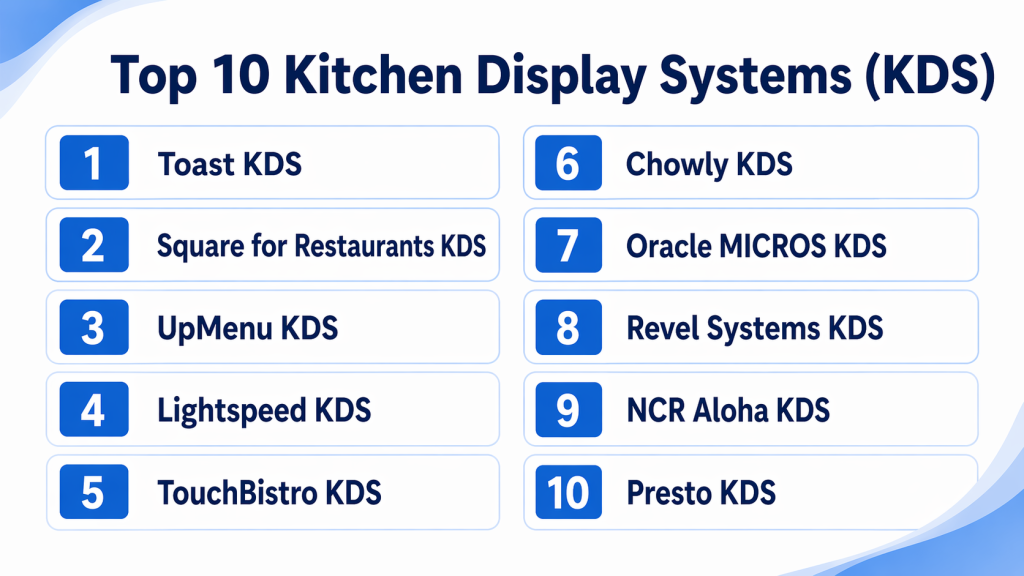
Top 10 Kitchen Display Systems (KDS)
#1 — Toast KDS
Short description : Toast KDS is a powerful cloud-based kitchen display system integrated with Toast POS, designed to streamline kitchen operations and improve order accuracy.
Key Features
- Real-time order display
- Order prioritization
- POS integration
- Kitchen performance tracking
- Touchscreen interface
Pros
- Seamless POS integration
- Easy to use
Cons
- Best within Toast ecosystem
- Limited standalone flexibility
Platforms / Deployment
- Web / Android / Cloud
Security & Compliance
- Not publicly stated
Integrations & Ecosystem
Toast KDS integrates deeply with restaurant operations and POS workflows.
- Toast POS
- Online ordering systems
- APIs
Support & Community
- Vendor support and documentation
#2 — Square for Restaurants KDS
Short description : Square KDS provides a simple and efficient kitchen display solution integrated with Square POS for small to mid-sized restaurants.
Key Features
- Order display
- Real-time updates
- POS integration
- Ticket management
- Analytics
Pros
- Easy setup
- Affordable
Cons
- Limited advanced features
- Best for SMBs
Platforms / Deployment
- Web / iOS / Cloud
Security & Compliance
- Not publicly stated
Integrations & Ecosystem
- Square POS
- Payment systems
- APIs
Support & Community
- Documentation and support
#3 — Lightspeed KDS
Short description : Lightspeed KDS is designed for restaurants needing advanced order management and integration with POS systems.
Key Features
- Order routing
- Real-time updates
- POS integration
- Analytics dashboards
- Multi-location support
Pros
- Strong integration capabilities
- Scalable
Cons
- Learning curve
- Premium pricing
Platforms / Deployment
- Web / Cloud
Security & Compliance
- Not publicly stated
Integrations & Ecosystem
- POS systems
- APIs
- Restaurant tools
Support & Community
- Vendor support
#4 — TouchBistro KDS
Short description : TouchBistro KDS integrates with TouchBistro POS to provide streamlined kitchen operations and order tracking.
Key Features
- Order display
- POS integration
- Table tracking
- Reporting tools
- Workflow management
Pros
- Restaurant-focused design
- Reliable performance
Cons
- Requires POS
- Limited customization
Platforms / Deployment
- iOS / Web / Cloud
Security & Compliance
- Not publicly stated
Integrations & Ecosystem
- POS systems
- APIs
Support & Community
- Vendor support
#5 — Chowly KDS
Short description : Chowly KDS focuses on consolidating orders from multiple delivery platforms into a single kitchen display.
Key Features
- Multi-channel order integration
- Real-time updates
- Delivery platform integration
- Order tracking
- Automation
Pros
- Great for delivery-heavy businesses
- Reduces order errors
Cons
- Limited POS features
- Integration setup required
Platforms / Deployment
- Web / Cloud
Security & Compliance
- Not publicly stated
Integrations & Ecosystem
- Delivery apps
- POS systems
- APIs
Support & Community
- Vendor support
#6 — Oracle MICROS KDS
Short description : Oracle MICROS KDS is an enterprise-grade kitchen display system designed for large restaurant chains.
Key Features
- Advanced order routing
- Real-time kitchen analytics
- Multi-location support
- POS integration
- Custom workflows
Pros
- Enterprise-grade
- Highly scalable
Cons
- Complex implementation
- Expensive
Platforms / Deployment
- Web / Cloud / On-premise
Security & Compliance
- Enterprise-level security
Integrations & Ecosystem
- Oracle ecosystem
- APIs
- POS systems
Support & Community
- Enterprise support
#7 — Revel Systems KDS
Short description : Revel KDS offers real-time order display and workflow optimization integrated with Revel POS.
Key Features
- Order display
- POS integration
- Workflow management
- Analytics
- Reporting
Pros
- Reliable
- Good integration
Cons
- Requires POS ecosystem
- Learning curve
Platforms / Deployment
- iOS / Cloud
Security & Compliance
- Not publicly stated
Integrations & Ecosystem
- POS systems
- APIs
Support & Community
- Vendor support
#8 — NCR Aloha KDS
Short description : NCR Aloha KDS is a widely used enterprise solution for managing high-volume restaurant operations.
Key Features
- Order management
- Real-time tracking
- POS integration
- Workflow optimization
- Reporting
Pros
- Strong enterprise features
- Reliable
Cons
- Expensive
- Complex setup
Platforms / Deployment
- Web / On-premise / Cloud
Security & Compliance
- Not publicly stated
Integrations & Ecosystem
- NCR ecosystem
- APIs
Support & Community
- Enterprise support
#9 — UpMenu KDS
Short description : UpMenu KDS is designed for small to mid-sized restaurants, offering simple and efficient kitchen display functionality.
Key Features
- Order display
- Real-time updates
- Online ordering integration
- Reporting
- Mobile support
Pros
- Easy to use
- Affordable
Cons
- Limited advanced features
- Not enterprise-ready
Platforms / Deployment
- Web / Cloud
Security & Compliance
- Not publicly stated
Integrations & Ecosystem
- Online ordering tools
- APIs
Support & Community
- Vendor support
#10 — Presto KDS
Short description : Presto KDS focuses on improving speed and efficiency in quick-service restaurant environments.
Key Features
- Order display
- Automation tools
- POS integration
- Analytics
- Workflow optimization
Pros
- Fast performance
- Good for QSRs
Cons
- Limited flexibility
- Niche focus
Platforms / Deployment
- Web / Cloud
Security & Compliance
- Not publicly stated
Integrations & Ecosystem
- POS systems
- APIs
Support & Community
- Vendor support
Comparison Table (Top 10)
| Tool Name | Best For | Platform(s) Supported | Deployment | Standout Feature | Public Rating |
|---|---|---|---|---|---|
| Toast KDS | SMB & enterprise | Android/Web | Cloud | POS integration | N/A |
| Square KDS | SMB | iOS/Web | Cloud | Easy setup | N/A |
| Lightspeed | Mid-market | Web | Cloud | Scalability | N/A |
| TouchBistro | SMB | iOS/Web | Cloud | Restaurant-focused | N/A |
| Chowly | Delivery-first | Web | Cloud | Multi-channel orders | N/A |
| Oracle MICROS | Enterprise | Web | Hybrid | Advanced routing | N/A |
| Revel Systems | SMB | iOS | Cloud | Workflow tools | N/A |
| NCR Aloha | Enterprise | Web | Hybrid | High-volume support | N/A |
| UpMenu | SMB | Web | Cloud | Simplicity | N/A |
| Presto | QSR | Web | Cloud | Speed optimization | N/A |
Evaluation & Scoring of Kitchen Display Systems (KDS)
| Tool Name | Core (25%) | Ease (15%) | Integrations (15%) | Security (10%) | Performance (10%) | Support (10%) | Value (15%) | Weighted Total |
|---|---|---|---|---|---|---|---|---|
| Toast KDS | 9 | 9 | 8 | 7 | 9 | 8 | 8 | 8.5 |
| Square KDS | 8 | 9 | 7 | 7 | 8 | 7 | 9 | 8.1 |
| Lightspeed | 8 | 7 | 8 | 7 | 8 | 7 | 7 | 7.6 |
| TouchBistro | 8 | 8 | 7 | 7 | 8 | 7 | 7 | 7.7 |
| Chowly | 8 | 8 | 8 | 7 | 8 | 7 | 7 | 7.8 |
| Oracle MICROS | 10 | 6 | 9 | 8 | 9 | 8 | 6 | 8.4 |
| Revel Systems | 8 | 7 | 8 | 7 | 8 | 7 | 7 | 7.6 |
| NCR Aloha | 9 | 6 | 9 | 8 | 9 | 8 | 6 | 8.2 |
| UpMenu | 7 | 9 | 7 | 7 | 7 | 7 | 8 | 7.5 |
| Presto | 8 | 8 | 7 | 7 | 9 | 7 | 7 | 7.8 |
Scores are comparative and should be used to shortlist tools based on priorities such as integration, scalability, and ease of use.
Which Kitchen Display System (KDS) Is Right for You?
Solo / Small Kitchen
- UpMenu or Square KDS for simplicity and affordability
SMB
- Toast KDS or TouchBistro for balanced features
Mid-Market
- Lightspeed or Chowly for better integrations and scalability
Enterprise
- Oracle MICROS or NCR Aloha for high-volume operations
Budget vs Premium
- Budget → Square, UpMenu
- Premium → Oracle MICROS, NCR
Feature Depth vs Ease of Use
- Easy → Square KDS
- Advanced → Oracle MICROS
Integrations & Scalability
- Choose tools with strong POS integrations
Security & Compliance Needs
- Enterprise systems provide better control and compliance
Frequently Asked Questions (FAQs)
1. What is a KDS system?
It is a digital system that displays kitchen orders instead of paper tickets.
2. Why is KDS important?
It improves speed, accuracy, and communication in kitchens.
3. Can it integrate with POS?
Yes, most KDS platforms integrate with POS systems.
4. Does it reduce errors?
Yes, it minimizes manual mistakes.
5. Is it suitable for small restaurants?
Yes, SMB-friendly options are available.
6. Does it support delivery orders?
Yes, many systems integrate with delivery platforms.
7. Is it cloud-based?
Most modern KDS solutions are cloud-based.
8. Can it improve kitchen efficiency?
Yes, significantly by streamlining workflows.
9. How long does implementation take?
Cloud systems are quick; enterprise systems take longer.
10. What is the biggest benefit?
Faster service and better order accuracy.
Conclusion
Kitchen Display Systems are transforming how restaurants manage orders and kitchen workflows by replacing outdated paper-based processes with real-time digital solutions. From small cafes to large restaurant chains, KDS platforms help improve speed, accuracy, and overall efficiency. SMBs can benefit from easy-to-use tools like Square or UpMenu, while enterprises should consider Oracle MICROS or NCR Aloha for advanced capabilities. The right system depends on your kitchen complexity, order volume, and integration needs. A smart approach is to test a few solutions, evaluate their impact on operations, and choose one that enhances productivity and customer experience.