Introduction
Application Lifecycle Management (ALM) Suites are end-to-end platforms that manage the entire journey of software applications—from idea, requirements, design, development, testing, deployment, to maintenance and retirement. These tools unify people, processes, and technology into a single system so teams can deliver software faster, with better quality, and full traceability.
In modern software development, ALM suites are critical because organizations now work in fast Agile and DevOps cycles, often with distributed teams and complex release pipelines. Without a unified ALM system, teams struggle with disconnected tools, unclear requirements, and poor visibility across the lifecycle.
Real-world use cases include:
- Managing full software lifecycle from planning to deployment
- Aligning business requirements with engineering execution
- Ensuring compliance in regulated industries (finance, healthcare, aerospace)
- Tracking defects, test cases, and release cycles in one system
- Supporting Agile, DevOps, and hybrid development workflows
- Providing audit-ready documentation and traceability
When evaluating ALM suites, buyers should consider:
- End-to-end lifecycle coverage (requirements to release)
- Requirements traceability and change management
- Agile and DevOps integration capabilities
- Test management and QA integration
- Version control and configuration management
- Collaboration across distributed teams
- Automation and workflow orchestration
- Reporting, dashboards, and analytics
- Security, compliance, and audit readiness
- Scalability for enterprise-level systems
Best for: Enterprise IT teams, software engineering organizations, product companies, regulated industries, and large-scale DevOps teams.
Not ideal for: Small projects, simple apps, or teams that only need lightweight issue tracking or basic project management.
Key Trends in ALM Suites
- AI-assisted requirement analysis and test generation
- Deep DevOps integration across CI/CD pipelines
- Shift from siloed tools to unified lifecycle platforms
- Cloud-native ALM adoption replacing on-prem systems
- Real-time collaboration across global engineering teams
- Increased automation in release and change management
- Stronger focus on compliance and auditability
- Integration with observability and monitoring platforms
- Model-based systems engineering (MBSE) adoption
- Product lifecycle convergence (ALM + PLM + DevOps)
How We Selected These Tools (Methodology)
- Market adoption across enterprise software teams
- Depth of lifecycle coverage (end-to-end ALM support)
- Requirements, testing, and release management capabilities
- Integration with DevOps and development ecosystems
- Scalability for enterprise-grade applications
- Security, governance, and compliance readiness
- Collaboration and workflow management strength
- Automation and AI-enabled capabilities
- Reporting, analytics, and traceability features
- Balance between traditional ALM and modern SaaS platforms
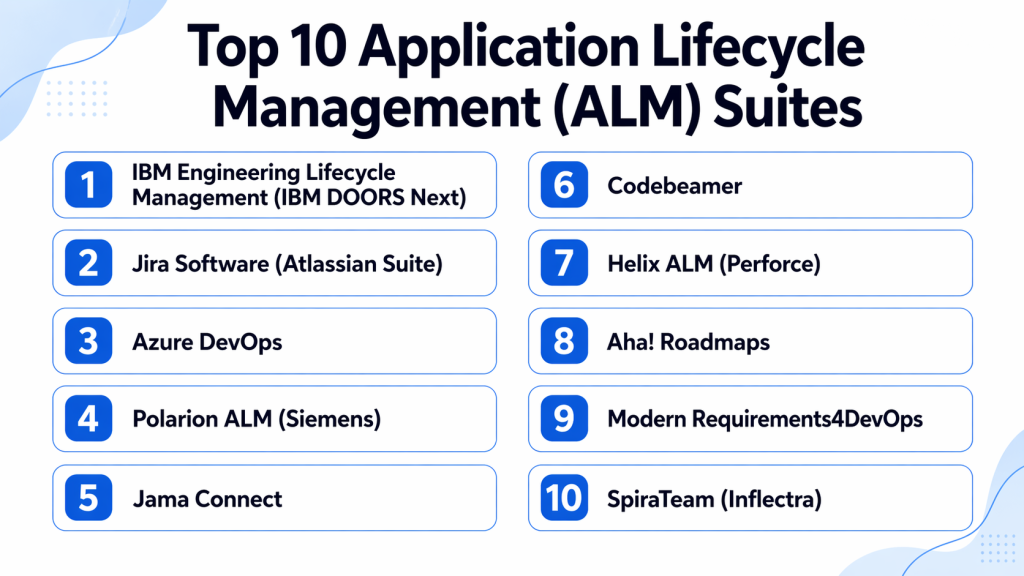
Top 10 Application Lifecycle Management (ALM) Suites
#1 — IBM Engineering Lifecycle Management (DOORS Next + ELM Suite)
Short description: IBM ELM is a powerful enterprise ALM suite designed for complex systems engineering, offering end-to-end lifecycle management with strong traceability, compliance, and integration capabilities. It is widely used in aerospace, automotive, and defense industries where precision and governance are critical.
Key Features
- End-to-end requirements traceability
- Change and configuration management
- Test and quality management integration
- Workflow automation across lifecycle stages
- Compliance and audit reporting
- Cross-team collaboration tools
Pros
- Extremely strong for regulated industries
- Best-in-class traceability and governance
Cons
- Complex implementation and onboarding
- High cost for smaller organizations
Platforms / Deployment
- Web
- Cloud / On-premises
Security & Compliance
- Role-based access control
- Encryption and audit logging
- Strong enterprise compliance frameworks
Integrations & Ecosystem
- DevOps tools
- Testing platforms
- IBM engineering suite
- APIs for enterprise integration
Support & Community
- Enterprise-level support
- Extensive documentation and training programs
#2 — Jira Software (Atlassian Suite)
Short description: Jira is a widely adopted Agile project and lifecycle management tool that acts as a flexible ALM system when combined with Confluence, Bitbucket, and CI/CD integrations.
Key Features
- Agile boards (Scrum and Kanban)
- Issue and requirement tracking
- Sprint planning and backlog management
- Workflow automation
- Reporting dashboards
- DevOps integrations
Pros
- Highly flexible and customizable
- Strong ecosystem and integrations
Cons
- Requires configuration for full ALM usage
- Can become complex at scale
Platforms / Deployment
- Web
- Cloud / Self-hosted
Security & Compliance
- RBAC, encryption, audit logs
- Enterprise-grade security options
Integrations & Ecosystem
- Bitbucket, GitHub, GitLab
- Confluence
- CI/CD tools
- Marketplace apps
Support & Community
- Massive global user community
- Strong documentation
#3 — Azure DevOps
Short description: Azure DevOps is Microsoft’s integrated ALM platform that covers planning, development, testing, and deployment within a unified DevOps ecosystem.
Key Features
- Boards for work tracking
- Repos for version control
- Pipelines for CI/CD automation
- Test Plans for QA management
- Release tracking
- Reporting dashboards
Pros
- Strong end-to-end DevOps integration
- Ideal for Microsoft-centric environments
Cons
- Complex for beginners
- Best suited for enterprise workflows
Platforms / Deployment
- Web
- Cloud
Security & Compliance
- Enterprise security controls
- RBAC and encryption
Integrations & Ecosystem
- GitHub
- Azure Cloud services
- Microsoft ecosystem tools
- APIs
Support & Community
- Strong enterprise support
- Microsoft documentation ecosystem
#4 — Polarion ALM (Siemens)
Short description: Polarion ALM is a robust lifecycle management platform focused on requirements-driven development and compliance-heavy industries.
Key Features
- Requirements lifecycle management
- Full traceability across lifecycle
- Test and defect management
- Workflow automation
- Version control
- Compliance reporting
Pros
- Strong for safety-critical industries
- Excellent traceability model
Cons
- Steep learning curve
- Requires training for adoption
Platforms / Deployment
- Web
- Cloud / On-premises
Security & Compliance
- Enterprise-grade access control
- Audit-ready documentation
Integrations & Ecosystem
- Siemens tools
- DevOps pipelines
- APIs
Support & Community
- Enterprise support
- Industry-focused training
#5 — Jama Connect
Short description: Jama Connect is a modern requirements and ALM platform designed for product development teams needing real-time traceability and collaboration.
Key Features
- Live traceability matrix
- Requirements management
- Risk and test integration
- Review and approval workflows
- Collaboration tools
- Change tracking
Pros
- Excellent real-time collaboration
- Strong visualization of dependencies
Cons
- Premium pricing
- Requires structured onboarding
Platforms / Deployment
- Web
- Cloud
Security & Compliance
- RBAC and encryption
- Not publicly stated certifications
Integrations & Ecosystem
- Jira
- Azure DevOps
- Testing tools
- APIs
Support & Community
- Strong enterprise onboarding support
- Training resources available
#6 — Codebeamer
Short description: Codebeamer is an ALM platform built for complex product development with strong requirements, risk, and test management capabilities.
Key Features
- Requirements and risk management
- Test management integration
- End-to-end traceability
- Workflow automation
- Agile support
- Product lifecycle tracking
Pros
- Strong for engineering-heavy projects
- Excellent compliance support
Cons
- Complex interface
- Enterprise-focused pricing
Platforms / Deployment
- Web
- Cloud / On-premises
Security & Compliance
- RBAC and encryption
- Enterprise compliance support
Integrations & Ecosystem
- DevOps tools
- Testing systems
- APIs
Support & Community
- Enterprise-level support
#7 — Helix ALM (Perforce)
Short description: Helix ALM is a unified platform for requirements, test, and defect management designed for regulated and high-complexity environments.
Key Features
- Requirements management
- Test case tracking
- Defect lifecycle management
- Traceability reporting
- Workflow automation
- Version control integration
Pros
- Strong ALM suite in regulated industries
- Excellent traceability
Cons
- High complexity
- Higher cost
Platforms / Deployment
- Web
- Cloud / On-premises
Security & Compliance
- RBAC and encryption
- Enterprise compliance support
Integrations & Ecosystem
- Perforce tools
- DevOps systems
- APIs
Support & Community
- Strong enterprise support
#8 — Aha! Roadmaps (ALM Extension)
Short description: Aha! is primarily a product management tool but functions as a lightweight ALM suite for requirements, roadmap planning, and strategy execution.
Key Features
- Requirements planning
- Product roadmap management
- Idea collection and prioritization
- Workflow customization
- Collaboration tools
- Reporting dashboards
Pros
- Strong strategic planning support
- Easy roadmap visualization
Cons
- Limited engineering depth
- Not full enterprise ALM
Platforms / Deployment
- Web
- Cloud
Security & Compliance
- RBAC and encryption
- Not publicly stated certifications
Integrations & Ecosystem
- Jira
- Dev tools
- APIs
Support & Community
- Strong customer support
#9 — Modern Requirements4DevOps
Short description: This tool extends Azure DevOps with full ALM capabilities, especially for requirements and documentation management.
Key Features
- Requirements management inside DevOps
- Traceability matrix
- Document generation
- Workflow automation
- Compliance tracking
- Review workflows
Pros
- Strong Azure DevOps integration
- Excellent documentation features
Cons
- Limited outside Microsoft ecosystem
- Dependency on Azure DevOps
Platforms / Deployment
- Web
- Cloud
Security & Compliance
- RBAC and encryption
- Enterprise compliance support
Integrations & Ecosystem
- Azure DevOps
- Microsoft ecosystem
- APIs
Support & Community
- Strong enterprise support
#10 — SpiraTeam (Inflectra)
Short description: SpiraTeam is a unified ALM platform combining requirements, test, and defect management into a single integrated system.
Key Features
- Requirements management
- Test case management
- Defect tracking
- Release planning
- Workflow automation
- Reporting dashboards
Pros
- All-in-one ALM suite
- Strong traceability
Cons
- UI less modern than competitors
- Moderate learning curve
Platforms / Deployment
- Web
- Cloud / On-premises
Security & Compliance
- RBAC and encryption
- Enterprise security support
Integrations & Ecosystem
- DevOps tools
- Testing frameworks
- APIs
Support & Community
- Strong enterprise documentation
Comparison Table (Top 10)
| Tool Name | Best For | Platform(s) Supported | Deployment | Standout Feature | Public Rating |
|---|---|---|---|---|---|
| IBM ELM | Enterprise systems | Web | Cloud/On-prem | Traceability | N/A |
| Jira | Agile teams | Web | Cloud/Self-hosted | Workflow flexibility | N/A |
| Azure DevOps | Microsoft teams | Web | Cloud | DevOps integration | N/A |
| Polarion ALM | Regulated industries | Web | Cloud/On-prem | Compliance tracking | N/A |
| Jama Connect | Product teams | Web | Cloud | Live traceability | N/A |
| Codebeamer | Engineering teams | Web | Cloud/On-prem | Risk management | N/A |
| Helix ALM | Enterprises | Web | Cloud/On-prem | Unified ALM suite | N/A |
| Aha! | Product strategy | Web | Cloud | Roadmapping | N/A |
| Modern Requirements4DevOps | Azure users | Web | Cloud | DevOps extension | N/A |
| SpiraTeam | Mid-market teams | Web | Cloud/On-prem | All-in-one ALM | N/A |
Evaluation & Scoring of ALM Suites
| Tool Name | Core (25%) | Ease (15%) | Integrations (15%) | Security (10%) | Performance (10%) | Support (10%) | Value (15%) | Weighted Total |
|---|---|---|---|---|---|---|---|---|
| IBM ELM | 10 | 6 | 9 | 10 | 9 | 9 | 7 | 8.60 |
| Jira | 8 | 9 | 10 | 9 | 9 | 9 | 10 | 8.90 |
| Azure DevOps | 10 | 7 | 10 | 9 | 9 | 9 | 8 | 8.85 |
| Polarion | 10 | 7 | 9 | 10 | 9 | 9 | 7 | 8.55 |
| Jama Connect | 9 | 8 | 9 | 9 | 9 | 9 | 8 | 8.65 |
| Codebeamer | 9 | 7 | 9 | 9 | 9 | 9 | 7 | 8.35 |
| Helix ALM | 9 | 7 | 9 | 9 | 9 | 9 | 7 | 8.40 |
| Aha! | 8 | 8 | 9 | 9 | 8 | 8 | 8 | 8.25 |
| Modern Req4DevOps | 8 | 8 | 10 | 9 | 8 | 8 | 9 | 8.45 |
| SpiraTeam | 9 | 8 | 9 | 9 | 9 | 9 | 8 | 8.60 |
Which ALM Suite Is Right for You?
Solo / Freelancer
Aha! or Jira for lightweight lifecycle tracking.
SMB
Jira, SpiraTeam, and Aha! for structured but flexible ALM workflows.
Mid-Market
Jama Connect, Codebeamer, and Helix ALM for scalable development environments.
Enterprise
IBM ELM, Polarion ALM, and Azure DevOps for full lifecycle governance.
Budget vs Premium
SMBs benefit from flexible tools; enterprises need compliance-heavy ALM suites.
Feature Depth vs Ease of Use
Enterprise ALM tools are powerful but require onboarding and training.
Integrations & Scalability
Choose tools that integrate deeply with DevOps, testing, and CI/CD pipelines.
Security & Compliance Needs
Enterprise ALM tools must support RBAC, encryption, audit logs, and regulatory standards.
Frequently Asked Questions (FAQs)
1. What is an ALM suite?
It is a platform that manages the entire software lifecycle from idea to retirement.
2. How is ALM different from DevOps?
ALM covers the full lifecycle, while DevOps focuses on development and operations.
3. Do ALM tools support Agile?
Yes, most modern ALM tools support Agile and hybrid methodologies.
4. Are ALM suites expensive?
Enterprise ALM suites are expensive, while SMB tools are more affordable.
5. Do they integrate with Jira or Git?
Yes, most ALM tools integrate with Git, Jira, and DevOps platforms.
6. Are ALM tools cloud-based?
Most modern ALM tools are cloud-based, with hybrid options available.
7. Who uses ALM tools?
Product managers, engineers, QA teams, and enterprise IT teams.
8. Do ALM tools improve productivity?
Yes, they reduce fragmentation and improve lifecycle visibility.
9. Are ALM tools only for large enterprises?
No, SMB-focused ALM tools also exist.
10. What is the biggest benefit?
End-to-end visibility and traceability across software development.
Conclusion
Application Lifecycle Management (ALM) Suites are essential for organizations that want complete control over software development from planning to deployment and maintenance. SMBs often rely on tools like Jira, Aha!, and SpiraTeam for flexibility, while enterprises depend on IBM ELM, Polarion, and Azure DevOps for deep governance and traceability. The right ALM suite depends on complexity, compliance needs, and integration requirements. Organizations should prioritize lifecycle coverage, scalability, and DevOps integration when selecting a platform.