Introduction
Mocking & Service Virtualization Tools help software teams simulate APIs, third-party systems, microservices, databases, and dependent applications during development and testing. Instead of waiting for unavailable systems or unstable environments, teams can create realistic virtual services and predictable responses to continue building and validating software faster.
As modern applications rely on distributed architectures, external integrations, and microservices, dependency delays can slow releases. Mocking and virtualization tools solve this by enabling isolated testing, parallel development, CI/CD automation, and failure scenario simulation. They reduce bottlenecks, improve quality, and accelerate delivery.
Common use cases include:
- API mocking during development
- Simulating unavailable third-party systems
- Microservices integration testing
- CI/CD pipeline automation
- Performance and failure testing
- Contract testing workflows
- QA environment stabilization
- Faster parallel development
Buyers should evaluate:
- Ease of mock creation
- Protocol support
- Realistic response simulation
- Team collaboration features
- CI/CD integrations
- Scalability
- Security controls
- Analytics and reporting
- Cloud or self-hosted deployment
- Pricing and support quality
Best for: Developers, QA teams, DevOps engineers, SRE teams, enterprises, SaaS companies, and API-driven product teams.
Not ideal for: Very simple standalone apps with no integrations or teams that never test dependent systems.
Key Trends in Mocking & Service Virtualization Tools
- API-first development accelerating adoption
- AI-assisted mock generation emerging
- Contract testing integrations increasing
- Cloud-based mock environments expanding
- Shift-left dependency testing growing
- Chaos and fault injection scenarios rising
- Better CI/CD automation support
- Security testing with simulated services increasing
- Microservices dependency management improving
- Real-time collaboration features growing
How We Selected These Tools (Methodology)
These tools were selected based on:
- Market recognition and adoption
- Protocol coverage
- Ease of setup
- Realism of virtual services
- CI/CD compatibility
- Team collaboration features
- Scalability
- Security and governance options
- Community or vendor support
- Long-term relevance
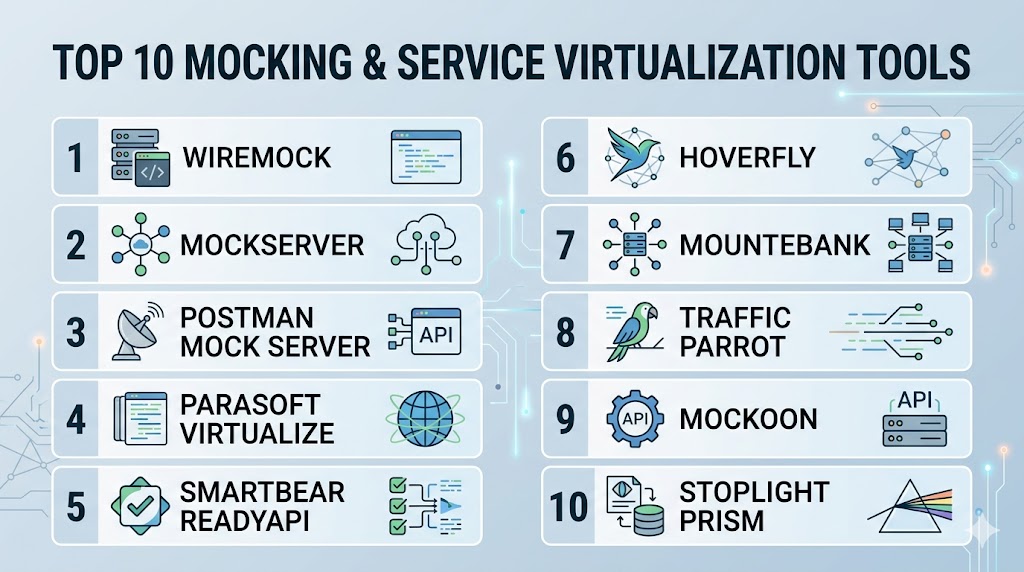
Top 10 Mocking & Service Virtualization Tools
#1 — WireMock
Short description:
One of the most popular API mocking tools used for simulating HTTP services in development and automated testing.
Key Features
- REST API mocking
- Request matching
- Dynamic responses
- Fault simulation
- Record and playback
- CI/CD compatibility
- Local and cloud workflows
Pros
- Strong developer adoption
- Great automation fit
- Flexible configuration
Cons
- Technical setup for beginners
- Advanced governance varies by edition
- Primarily HTTP-focused strength
Platforms / Deployment
Windows / Linux / macOS / Cloud
Security & Compliance
Depends on deployment controls.
Integrations & Ecosystem
Strong CI/CD and API testing compatibility.
Support & Community
Large global community.
#2 — Postman Mock Servers
Short description:
Mock server capability within a widely used API platform for rapid API prototyping and collaboration.
Key Features
- Fast mock creation
- Collection-based workflows
- Team collaboration
- API examples support
- Cloud accessibility
- Easy sharing
- Developer-friendly UX
Pros
- Very easy to start
- Great for API teams
- Strong collaboration workflows
Cons
- Best for API-focused use cases
- Deep enterprise virtualization limited vs specialists
- Subscription tiers may matter
Platforms / Deployment
Web / Cloud
Security & Compliance
Workspace permissions vary by plan.
Integrations & Ecosystem
Strong API lifecycle ecosystem fit.
Support & Community
Huge user base.
#3 — SmartBear Virtualize
Short description:
Enterprise service virtualization platform designed for complex dependencies and large QA programs.
Key Features
- Multi-protocol virtualization
- Dependency simulation
- Performance scenario support
- Team governance
- Enterprise integrations
- Reusable virtual assets
- Advanced reporting
Pros
- Strong enterprise depth
- Broad protocol support
- Great for complex systems
Cons
- Premium pricing
- More than SMBs may need
- Learning curve possible
Platforms / Deployment
Cloud / Self-hosted / Hybrid
Security & Compliance
RBAC, governance controls vary by edition.
Integrations & Ecosystem
Strong QA and enterprise testing compatibility.
Support & Community
Commercial support model.
#4 — Broadcom Service Virtualization
Short description:
Enterprise-grade virtualization platform focused on simulating complex backend and legacy dependencies.
Key Features
- Multi-system simulation
- Mainframe and legacy support
- Performance testing alignment
- Governance workflows
- Enterprise scalability
- Monitoring tools
- Test environment acceleration
Pros
- Strong enterprise legacy relevance
- Excellent complex dependency coverage
- Scalable operations
Cons
- Premium pricing
- Best suited for large enterprises
- Implementation effort required
Platforms / Deployment
Cloud / Hybrid
Security & Compliance
Enterprise controls, RBAC, auditing.
Integrations & Ecosystem
Strong enterprise QA ecosystem compatibility.
Support & Community
Commercial enterprise support.
#5 — Mountebank
Short description:
Open-source tool for multi-protocol service virtualization and API mocking.
Key Features
- Multi-protocol support
- Stubs and imposters
- Dynamic responses
- Fault simulation
- CLI workflows
- Automation friendly
- Lightweight runtime
Pros
- Open-source flexibility
- Good protocol variety
- Useful for engineers
Cons
- Requires technical setup
- Smaller ecosystem than leaders
- UI simplicity compared with premium tools
Platforms / Deployment
Windows / Linux / macOS
Security & Compliance
Depends on deployment controls.
Integrations & Ecosystem
Good fit for engineering automation teams.
Support & Community
Open-source community support.
#6 — MockServer
Short description:
Developer-focused tool for mocking HTTP and HTTPS services with verification capabilities.
Key Features
- API mocking
- Request verification
- Dynamic expectations
- Proxying support
- Secure connections
- Automation support
- CI/CD compatibility
Pros
- Strong test automation fit
- Good verification workflows
- Lightweight setup
Cons
- More technical than UI tools
- Primarily API-focused
- Smaller mainstream visibility
Platforms / Deployment
Windows / Linux / macOS
Security & Compliance
Depends on deployment model.
Integrations & Ecosystem
Strong developer testing compatibility.
Support & Community
Active technical community.
#7 — Parasoft Virtualize
Short description:
Enterprise service virtualization platform built for continuous testing and complex integration landscapes.
Key Features
- Service simulation
- Data environment support
- CI/CD integrations
- Performance scenarios
- Team collaboration
- Governance controls
- Enterprise analytics
Pros
- Strong continuous testing focus
- Good enterprise workflows
- Broad use-case coverage
Cons
- Premium pricing
- Best for larger organizations
- Smaller mainstream awareness
Platforms / Deployment
Cloud / Hybrid
Security & Compliance
RBAC, governance, enterprise controls.
Integrations & Ecosystem
Strong enterprise QA compatibility.
Support & Community
Commercial support available.
#8 — Beeceptor
Short description:
Cloud-based mock API platform focused on quick prototyping and webhook testing.
Key Features
- Fast mock endpoints
- Webhook testing
- Request inspection
- Rules-based responses
- Easy sharing
- Lightweight setup
- Cloud convenience
Pros
- Very fast onboarding
- Great for prototypes
- Useful webhook workflows
Cons
- Less enterprise depth
- Primarily API use cases
- Scale needs vary by plan
Platforms / Deployment
Cloud
Security & Compliance
Depends on subscription tier.
Integrations & Ecosystem
Great for developers and integrations testing.
Support & Community
Growing user adoption.
#9 — Hoverfly
Short description:
Open-source API simulation tool used for testing and traffic capture workflows.
Key Features
- API simulation
- Traffic capture
- Middleware support
- Lightweight runtime
- Automation workflows
- Request matching
- Open-source flexibility
Pros
- Good capture workflows
- Lightweight usage
- Strong engineering value
Cons
- Smaller ecosystem
- More technical learning curve
- Limited enterprise governance features
Platforms / Deployment
Windows / Linux / macOS
Security & Compliance
Depends on deployment controls.
Integrations & Ecosystem
Good CI/CD engineering fit.
Support & Community
Open-source community.
#10 — ReadyAPI Virtualization
Short description:
Part of a broader API testing ecosystem with service virtualization for QA teams.
Key Features
- API virtualization
- GUI workflows
- Team collaboration
- Scenario simulation
- Integration testing support
- Reporting dashboards
- Enterprise connectivity
Pros
- Good for QA teams
- GUI-friendly workflows
- Strong API testing alignment
Cons
- Commercial pricing
- Best within same ecosystem
- Smaller mindshare than leaders
Platforms / Deployment
Windows / Cloud / Hybrid
Security & Compliance
Permissions and controls vary by edition.
Integrations & Ecosystem
Strong SmartBear ecosystem compatibility.
Support & Community
Commercial support model.
Comparison Table (Top 10)
| Tool Name | Best For | Platform(s) Supported | Deployment | Standout Feature | Public Rating |
|---|---|---|---|---|---|
| WireMock | Dev teams | Multi-platform | Hybrid | Popular API mocking | N/A |
| Postman Mock Servers | API teams | Web | Cloud | Easy collaboration | N/A |
| SmartBear Virtualize | Enterprises | Multi-platform | Hybrid | Broad protocol depth | N/A |
| Broadcom SV | Legacy enterprises | Multi-platform | Hybrid | Complex dependency simulation | N/A |
| Mountebank | Engineers | Multi-platform | Self-hosted | Multi-protocol OSS | N/A |
| MockServer | Automation teams | Multi-platform | Self-hosted | Verification workflows | N/A |
| Parasoft Virtualize | Continuous testing | Multi-platform | Hybrid | Enterprise testing fit | N/A |
| Beeceptor | Prototyping | Cloud | Cloud | Fast mock APIs | N/A |
| Hoverfly | CI teams | Multi-platform | Self-hosted | Traffic capture | N/A |
| ReadyAPI Virtualization | QA teams | Multi-platform | Hybrid | GUI virtualization | N/A |
Evaluation & Scoring of Mocking & Service Virtualization Tools
| Tool Name | Core | Ease | Integrations | Security | Performance | Support | Value | Weighted Total |
|---|---|---|---|---|---|---|---|---|
| WireMock | 9 | 8 | 9 | 7 | 8 | 9 | 10 | 8.7 |
| Postman Mock Servers | 8 | 10 | 9 | 8 | 8 | 8 | 8 | 8.5 |
| SmartBear Virtualize | 9 | 7 | 9 | 9 | 8 | 8 | 6 | 8.0 |
| Broadcom SV | 9 | 6 | 8 | 9 | 8 | 8 | 6 | 7.8 |
| Mountebank | 8 | 7 | 7 | 7 | 8 | 7 | 10 | 7.8 |
| MockServer | 8 | 7 | 8 | 7 | 8 | 7 | 9 | 7.9 |
| Parasoft Virtualize | 8 | 7 | 8 | 9 | 8 | 8 | 6 | 7.8 |
| Beeceptor | 7 | 10 | 7 | 7 | 7 | 7 | 9 | 7.9 |
| Hoverfly | 7 | 7 | 7 | 7 | 8 | 7 | 9 | 7.5 |
| ReadyAPI Virtualization | 8 | 8 | 8 | 8 | 8 | 8 | 7 | 7.9 |
These scores are comparative benchmarks. The best choice depends on whether you need lightweight API mocks or enterprise-grade dependency virtualization.
Which Mocking & Service Virtualization Tool Is Right for You?
Solo / Freelancer
Choose WireMock, Beeceptor, or Postman Mock Servers.
SMB
Choose WireMock, Postman, MockServer, or Mountebank.
Mid-Market
Choose WireMock, SmartBear Virtualize, or ReadyAPI Virtualization.
Enterprise
Choose SmartBear Virtualize, Broadcom Service Virtualization, or Parasoft Virtualize.
Budget vs Premium
Budget: WireMock, Mountebank, Hoverfly
Premium: SmartBear, Broadcom, Parasoft
Feature Depth vs Ease of Use
Depth: SmartBear, Broadcom
Ease: Postman, Beeceptor
Integrations & Scalability
Strong options: WireMock, SmartBear, Parasoft.
Security & Compliance Needs
Strong choices: SmartBear, Broadcom, Parasoft.
Frequently Asked Questions (FAQs)
1. What is service virtualization?
It simulates dependent systems for testing and development.
2. What is mocking?
Creating fake responses for APIs or services.
3. Why use these tools?
They remove dependency delays and speed testing.
4. Which tool is best for APIs?
WireMock and Postman are popular choices.
5. Which tools suit enterprises?
SmartBear, Broadcom, and Parasoft are common options.
6. Are open-source tools available?
Yes, WireMock, Mountebank, Hoverfly, and MockServer.
7. Can they fit CI/CD?
Yes, many integrate well with pipelines.
8. Can I simulate failures?
Yes, many tools support delays and error scenarios.
9. What should I evaluate first?
Protocol support, realism, ease of use, and integrations.
10. Are they only for QA teams?
No, developers and DevOps teams benefit heavily too.
Conclusion
Mocking & Service Virtualization Tools are essential for modern teams building software with multiple dependencies, APIs, and distributed services. The best platform depends on whether you need lightweight developer mocking or enterprise-grade system simulation. Some teams prioritize speed and simplicity, while others need governance, multi-protocol coverage, and scale. CI/CD compatibility, realism, and maintainability should guide your decision. Shortlist two or three tools, validate them in real integration workflows, and choose the platform that best accelerates reliable delivery.