Introduction
Remote Monitoring & Management (RMM) tools are platforms that allow IT teams and Managed Service Providers (MSPs) to monitor, manage, and maintain IT systems, endpoints, and networks remotely from a centralized dashboard. These tools provide real-time visibility into system health, automate maintenance tasks, and enable remote troubleshooting without physical access.
As organizations adopt hybrid and distributed work environments, RMM tools have become essential for maintaining uptime, improving security, and reducing operational overhead. They help IT teams proactively detect issues, automate patching, and ensure consistent performance across devices.
Common use cases include:
- Remote endpoint monitoring and troubleshooting
- Automated patch management and updates
- IT asset tracking and inventory management
- Network performance monitoring
- Managed service provider (MSP) operations
Key evaluation criteria buyers should consider:
- Real-time monitoring and alerting capabilities
- Automation and scripting support
- Remote access and troubleshooting features
- Integration with PSA, security, and backup tools
- Scalability across endpoints and clients
- Security and compliance readiness
- Reporting and analytics
- Ease of deployment and management
- Pricing model (per device, per user, etc.)
Best for: MSPs, IT service providers, enterprise IT teams, and organizations managing distributed infrastructure.
Not ideal for: Small teams with limited IT environments or businesses that only require basic remote access tools.
Key Trends in Remote Monitoring & Management (RMM) Tools
- Shift toward AI-driven automation and predictive monitoring
- Integration of RMM with PSA and ITSM platforms
- Increased focus on endpoint security and compliance
- Rise of cloud-native RMM platforms
- Unified dashboards for multi-tenant environments
- Growth of remote-first IT management practices
- Automation of patching and remediation workflows
- API-first platforms for extensibility
- Increased use of real-time analytics and reporting
- Convergence of RMM with endpoint management and security tools
How We Selected These Tools (Methodology)
- Market adoption and popularity among MSPs and IT teams
- Feature completeness (monitoring, patching, automation)
- Reliability and performance indicators
- Security capabilities and compliance readiness
- Integration ecosystem (PSA, ITSM, security tools)
- Ease of use for technicians and administrators
- Scalability across SMB and enterprise environments
- Innovation in automation and AI-driven capabilities
- Quality of support and documentation
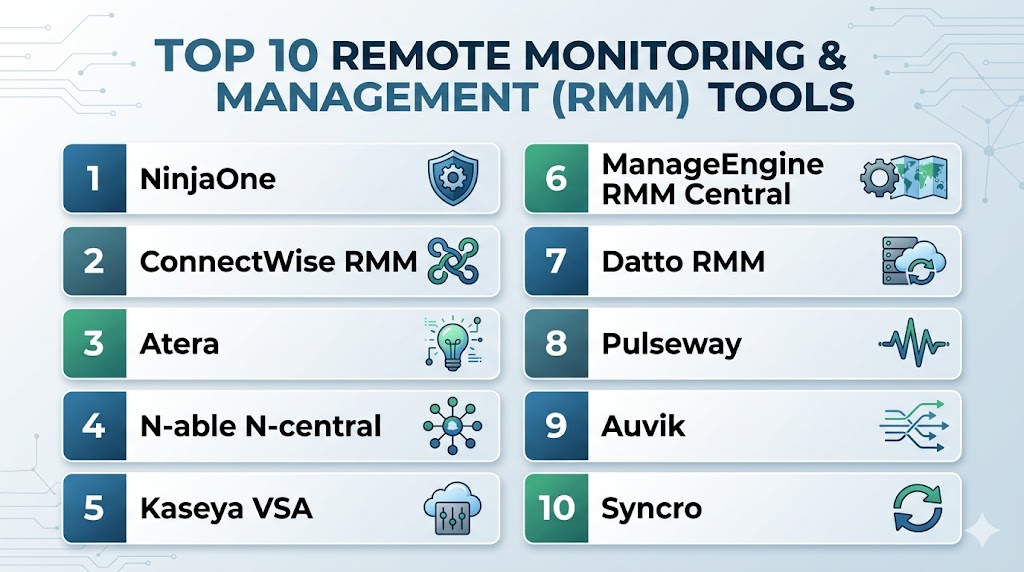
Top 10 Remote Monitoring & Management (RMM) Tools
#1 — NinjaOne
Short description: A modern RMM platform known for simplicity, fast deployment, and strong automation capabilities.
Key Features
- Endpoint monitoring and alerting
- Automated patch management
- Remote access tools
- IT asset management
- Scripting automation
- Reporting dashboards
Pros
- Easy to deploy and use
- Strong automation features
Cons
- Pricing not transparent
- Limited built-in PSA
Platforms / Deployment
Cloud
Security & Compliance
Encryption, access controls. Other details not publicly stated.
Integrations & Ecosystem
Strong integration capabilities for IT workflows.
- PSA tools
- Backup solutions
- APIs
Support & Community
High-quality support and onboarding with strong documentation.
#2 — ConnectWise RMM
Short description: A powerful RMM platform designed for MSPs with deep automation and PSA integration.
Key Features
- Real-time monitoring
- Automation scripting
- Remote control
- Alerting system
- Patch management
- PSA integration
Pros
- Strong MSP ecosystem
- Advanced automation
Cons
- Complex for beginners
- Learning curve
Platforms / Deployment
Cloud
Security & Compliance
Encryption, RBAC. Other details not publicly stated.
Integrations & Ecosystem
- PSA tools
- CRM systems
- APIs
Support & Community
Large MSP community and strong support resources.
#3 — Atera
Short description: An all-in-one RMM and PSA platform designed for IT professionals and MSPs.
Key Features
- Remote monitoring
- Patch management
- Integrated PSA
- Automation tools
- Reporting dashboards
- Ticketing system
Pros
- All-in-one solution
- Simple pricing model
Cons
- Limited enterprise scalability
- Fewer advanced features
Platforms / Deployment
Cloud
Security & Compliance
Encryption. Other details not publicly stated.
Integrations & Ecosystem
- PSA integration
- IT tools
- APIs
Support & Community
Good support and onboarding.
#4 — N-able N-central
Short description: A scalable RMM platform designed for large MSPs and enterprise IT environments.
Key Features
- Endpoint monitoring
- Automation workflows
- Patch management
- Security integrations
- Reporting tools
- Remote control
Pros
- Enterprise scalability
- Strong automation
Cons
- Steep learning curve
- Complex setup
Platforms / Deployment
Cloud
Security & Compliance
Encryption, RBAC. Other details not publicly stated.
Integrations & Ecosystem
- Security tools
- PSA systems
- APIs
Support & Community
Enterprise-level support.
#5 — Kaseya VSA
Short description: A comprehensive RMM platform offering endpoint management, automation, and security capabilities.
Key Features
- Remote monitoring
- Patch management
- Endpoint security
- Automation scripting
- Asset management
- Reporting
Pros
- Feature-rich
- Strong ecosystem
Cons
- Complex interface
- Setup challenges
Platforms / Deployment
Cloud / Hybrid
Security & Compliance
Encryption. Other details not publicly stated.
Integrations & Ecosystem
- Security tools
- Backup systems
- APIs
Support & Community
Strong enterprise support.
#6 — ManageEngine RMM Central
Short description: A unified RMM platform offering endpoint management, patching, and remote troubleshooting.
Key Features
- Network discovery
- Patch management
- Remote troubleshooting
- Mobile device management
- Asset management
- Reporting tools
Pros
- All-in-one IT management
- Good value
Cons
- UI complexity
- Learning curve
Platforms / Deployment
Cloud / On-premise
Security & Compliance
Encryption, RBAC. Other details not publicly stated.
Integrations & Ecosystem
- IT tools
- APIs
- Monitoring systems
Support & Community
Reliable enterprise support.
#7 — Datto RMM
Short description: A cloud-based RMM platform focused on automation and endpoint management for MSPs.
Key Features
- Endpoint monitoring
- Automation scripting
- Patch management
- Remote control
- Reporting
- Security tools
Pros
- Strong automation
- MSP-focused
Cons
- Limited customization
- Pricing varies
Platforms / Deployment
Cloud
Security & Compliance
Encryption. Other details not publicly stated.
Integrations & Ecosystem
- PSA tools
- Backup systems
- APIs
Support & Community
Strong MSP support network.
#8 — Pulseway
Short description: A mobile-first RMM platform offering real-time monitoring and remote management.
Key Features
- Mobile app management
- Real-time alerts
- Remote control
- Patch management
- Automation tools
- Reporting
Pros
- Strong mobile experience
- Real-time monitoring
Cons
- Limited enterprise features
- UI limitations
Platforms / Deployment
Cloud
Security & Compliance
Encryption. Other details not publicly stated.
Integrations & Ecosystem
- IT tools
- APIs
- Monitoring systems
Support & Community
Good support and documentation.
#9 — Auvik
Short description: A network-focused RMM tool offering deep visibility into infrastructure and performance.
Key Features
- Network monitoring
- Automated discovery
- Traffic analysis
- Remote access
- Configuration management
- Reporting
Pros
- Easy deployment
- Strong network insights
Cons
- Higher pricing
- Limited endpoint features
Platforms / Deployment
Cloud
Security & Compliance
Encryption. Other details not publicly stated.
Integrations & Ecosystem
- Network tools
- APIs
- Monitoring systems
Support & Community
Good support with knowledge base resources.
#10 — Syncro
Short description: An RMM and PSA platform designed for small MSPs and IT teams.
Key Features
- Remote monitoring
- Ticketing system
- Automation workflows
- Patch management
- Reporting tools
- Asset management
Pros
- Affordable
- All-in-one platform
Cons
- Limited scalability
- Fewer enterprise features
Platforms / Deployment
Cloud
Security & Compliance
Encryption. Other details not publicly stated.
Integrations & Ecosystem
- PSA tools
- APIs
- IT systems
Support & Community
Active community and support resources.
Comparison Table (Top 10)
| Tool Name | Best For | Platform(s) Supported | Deployment | Standout Feature | Public Rating |
|---|---|---|---|---|---|
| NinjaOne | MSPs | Web | Cloud | Ease of use | N/A |
| ConnectWise RMM | MSPs | Web | Cloud | PSA integration | N/A |
| Atera | SMB MSPs | Web | Cloud | All-in-one RMM + PSA | N/A |
| N-able N-central | Enterprises | Web | Cloud | Scalability | N/A |
| Kaseya VSA | Enterprises | Web | Cloud/Hybrid | Endpoint management | N/A |
| ManageEngine RMM Central | IT teams | Web | Cloud/On-prem | Unified management | N/A |
| Datto RMM | MSPs | Web | Cloud | Automation | N/A |
| Pulseway | SMB | Web / Mobile | Cloud | Mobile-first management | N/A |
| Auvik | Network teams | Web | Cloud | Network visibility | N/A |
| Syncro | Small MSPs | Web | Cloud | Affordability | N/A |
Evaluation & Scoring of Remote Monitoring & Management (RMM) Tools
| Tool Name | Core (25%) | Ease (15%) | Integrations (15%) | Security (10%) | Performance (10%) | Support (10%) | Value (15%) | Weighted Total (0–10) |
|---|---|---|---|---|---|---|---|---|
| NinjaOne | 9 | 9 | 8 | 8 | 9 | 9 | 7 | 8.5 |
| ConnectWise | 9 | 7 | 9 | 8 | 9 | 8 | 7 | 8.3 |
| Atera | 8 | 9 | 8 | 7 | 8 | 8 | 9 | 8.3 |
| N-able N-central | 9 | 7 | 9 | 8 | 9 | 8 | 7 | 8.3 |
| Kaseya VSA | 9 | 7 | 8 | 8 | 8 | 7 | 7 | 8.0 |
| ManageEngine | 8 | 7 | 8 | 8 | 8 | 7 | 8 | 7.9 |
| Datto RMM | 8 | 8 | 8 | 8 | 8 | 8 | 7 | 8.0 |
| Pulseway | 7 | 9 | 7 | 7 | 8 | 7 | 8 | 7.8 |
| Auvik | 8 | 8 | 7 | 8 | 8 | 7 | 7 | 7.8 |
| Syncro | 7 | 8 | 7 | 7 | 7 | 7 | 9 | 7.6 |
How to interpret the scores:
These scores are comparative and highlight strengths across different criteria. Higher scores indicate stronger overall capability, but the best tool depends on your specific use case. Enterprise tools typically excel in scalability and performance, while SMB tools perform better in ease of use and value.
Which Remote Monitoring & Management Tool Is Right for You?
Solo / Freelancer
Lightweight tools like Syncro or Atera are ideal due to simplicity and affordability.
SMB
Atera and Pulseway provide a strong balance of usability and essential RMM features.
Mid-Market
NinjaOne and Datto RMM offer scalability with manageable complexity.
Enterprise
N-able N-central and Kaseya VSA are better suited for large-scale operations.
Budget vs Premium
- Budget: Syncro, Atera
- Premium: NinjaOne, Kaseya
Feature Depth vs Ease of Use
- Feature-rich: ConnectWise, N-able
- Easy to use: NinjaOne, Atera
Integrations & Scalability
Best options: ConnectWise, Kaseya, N-able
Security & Compliance Needs
Choose platforms with strong patching, monitoring, and security integrations.
Frequently Asked Questions (FAQs)
What is RMM software?
RMM software allows IT teams to monitor and manage systems remotely from a centralized platform.
Who uses RMM tools?
MSPs, IT departments, and enterprises managing distributed infrastructure.
What are the core features of RMM tools?
Monitoring, patch management, automation, remote access, and reporting.
Are RMM tools secure?
Most offer encryption and access controls, but features vary by vendor.
How much do RMM tools cost?
Pricing depends on endpoints, features, and licensing models.
Can RMM tools automate IT tasks?
Yes, automation is a core feature for patching and remediation.
Do RMM tools integrate with other systems?
Yes, most integrate with PSA, ITSM, and security tools.
Are RMM tools scalable?
Cloud-based RMM tools scale easily with business growth.
What industries use RMM tools?
IT services, healthcare, finance, and enterprises with distributed systems.
Can I switch RMM tools later?
Yes, but migration requires planning and data transfer.
Conclusion
Remote Monitoring & Management tools have become essential for modern IT operations, enabling proactive monitoring, automation, and efficient remote support. They help organizations reduce downtime, improve security, and streamline IT workflows across distributed environments. While enterprise-grade platforms offer deep functionality and scalability, SMB-focused tools prioritize simplicity and cost efficiency. Developer-friendly and MSP-centric solutions provide flexibility for specialized use cases. The right choice ultimately depends on your infrastructure size, technical expertise, and operational goals. Start by shortlisting a few platforms, testing their capabilities, and validating how well they integrate with your existing tools before making a final decision.