Introduction
Conversion Rate Optimization (CRO) tools are software platforms that help businesses increase the percentage of website visitors who take desired actions—such as signing up, making a purchase, or filling out a form. These tools analyze user behavior, run experiments, and provide insights to improve website performance and conversions.
Instead of focusing only on driving traffic, CRO tools help businesses maximize the value of existing visitors, making marketing efforts more efficient and cost-effective. From heatmaps and session recordings to A/B testing and personalization, these tools provide actionable data to improve user experience and results.
Common Use Cases
- A/B and multivariate testing
- User behavior analysis (heatmaps, recordings)
- Landing page optimization
- Funnel and conversion tracking
- Personalization and experimentation
What Buyers Should Evaluate
- Testing capabilities (A/B, multivariate)
- Behavioral analytics features
- Ease of implementation
- Integration with analytics and marketing tools
- Performance and scalability
- Security and compliance
- Collaboration features
- Reporting and insights
- Pricing and ROI
Best for: Marketers, product teams, UX designers, SaaS companies, and e-commerce businesses focused on improving conversions and user experience.
Not ideal for: Businesses with very low traffic or those not running experiments or optimization strategies.
Key Trends in Conversion Rate Optimization Tools
- AI-driven experimentation and recommendations
- Real-time personalization and segmentation
- Integration with analytics and data platforms
- Automated insights from user behavior data
- Growth of no-code and low-code testing tools
- Increased focus on customer journey optimization
- Advanced heatmaps and session replay features
- Privacy-focused tracking and compliance
- API-first ecosystems for flexibility
- Predictive analytics for conversion improvements
How We Selected These Tools (Methodology)
- Industry adoption and popularity
- Coverage across CRO categories (testing, analytics, personalization)
- Data accuracy and reliability
- Integration ecosystem
- Ease of use for different teams
- Scalability across business sizes
- Security considerations
- Support and onboarding quality
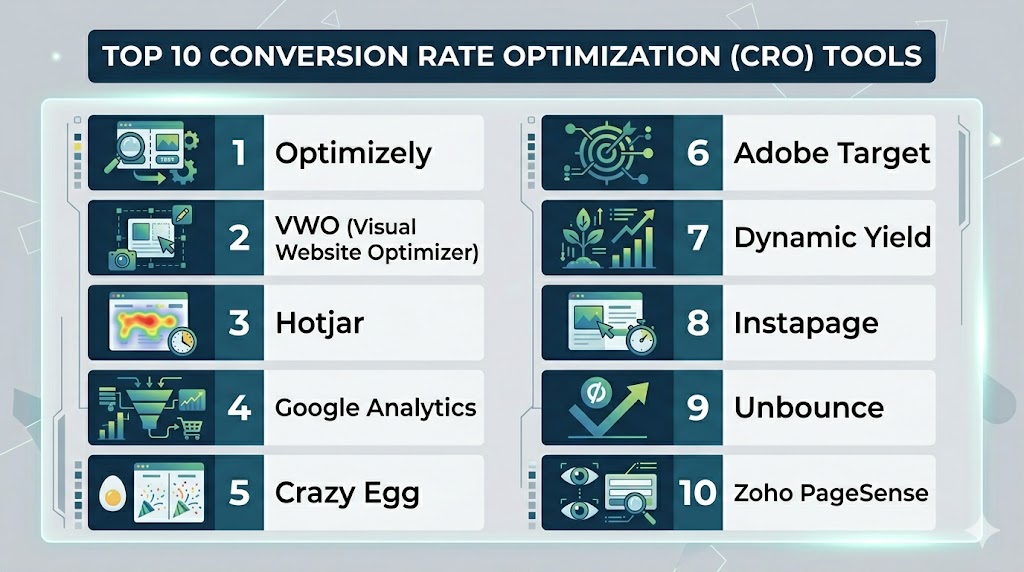
Top 10 Conversion Rate Optimization (CRO) Tools
#1 — Optimizely
Short description: A leading experimentation platform for A/B testing and personalization at scale.
Key Features
- A/B and multivariate testing
- Personalization engine
- Feature experimentation
- Analytics dashboards
- Experiment tracking
Pros
- Enterprise-grade testing
- Strong experimentation capabilities
Cons
- Expensive
- Requires technical setup
Platforms / Deployment
- Web
- Cloud
Security & Compliance
- SSO, RBAC
- Compliance: Not publicly stated
Integrations & Ecosystem
Integrates with analytics, CRM, and product tools.
- APIs
- Analytics platforms
- Data tools
Support & Community
Enterprise support with onboarding.
#2 — VWO (Visual Website Optimizer)
Short description: An all-in-one CRO platform for testing, analytics, and user behavior insights.
Key Features
- A/B testing
- Heatmaps and session recordings
- Funnel analysis
- Personalization tools
- Survey tools
Pros
- All-in-one platform
- Easy to use
Cons
- Pricing varies
- Limited advanced customization
Platforms / Deployment
- Web
- Cloud
Security & Compliance
- Not publicly stated
Integrations & Ecosystem
- CRM tools
- APIs
- Analytics platforms
Support & Community
Strong support and documentation.
#3 — Hotjar
Short description: A behavior analytics tool focused on heatmaps and session recordings.
Key Features
- Heatmaps
- Session recordings
- User feedback surveys
- Funnel tracking
- Behavior analytics
Pros
- Easy to use
- Visual insights
Cons
- Limited testing features
- Requires other tools
Platforms / Deployment
- Web
- Cloud
Security & Compliance
- Not publicly stated
Integrations & Ecosystem
- Analytics tools
- APIs
Support & Community
Strong community and guides.
#4 — Google Analytics
Short description: A widely used analytics platform for tracking user behavior and conversions.
Key Features
- Traffic analysis
- Conversion tracking
- Funnel analysis
- Audience segmentation
- Reporting dashboards
Pros
- Free to use
- Powerful analytics
Cons
- Not a dedicated CRO tool
- Requires setup
Platforms / Deployment
- Web
- Cloud
Security & Compliance
- Not publicly stated
Integrations & Ecosystem
- Marketing tools
- APIs
Support & Community
Extensive documentation and community.
#5 — Crazy Egg
Short description: A CRO tool focused on heatmaps and user interaction tracking.
Key Features
- Heatmaps
- Scroll tracking
- Click tracking
- A/B testing
- User recordings
Pros
- Simple interface
- Actionable insights
Cons
- Limited advanced analytics
- Smaller ecosystem
Platforms / Deployment
- Web
- Cloud
Security & Compliance
- Not publicly stated
Integrations & Ecosystem
- APIs
- Analytics tools
Support & Community
Moderate support.
#6 — Adobe Target
Short description: A personalization and experimentation platform for enterprise marketing teams.
Key Features
- AI-driven personalization
- A/B testing
- Automated recommendations
- Audience segmentation
- Cross-channel optimization
Pros
- Strong personalization
- Enterprise capabilities
Cons
- Expensive
- Complex setup
Platforms / Deployment
- Web
- Cloud
Security & Compliance
- Not publicly stated
Integrations & Ecosystem
- Adobe ecosystem
- APIs
Support & Community
Enterprise support available.
#7 — Dynamic Yield
Short description: A personalization platform for optimizing customer journeys and conversions.
Key Features
- Personalization
- A/B testing
- Recommendation engine
- Customer segmentation
- Analytics
Pros
- Strong personalization
- Scalable
Cons
- Learning curve
- Premium pricing
Platforms / Deployment
- Web
- Cloud
Security & Compliance
- Not publicly stated
Integrations & Ecosystem
- CRM tools
- APIs
Support & Community
Enterprise-level support.
#8 — Instapage
Short description: A landing page builder with built-in CRO and testing features.
Key Features
- Landing page builder
- A/B testing
- Heatmaps
- Analytics
- Personalization
Pros
- Easy to use
- Great for landing pages
Cons
- Limited beyond landing pages
- Pricing can be high
Platforms / Deployment
- Web
- Cloud
Security & Compliance
- Not publicly stated
Integrations & Ecosystem
- Marketing tools
- APIs
Support & Community
Good support and onboarding.
#9 — Unbounce
Short description: A platform for creating high-converting landing pages with testing capabilities.
Key Features
- Landing page builder
- A/B testing
- AI optimization
- Popups and sticky bars
- Analytics
Pros
- User-friendly
- Fast setup
Cons
- Limited advanced analytics
- Pricing tiers
Platforms / Deployment
- Web
- Cloud
Security & Compliance
- Not publicly stated
Integrations & Ecosystem
- CRM tools
- APIs
Support & Community
Strong documentation and support.
#10 — Zoho PageSense
Short description: A CRO platform focused on experimentation, personalization, and analytics.
Key Features
- A/B testing
- Funnel analysis
- Heatmaps
- Personalization
- Form analytics
Pros
- Affordable
- Feature-rich
Cons
- UI complexity
- Limited enterprise depth
Platforms / Deployment
- Web
- Cloud
Security & Compliance
- Not publicly stated
Integrations & Ecosystem
- Zoho ecosystem
- APIs
Support & Community
Good support for SMBs.
Comparison Table (Top 10)
| Tool Name | Best For | Platform(s) Supported | Deployment | Standout Feature | Public Rating |
|---|---|---|---|---|---|
| Optimizely | Enterprise testing | Web | Cloud | Experimentation platform | N/A |
| VWO | All-in-one CRO | Web | Cloud | Testing + analytics | N/A |
| Hotjar | Behavior insights | Web | Cloud | Heatmaps | N/A |
| Google Analytics | Analytics | Web | Cloud | Conversion tracking | N/A |
| Crazy Egg | Heatmaps | Web | Cloud | Click tracking | N/A |
| Adobe Target | Personalization | Web | Cloud | AI personalization | N/A |
| Dynamic Yield | Customer journeys | Web | Cloud | Personalization engine | N/A |
| Instapage | Landing pages | Web | Cloud | Landing page builder | N/A |
| Unbounce | Landing pages | Web | Cloud | AI optimization | N/A |
| Zoho PageSense | SMB CRO | Web | Cloud | Affordable testing | N/A |
Evaluation & Scoring of Conversion Rate Optimization Tools
| Tool Name | Core | Ease | Integrations | Security | Performance | Support | Value | Weighted Total |
|---|---|---|---|---|---|---|---|---|
| Optimizely | 9 | 6 | 9 | 8 | 9 | 8 | 6 | 8.1 |
| VWO | 9 | 8 | 8 | 7 | 8 | 8 | 7 | 8.0 |
| Hotjar | 7 | 9 | 7 | 6 | 7 | 8 | 8 | 7.6 |
| Google Analytics | 8 | 8 | 8 | 7 | 8 | 7 | 9 | 7.9 |
| Crazy Egg | 7 | 8 | 6 | 6 | 7 | 7 | 8 | 7.2 |
| Adobe Target | 9 | 5 | 9 | 8 | 9 | 8 | 6 | 8.0 |
| Dynamic Yield | 8 | 6 | 8 | 7 | 8 | 7 | 6 | 7.5 |
| Instapage | 7 | 9 | 7 | 6 | 7 | 7 | 7 | 7.3 |
| Unbounce | 7 | 9 | 7 | 6 | 7 | 7 | 7 | 7.3 |
| Zoho PageSense | 8 | 7 | 7 | 6 | 7 | 7 | 8 | 7.4 |
How to interpret scores:
- Scores are relative comparisons
- Higher scores indicate stronger capabilities
- Enterprise tools excel in features but require expertise
- Simpler tools focus on usability and value
- Choose based on your CRO strategy
Which Conversion Rate Optimization Tool Is Right for You?
Solo / Freelancer
Use Hotjar or Google Analytics for simplicity and cost-effectiveness.
SMB
VWO or Zoho PageSense offer a balance of features and affordability.
Mid-Market
Unbounce or Instapage provide strong optimization and testing capabilities.
Enterprise
Optimizely, Adobe Target, and Dynamic Yield are ideal for scale and advanced experimentation.
Budget vs Premium
- Budget: Hotjar, Zoho PageSense
- Premium: Optimizely, Adobe Target
Feature Depth vs Ease of Use
- Deep features: Optimizely, Adobe Target
- Easy to use: Hotjar, Unbounce
Integrations & Scalability
- Strong integrations: Optimizely, Adobe
- Moderate: Unbounce, Instapage
Security & Compliance Needs
Choose tools with strong access control and compliance features.
Frequently Asked Questions (FAQs)
What are CRO tools?
They help improve the percentage of users who complete desired actions on a website.
Why are CRO tools important?
They maximize results from existing traffic without increasing acquisition costs.
Are CRO tools easy to use?
Some are beginner-friendly, while enterprise tools require expertise.
Do they support A/B testing?
Yes, testing is a core feature of most CRO tools.
Can they improve sales?
Yes, by optimizing user experience and reducing friction.
Are they expensive?
Pricing varies from free tools to enterprise solutions.
Do they integrate with other tools?
Most tools offer APIs and integrations.
Can small businesses use CRO tools?
Yes, many tools are designed for SMBs.
Are CRO tools secure?
Security varies; check platform features.
Can I switch tools later?
Yes, but migration may require effort.
Conclusion
CRO tools are essential for turning website traffic into measurable results. The right tool depends on your goals, budget, and level of expertise. Advanced platforms offer deep experimentation and personalization, while simpler tools focus on usability and quick insights. It’s important to evaluate testing capabilities, analytics, and integrations before choosing. No single tool fits all needs, so alignment with your strategy is key. Start by testing a few tools and selecting the one that drives consistent conversion improvements.