Introduction
Release Management Tools are platforms that help teams plan, schedule, coordinate, and automate the deployment of software releases across environments. These tools ensure that new features, updates, and fixes are delivered reliably, efficiently, and with minimal risk.
In modern DevOps-driven environments, release management is no longer a manual process. With CI/CD pipelines, microservices architectures, and rapid deployment cycles, these tools provide automation, visibility, and control over the entire release lifecycle. They help reduce errors, improve collaboration, and ensure consistent delivery of high-quality software.
Real-World Use Cases
- Automating software deployment pipelines
- Managing release schedules and dependencies
- Coordinating multi-team releases
- Tracking release progress and performance
- Reducing downtime and release failures
What Buyers Should Evaluate
- Automation and CI/CD integration
- Release orchestration and workflow control
- Visibility and reporting capabilities
- Scalability across environments
- Integration with DevOps tools
- Rollback and recovery features
- Security and compliance controls
- Ease of use and onboarding
Best for: DevOps teams, release managers, software engineers, and enterprises delivering frequent software updates.
Not ideal for: Small projects with infrequent releases or teams without automated deployment pipelines.
Key Trends in Release Management Tools
- Deep integration with CI/CD pipelines
- Automation of release orchestration and rollbacks
- AI-driven release risk analysis
- Cloud-native and multi-cloud deployment support
- Real-time monitoring and analytics dashboards
- Feature flagging and progressive delivery
- DevSecOps integration for secure releases
- Microservices and container deployment support
- API-first and automation-driven workflows
- Increasing adoption of GitOps practices
How We Selected These Tools (Methodology)
- Strong adoption in DevOps and enterprise environments
- Comprehensive release lifecycle management features
- Integration with modern CI/CD ecosystems
- Proven reliability and scalability
- Automation and orchestration capabilities
- Security and compliance features
- Active community or vendor support
- Balanced mix of enterprise and developer-friendly tools
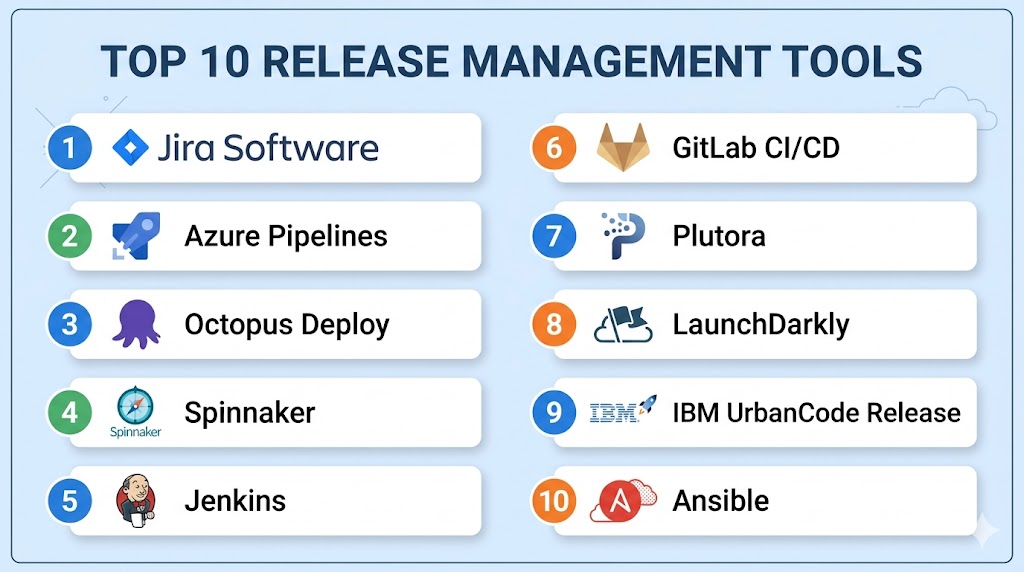
Top 10 Release Management Tools
#1 — Jira Software
Short description: A widely used platform for agile planning, issue tracking, and release management workflows.
Key Features
- Agile release planning
- Issue and sprint tracking
- Release version management
- Reporting dashboards
- Workflow automation
Pros
- Strong collaboration features
- Widely adopted
Cons
- Requires configuration
- Not a full deployment tool
Platforms / Deployment
Web / Windows / macOS / Linux
Cloud / Self-hosted
Security & Compliance
SSO, RBAC, audit logs
Not publicly stated
Integrations & Ecosystem
- CI/CD tools
- Git platforms
- DevOps tools
Support & Community
Large global community and strong vendor support.
#2 — Azure Pipelines
Short description: A CI/CD platform for building, testing, and deploying applications across environments.
Key Features
- CI/CD pipelines
- Multi-platform deployment
- Release automation
- Integration with Azure DevOps
- Parallel job execution
Pros
- Strong automation
- Multi-platform support
Cons
- Best for Microsoft ecosystem
- Configuration complexity
Platforms / Deployment
Web
Cloud
Security & Compliance
RBAC, encryption
Not publicly stated
Integrations & Ecosystem
- Azure services
- GitHub
- DevOps tools
Support & Community
Enterprise support.
#3 — Octopus Deploy
Short description: A deployment automation tool focused on release orchestration and environment management.
Key Features
- Deployment automation
- Environment management
- Rollback capabilities
- Release dashboards
- Multi-cloud support
Pros
- Strong deployment control
- Easy rollback
Cons
- Paid solution
- Setup required
Platforms / Deployment
Windows / Linux
Cloud / Self-hosted
Security & Compliance
RBAC, audit logs
Not publicly stated
Integrations & Ecosystem
- CI/CD tools
- Cloud platforms
Support & Community
Strong community and enterprise support.
#4 — Spinnaker
Short description: An open-source platform for continuous delivery and release automation.
Key Features
- Multi-cloud deployment
- Continuous delivery pipelines
- Canary deployments
- Automated rollbacks
- Kubernetes support
Pros
- Powerful and flexible
- Open-source
Cons
- Complex setup
- Requires expertise
Platforms / Deployment
Linux
Cloud / Self-hosted
Security & Compliance
Not publicly stated
Integrations & Ecosystem
- Kubernetes
- Cloud providers
Support & Community
Active open-source community.
#5 — Jenkins
Short description: A widely used automation server for CI/CD and release management workflows.
Key Features
- Build and deployment automation
- Plugin ecosystem
- Pipeline support
- Integration with tools
- Open-source
Pros
- Highly flexible
- Large plugin ecosystem
Cons
- Maintenance overhead
- UI limitations
Platforms / Deployment
Windows / macOS / Linux
Self-hosted
Security & Compliance
Not publicly stated
Integrations & Ecosystem
- DevOps tools
- SCM platforms
Support & Community
Very large community.
#6 — GitLab CI/CD
Short description: An integrated DevOps platform with built-in release management and deployment features.
Key Features
- CI/CD pipelines
- Release tracking
- Automation workflows
- Security scanning
- Version control integration
Pros
- All-in-one platform
- Strong automation
Cons
- Learning curve
- Resource-heavy
Platforms / Deployment
Web / Linux
Cloud / Self-hosted
Security & Compliance
SSO, RBAC
Not publicly stated
Integrations & Ecosystem
- Kubernetes
- Cloud platforms
Support & Community
Strong open-source and enterprise support.
#7 — Plutora
Short description: A release management platform focused on enterprise visibility and coordination.
Key Features
- Release planning and tracking
- Workflow automation
- Analytics dashboards
- Dependency management
- Integration with DevOps tools
Pros
- Strong enterprise features
- Good visibility
Cons
- Complex setup
- Pricing
Platforms / Deployment
Web
Cloud
Security & Compliance
Not publicly stated
Integrations & Ecosystem
- DevOps tools
- CI/CD pipelines
Support & Community
Enterprise support.
#8 — LaunchDarkly
Short description: A feature management platform enabling controlled feature releases.
Key Features
- Feature flags
- Progressive delivery
- Real-time control
- Rollback capabilities
- Experimentation tools
Pros
- Reduces release risk
- Easy feature control
Cons
- Not a full release platform
- Paid solution
Platforms / Deployment
Web
Cloud
Security & Compliance
Not publicly stated
Integrations & Ecosystem
- CI/CD tools
- Cloud platforms
Support & Community
Strong vendor support.
#9 — IBM UrbanCode Release
Short description: An enterprise tool for orchestrating and managing complex release processes.
Key Features
- Release orchestration
- Workflow automation
- Compliance tracking
- Multi-environment support
- Reporting tools
Pros
- Enterprise-grade
- Strong governance
Cons
- Complex setup
- Expensive
Platforms / Deployment
Web
Cloud / Self-hosted
Security & Compliance
RBAC, audit logs
Not publicly stated
Integrations & Ecosystem
- DevOps tools
- CI/CD pipelines
Support & Community
Enterprise support.
#10 — Ansible
Short description: An automation tool used for configuration management and release deployment.
Key Features
- Infrastructure automation
- Deployment automation
- Playbooks for workflows
- Agentless architecture
- Multi-platform support
Pros
- Easy to use
- Open-source
Cons
- Not dedicated release tool
- Requires scripting
Platforms / Deployment
Windows / Linux / macOS
Cloud / Self-hosted
Security & Compliance
Not publicly stated
Integrations & Ecosystem
- Cloud platforms
- DevOps tools
Support & Community
Large open-source community.
Comparison Table (Top 10)
| Tool Name | Best For | Platform(s) Supported | Deployment | Standout Feature | Public Rating |
|---|---|---|---|---|---|
| Jira | Agile teams | Multi-OS | Cloud/Hybrid | Planning | N/A |
| Azure Pipelines | CI/CD | Web | Cloud | Automation | N/A |
| Octopus Deploy | Deployments | Multi-OS | Hybrid | Rollbacks | N/A |
| Spinnaker | Cloud releases | Linux | Hybrid | Multi-cloud | N/A |
| Jenkins | Automation | Multi-OS | Self-hosted | Plugins | N/A |
| GitLab CI/CD | DevOps | Web/Linux | Hybrid | All-in-one | N/A |
| Plutora | Enterprise | Web | Cloud | Visibility | N/A |
| LaunchDarkly | Feature flags | Web | Cloud | Progressive delivery | N/A |
| UrbanCode | Enterprise | Web | Hybrid | Governance | N/A |
| Ansible | Automation | Multi-OS | Hybrid | Agentless | N/A |
Evaluation & Scoring of Release Management Tools
| Tool Name | Core | Ease | Integrations | Security | Performance | Support | Value | Weighted Total |
|---|---|---|---|---|---|---|---|---|
| Jira | 9 | 8 | 9 | 8 | 8 | 9 | 9 | 8.7 |
| Azure Pipelines | 9 | 8 | 9 | 9 | 9 | 9 | 8 | 8.9 |
| Octopus Deploy | 9 | 8 | 8 | 8 | 9 | 8 | 8 | 8.5 |
| Spinnaker | 9 | 6 | 8 | 8 | 9 | 8 | 9 | 8.2 |
| Jenkins | 8 | 7 | 10 | 7 | 8 | 9 | 10 | 8.4 |
| GitLab | 9 | 8 | 9 | 9 | 8 | 9 | 8 | 8.8 |
| Plutora | 9 | 7 | 8 | 8 | 9 | 8 | 7 | 8.3 |
| LaunchDarkly | 8 | 9 | 8 | 8 | 8 | 8 | 7 | 8.1 |
| UrbanCode | 9 | 6 | 8 | 9 | 9 | 8 | 7 | 8.2 |
| Ansible | 8 | 8 | 8 | 8 | 9 | 8 | 10 | 8.4 |
How to interpret scores:
These scores compare tools across core capabilities and usability. Higher scores indicate better overall balance, but the right choice depends on your workflow. CI/CD tools excel in automation, while enterprise tools focus on governance and compliance.
Which Release Management Tools Tool Is Right for You?
Solo / Freelancer
Jira and Jenkins provide simple workflows and flexibility.
SMB
GitLab and Ansible offer automation and scalability.
Mid-Market
Azure Pipelines and Octopus Deploy provide strong deployment control.
Enterprise
Plutora, UrbanCode, and Spinnaker excel in complex environments.
Budget vs Premium
- Budget: Jenkins, Ansible
- Premium: Plutora, UrbanCode
Feature Depth vs Ease of Use
- Feature-rich: GitLab
- Easy-to-use: Jira
Integrations & Scalability
- Best integrations: Jenkins
- Scalable: Spinnaker
Security & Compliance Needs
- Strong security: Azure Pipelines
- Moderate: Jira
Frequently Asked Questions (FAQs)
What is a release management tool?
It helps plan, track, and automate software releases.
Why are these tools important?
They reduce errors and improve deployment reliability.
Do they support CI/CD?
Yes, most modern tools integrate with CI/CD.
Are they cloud-based?
Many are cloud-based, but some support self-hosting.
Can small teams use them?
Yes, especially tools like Jira and Jenkins.
Do they support automation?
Yes, automation is a core feature.
Are they secure?
Most include security and compliance features.
Can they handle large-scale deployments?
Yes, enterprise tools are designed for scale.
What is the best tool overall?
Depends on your workflow and ecosystem.
Do they support rollback?
Yes, many tools include rollback features.
Conclusion
Release Management Tools are essential for ensuring smooth, reliable, and efficient software delivery in modern development environments. From planning and coordination to automated deployment and monitoring, these tools help teams manage complex release processes with confidence. Whether you choose a flexible solution like Jenkins, an all-in-one platform like GitLab, or an enterprise-grade tool like Plutora, the right choice depends on your team size, infrastructure, and release complexity. To get the best results, shortlist a few tools, integrate them into your CI/CD pipeline, and evaluate their performance in real-world scenarios before making a final decision.