Introduction
Brand Asset Portals help companies organize, share, and control approved brand materials from one central location. These portals are used to store logos, color palettes, fonts, brand guidelines, product images, campaign files, presentation templates, videos, documents, sales collateral, social media graphics, and partner-ready assets.
A Brand Asset Portal is more focused than ordinary file storage because it gives teams controlled access to the latest approved assets. Marketing, sales, agencies, partners, franchise teams, distributors, and regional teams can find the right files without asking the brand team every time. This reduces outdated content, off-brand designs, duplicate files, and slow creative delivery.
Real-world use cases include:
- Sharing approved logos, icons, and brand guidelines
- Giving agencies and partners access to campaign assets
- Managing sales decks, brochures, and product visuals
- Controlling asset permissions by team, region, or partner
- Keeping brand files consistent across departments
- Creating self-service access for approved marketing materials
Buyer evaluation criteria should include:
- Asset organization and search quality
- Brand guideline support
- Permission and access controls
- External sharing and partner portals
- Version control and asset approval workflows
- Metadata, tagging, and filtering
- Download formats and file conversion options
- Integrations with design, DAM, CMS, and marketing tools
- Security, user roles, and audit controls
- Pricing, onboarding, scalability, and support quality
Best for: Brand teams, marketing teams, creative teams, agencies, sales teams, franchise networks, ecommerce teams, partner marketing teams, media teams, and enterprises that need consistent brand asset access across many users.
Not ideal for: Very small teams with only a few files, businesses that only need basic cloud storage, or organizations that do not require permissions, brand guidelines, external sharing, version control, or approved asset governance.
Key Trends in Brand Asset Portals
- Self-service brand access is becoming essential: Teams want sales, partners, agencies, and local teams to find approved assets without waiting for marketing.
- Brand guidelines and DAM are merging: Many platforms now combine asset libraries with style guides, templates, usage rules, and approval workflows.
- AI tagging improves asset discovery: Tools increasingly help classify images, logos, documents, campaign files, and videos automatically.
- Partner and franchise portals are growing: Distributed businesses need controlled access for resellers, franchisees, agencies, and regional teams.
- Template-based brand control is expanding: Teams want editable but controlled templates for social posts, presentations, ads, and documents.
- Rights management is more important: Brands need to manage asset usage rules, expiration dates, licenses, and regional restrictions.
- Video and rich media support is now expected: Brand portals must support product videos, campaign clips, motion graphics, and high-resolution media.
- Analytics are becoming useful: Teams want to know which assets are downloaded, shared, ignored, expired, or used most often.
- Security and permissions matter more: Businesses need role-based access, password-protected portals, SSO, and controlled external sharing.
- Brand consistency is a business priority: Companies are using asset portals to reduce off-brand content and improve customer-facing consistency.
How We Selected These Tools
The tools in this list were selected using practical buyer-focused evaluation logic:
- Strong recognition in brand asset management, digital asset management, brand portals, or creative operations
- Ability to organize, search, share, and govern brand assets in a centralized portal
- Fit across SMBs, agencies, mid-market teams, franchises, ecommerce brands, and enterprise organizations
- Practical support for brand guidelines, templates, permissions, metadata, versioning, and external sharing
- Ease of use for non-technical users such as marketers, sales teams, partners, and regional teams
- Integration strength with design tools, CMS platforms, ecommerce systems, project management, and marketing workflows
- Asset governance features such as approvals, usage rights, expiration controls, and user access rules
- Support for rich media including images, videos, documents, presentations, and design files
- Security and administration controls such as SSO, permissions, roles, and auditability
- Overall value based on usability, scalability, search quality, brand control, collaboration, and support
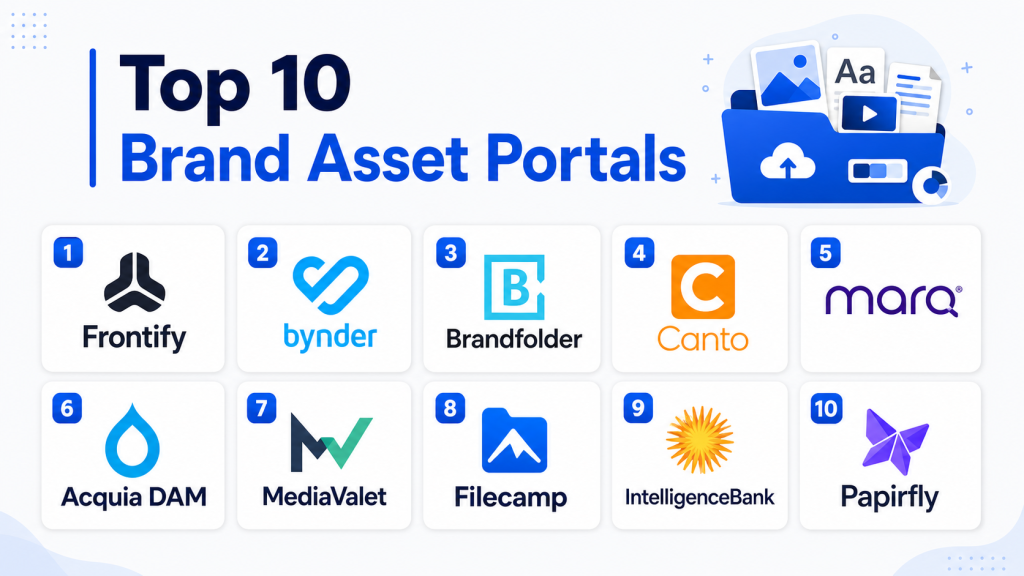
Top 10 Brand Asset Portals
#1 — Frontify
Short description: Frontify is a brand management platform that combines brand guidelines, digital asset management, design templates, and brand portals. It helps teams centralize brand rules and approved assets in one user-friendly system. It is especially useful for companies that want brand consistency across marketing, design, sales, agencies, and regional teams.
Key Features
- Brand guidelines and style guide management
- Centralized brand asset library
- Brand portal creation
- Creative templates and design workflows
- Asset sharing and access control
- Collaboration and approval support
- Metadata and organization tools
Pros
- Strong for brand governance and creative consistency
- Useful for teams managing both guidelines and assets
- Easy for non-technical teams to use
Cons
- May not be ideal for very complex enterprise DAM-only workflows
- Advanced media delivery may require additional tools
- Best value depends on strong brand governance needs
Platforms / Deployment
Cloud
Web-based platform
Security & Compliance
Security and compliance details should be verified directly. Buyers should validate SSO, role-based access, encryption, audit logs, permissions, data retention, and compliance needs.
Integrations & Ecosystem
Frontify fits brand, marketing, creative, and partner enablement workflows where guidelines and assets need to stay connected.
- Creative design workflows
- Brand guideline workflows
- Template workflows
- Marketing systems
- Collaboration platforms
- Brand portal sharing
Support & Community
Frontify provides documentation, onboarding, support resources, brand management guidance, and customer success options. Support depth may vary by plan and customer size.
#2 — Bynder
Short description: Bynder is a digital asset management and brand portal platform built for marketing and creative teams that need approved asset access at scale. It helps organizations manage, distribute, and govern brand content across departments, agencies, and external partners. Bynder is a strong option for global brands that need asset control and self-service access.
Key Features
- Centralized DAM and asset library
- Brand portals and asset collections
- Metadata, tagging, and advanced search
- Creative workflow and approval support
- Asset usage and distribution controls
- AI-assisted asset organization
- Integrations with marketing and creative tools
Pros
- Strong for global brand and marketing teams
- Good asset sharing and self-service portal capabilities
- Useful for controlled distribution of approved content
Cons
- May require planning for taxonomy and permissions
- Advanced workflows may need configuration
- Pricing should be reviewed based on asset and user needs
Platforms / Deployment
Cloud
Web-based platform
Security & Compliance
Enterprise security controls may be available. Buyers should validate SSO, permissions, role-based access, encryption, audit logs, retention, and compliance requirements directly.
Integrations & Ecosystem
Bynder fits brand management, marketing operations, content distribution, and creative workflow use cases.
- Creative tools
- CMS platforms
- Marketing automation tools
- Ecommerce workflows
- Project management systems
- Partner asset portals
Support & Community
Bynder provides onboarding, customer success resources, documentation, training, and implementation support. Support level may vary by package.
#3 — Brandfolder
Short description: Brandfolder is a brand asset management and DAM platform that helps teams organize, share, and analyze brand assets from a central portal. It is especially useful for marketing teams, creative teams, agencies, and sales teams that need easy access to approved files. Brandfolder focuses on simplicity, visual asset discovery, and controlled sharing.
Key Features
- Brand asset library and portal
- External sharing and public/private collections
- Metadata and tagging support
- Version control and asset organization
- Asset analytics and usage tracking
- Search and filtering
- Brand governance workflows
Pros
- Easy to use for brand and marketing teams
- Strong for partner and sales asset sharing
- Useful asset analytics and download tracking
Cons
- Complex enterprise workflows may need extra setup
- Advanced rights management should be validated
- Best value depends on active portal adoption
Platforms / Deployment
Cloud
Web-based platform
Security & Compliance
Security and compliance details should be verified directly. Buyers should validate permissions, SSO, access controls, encryption, audit logs, retention, and compliance needs.
Integrations & Ecosystem
Brandfolder supports brand management, sales enablement, partner sharing, creative operations, and marketing content workflows.
- Creative workflows
- Sales enablement systems
- CMS tools
- Project management platforms
- Marketing workflows
- External partner sharing
Support & Community
Brandfolder provides onboarding, documentation, support resources, product guidance, and customer success options. Support level may vary by plan.
#4 — Canto
Short description: Canto is a digital asset management platform that helps teams organize, search, share, and manage brand files through a central asset library. It is popular with marketing teams, agencies, nonprofits, education teams, and mid-sized organizations. Canto is a practical option for teams that want an intuitive brand asset portal without excessive complexity.
Key Features
- Centralized asset library
- Visual search and filtering
- Portals and external sharing
- Metadata and tagging support
- Version control
- Approval and collaboration workflows
- Asset usage reporting
Pros
- User-friendly for marketing and creative teams
- Good for SMB and mid-market brand asset needs
- Useful for building organized self-service portals
Cons
- Enterprise-scale governance should be validated
- Advanced integrations may vary by package
- Rights management depth should be reviewed
Platforms / Deployment
Cloud
Web-based platform
Security & Compliance
Security and compliance details should be verified directly. Buyers should validate user roles, permissions, SSO, encryption, audit logs, and data handling requirements.
Integrations & Ecosystem
Canto fits brand asset management, creative collaboration, external sharing, and marketing workflows.
- Creative tools
- CMS workflows
- Marketing tools
- Collaboration platforms
- External asset portals
- Workflow automation tools
Support & Community
Canto provides onboarding, support, documentation, training resources, and customer success assistance. Support depth may vary by package.
#5 — Marq
Short description: Marq is a brand templating and asset management platform that helps teams create, customize, and share branded content while maintaining design consistency. It is useful for distributed teams that need editable templates for brochures, flyers, social graphics, presentations, and marketing materials. Marq is especially practical for sales, franchise, field marketing, and local teams.
Key Features
- Brand templates and content creation
- Controlled editing for non-designers
- Brand asset management
- Team and role permissions
- Approval workflows
- Digital and print content support
- Centralized brand control
Pros
- Strong for template-based brand consistency
- Useful for local teams, sales teams, and franchises
- Helps non-designers create on-brand materials
Cons
- Not a full enterprise DAM for every asset workflow
- Best fit depends on template and content creation needs
- Advanced asset governance should be validated
Platforms / Deployment
Cloud
Web-based platform
Security & Compliance
Security and compliance details should be verified directly. Buyers should validate user permissions, access controls, approval workflows, data handling, and compliance requirements.
Integrations & Ecosystem
Marq fits brand templating, field marketing, sales enablement, franchise marketing, and distributed content creation workflows.
- Brand template workflows
- Sales collateral creation
- Franchise marketing workflows
- Print and digital content workflows
- Team approval processes
- Brand asset libraries
Support & Community
Marq provides documentation, onboarding resources, support options, and brand templating guidance. Support level may vary by plan.
#6 — Acquia DAM
Short description: Acquia DAM is an enterprise digital asset management platform that helps teams centralize, organize, govern, and share brand assets. It is useful for marketing, creative, ecommerce, and product teams that manage large content libraries. Acquia DAM is especially valuable when asset control, metadata, and workflow structure are important.
Key Features
- Centralized digital asset library
- Metadata and taxonomy management
- Brand portals and asset sharing
- Rights and permissions management
- AI-assisted tagging and search support
- Review and approval workflows
- Marketing and content integrations
Pros
- Strong enterprise DAM foundation
- Useful for large asset libraries and structured governance
- Good fit for brand and content operations teams
Cons
- May require structured metadata planning
- Migration can take time for large libraries
- Pricing and integrations should be reviewed carefully
Platforms / Deployment
Cloud
Web-based platform
Security & Compliance
Enterprise security features may be available. Buyers should validate SSO, role-based access, permissions, audit logs, encryption, retention, and compliance requirements directly.
Integrations & Ecosystem
Acquia DAM fits brand, creative, ecommerce, product content, and digital experience workflows.
- CMS workflows
- Marketing tools
- Creative systems
- Ecommerce platforms
- Product content workflows
- Brand portal workflows
Support & Community
Acquia provides documentation, onboarding, implementation support, customer success resources, and technical assistance. Support level may vary by contract.
#7 — MediaValet
Short description: MediaValet is an enterprise DAM platform that helps teams centralize, search, share, and secure digital assets across departments and regions. It is designed for organizations with large asset libraries and distributed teams. MediaValet is especially useful when secure sharing and fast asset discovery are high priorities.
Key Features
- Centralized brand asset library
- Search and metadata management
- Secure asset sharing
- User permissions and access controls
- Brand portals and collections
- Video and rich media support
- Usage reporting and insights
Pros
- Strong for enterprise asset centralization
- Useful for secure sharing across teams and partners
- Good fit for large asset libraries
Cons
- May be more advanced than small teams need
- Setup depends on metadata strategy
- Pricing should be reviewed based on storage and users
Platforms / Deployment
Cloud
Web-based platform
Security & Compliance
Enterprise security and administrative controls may be available. Buyers should validate SSO, permissions, encryption, audit logs, retention, and compliance requirements directly.
Integrations & Ecosystem
MediaValet fits brand asset management, marketing operations, partner sharing, and distributed team workflows.
- Creative workflows
- Marketing systems
- Collaboration tools
- Partner portals
- Brand asset libraries
- Reporting dashboards
Support & Community
MediaValet provides onboarding, documentation, training, customer success support, and implementation guidance. Support level may vary by package.
#8 — Filecamp
Short description: Filecamp is a cloud-based digital asset management and brand portal solution for teams that need simple asset sharing, branding, and permissions. It is suitable for small businesses, agencies, marketing teams, and organizations that want a straightforward brand asset portal. Filecamp is especially useful for companies that need a clean, affordable way to share brand files externally.
Key Features
- Digital asset library
- Branded portals and custom login pages
- Folder-based organization
- User permissions and access control
- File sharing and download controls
- Basic metadata and search
- Client and partner asset access
Pros
- Simple and accessible for smaller teams
- Useful for branded asset sharing
- Good fit for agencies and partner portals
Cons
- Not as advanced as enterprise DAM platforms
- Workflow automation may be limited
- Advanced AI tagging and deep analytics should be validated
Platforms / Deployment
Cloud
Web-based platform
Security & Compliance
Security and compliance details should be verified directly. Buyers should validate permissions, password protection, access controls, encryption, data storage, and compliance needs.
Integrations & Ecosystem
Filecamp fits simple brand portal, client portal, agency asset sharing, and external file delivery workflows.
- Client asset portals
- Partner sharing workflows
- Agency file libraries
- Marketing asset folders
- Brand asset sharing
- External download workflows
Support & Community
Filecamp provides documentation, support resources, onboarding guidance, and customer assistance. Support depth may vary by plan.
#9 — IntelligenceBank
Short description: IntelligenceBank is a marketing operations and brand asset management platform that supports DAM, brand portals, creative approvals, compliance workflows, and marketing content governance. It is especially useful for regulated teams that need review, approval, and compliance checks before assets are published or shared. It helps brands manage assets and marketing workflows from one platform.
Key Features
- Brand asset management
- Creative approvals and review workflows
- Brand portals and guidelines
- Marketing compliance workflows
- Version control and audit support
- Metadata and search
- Campaign and content operations support
Pros
- Strong for regulated marketing and approval workflows
- Useful for teams needing compliance and brand governance
- Combines assets with workflow and review processes
Cons
- May be more complex than basic brand portal tools
- Best value depends on approval and compliance needs
- Setup requires workflow planning
Platforms / Deployment
Cloud
Web-based platform
Security & Compliance
Security and compliance features should be verified directly. Buyers should validate SSO, role-based access, audit logs, approvals, encryption, retention, and compliance requirements.
Integrations & Ecosystem
IntelligenceBank fits marketing operations, compliance-heavy brand workflows, asset approvals, and distributed marketing teams.
- Creative approval workflows
- Marketing compliance systems
- Brand portals
- DAM workflows
- Campaign operations
- Content governance processes
Support & Community
IntelligenceBank provides onboarding, documentation, customer support, implementation assistance, and workflow guidance. Support level may vary by package.
#10 — Papirfly
Short description: Papirfly is a brand management and brand activation platform that helps organizations manage brand assets, templates, campaigns, and distributed marketing content. It is designed for companies that need brand consistency across many teams, markets, or regions. Papirfly is especially useful when local teams need to create on-brand content from controlled templates and approved assets.
Key Features
- Brand asset portal
- Brand templates and content creation
- Local marketing enablement
- Campaign asset management
- Approval and governance workflows
- Brand guideline support
- Asset sharing and distribution
Pros
- Strong for distributed brand activation
- Useful for regional teams, franchises, and local marketing
- Helps maintain brand consistency at scale
Cons
- May be more platform than simple asset sharing teams need
- Implementation may require template and brand workflow setup
- Buyers should validate integrations and localization needs
Platforms / Deployment
Cloud
Web-based platform
Security & Compliance
Security and compliance details should be verified directly. Buyers should validate access controls, permissions, SSO, audit logs, approvals, retention, and compliance needs.
Integrations & Ecosystem
Papirfly fits distributed marketing, brand activation, asset portals, templates, and local campaign workflows.
- Brand activation workflows
- Template-based content creation
- Local marketing processes
- Partner and regional portals
- Brand guideline workflows
- Campaign asset management
Support & Community
Papirfly provides onboarding, support resources, implementation guidance, training, and brand management assistance. Support depth may vary by package.
Comparison Table
| Tool Name | Best For | Platform(s) Supported | Deployment | Standout Feature | Public Rating |
|---|---|---|---|---|---|
| Frontify | Brand guidelines and asset portals | Web-based | Cloud | Brand guidelines plus asset management | N/A |
| Bynder | Global brand and marketing teams | Web-based | Cloud | Brand portals and content distribution | N/A |
| Brandfolder | Brand asset sharing and analytics | Web-based | Cloud | Simple brand asset portal and usage insights | N/A |
| Canto | SMB and mid-market creative teams | Web-based | Cloud | Easy asset organization and portal sharing | N/A |
| Marq | Distributed brand template creation | Web-based | Cloud | Controlled editable brand templates | N/A |
| Acquia DAM | Enterprise asset governance | Web-based | Cloud | Structured DAM and brand asset control | N/A |
| MediaValet | Enterprise asset centralization | Web-based | Cloud | Secure asset discovery and sharing | N/A |
| Filecamp | Affordable branded file portals | Web-based | Cloud | Simple branded asset sharing | N/A |
| IntelligenceBank | Regulated marketing and approval workflows | Web-based | Cloud | DAM plus compliance and creative approvals | N/A |
| Papirfly | Distributed brand activation | Web-based | Cloud | Brand portal plus local marketing templates | N/A |
Evaluation & Scoring of Brand Asset Portals
| Tool Name | Core (25%) | Ease (15%) | Integrations (15%) | Security (10%) | Performance (10%) | Support (10%) | Value (15%) | Weighted Total (0–10) |
|---|---|---|---|---|---|---|---|---|
| Frontify | 9 | 9 | 8 | 8 | 8 | 8 | 8 | 8.40 |
| Bynder | 9 | 9 | 9 | 8 | 8 | 8 | 8 | 8.55 |
| Brandfolder | 8 | 9 | 8 | 8 | 8 | 8 | 8 | 8.20 |
| Canto | 8 | 9 | 8 | 8 | 8 | 8 | 9 | 8.35 |
| Marq | 8 | 9 | 7 | 7 | 8 | 8 | 8 | 7.95 |
| Acquia DAM | 9 | 8 | 8 | 8 | 8 | 8 | 8 | 8.25 |
| MediaValet | 9 | 8 | 8 | 8 | 8 | 8 | 7 | 8.05 |
| Filecamp | 7 | 9 | 6 | 7 | 8 | 8 | 9 | 7.70 |
| IntelligenceBank | 9 | 8 | 8 | 9 | 8 | 8 | 7 | 8.20 |
| Papirfly | 8 | 8 | 8 | 8 | 8 | 8 | 7 | 7.85 |
These scores are comparative and should be used as a shortlist guide. Brand-focused platforms score higher for guidelines, templates, usability, and self-service access. Enterprise DAM platforms score higher for governance, security, metadata, and asset scale. Lightweight portals may score higher for ease and value, while compliance-focused platforms are better for approval-heavy workflows. The best tool depends on brand complexity, user groups, asset volume, sharing needs, and governance requirements.
Which Brand Asset Portal Is Right for You?
Solo / Freelancer
Solo designers, consultants, and small creators usually do not need a full enterprise brand portal. Filecamp, Canto, or a simple Brandfolder-style setup may be enough if you need to share approved files with clients. If you work with multiple brands, choose a tool that supports clean folders, branded portals, and client-specific permissions. Avoid complex enterprise platforms unless you manage large asset libraries or regulated approvals.
SMB
SMBs should prioritize ease of setup, simple sharing, search, permissions, and affordable pricing. Canto, Brandfolder, Filecamp, Frontify, or Marq can be practical depending on whether the team needs asset sharing, brand guidelines, or templates. If the main challenge is employees using outdated logos and decks, a simple self-service portal can create fast value.
Mid-Market
Mid-market teams usually need structured metadata, permissions, brand portals, templates, external sharing, and integration with marketing workflows. Frontify, Bynder, Brandfolder, Canto, Marq, Acquia DAM, and IntelligenceBank are strong candidates. Teams should evaluate user adoption, portal design, access rules, asset migration, and whether the system supports both internal and external users.
Enterprise
Enterprises should prioritize SSO, audit logs, role-based access, approval workflows, regional permissions, rights management, analytics, and integration depth. Bynder, Frontify, Acquia DAM, MediaValet, IntelligenceBank, and Papirfly are strong enterprise candidates. Large brands should involve marketing, brand, legal, IT, sales, agencies, and regional teams before rollout.
Budget vs Premium
Budget-focused buyers should consider Filecamp, Canto, Marq, or simpler brand portal setups depending on the use case. These tools can solve common brand sharing problems without heavy complexity. Premium buyers should evaluate Bynder, Frontify, Acquia DAM, MediaValet, IntelligenceBank, and Papirfly when governance, workflows, security, and scale matter more than lowest cost.
Feature Depth vs Ease of Use
If ease of use matters most, Filecamp, Canto, Brandfolder, Frontify, and Marq are practical choices. If feature depth matters more, Bynder, Acquia DAM, MediaValet, IntelligenceBank, and Papirfly offer stronger governance, workflows, integrations, and enterprise capabilities. Teams should choose based on whether they need simple sharing, brand guidelines, editable templates, or full DAM governance.
Integrations & Scalability
Brand Asset Portals should integrate with design tools, DAM systems, CMS platforms, ecommerce systems, marketing automation, project management, sales enablement tools, and collaboration software. As teams scale, they should evaluate API access, user provisioning, metadata standards, version control, regional permissions, template workflows, and analytics. Poor integration can make the portal another disconnected file library.
Security & Compliance Needs
Brand portals often store licensed creative assets, brand guidelines, unreleased campaign files, product visuals, legal documents, partner assets, and confidential marketing materials. Buyers should validate SSO, role-based access, permissions, audit logs, encryption, asset expiration controls, approval workflows, and data retention. Regulated industries should also review legal approval, compliance review, and external sharing controls.
Frequently Asked Questions
1. What are Brand Asset Portals?
Brand Asset Portals are centralized systems where companies store and share approved brand assets.
They usually include logos, images, videos, templates, guidelines, product visuals, and marketing files.
They help teams find the right content and use it consistently.
2. How are Brand Asset Portals different from DAM platforms?
A DAM platform manages digital assets broadly, while a Brand Asset Portal focuses on approved brand access and controlled sharing.
Many DAM tools include brand portal features.
Brand portals are usually more user-facing for employees, agencies, partners, and sales teams.
3. Why do businesses need Brand Asset Portals?
Businesses need brand asset portals to prevent outdated logos, inconsistent designs, duplicate files, and off-brand content.
They give teams self-service access to approved materials.
This saves time for marketing teams and improves brand consistency across channels.
4. What features should buyers prioritize?
Buyers should prioritize asset search, permissions, brand guidelines, external sharing, version control, templates, and metadata.
Teams with many partners or regions should also look for role-based access and portal customization.
Regulated teams should prioritize approvals, audit logs, and usage controls.
5. Are Brand Asset Portals useful for small businesses?
Yes, small businesses can benefit if they share assets with agencies, sales teams, partners, or freelancers.
A simple portal can reduce confusion around logos, templates, and approved marketing files.
Very small teams with only a few files may be fine with basic cloud storage at first.
6. How much do Brand Asset Portals cost?
Pricing varies based on users, storage, portals, asset volume, integrations, templates, and enterprise features.
Simple portals may be more affordable, while enterprise DAM and brand management platforms usually cost more.
Buyers should also consider onboarding, asset migration, and training costs.
7. Can Brand Asset Portals manage templates?
Yes, many brand asset portals support templates for presentations, social graphics, flyers, brochures, and sales materials.
Template controls help non-designers create branded content without changing locked design elements.
This is especially useful for franchises, field marketing, and distributed sales teams.
8. What mistakes should buyers avoid?
A common mistake is uploading files without organizing metadata, folders, permissions, and ownership rules.
Another mistake is failing to remove outdated or unapproved assets.
Teams should also avoid choosing a tool that employees find difficult to use.
9. Are Brand Asset Portals secure?
Many platforms provide permissions, authentication, access controls, encryption, and secure sharing options.
However, security depth varies by vendor and plan.
Buyers should validate SSO, audit logs, role-based permissions, external sharing controls, and data retention.
10. What are alternatives to dedicated Brand Asset Portals?
Alternatives include cloud storage, shared drives, project management folders, simple DAM systems, CMS media libraries, and manual file sharing.
These can work for small teams with limited assets.
Dedicated brand asset portals are better when teams need governance, self-service access, permissions, templates, and consistent brand usage.
Conclusion
Brand Asset Portals help teams protect brand consistency while making approved assets easier to find, share, and reuse. They reduce file confusion, outdated content, repeated asset requests, and off-brand materials across departments and partners. Frontify, Bynder, Brandfolder, and Canto are strong choices for teams that need user-friendly brand portals and asset sharing. Marq and Papirfly are useful when distributed teams need controlled templates and local brand activation workflows. Acquia DAM, MediaValet, and IntelligenceBank are better suited for organizations that need deeper governance, approval workflows, compliance controls, and enterprise asset management.
Filecamp is practical for smaller teams that need simple branded portals and external sharing without heavy complexity. The best tool depends on your asset volume, brand governance needs, user groups, security requirements, and budget.