Introduction
Virtual Machine Management Tools help organizations create, monitor, control, optimize, and automate virtual machines across on-premises, private cloud, and hybrid environments. Instead of manually managing each VM, these platforms centralize operations such as provisioning, resource allocation, lifecycle management, backups, migrations, performance monitoring, and policy enforcement.
As businesses continue modernizing infrastructure, VM management remains essential for data centers, development labs, disaster recovery environments, private cloud operations, and hybrid IT strategies. With growing pressure to reduce costs and improve uptime, centralized VM management platforms help IT teams operate faster and more efficiently.
Common use cases include:
- VM provisioning and deployment
- Centralized infrastructure administration
- Capacity planning and optimization
- High availability operations
- Backup and recovery workflows
- Hybrid cloud workload management
Buyers should evaluate:
- Ease of administration
- Automation features
- Monitoring depth
- Multi-cluster scalability
- Security controls
- Integration ecosystem
- Backup compatibility
- Reporting and analytics
- Licensing cost
- Vendor support quality
Best for: Enterprises, MSPs, infrastructure teams, cloud admins, IT operations teams, and growing businesses managing multiple virtual workloads.
Not ideal for: Very small teams with only one or two local VMs, businesses fully running SaaS workloads, or users needing desktop-only virtualization tools.
Key Trends in Virtual Machine Management Tools
- AI-based resource optimization and alerting
- Unified VM + container management demand rising
- Hybrid cloud orchestration becoming standard
- Cost visibility and chargeback reporting growing
- Security posture management for VMs increasing
- More self-service provisioning portals
- API-first infrastructure automation adoption
- Better predictive maintenance analytics
- Role-based access becoming more granular
- Simplified lifecycle management across clusters
How We Selected These Tools (Methodology)
These tools were selected based on:
- Market presence and trust
- VM lifecycle management depth
- Monitoring and analytics capabilities
- Scalability for growing environments
- Security and access controls
- Integration with virtualization platforms
- Automation and orchestration maturity
- Support quality
- Value for business buyers
- Long-term infrastructure relevance
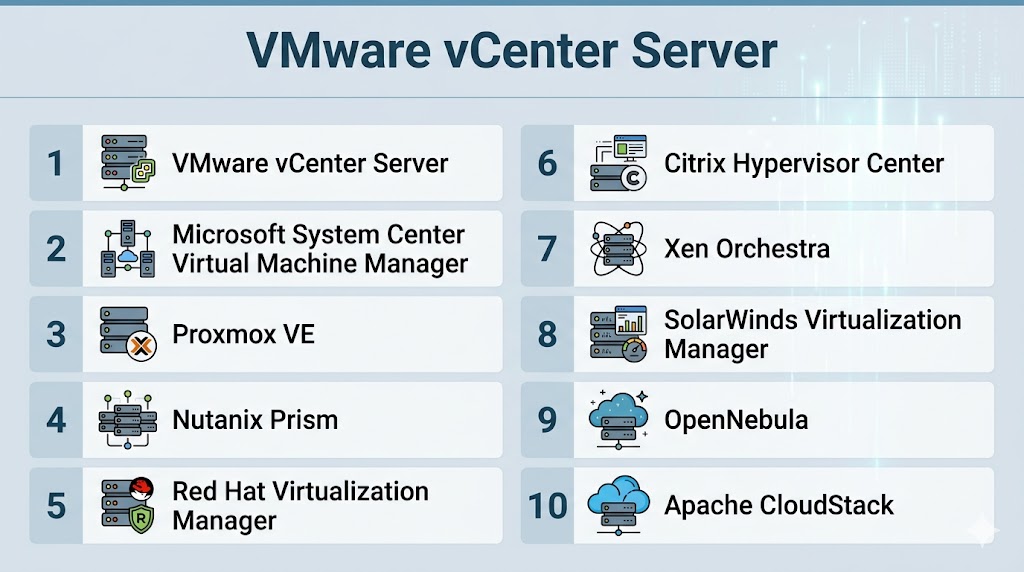
Top 10 Virtual Machine Management Tools
#1 — VMware vCenter Server
Short description:
A leading centralized management platform for VMware environments that helps admins manage hosts, clusters, storage, networking, and virtual machines efficiently.
Key Features
- Centralized VM administration
- Live migration management
- Cluster management
- Resource scheduling
- Templates and cloning
- Performance dashboards
- Role-based access controls
Pros
- Deep enterprise functionality
- Mature ecosystem support
- Strong scalability
Cons
- Best fit for same ecosystem environments
- Licensing can be premium
- Requires trained administrators
Platforms / Deployment
Windows / Linux
Self-hosted / Hybrid
Security & Compliance
RBAC, audit logs, identity integrations, encryption support.
Integrations & Ecosystem
Strong integrations with backup, monitoring, networking, and automation tools.
Support & Community
Large enterprise community and mature support network.
#2 — Microsoft System Center Virtual Machine Manager
Short description:
A centralized management tool for Windows-based virtualization environments focused on enterprise operations and automation.
Key Features
- VM provisioning
- Host and cluster management
- Template libraries
- Network management
- Storage integration
- Automation workflows
- Reporting features
Pros
- Strong Windows ecosystem fit
- Useful enterprise automation
- Familiar admin experience
Cons
- Best in Microsoft-heavy environments
- Interface preferences vary
- Less popular in mixed environments
Platforms / Deployment
Windows
Self-hosted
Security & Compliance
RBAC, identity controls, logging.
Integrations & Ecosystem
Strong alignment with Microsoft server and management products.
Support & Community
Large enterprise support ecosystem.
#3 — Proxmox VE
Short description:
An open-source virtualization management platform combining VM and container management with a user-friendly web interface.
Key Features
- VM and container management
- Web admin console
- Backup scheduling
- Clustering
- Live migration
- Storage integrations
- Role permissions
Pros
- Excellent value
- Strong community adoption
- Great for SMB and labs
Cons
- Requires Linux familiarity
- Enterprise polish varies
- Support model differs from premium vendors
Platforms / Deployment
Linux
Self-hosted
Security & Compliance
Access controls, permissions, backup security.
Integrations & Ecosystem
Works with many open-source infrastructure stacks.
Support & Community
Strong community plus commercial subscriptions.
#4 — Nutanix Prism
Short description:
A modern infrastructure management platform for Nutanix environments offering VM operations, analytics, and simplified administration.
Key Features
- Central management
- VM lifecycle tools
- Capacity analytics
- One-click operations
- Performance dashboards
- Multi-cluster visibility
- Automation workflows
Pros
- Easy operational model
- Strong analytics
- Great HCI alignment
Cons
- Best fit inside same ecosystem
- Pricing depends on platform bundle
- Less standalone appeal
Platforms / Deployment
Self-hosted / Hybrid
Security & Compliance
RBAC, admin controls, logging.
Integrations & Ecosystem
Strong fit with HCI, backup, and private cloud operations.
Support & Community
Strong enterprise support reputation.
#5 — Red Hat Virtualization Manager
Short description:
Enterprise VM management tool suited for Linux-heavy environments requiring centralized virtualization operations.
Key Features
- VM lifecycle management
- Cluster management
- Templates
- Role controls
- High availability support
- Reporting
- API automation
Pros
- Strong Linux ecosystem fit
- Good enterprise controls
- Flexible architecture
Cons
- More technical learning curve
- Smaller mainstream market share
- Best for Linux-oriented teams
Platforms / Deployment
Linux
Self-hosted
Security & Compliance
RBAC, audit controls, enterprise security options.
Integrations & Ecosystem
Works well with enterprise Linux stacks.
Support & Community
Commercial support with open-source roots.
#6 — Citrix Hypervisor Center
Short description:
Management tool for virtualization environments focused on workload administration and operational visibility.
Key Features
- VM management
- Resource pools
- Snapshot handling
- Migration tools
- Monitoring dashboards
- User permissions
- Infrastructure controls
Pros
- Useful for aligned virtualization setups
- Centralized visibility
- Reliable core controls
Cons
- Smaller ecosystem reach
- Less common than leaders
- Best fit in specific environments
Platforms / Deployment
Self-hosted
Security & Compliance
Access controls, logging, permissions.
Integrations & Ecosystem
Often aligned with desktop and virtualization environments.
Support & Community
Business support availability.
#7 — Xen Orchestra
Short description:
Popular management platform for Xen-based environments offering backup, orchestration, and modern administration.
Key Features
- Central dashboard
- Backup automation
- VM monitoring
- Snapshot controls
- Live migration tools
- Multi-host management
- Reporting tools
Pros
- Strong for Xen environments
- Modern interface
- Useful backup tooling
Cons
- Niche ecosystem focus
- Depends on Xen environments
- Smaller market reach
Platforms / Deployment
Linux
Self-hosted
Security & Compliance
Permissions, admin controls, logging.
Integrations & Ecosystem
Focused on Xen virtualization ecosystems.
Support & Community
Active specialized community.
#8 — SolarWinds Virtualization Manager
Short description:
A monitoring-focused VM management platform built to improve performance visibility and capacity planning.
Key Features
- Performance monitoring
- Capacity forecasting
- Alerting
- VM sprawl detection
- Resource optimization insights
- Reporting dashboards
- Multi-platform visibility
Pros
- Strong analytics focus
- Useful capacity planning
- Good for operations teams
Cons
- Monitoring-first rather than full lifecycle tool
- Pricing varies by deployment
- Best with broader monitoring strategy
Platforms / Deployment
Windows / Web
Self-hosted / Hybrid
Security & Compliance
Access controls, admin permissions.
Integrations & Ecosystem
Works with broader monitoring and IT operations tools.
Support & Community
Well-known IT operations vendor presence.
#9 — OpenNebula
Short description:
Open-source cloud and VM management platform for private cloud and virtualization environments.
Key Features
- VM provisioning
- Private cloud controls
- Multi-tenant management
- Automation APIs
- Templates
- Resource scheduling
- Hybrid options
Pros
- Flexible open platform
- Good private cloud fit
- Strong customization potential
Cons
- Requires technical expertise
- Smaller ecosystem than leaders
- UI preferences vary
Platforms / Deployment
Linux
Self-hosted / Hybrid
Security & Compliance
Role controls, admin policies.
Integrations & Ecosystem
Useful for open infrastructure strategies.
Support & Community
Community plus commercial support options.
#10 — Apache CloudStack
Short description:
Cloud orchestration and VM management platform designed for service providers and scalable infrastructure environments.
Key Features
- VM orchestration
- Multi-tenant controls
- Network management
- Resource pooling
- API automation
- Usage reporting
- Scalable architecture
Pros
- Strong for service providers
- Scalable design
- Mature open-source option
Cons
- More complex than SMB tools
- Requires infrastructure skills
- Not ideal for tiny environments
Platforms / Deployment
Linux
Self-hosted / Hybrid
Security & Compliance
Access controls, tenant isolation, logging.
Integrations & Ecosystem
Useful for cloud hosting and infrastructure teams.
Support & Community
Established technical community.
Comparison Table (Top 10)
| Tool Name | Best For | Platform(s) Supported | Deployment | Standout Feature | Public Rating |
|---|---|---|---|---|---|
| VMware vCenter Server | Enterprise | Multi-platform | Hybrid | Deep control | N/A |
| Microsoft SCVMM | Windows IT | Windows | Self-hosted | Microsoft alignment | N/A |
| Proxmox VE | SMB / Labs | Linux | Self-hosted | Open-source value | N/A |
| Nutanix Prism | HCI teams | Multi-platform | Hybrid | Simplicity | N/A |
| Red Hat Manager | Linux teams | Linux | Self-hosted | Linux ecosystem | N/A |
| Citrix Hypervisor Center | Specific enterprise use | Multi-platform | Self-hosted | Central controls | N/A |
| Xen Orchestra | Xen users | Linux | Self-hosted | Backup automation | N/A |
| SolarWinds VM Manager | Ops teams | Multi-platform | Hybrid | Analytics | N/A |
| OpenNebula | Private cloud | Linux | Hybrid | Flexible cloud ops | N/A |
| Apache CloudStack | Providers | Linux | Hybrid | Multi-tenant scale | N/A |
Evaluation & Scoring of Virtual Machine Management Tools
| Tool Name | Core | Ease | Integrations | Security | Performance | Support | Value | Weighted Total |
|---|---|---|---|---|---|---|---|---|
| VMware vCenter Server | 10 | 7 | 10 | 9 | 10 | 9 | 6 | 8.7 |
| Microsoft SCVMM | 8 | 8 | 8 | 8 | 8 | 8 | 8 | 8.0 |
| Proxmox VE | 8 | 8 | 7 | 7 | 8 | 7 | 10 | 8.0 |
| Nutanix Prism | 9 | 9 | 8 | 8 | 9 | 8 | 8 | 8.5 |
| Red Hat Manager | 8 | 6 | 8 | 8 | 8 | 8 | 8 | 7.7 |
| Citrix Hypervisor Center | 7 | 7 | 7 | 8 | 8 | 7 | 7 | 7.3 |
| Xen Orchestra | 7 | 8 | 6 | 7 | 8 | 7 | 8 | 7.4 |
| SolarWinds VM Manager | 8 | 7 | 8 | 8 | 8 | 8 | 7 | 7.8 |
| OpenNebula | 8 | 6 | 7 | 7 | 8 | 7 | 8 | 7.4 |
| Apache CloudStack | 8 | 6 | 8 | 8 | 8 | 7 | 8 | 7.7 |
These scores are comparative benchmarks. The best fit depends on your virtualization stack, team skill level, budget, and automation needs.
Which Virtual Machine Management Tool Is Right for You?
Solo / Freelancer
Choose Proxmox VE or VirtualBox-style lightweight solutions.
SMB
Choose Proxmox VE or Nutanix Prism.
Mid-Market
Choose Microsoft SCVMM or Nutanix Prism.
Enterprise
Choose VMware vCenter Server, Nutanix Prism, or Apache CloudStack.
Budget vs Premium
Budget: Proxmox VE, OpenNebula
Premium: VMware vCenter Server, Nutanix Prism
Feature Depth vs Ease of Use
Depth: VMware vCenter Server, Apache CloudStack
Ease: Nutanix Prism, Proxmox VE
Integrations & Scalability
Strong options: VMware vCenter Server, SCVMM, Nutanix Prism.
Security & Compliance Needs
Strong options: VMware vCenter Server, Nutanix Prism, Red Hat Manager.
Frequently Asked Questions (FAQs)
1. What do VM management tools do?
They help manage creation, monitoring, optimization, and control of virtual machines.
2. Are these tools only for enterprises?
No, some tools fit SMBs and labs too.
3. Can they automate provisioning?
Yes, many support templates and workflows.
4. Which tool is best for open-source users?
Proxmox VE, OpenNebula, and CloudStack are popular choices.
5. Which tool fits VMware environments?
VMware vCenter Server is the common choice.
6. Are backups included?
Some include native backup features, others integrate with backup tools.
7. Can I manage multiple clusters?
Yes, many enterprise tools support this.
8. Is Linux support common?
Yes, several tools are Linux-native.
9. What is VM sprawl?
Too many unmanaged or unused virtual machines increasing waste.
10. What should I test first?
Ease of management, reporting, automation, and scaling.
Conclusion
Virtual Machine Management Tools remain essential for organizations running virtualized infrastructure at scale. The right platform depends on your existing ecosystem, internal skills, budget, and how much automation you need. Some tools focus on enterprise depth, while others deliver strong value through open-source flexibility or simplified operations. Monitoring, lifecycle control, and scalability should be top decision factors. Shortlist two or three tools, test with real workloads, and compare long-term operating efficiency before making your final choice.