Introduction
Load Testing Tools help organizations measure how applications, websites, APIs, and digital platforms perform under expected or extreme traffic conditions. These tools simulate real users, concurrent sessions, transactions, and traffic spikes to identify bottlenecks before customers experience outages or slow performance.
As businesses depend more on digital platforms, load testing has become essential for product launches, seasonal traffic peaks, API reliability, SaaS growth, and DevOps release cycles. A single performance failure can damage revenue, reputation, and user trust. Modern load testing tools help teams validate scalability, stability, and responsiveness before production.
Common use cases include:
- Website traffic simulation
- API stress testing
- Mobile backend testing
- eCommerce sale preparation
- Capacity planning
- CI/CD performance validation
Buyers should evaluate:
- Ease of scripting
- Realistic traffic simulation
- Cloud scalability
- Reporting dashboards
- CI/CD integrations
- Protocol support
- Cost efficiency
- Collaboration features
- Monitoring integrations
- Enterprise support
Best for: QA teams, DevOps engineers, SRE teams, developers, product teams, SaaS businesses, and enterprises releasing customer-facing systems.
Not ideal for: Static brochure websites with low traffic, tiny internal apps with minimal usage, or teams that never release performance-sensitive systems.
Key Trends in Load Testing Tools
- Shift-left performance testing in CI/CD pipelines
- AI-assisted bottleneck detection growing
- Browser-based realistic user testing increasing
- API-first load testing demand rising
- Cloud-native distributed testing becoming standard
- Cost-aware usage models expanding
- Real-time observability integrations improving
- Chaos + load testing combined workflows emerging
- Scriptless testing options gaining popularity
- Performance budgets entering DevOps workflows
How We Selected These Tools (Methodology)
These tools were selected based on:
- Market popularity and trust
- Protocol and scenario coverage
- Scalability under large loads
- Reporting and analytics quality
- Automation and CI/CD compatibility
- Ease of scripting or no-code options
- Cloud testing readiness
- Community or vendor support
- Pricing flexibility
- Long-term relevance
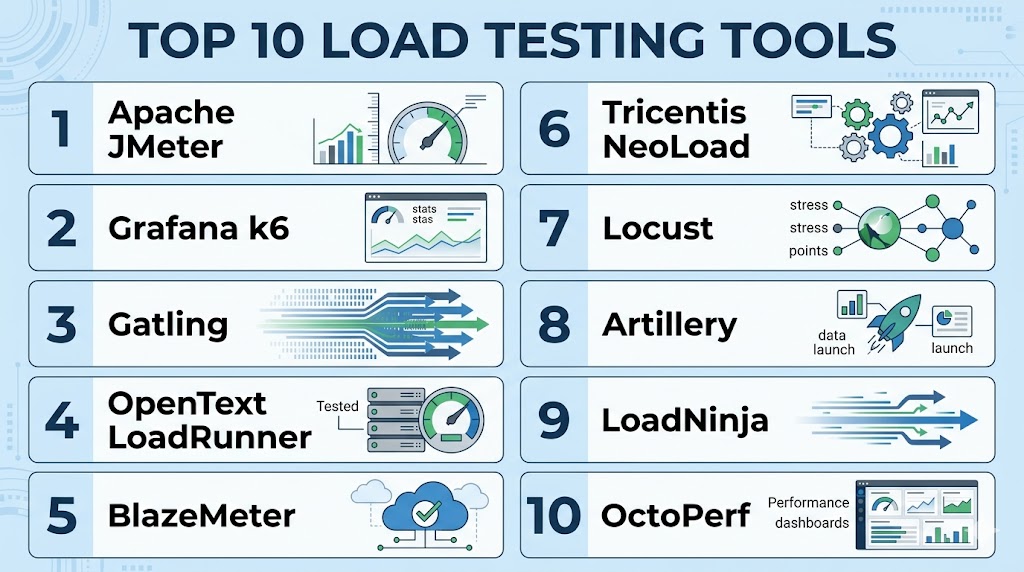
Top 10 Load Testing Tools
#1 — Apache JMeter
Short description:
One of the most widely used open-source load testing tools for web apps, APIs, databases, and network services.
Key Features
- Open-source platform
- HTTP/API testing
- Distributed load testing
- Plugin ecosystem
- GUI and CLI modes
- Assertions and scripting
- Broad protocol support
Pros
- Free and powerful
- Huge community adoption
- Flexible use cases
Cons
- UI feels dated to some users
- Heavy local resource use at scale
- Test plans can become complex
Platforms / Deployment
Windows / Linux / macOS
Self-hosted / Cloud / Hybrid
Security & Compliance
Role controls vary by deployment, secure scripting practices required.
Integrations & Ecosystem
Strong CI/CD, monitoring, and plugin ecosystem.
Support & Community
Massive global community.
#2 — Grafana k6
Short description:
Modern developer-friendly load testing platform focused on scripting, APIs, automation, and cloud-scale execution.
Key Features
- JavaScript scripting
- CLI-first workflows
- API load testing
- Cloud execution options
- Metrics integrations
- CI/CD ready
- Modern reporting
Pros
- Great developer experience
- Excellent automation fit
- Strong observability alignment
Cons
- Browser realism differs from UI tools
- Scripting still required
- Advanced scale may need paid tiers
Platforms / Deployment
Windows / Linux / macOS / Cloud
Security & Compliance
Access controls vary by deployment, secure tokens and secrets support.
Integrations & Ecosystem
Strong fit with observability and DevOps workflows.
Support & Community
Fast-growing modern community.
#3 — Gatling
Short description:
High-performance load testing tool popular for code-based performance testing and enterprise scale.
Key Features
- Code-based scenarios
- High concurrency engine
- Detailed reports
- CI/CD integrations
- Protocol support
- Enterprise options
- Performance efficiency
Pros
- Excellent performance engine
- Great for engineers
- Strong reporting quality
Cons
- Code-first learning curve
- Less beginner-friendly
- Enterprise features may be paid
Platforms / Deployment
Windows / Linux / macOS / Cloud
Security & Compliance
Access controls vary by deployment.
Integrations & Ecosystem
Strong DevOps pipeline compatibility.
Support & Community
Strong technical community.
#4 — OpenText LoadRunner
Short description:
Enterprise-grade load testing platform trusted for complex, mission-critical application performance programs.
Key Features
- Enterprise-scale simulation
- Broad protocol support
- Advanced analytics
- Realistic user scenarios
- Large team collaboration
- Controller architecture
- Enterprise governance tools
Pros
- Very mature enterprise platform
- Broad technology coverage
- Strong for complex environments
Cons
- Premium pricing
- Higher learning curve
- More than SMBs may need
Platforms / Deployment
Windows / Cloud / Hybrid
Security & Compliance
Enterprise controls, RBAC, audit features vary by edition.
Integrations & Ecosystem
Strong enterprise ecosystem compatibility.
Support & Community
Commercial enterprise support.
#5 — BlazeMeter
Short description:
Cloud-based performance testing platform supporting open-source tools and scalable execution.
Key Features
- Cloud load generation
- JMeter compatibility
- API testing support
- Team collaboration
- Real-time dashboards
- CI/CD integrations
- Scalable execution
Pros
- Easy cloud scaling
- Good for distributed teams
- Open-source friendly
Cons
- Subscription costs at scale
- Cloud dependency for some workflows
- Advanced governance varies by plan
Platforms / Deployment
Cloud / Hybrid
Security & Compliance
Access controls, secure workspaces vary by plan.
Integrations & Ecosystem
Strong fit with testing pipelines.
Support & Community
Commercial support with strong adoption.
#6 — Tricentis NeoLoad
Short description:
Enterprise performance testing platform designed for continuous testing and modern application delivery.
Key Features
- GUI scenario builder
- CI/CD integrations
- API and web testing
- Cloud scalability
- Real-time analytics
- Collaboration tools
- Enterprise workflows
Pros
- Easier than script-heavy tools
- Strong enterprise CI/CD fit
- Good reporting experience
Cons
- Commercial pricing
- Enterprise focus
- Smaller community than open-source leaders
Platforms / Deployment
Windows / Cloud / Hybrid
Security & Compliance
RBAC, enterprise controls vary by plan.
Integrations & Ecosystem
Strong DevOps and QA pipeline alignment.
Support & Community
Commercial support model.
#7 — Locust
Short description:
Python-based open-source load testing tool popular with developers and automation teams.
Key Features
- Python scripting
- Distributed testing
- Web UI monitoring
- Custom workflows
- Lightweight architecture
- API testing
- Open-source flexibility
Pros
- Great for Python teams
- Flexible scripting power
- Good automation fit
Cons
- Requires coding skills
- Less no-code friendliness
- Reporting simpler than premium suites
Platforms / Deployment
Windows / Linux / macOS
Security & Compliance
Depends on deployment controls.
Integrations & Ecosystem
Strong developer automation compatibility.
Support & Community
Active open-source community.
#8 — Artillery
Short description:
Modern load testing tool focused on APIs, microservices, and developer-friendly automation.
Key Features
- YAML/JS scripting
- API load testing
- Cloud execution options
- CI/CD workflows
- Lightweight runtime
- Metrics outputs
- Scenario flexibility
Pros
- Good for APIs
- Developer-friendly workflows
- Lightweight setup
Cons
- Smaller ecosystem than leaders
- UI reporting lighter than enterprise suites
- Advanced scenarios need scripting
Platforms / Deployment
Windows / Linux / macOS / Cloud
Security & Compliance
Depends on deployment model.
Integrations & Ecosystem
Strong fit for API engineering teams.
Support & Community
Growing technical community.
#9 — LoadNinja
Short description:
Cloud load testing platform emphasizing browser-based realism and reduced scripting effort.
Key Features
- Real browser testing
- Cloud execution
- Less scripting overhead
- Performance dashboards
- Collaboration tools
- Scalable testing
- User journey simulation
Pros
- Realistic browser behavior
- Faster onboarding
- Good team collaboration
Cons
- Commercial pricing
- Cloud-first dependency
- Smaller ecosystem than open-source leaders
Platforms / Deployment
Cloud
Security & Compliance
Enterprise controls vary by plan.
Integrations & Ecosystem
Useful for web application testing workflows.
Support & Community
Commercial support available.
#10 — OctoPerf
Short description:
Cloud performance testing platform designed to simplify JMeter-based load testing.
Key Features
- JMeter compatibility
- Cloud load generation
- Team collaboration
- Real-time dashboards
- Scenario management
- Distributed testing
- Reporting tools
Pros
- Easier JMeter operations
- Good cloud scalability
- Team-friendly workflows
Cons
- Subscription model
- Best for JMeter-oriented teams
- Smaller brand awareness than leaders
Platforms / Deployment
Cloud / Hybrid
Security & Compliance
Workspace controls vary by plan.
Integrations & Ecosystem
Strong fit for JMeter modernization workflows.
Support & Community
Commercial support options.
Comparison Table (Top 10)
| Tool Name | Best For | Platform(s) Supported | Deployment | Standout Feature | Public Rating |
|---|---|---|---|---|---|
| Apache JMeter | Open-source teams | Multi-platform | Hybrid | Broad protocol support | N/A |
| Grafana k6 | DevOps teams | Multi-platform | Hybrid | Modern scripting | N/A |
| Gatling | Engineers | Multi-platform | Hybrid | High performance engine | N/A |
| LoadRunner | Enterprise QA | Multi-platform | Hybrid | Enterprise depth | N/A |
| BlazeMeter | Cloud teams | Cloud | Hybrid | Elastic scale | N/A |
| NeoLoad | Continuous testing | Multi-platform | Hybrid | Easier enterprise use | N/A |
| Locust | Python teams | Multi-platform | Self-hosted | Python scripting | N/A |
| Artillery | API teams | Multi-platform | Hybrid | API focus | N/A |
| LoadNinja | Web realism | Cloud | Cloud | Real browsers | N/A |
| OctoPerf | JMeter users | Cloud | Hybrid | Managed JMeter scale | N/A |
Evaluation & Scoring of Load Testing Tools
| Tool Name | Core | Ease | Integrations | Security | Performance | Support | Value | Weighted Total |
|---|---|---|---|---|---|---|---|---|
| Apache JMeter | 9 | 7 | 9 | 7 | 8 | 9 | 10 | 8.5 |
| Grafana k6 | 9 | 8 | 9 | 8 | 9 | 8 | 9 | 8.7 |
| Gatling | 9 | 7 | 8 | 8 | 9 | 8 | 8 | 8.2 |
| LoadRunner | 10 | 6 | 9 | 9 | 10 | 9 | 6 | 8.4 |
| BlazeMeter | 8 | 8 | 9 | 8 | 8 | 8 | 7 | 8.0 |
| NeoLoad | 8 | 8 | 8 | 8 | 8 | 8 | 7 | 7.9 |
| Locust | 8 | 7 | 8 | 7 | 8 | 7 | 9 | 7.9 |
| Artillery | 8 | 8 | 8 | 7 | 8 | 7 | 8 | 7.8 |
| LoadNinja | 8 | 9 | 7 | 8 | 8 | 8 | 7 | 7.9 |
| OctoPerf | 8 | 8 | 8 | 8 | 8 | 8 | 7 | 7.9 |
These scores are comparative benchmarks. The best tool depends on traffic type, engineering skills, budget, and CI/CD maturity.
Which Load Testing Tool Is Right for You?
Solo / Freelancer
Choose Apache JMeter, k6, or Locust.
SMB
Choose k6, BlazeMeter, or JMeter.
Mid-Market
Choose Gatling, NeoLoad, or BlazeMeter.
Enterprise
Choose LoadRunner, NeoLoad, BlazeMeter, or k6 Enterprise options.
Budget vs Premium
Budget: JMeter, Locust, Artillery
Premium: LoadRunner, NeoLoad
Feature Depth vs Ease of Use
Depth: LoadRunner, Gatling
Ease: LoadNinja, k6, BlazeMeter
Integrations & Scalability
Strong options: k6, JMeter, BlazeMeter, NeoLoad.
Security & Compliance Needs
Strong choices: LoadRunner, NeoLoad, BlazeMeter.
Frequently Asked Questions (FAQs)
1. What is load testing?
It simulates traffic to measure system performance under usage.
2. Why is load testing important?
It helps prevent outages and slowdowns before production.
3. Is JMeter still relevant?
Yes, it remains one of the most used open-source options.
4. Which tool is best for DevOps teams?
k6 is popular for CI/CD workflows.
5. Which tool is best for enterprises?
LoadRunner and NeoLoad are common enterprise choices.
6. Can I test APIs only?
Yes, many tools are excellent for API load testing.
7. Do I need coding skills?
Some tools need scripting, others are more GUI-based.
8. Can load tests run in the cloud?
Yes, many platforms support cloud execution.
9. What should I test first?
Response time, errors, throughput, and bottlenecks.
10. How often should I run tests?
Before major releases and during scaling changes.
Conclusion
Load Testing Tools are essential for delivering reliable digital experiences in a world where downtime and slow performance directly impact revenue and trust. The right platform depends on your team’s skills, release speed, budget, and testing complexity. Some teams need open-source flexibility, while others benefit from enterprise governance or cloud scale. Automation, reporting, and realistic traffic simulation should guide your evaluation. Shortlist two or three tools, run pilot scenarios, and choose the one that best fits your long-term performance strategy.