Introduction
Remote Desktop Tools allow users to securely access another computer, server, or workstation from anywhere using the internet or a private network. These platforms help individuals and businesses control remote devices, transfer files, troubleshoot issues, collaborate with teams, and manage systems without being physically present.
Remote desktop software has become essential for hybrid work, distributed IT support, MSP operations, remote learning, global collaboration, and secure access to office machines. Instead of relying on physical presence, businesses can improve response time, reduce downtime, and support employees across locations.
Common use cases include:
- Remote IT support
- Work-from-home access to office PCs
- Managed service provider operations
- Server administration
- Remote training and collaboration
- Secure contractor access
Buyers should evaluate:
- Connection speed and latency
- Security features
- Ease of use
- File transfer tools
- Multi-device support
- Unattended access options
- Admin controls
- Scalability
- Pricing model
- Customer support
Best for: IT teams, MSPs, freelancers, remote workers, support teams, educators, and businesses with distributed employees.
Not ideal for: Teams needing only browser-based SaaS access, fully offline environments, or users with no remote access requirements.
Key Trends in Remote Desktop Tools
- AI-assisted troubleshooting and diagnostics
- Zero Trust remote access models
- Browser-based remote sessions growing fast
- Better mobile remote control experiences
- Session recording and audit logging demand rising
- Deeper help desk integrations
- Faster low-bandwidth performance optimization
- Stronger MFA and identity integrations
- More unattended device management features
- Cross-platform remote work becoming standard
How We Selected These Tools (Methodology)
These tools were selected using practical criteria:
- Market popularity and trust
- Performance and connection quality
- Security capabilities
- Ease of deployment
- Cross-platform support
- Business and enterprise readiness
- Support quality
- Pricing flexibility
- Feature completeness
- Overall long-term relevance
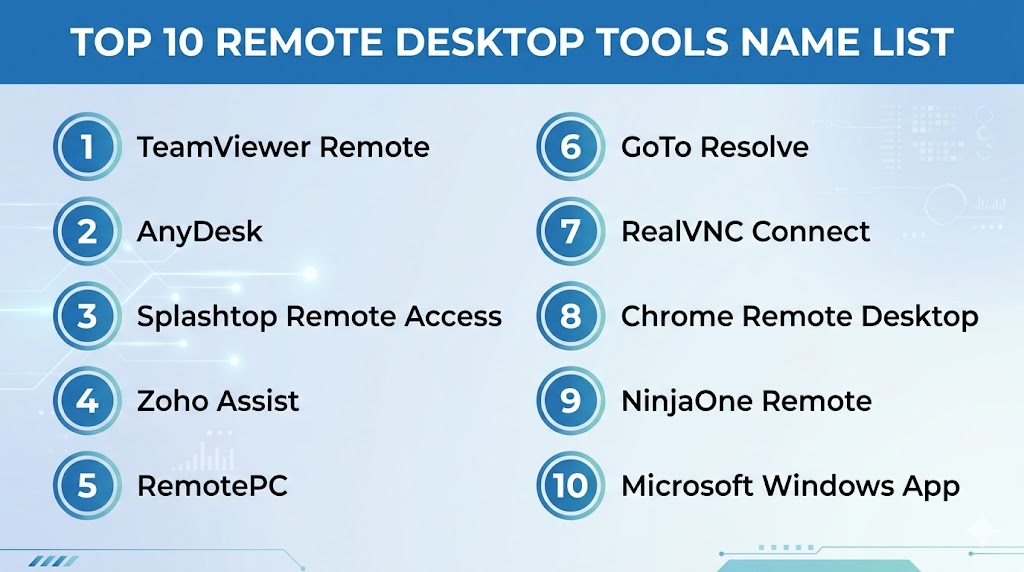
Top 10 Remote Desktop Tools
#1 — TeamViewer Remote
Short description:
One of the most recognized remote desktop platforms for business support, remote access, and enterprise device management.
Key Features
- Fast remote control sessions
- Cross-platform support
- Unattended access
- File transfer
- Multi-monitor support
- Session recording
- Device management tools
Pros
- Strong brand trust
- Easy to use
- Excellent platform coverage
Cons
- Premium pricing for business plans
- Free version limitations
- Can feel expensive for small teams
Platforms / Deployment
Windows / macOS / Linux / iOS / Android / Web
Cloud
Security & Compliance
MFA, encryption, SSO, audit controls.
Integrations & Ecosystem
Works with help desk, ITSM, and enterprise identity systems.
Support & Community
Strong documentation and global support presence.
#2 — AnyDesk
Short description:
Popular remote access platform known for speed, lightweight design, and smooth low-latency performance.
Key Features
- Lightweight client
- Fast connections
- File transfer
- Unattended access
- Session permissions
- Mobile support
- Multi-platform use
Pros
- Strong performance
- Simple setup
- Good for SMBs
Cons
- Advanced admin tools vary by plan
- Enterprise depth lower than some rivals
- UI preferences vary by users
Platforms / Deployment
Windows / macOS / Linux / iOS / Android
Cloud
Security & Compliance
Encryption, MFA, access permissions.
Integrations & Ecosystem
Works well for standard remote support workflows.
Support & Community
Popular community and growing business support.
#3 — Splashtop
Short description:
A strong value-focused remote desktop platform for IT support, education, and business remote access.
Key Features
- High-definition remote sessions
- File transfer
- Remote printing
- Multi-monitor support
- Unattended access
- Device grouping
- Session controls
Pros
- Competitive pricing
- Good performance
- Strong business value
Cons
- Some advanced tools on higher plans
- Less enterprise prestige
- UI may vary by edition
Platforms / Deployment
Windows / macOS / Linux / iOS / Android / Web
Cloud
Security & Compliance
Encryption, MFA, role-based access.
Integrations & Ecosystem
Useful for education, SMB, and IT support environments.
Support & Community
Reliable support and growing adoption.
#4 — RemotePC
Short description:
Affordable remote access tool ideal for individuals and small businesses needing always-on access.
Key Features
- Always-on remote access
- File transfer
- Remote printing
- Multi-user access
- Chat tools
- Session recording
- Device management
Pros
- Budget-friendly
- Easy deployment
- Good for SMB users
Cons
- Less advanced enterprise tooling
- Smaller ecosystem
- Fewer premium integrations
Platforms / Deployment
Windows / macOS / Linux / iOS / Android / Web
Cloud
Security & Compliance
Encryption, access controls, MFA.
Integrations & Ecosystem
Focused on direct remote access use cases.
Support & Community
Good SMB support experience.
#5 — Zoho Assist
Short description:
Remote support and unattended access platform that fits well with broader business operations environments.
Key Features
- Browser-based sessions
- Unattended access
- File transfer
- Multi-monitor navigation
- Session scheduling
- Technician tools
- Reporting features
Pros
- Strong value
- Good for support teams
- Useful ecosystem alignment
Cons
- Best fit within same ecosystem
- Enterprise depth varies
- UI preferences vary
Platforms / Deployment
Windows / macOS / Linux / iOS / Android / Web
Cloud
Security & Compliance
Encryption, MFA, role controls.
Integrations & Ecosystem
Strong business app integrations and automation options.
Support & Community
Reliable business support and documentation.
#6 — Chrome Remote Desktop
Short description:
Simple free remote desktop solution ideal for personal use and basic business access.
Key Features
- Browser-based access
- Easy setup
- Cross-device support
- Lightweight install
- Secure account login
- Fast personal access
- Free usage
Pros
- Free and simple
- Great for casual users
- Minimal setup effort
Cons
- Limited admin tools
- Fewer enterprise features
- Basic compared to premium tools
Platforms / Deployment
Windows / macOS / Linux / Android / iOS / Web
Cloud
Security & Compliance
Encryption, account-based authentication.
Integrations & Ecosystem
Best for direct remote access rather than enterprise workflows.
Support & Community
Large user base with basic help resources.
#7 — GoTo Resolve
Short description:
Modern IT support and remote management platform combining support tools with remote access.
Key Features
- Remote control
- Ticketing options
- Monitoring features
- Unattended access
- Automation tools
- Reporting
- Multi-device support
Pros
- Good all-in-one support stack
- Useful for IT teams
- Strong operational features
Cons
- Broader suite may cost more
- Simpler needs may not require full stack
- Learning curve for full features
Platforms / Deployment
Windows / macOS / iOS / Android / Web
Cloud
Security & Compliance
Encryption, MFA, admin controls.
Integrations & Ecosystem
Good fit for service desk workflows.
Support & Community
Strong commercial support presence.
#8 — RealVNC Connect
Short description:
Trusted remote access platform known for secure connectivity and long-standing remote control technology.
Key Features
- Secure remote sessions
- Cross-platform support
- File transfer
- Device management
- Session permissions
- Scalable deployment
- Reliable connectivity
Pros
- Trusted legacy vendor
- Strong security reputation
- Good enterprise fit
Cons
- UI less modern than some rivals
- Premium plans may be needed
- Less hype than newer tools
Platforms / Deployment
Windows / macOS / Linux / iOS / Android
Cloud / Hybrid
Security & Compliance
Encryption, MFA, access controls.
Integrations & Ecosystem
Useful for secure remote access environments.
Support & Community
Strong documentation and professional support.
#9 — Microsoft Windows App
Short description:
Remote access solution for connecting to Windows environments and business desktops.
Key Features
- Windows remote sessions
- Multi-monitor support
- Enterprise identity options
- Secure connections
- App access
- Productivity alignment
- Broad Windows compatibility
Pros
- Strong for Windows users
- Good enterprise alignment
- Familiar ecosystem experience
Cons
- Best for Windows-focused environments
- Less cross-platform depth than specialists
- Some scenarios need additional setup
Platforms / Deployment
Windows / macOS / iOS / Android / Web
Security & Compliance
Encryption, identity integrations, access controls.
Integrations & Ecosystem
Strong fit with productivity and identity ecosystems.
Support & Community
Large business user base.
#10 — LogMeIn Pro
Short description:
Well-known remote access tool designed for professionals and businesses needing secure device access.
Key Features
- Remote control
- File transfer
- Multi-monitor access
- Remote printing
- Device access management
- User controls
- Cloud management
Pros
- Mature platform
- Reliable access experience
- Good professional use case
Cons
- Pricing can feel premium
- Strong competition in market
- Feature plans vary
Platforms / Deployment
Windows / macOS / iOS / Android / Web
Cloud
Security & Compliance
Encryption, MFA, admin controls.
Integrations & Ecosystem
Useful for business remote access workflows.
Support & Community
Established vendor support network.
Comparison Table (Top 10)
| Tool Name | Best For | Platform(s) Supported | Deployment | Standout Feature | Public Rating |
|---|---|---|---|---|---|
| TeamViewer Remote | Enterprise support | Multi-platform | Cloud | Brand trust | N/A |
| AnyDesk | Fast remote access | Multi-platform | Cloud | Speed | N/A |
| Splashtop | Value buyers | Multi-platform | Cloud | Price-performance | N/A |
| RemotePC | SMB users | Multi-platform | Cloud | Affordable access | N/A |
| Zoho Assist | Support teams | Multi-platform | Cloud | Business ecosystem | N/A |
| Chrome Remote Desktop | Personal use | Multi-platform | Cloud | Free simplicity | N/A |
| GoTo Resolve | IT teams | Multi-platform | Cloud | Support suite | N/A |
| RealVNC Connect | Secure access | Multi-platform | Hybrid | Security focus | N/A |
| Microsoft Windows App | Windows teams | Multi-platform | Cloud | Windows alignment | N/A |
| LogMeIn Pro | Professionals | Multi-platform | Cloud | Mature platform | N/A |
Evaluation & Scoring of Remote Desktop Tools
| Tool Name | Core | Ease | Integrations | Security | Performance | Support | Value | Weighted Total |
|---|---|---|---|---|---|---|---|---|
| TeamViewer Remote | 9 | 9 | 8 | 9 | 9 | 9 | 7 | 8.6 |
| AnyDesk | 8 | 9 | 7 | 8 | 9 | 8 | 9 | 8.4 |
| Splashtop | 8 | 8 | 7 | 8 | 8 | 8 | 9 | 8.1 |
| RemotePC | 7 | 8 | 6 | 8 | 7 | 7 | 9 | 7.6 |
| Zoho Assist | 8 | 8 | 8 | 8 | 8 | 8 | 8 | 8.0 |
| Chrome Remote Desktop | 6 | 10 | 5 | 7 | 7 | 6 | 10 | 7.3 |
| GoTo Resolve | 8 | 7 | 8 | 8 | 8 | 8 | 7 | 7.8 |
| RealVNC Connect | 8 | 7 | 7 | 9 | 8 | 8 | 7 | 7.8 |
| Microsoft Windows App | 8 | 8 | 8 | 8 | 8 | 8 | 8 | 8.0 |
| LogMeIn Pro | 8 | 8 | 7 | 8 | 8 | 8 | 6 | 7.6 |
These scores are comparative benchmarks. The best tool depends on budget, operating systems, security needs, and support workflows. Use scoring to shortlist top options, then test real-world performance.
Which Remote Desktop Tool Is Right for You?
Solo / Freelancer
Choose Chrome Remote Desktop, RemotePC, or AnyDesk.
SMB
Choose Splashtop, Zoho Assist, or RemotePC.
Mid-Market
Choose TeamViewer Remote, GoTo Resolve, or Microsoft Windows App.
Enterprise
Choose TeamViewer Remote, RealVNC Connect, or GoTo Resolve.
Budget vs Premium
Budget: Chrome Remote Desktop, RemotePC, Splashtop
Premium: TeamViewer Remote, LogMeIn Pro
Feature Depth vs Ease of Use
Depth: TeamViewer Remote, GoTo Resolve
Ease: Chrome Remote Desktop, AnyDesk
Integrations & Scalability
Strong choices: Zoho Assist, TeamViewer Remote, Microsoft Windows App.
Security & Compliance Needs
Best options: TeamViewer Remote, RealVNC Connect, Microsoft Windows App.
Frequently Asked Questions (FAQs)
1. What are Remote Desktop Tools?
They let you access and control another computer remotely through the internet.
2. Are Remote Desktop Tools secure?
Yes, especially when using MFA, encryption, and access controls.
3. Which tool is best for free use?
Chrome Remote Desktop is a common simple free option.
4. Which tool is best for IT support?
TeamViewer Remote, Zoho Assist, and GoTo Resolve are strong options.
5. Can I transfer files remotely?
Yes, many premium tools include file transfer features.
6. Can I use mobile devices?
Most major platforms support Android and iOS access.
7. What is unattended access?
It allows remote connection without someone accepting the session each time.
8. Are these tools good for businesses?
Yes, many offer admin controls, reporting, and team management.
9. Can I switch tools later?
Yes, migration is usually easier than VDI platform switching.
10. What should I test first?
Speed, security, device compatibility, and support workflows.
Conclusion
Remote Desktop Tools have become essential for modern support teams, hybrid workers, and businesses that need secure access from anywhere. The right platform depends on your budget, technical needs, device mix, and how often remote support is required. Some tools focus on simplicity and affordability, while others offer deeper enterprise management and compliance controls. Performance, security, and ease of use should always guide your decision. Shortlist two or three options, run live tests, and compare real user experience before committing long term.