Introduction
Storage Management Tools help organizations monitor, optimize, automate, and secure storage infrastructure across on-premises, cloud, and hybrid environments. These tools give IT teams visibility into storage capacity, performance, availability, costs, and lifecycle operations.
As businesses generate more data from apps, AI workloads, analytics, backups, and compliance systems, storage complexity grows rapidly. Modern storage management platforms reduce waste, improve performance, prevent outages, and simplify administration across multiple vendors and environments.
Common use cases include:
- Capacity planning
- Storage performance monitoring
- Multi-vendor storage visibility
- Automated provisioning
- Cost optimization
- Hybrid cloud storage management
- Compliance and lifecycle governance
What buyers should evaluate:
- Multi-vendor support
- Cloud and hybrid readiness
- Performance analytics
- Automation features
- Ease of use
- Security controls
- Scalability
- Reporting quality
- API integrations
- Pricing model
Best for: Enterprises, IT teams, data centers, MSPs, cloud-first businesses, and organizations managing growing storage estates.
Not ideal for: Very small businesses using only simple local drives or consumer cloud storage.
Key Trends in Storage Management Tools
- AI-driven capacity forecasting growing rapidly
- Unified hybrid storage consoles becoming standard
- Storage-as-a-service adoption increasing
- Predictive performance monitoring improving uptime
- Policy-based automated tiering expanding
- Multi-cloud storage governance becoming critical
- Cyber-resilient immutable storage integration growing
- Cost optimization dashboards gaining importance
- API-first automation replacing manual provisioning
- Sustainability metrics entering storage planning
How We Selected These Tools (Methodology)
- Strong enterprise reputation and adoption
- Broad storage management capabilities
- Monitoring and automation maturity
- Hybrid cloud readiness
- Security and governance features
- Ease of administration
- Integration ecosystem quality
- Suitability across mid-market to enterprise
- Vendor support reputation
- Overall operational value
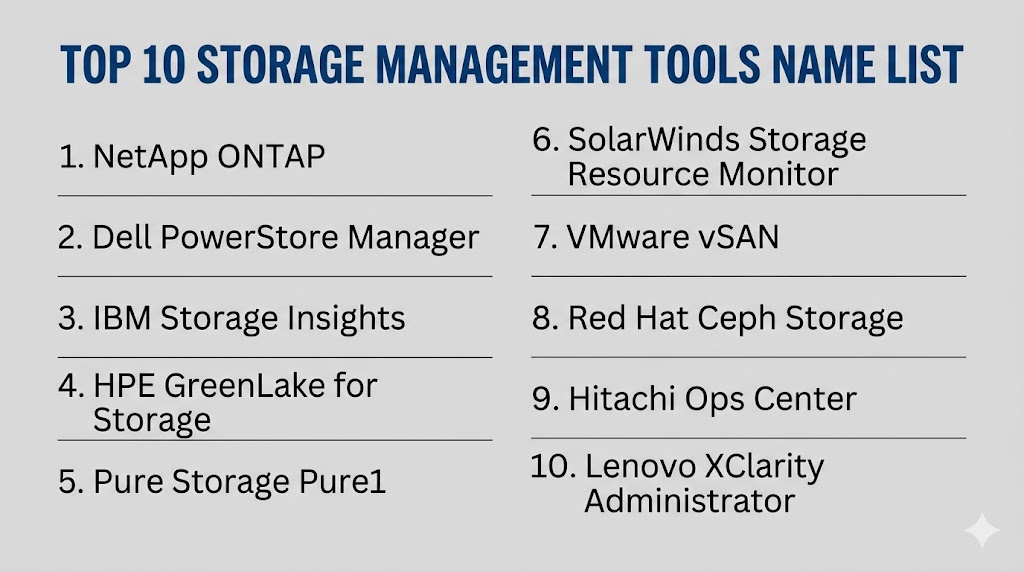
Top 10 Storage Management Tools
#1 — NetApp ONTAP
Short description: A leading enterprise storage operating platform for managing NAS, SAN, and hybrid cloud storage with strong automation.
Key Features
- Unified storage management
- Snapshot technology
- Replication workflows
- Tiering automation
- Ransomware protections
- Hybrid cloud integration
- Performance analytics
Pros
- Mature enterprise platform
- Strong hybrid flexibility
- Broad ecosystem support
Cons
- Best fit for NetApp environments
- Enterprise pricing levels possible
Platforms / Deployment
Cloud / On-prem / Hybrid
Security & Compliance
RBAC, MFA, encryption, audit logging
Integrations & Ecosystem
- AWS
- Azure
- VMware
- Kubernetes
- APIs
Support & Community
Large enterprise support ecosystem.
#2 — Dell PowerStore Manager
Short description: Centralized management platform for Dell storage systems with automation and performance visibility.
Key Features
- Unified dashboard
- Provisioning automation
- Capacity analytics
- Replication tools
- Snapshot controls
- Performance monitoring
- Multi-workload support
Pros
- Strong Dell ecosystem fit
- Modern management experience
Cons
- Best for Dell estates
- Less universal for mixed vendors
Platforms / Deployment
Cloud / On-prem / Hybrid
Security & Compliance
RBAC, encryption, audit controls
Integrations & Ecosystem
- VMware
- Dell ecosystem
- APIs
Support & Community
Strong enterprise vendor support.
#3 — IBM Storage Insights
Short description: Cloud-based storage monitoring and analytics platform with AI-assisted recommendations.
Key Features
- Capacity analytics
- Performance monitoring
- Health insights
- AI recommendations
- Multi-vendor support
- Alerting tools
- Centralized dashboards
Pros
- Strong analytics focus
- Useful multi-vendor visibility
Cons
- Best value in IBM ecosystems
- Advanced workflows may vary
Platforms / Deployment
Cloud / Hybrid
Security & Compliance
RBAC, MFA, encryption
Integrations & Ecosystem
- IBM storage
- Mixed arrays
- APIs
Support & Community
Strong enterprise support model.
#4 — HPE GreenLake for Storage
Short description: Consumption-based storage platform with centralized management and hybrid flexibility.
Key Features
- Storage as a service
- Capacity scaling
- Unified management
- Performance monitoring
- Automated provisioning
- Cost visibility
- Hybrid deployment support
Pros
- Flexible consumption model
- Strong hybrid approach
Cons
- Best fit for HPE buyers
- Pricing depends on contracts
Platforms / Deployment
Cloud / Hybrid / On-prem
Security & Compliance
RBAC, encryption, audit logs
Integrations & Ecosystem
- HPE storage
- Cloud platforms
- APIs
Support & Community
Strong enterprise channel presence.
#5 — Pure Storage Pure1
Short description: Cloud-based storage management platform known for simplicity and predictive analytics.
Key Features
- Fleet monitoring
- AI support insights
- Capacity planning
- Performance analytics
- Case automation
- Global visibility
- Health dashboards
Pros
- Excellent user experience
- Strong proactive support model
Cons
- Best for Pure Storage customers
- Less useful outside ecosystem
Platforms / Deployment
Cloud
Security & Compliance
RBAC, MFA, encryption
Integrations & Ecosystem
- Pure arrays
- VMware
- APIs
Support & Community
Highly regarded enterprise support.
#6 — SolarWinds Storage Resource Monitor
Short description: A monitoring-focused platform that centralizes storage performance and capacity visibility across vendors.
Key Features
- Multi-vendor monitoring
- Capacity forecasting
- Alerting thresholds
- Performance dashboards
- Reporting tools
- Centralized console
- Trend analytics
Pros
- Strong monitoring depth
- Useful for mixed environments
Cons
- More monitoring-centric than provisioning-centric
- Setup tuning may be needed
Platforms / Deployment
On-prem / Hybrid
Security & Compliance
RBAC, audit controls
Integrations & Ecosystem
- SAN/NAS arrays
- Network tools
- APIs
Support & Community
Established IT operations ecosystem.
#7 — VMware vSAN
Short description: Software-defined storage platform integrated with VMware virtualization environments.
Key Features
- Hyperconverged storage
- Cluster management
- Policy-based storage
- Performance controls
- Scalability tools
- Snapshot support
- VMware-native operations
Pros
- Excellent VMware fit
- Simplifies HCI deployments
Cons
- Best for VMware estates
- Licensing can vary
Platforms / Deployment
On-prem / Hybrid / Cloud
Security & Compliance
RBAC, encryption, audit logging
Integrations & Ecosystem
- VMware stack
- Kubernetes
- Cloud integrations
Support & Community
Large enterprise virtualization ecosystem.
#8 — Red Hat Ceph Storage
Short description: Open-source driven software-defined storage platform for object, block, and file workloads.
Key Features
- Object storage
- Block storage
- File storage
- Scale-out architecture
- Self-healing clusters
- API-driven automation
- Commodity hardware support
Pros
- Strong scalability
- Open ecosystem flexibility
Cons
- Requires expertise
- More complex than turnkey appliances
Platforms / Deployment
Cloud / On-prem / Hybrid
Security & Compliance
RBAC, encryption options
Integrations & Ecosystem
- OpenShift
- Kubernetes
- Linux ecosystems
Support & Community
Strong open-source and enterprise support.
#9 — Hitachi Ops Center
Short description: Enterprise storage operations suite focused on automation and performance optimization.
Key Features
- Provisioning automation
- Performance analytics
- Capacity planning
- Compliance reporting
- Policy management
- Alerting tools
- Centralized operations
Pros
- Strong enterprise operations depth
- Good automation tooling
Cons
- Best for Hitachi environments
- Less common SMB adoption
Platforms / Deployment
Cloud / Hybrid / On-prem
Security & Compliance
RBAC, encryption, audit logs
Integrations & Ecosystem
- Hitachi storage
- APIs
- Enterprise tools
Support & Community
Enterprise-focused support model.
#10 — Lenovo XClarity Administrator
Short description: Infrastructure management platform including storage-related lifecycle and operational visibility.
Key Features
- Hardware lifecycle controls
- Storage visibility
- Centralized alerts
- Firmware workflows
- Provisioning support
- Reporting dashboards
- Multi-site management
Pros
- Strong Lenovo infrastructure fit
- Practical centralized control
Cons
- Best for Lenovo estates
- Narrower storage specialization
Platforms / Deployment
On-prem / Hybrid
Security & Compliance
RBAC, encryption
Integrations & Ecosystem
- Lenovo infrastructure
- APIs
- Data center tools
Support & Community
Reliable enterprise vendor support.
Comparison Table (Top 10)
| Tool Name | Best For | Platform(s) Supported | Deployment | Standout Feature | Public Rating |
|---|---|---|---|---|---|
| NetApp ONTAP | Hybrid enterprises | Web | Hybrid | Unified storage OS | N/A |
| Dell PowerStore Manager | Dell customers | Web | Hybrid | Modern management | N/A |
| IBM Storage Insights | Analytics-heavy teams | Web | Cloud/Hybrid | AI insights | N/A |
| HPE GreenLake | Consumption buyers | Web | Hybrid | Storage as a service | N/A |
| Pure1 | Pure customers | Web | Cloud | Predictive support | N/A |
| SolarWinds SRM | Mixed vendors | Web | Hybrid | Deep monitoring | N/A |
| VMware vSAN | VMware estates | Web | Hybrid | Software-defined HCI | N/A |
| Red Hat Ceph | Scale-out environments | Web | Hybrid | Open storage platform | N/A |
| Hitachi Ops Center | Large enterprises | Web | Hybrid | Ops automation | N/A |
| Lenovo XClarity | Lenovo estates | Web | Hybrid | Lifecycle control | N/A |
Evaluation & Scoring of Storage Management Tools
| Tool Name | Core (25%) | Ease (15%) | Integrations (15%) | Security (10%) | Performance (10%) | Support (10%) | Value (15%) | Weighted Total |
|---|---|---|---|---|---|---|---|---|
| NetApp ONTAP | 9 | 8 | 9 | 9 | 9 | 9 | 7 | 8.55 |
| Dell PowerStore Manager | 8 | 8 | 7 | 8 | 8 | 8 | 7 | 7.75 |
| IBM Storage Insights | 8 | 8 | 8 | 8 | 8 | 8 | 7 | 7.90 |
| HPE GreenLake | 8 | 8 | 8 | 8 | 8 | 8 | 7 | 7.90 |
| Pure1 | 8 | 9 | 7 | 8 | 8 | 9 | 7 | 8.00 |
| SolarWinds SRM | 8 | 7 | 8 | 7 | 8 | 8 | 8 | 7.75 |
| VMware vSAN | 8 | 7 | 8 | 8 | 8 | 8 | 7 | 7.75 |
| Red Hat Ceph | 9 | 6 | 8 | 8 | 9 | 7 | 8 | 7.95 |
| Hitachi Ops Center | 8 | 7 | 7 | 8 | 8 | 8 | 7 | 7.55 |
| Lenovo XClarity | 7 | 8 | 7 | 7 | 7 | 8 | 8 | 7.40 |
These scores are comparative benchmarks. Enterprise platforms usually score higher in scale and control, while simpler tools may offer stronger usability and value.
Which Storage Management Tool Is Right for You?
Solo / Freelancer
Most solo users do not need enterprise storage management platforms.
SMB
SolarWinds SRM or Lenovo XClarity can be practical depending on infrastructure.
Mid-Market
IBM Storage Insights, HPE GreenLake, and Dell PowerStore Manager are strong choices.
Enterprise
NetApp ONTAP, Pure1, Hitachi Ops Center, and Red Hat Ceph suit large complex environments.
Budget vs Premium
- Budget: SolarWinds SRM, Lenovo XClarity, Ceph
- Premium: NetApp, Pure1, HPE GreenLake
Feature Depth vs Ease of Use
- Deep features: NetApp, Ceph, Hitachi
- Easy to use: Pure1, Dell, IBM
Integrations & Scalability
- Best integrations: NetApp, VMware, IBM
- Best scalability: Ceph, NetApp, HPE
Security & Compliance Needs
- High-security environments: NetApp, IBM, HPE
- General business needs: SolarWinds, Dell, Lenovo
Frequently Asked Questions (FAQs)
1. What is a storage management tool?
It helps monitor, optimize, and control business storage infrastructure.
2. Why is storage management important?
It reduces waste, improves performance, and prevents outages.
3. Is it only for enterprises?
No. Mid-sized businesses with growing data can benefit too.
4. Can it manage cloud storage?
Many modern tools support cloud and hybrid environments.
5. What is capacity planning?
Forecasting when storage will run low so upgrades happen early.
6. Are these tools secure?
Most enterprise tools offer encryption, RBAC, and logging.
7. Can they reduce costs?
Yes. Better tiering and utilization often lower spending.
8. Do they support automation?
Many platforms now automate provisioning and lifecycle tasks.
9. How is pricing structured?
Usually by capacity, nodes, features, or subscriptions.
10. How should I choose one?
Start with your storage vendors, growth plans, cloud strategy, and budget.
Conclusion
Storage management tools are essential for organizations dealing with rapid data growth and complex infrastructure. The right platform can improve performance, reduce costs, simplify operations, and strengthen resilience across cloud and on-prem environments. Enterprise buyers often prioritize automation and scale, while mid-market teams may focus on visibility and usability. Vendor-native platforms can deliver deep optimization, while multi-vendor tools offer broader oversight. There is no universal best option—only the best fit for your infrastructure strategy and operational needs. Shortlist a few strong choices, test reporting and automation workflows, and validate long-term scalability before committing.