Introduction
Automated Testing Tools help teams validate software quality faster by replacing repetitive manual checks with scripts, workflows, and reusable test cases. These platforms test web apps, mobile apps, APIs, desktop software, and enterprise systems across multiple environments. They improve release speed, consistency, and defect detection while reducing regression testing effort.
As businesses ship software more frequently through Agile and DevOps practices, automated testing has become essential. Modern teams need rapid feedback during CI/CD pipelines, cross-browser coverage, mobile testing, API validation, and scalable quality assurance. The right automation tool can significantly improve reliability while lowering long-term testing costs.
Common use cases include:
- Regression testing
- Cross-browser web testing
- Mobile app testing
- API testing automation
- CI/CD quality gates
- Smoke and sanity testing
- Enterprise workflow testing
- Release validation
Buyers should evaluate:
- Ease of scripting or no-code options
- Browser and device coverage
- CI/CD integrations
- Test maintenance effort
- Reporting dashboards
- Team collaboration features
- Framework flexibility
- Scalability
- Support ecosystem
- Total cost of ownership
Best for: QA teams, developers, DevOps engineers, product teams, enterprises, SaaS companies, and organizations with frequent releases.
Not ideal for: One-time small websites, products with almost no change cycles, or teams unwilling to maintain test automation assets.
Key Trends in Automated Testing Tools
- AI-assisted test generation increasing
- Self-healing locators gaining popularity
- Shift-left testing in CI/CD pipelines
- Cross-browser cloud testing expanding
- API-first automation becoming standard
- Low-code/no-code adoption growing
- Visual regression testing demand rising
- Mobile automation accelerating
- Unified test management integrations improving
- Faster parallel execution becoming essential
How We Selected These Tools (Methodology)
These tools were selected based on:
- Market popularity and trust
- Feature completeness
- Cross-platform coverage
- CI/CD compatibility
- Ease of adoption
- Scalability for growing teams
- Reporting and analytics quality
- Community or vendor support
- Innovation pace
- Long-term relevance
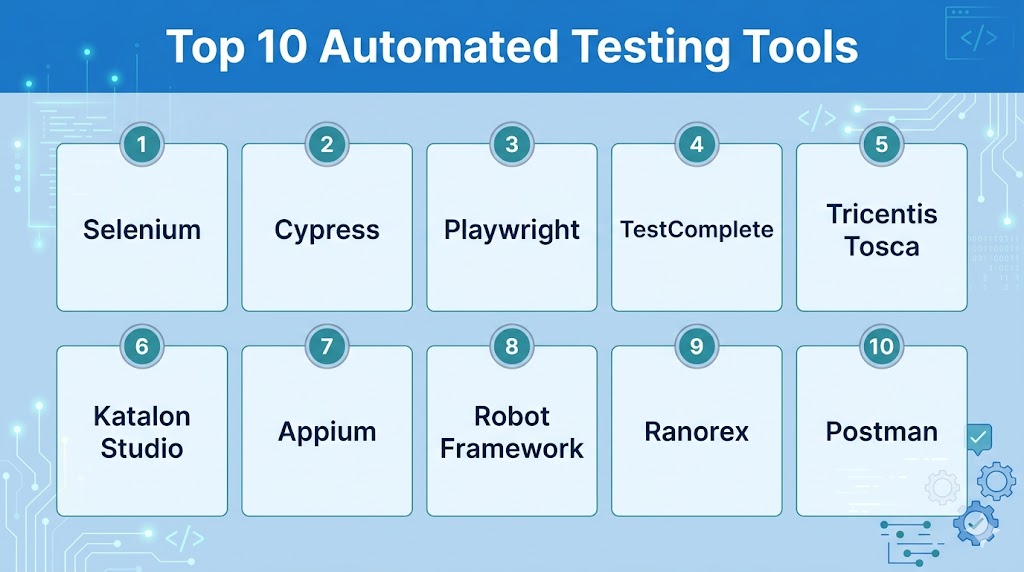
Top 10 Automated Testing Tools
#1 — Selenium
Short description:
One of the most recognized open-source automation frameworks for browser testing across multiple languages and platforms.
Key Features
- Cross-browser automation
- Multi-language support
- Large ecosystem
- Parallel execution support
- Grid infrastructure
- CI/CD compatibility
- Open-source flexibility
Pros
- Industry standard reputation
- Huge community support
- Highly flexible framework
Cons
- Higher maintenance effort
- Requires coding skills
- Setup complexity for beginners
Platforms / Deployment
Windows / Linux / macOS / Cloud
Security & Compliance
Depends on deployment controls and pipeline security.
Integrations & Ecosystem
Strong compatibility with frameworks, CI/CD, and cloud grids.
Support & Community
Massive global community.
#2 — Cypress
Short description:
Modern web testing platform focused on fast developer workflows and front-end testing.
Key Features
- Fast browser execution
- Real-time debugging
- Automatic waits
- Screenshots and videos
- CI/CD support
- Developer-friendly UX
- Modern web app focus
Pros
- Excellent developer experience
- Faster onboarding
- Great debugging tools
Cons
- Primarily web-focused
- Some advanced cross-browser scope varies
- Requires JavaScript familiarity
Platforms / Deployment
Windows / Linux / macOS / Cloud
Security & Compliance
Access controls vary by deployment.
Integrations & Ecosystem
Strong front-end and CI/CD compatibility.
Support & Community
Large modern community.
#3 — Playwright
Short description:
Advanced browser automation framework known for speed, reliability, and multi-browser support.
Key Features
- Chromium, Firefox, WebKit support
- Parallel testing
- Auto waits
- Mobile emulation
- Network interception
- Screenshots and traces
- API testing support
Pros
- Excellent reliability
- Strong cross-browser support
- Great for modern apps
Cons
- Requires coding skills
- Growing ecosystem vs older leaders
- Learning curve for advanced use
Platforms / Deployment
Windows / Linux / macOS / Cloud
Security & Compliance
Depends on deployment controls.
Integrations & Ecosystem
Strong CI/CD and modern dev workflow alignment.
Support & Community
Rapidly growing adoption.
#4 — TestComplete
Short description:
Commercial automation platform for web, desktop, and enterprise applications.
Key Features
- Scripted and keyword testing
- Desktop app automation
- Web automation
- Reusable objects
- Reporting dashboards
- CI/CD integrations
- Team collaboration
Pros
- Broad app coverage
- Good for mixed environments
- Easier than code-only tools for some teams
Cons
- Commercial pricing
- Windows-heavy workflows common
- Smaller community than open-source tools
Platforms / Deployment
Windows / Cloud / Hybrid
Security & Compliance
RBAC and enterprise controls vary by edition.
Integrations & Ecosystem
Strong QA ecosystem compatibility.
Support & Community
Commercial support model.
#5 — Tricentis Tosca
Short description:
Enterprise automation platform known for model-based and low-code testing across complex systems.
Key Features
- Low-code automation
- Model-based testing
- SAP and enterprise support
- API testing
- Risk-based testing
- Test case reuse
- Large-scale governance
Pros
- Strong enterprise depth
- Good for non-coders
- Broad enterprise workflow support
Cons
- Premium pricing
- Best suited for larger organizations
- Implementation effort may be higher
Platforms / Deployment
Windows / Cloud / Hybrid
Security & Compliance
RBAC, audit controls, enterprise governance features.
Integrations & Ecosystem
Strong fit with enterprise QA programs.
Support & Community
Enterprise support model.
#6 — Katalon Studio
Short description:
Popular all-in-one testing platform for web, mobile, desktop, and API automation.
Key Features
- Web automation
- API testing
- Mobile testing
- Record and playback
- Reporting dashboards
- CI/CD integrations
- Keyword testing
Pros
- Broad coverage
- Faster onboarding
- Good balance of power and usability
Cons
- Advanced scale may need paid tiers
- Power users may prefer code frameworks
- Some lock-in concerns for teams
Platforms / Deployment
Windows / Linux / macOS / Cloud
Security & Compliance
Access controls vary by plan.
Integrations & Ecosystem
Strong CI/CD and QA workflow compatibility.
Support & Community
Large business user base.
#7 — Appium
Short description:
Leading open-source mobile automation framework for Android and iOS app testing.
Key Features
- Android automation
- iOS automation
- Real device support
- Multiple language bindings
- Open-source model
- CI/CD compatibility
- Cross-platform mobile focus
Pros
- Strong mobile relevance
- Flexible framework approach
- Large community adoption
Cons
- Setup complexity
- Mobile test flakiness can occur
- Requires technical skills
Platforms / Deployment
Windows / Linux / macOS / Cloud
Security & Compliance
Depends on device lab and pipeline controls.
Integrations & Ecosystem
Strong compatibility with device clouds.
Support & Community
Large mobile testing community.
#8 — Robot Framework
Short description:
Open-source automation framework using keyword-driven testing across multiple domains.
Key Features
- Keyword-driven syntax
- Extensible libraries
- Web and API support
- Readable test cases
- CI/CD support
- Broad integrations
- Open-source flexibility
Pros
- Readable tests
- Great for mixed skill teams
- Strong extensibility
Cons
- Large suites need governance
- UI automation depends on libraries
- Advanced setups need expertise
Platforms / Deployment
Windows / Linux / macOS
Security & Compliance
Depends on deployment model.
Integrations & Ecosystem
Strong ecosystem through libraries.
Support & Community
Strong open-source community.
#9 — Ranorex
Short description:
Commercial automation platform focused on desktop, web, and enterprise UI testing.
Key Features
- UI object recognition
- Web testing
- Desktop automation
- Record and playback
- Reporting tools
- Reusable components
- Team workflows
Pros
- Strong desktop automation
- Easier onboarding for some teams
- Good enterprise workflows
Cons
- Commercial licensing
- Smaller ecosystem than leaders
- Windows-heavy orientation common
Platforms / Deployment
Windows / Hybrid
Security & Compliance
RBAC varies by edition.
Integrations & Ecosystem
Useful in enterprise QA environments.
Support & Community
Commercial support available.
#10 — Postman
Short description:
Widely used API platform that also supports automated API testing and regression workflows.
Key Features
- API collections
- Automated assertions
- CI/CD integrations
- Collaboration workspaces
- Mock servers
- Monitoring options
- Easy API workflows
Pros
- Excellent for API teams
- Very user-friendly
- Great collaboration features
Cons
- Primarily API-focused
- UI automation not core strength
- Advanced enterprise tiers may cost more
Platforms / Deployment
Windows / Linux / macOS / Cloud
Security & Compliance
Access controls, workspace security vary by plan.
Integrations & Ecosystem
Strong developer and API lifecycle ecosystem.
Support & Community
Huge global user base.
Comparison Table (Top 10)
| Tool Name | Best For | Platform(s) Supported | Deployment | Standout Feature | Public Rating |
|---|---|---|---|---|---|
| Selenium | Browser automation | Multi-platform | Hybrid | Open-source standard | N/A |
| Cypress | Front-end teams | Multi-platform | Hybrid | Great debugging | N/A |
| Playwright | Modern browser testing | Multi-platform | Hybrid | Multi-browser reliability | N/A |
| TestComplete | Mixed app testing | Windows-heavy | Hybrid | Broad coverage | N/A |
| Tosca | Enterprise QA | Multi-platform | Hybrid | Low-code depth | N/A |
| Katalon Studio | All-in-one teams | Multi-platform | Hybrid | Broad coverage | N/A |
| Appium | Mobile testing | Multi-platform | Hybrid | Android + iOS | N/A |
| Robot Framework | Keyword testing | Multi-platform | Self-hosted | Readability | N/A |
| Ranorex | Desktop testing | Windows | Hybrid | UI automation | N/A |
| Postman | API automation | Multi-platform | Hybrid | API workflows | N/A |
Evaluation & Scoring of Automated Testing Tools
| Tool Name | Core | Ease | Integrations | Security | Performance | Support | Value | Weighted Total |
|---|---|---|---|---|---|---|---|---|
| Selenium | 9 | 7 | 10 | 7 | 8 | 9 | 10 | 8.6 |
| Cypress | 8 | 9 | 8 | 8 | 9 | 8 | 9 | 8.5 |
| Playwright | 9 | 8 | 9 | 8 | 9 | 8 | 9 | 8.7 |
| TestComplete | 8 | 8 | 8 | 8 | 8 | 8 | 7 | 7.9 |
| Tricentis Tosca | 9 | 8 | 9 | 9 | 8 | 9 | 6 | 8.3 |
| Katalon Studio | 8 | 8 | 8 | 8 | 8 | 8 | 8 | 8.0 |
| Appium | 9 | 7 | 8 | 7 | 8 | 8 | 9 | 8.1 |
| Robot Framework | 8 | 8 | 8 | 7 | 8 | 8 | 9 | 8.0 |
| Ranorex | 8 | 8 | 7 | 8 | 8 | 7 | 7 | 7.7 |
| Postman | 8 | 9 | 9 | 8 | 8 | 8 | 8 | 8.3 |
These scores are comparative benchmarks. The best tool depends on application type, team skills, release speed, and budget.
Which Automated Testing Tool Is Right for You?
Solo / Freelancer
Choose Selenium, Playwright, Cypress, or Postman.
SMB
Choose Cypress, Katalon Studio, Playwright, or Postman.
Mid-Market
Choose Playwright, Selenium, Katalon Studio, or Appium.
Enterprise
Choose Tosca, Selenium, TestComplete, Appium, or Playwright.
Budget vs Premium
Budget: Selenium, Playwright, Robot Framework
Premium: Tosca, TestComplete, Ranorex
Feature Depth vs Ease of Use
Depth: Selenium, Tosca
Ease: Cypress, Postman, Katalon Studio
Integrations & Scalability
Strong options: Playwright, Selenium, Tosca, Postman.
Security & Compliance Needs
Strong choices: Tosca, TestComplete, enterprise-managed frameworks.
Frequently Asked Questions (FAQs)
1. What are automated testing tools?
They run repeatable tests automatically to validate software quality.
2. Why use automation instead of manual testing?
Automation saves time and improves consistency for repeated checks.
3. Which tool is best for web testing?
Playwright, Selenium, and Cypress are popular choices.
4. Which tool is best for mobile testing?
Appium is widely used for Android and iOS automation.
5. Which tool is best for APIs?
Postman is very popular for API testing automation.
6. Do I need coding skills?
Some tools do, while others offer low-code options.
7. Are open-source tools reliable?
Yes, many are widely trusted in production teams.
8. Can automation fit CI/CD?
Yes, modern tools integrate with pipelines.
9. What should I automate first?
Regression, smoke, and critical business flows.
10. Is automation enough alone?
No, exploratory and usability testing still matter.
Conclusion
Automated Testing Tools are essential for delivering reliable software quickly in fast-moving development environments. The right platform depends on whether you test web, mobile, desktop, or APIs, along with your team’s skills and budget. Some organizations need open-source flexibility, while others need enterprise governance or low-code simplicity. Maintainability, CI/CD integration, and coverage breadth should guide your decision. Shortlist two or three tools, automate your highest-value test cases first, and expand strategically over time.