Introduction
Application Servers are software platforms designed to run business applications, APIs, web services, and enterprise workloads reliably at scale. Unlike basic web servers that mainly deliver static content, application servers provide runtime environments, transaction management, session handling, messaging support, security controls, and integration capabilities for dynamic applications.
As organizations continue modernizing software delivery, application servers remain critical for Java workloads, enterprise systems, internal business apps, financial platforms, eCommerce systems, and API-driven architectures. They help ensure scalability, stability, security, and easier lifecycle management.
Common use cases include:
- Enterprise Java applications
- Internal business systems
- API hosting
- Banking and finance platforms
- ERP and CRM workloads
- High-availability web applications
Buyers should evaluate:
- Runtime performance
- Standards compatibility
- Scalability
- Security features
- Deployment simplicity
- Monitoring tools
- Integration support
- Clustering capabilities
- Vendor support
- Licensing cost
Best for: Enterprises, developers, middleware teams, IT operations, SaaS providers, and organizations running dynamic business applications.
Not ideal for: Static websites, tiny workloads needing only simple web hosting, or teams that can run serverless alternatives with no middleware requirements.
Key Trends in Application Servers
- Containerized deployments becoming standard
- Kubernetes-native runtime management growing
- Lightweight Java runtimes increasing
- API-first architectures driving demand
- Stronger observability integrations
- Zero Trust security models expanding
- Cloud-managed middleware environments rising
- Faster CI/CD deployment workflows
- Microservices replacing monolithic app stacks
- Performance tuning for modern JVM workloads
How We Selected These Tools (Methodology)
These tools were selected based on:
- Industry recognition and longevity
- Enterprise workload readiness
- Standards compatibility
- Performance reputation
- Security capabilities
- Cloud and container relevance
- Ecosystem support
- Operational manageability
- Scalability features
- Long-term relevance
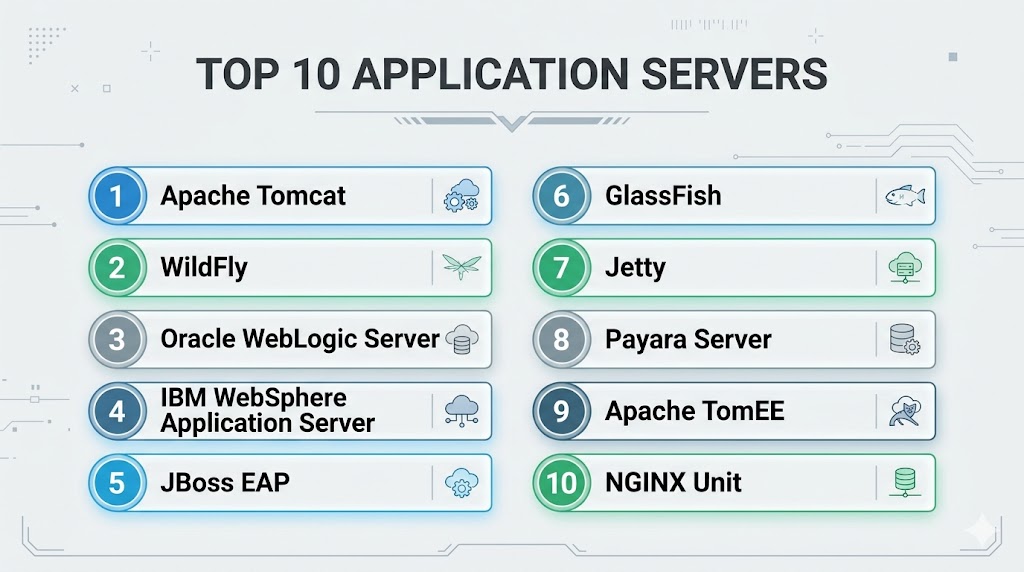
Top 10 Application Servers
#1 — Apache Tomcat
Short description:
One of the most widely used Java application servers for hosting web apps, APIs, and enterprise Java workloads.
Key Features
- Servlet container support
- JSP support
- WAR deployment
- Session management
- SSL support
- Lightweight architecture
- Broad Java ecosystem support
Pros
- Highly popular and trusted
- Lightweight compared to heavier suites
- Strong community support
Cons
- Full enterprise features may need add-ons
- Advanced clustering setup may vary
- Best for Java-centric environments
Platforms / Deployment
Windows / Linux / macOS
Self-hosted / Cloud / Hybrid
Security & Compliance
TLS, role-based access, logging, authentication controls.
Integrations & Ecosystem
Strong compatibility with Java frameworks and CI/CD tools.
Support & Community
Large global community.
#2 — WildFly
Short description:
Modern open-source application server designed for enterprise Java workloads with modular architecture.
Key Features
- Jakarta EE support
- Lightweight modular runtime
- Clustering options
- Messaging support
- Security framework
- Management console
- Cloud deployment readiness
Pros
- Strong enterprise features
- Modern Java compatibility
- Good performance flexibility
Cons
- Learning curve for new teams
- More complex than basic runtimes
- Best for Java workloads
Platforms / Deployment
Windows / Linux
Self-hosted / Cloud / Hybrid
Security & Compliance
Authentication, TLS, RBAC, logging.
Integrations & Ecosystem
Strong fit with enterprise Java stacks.
Support & Community
Strong open-source community.
#3 — Oracle WebLogic Server
Short description:
Enterprise-grade application server widely used for mission-critical business systems and large organizations.
Key Features
- Enterprise Java support
- High availability clustering
- Advanced management tools
- Security integrations
- Large-scale transaction support
- Monitoring tools
- Strong reliability controls
Pros
- Excellent enterprise maturity
- Strong mission-critical reputation
- Broad enterprise integrations
Cons
- Premium licensing model
- Complex administration
- Best suited for larger organizations
Platforms / Deployment
Windows / Linux
Self-hosted / Hybrid
Security & Compliance
Enterprise security controls, auditing, TLS, identity integration.
Integrations & Ecosystem
Strong fit with enterprise databases and business systems.
Support & Community
Strong commercial support.
#4 — IBM WebSphere Application Server
Short description:
A long-standing enterprise application platform designed for secure, large-scale corporate workloads.
Key Features
- Enterprise Java runtime
- Transaction management
- High availability
- Security controls
- Performance tuning tools
- Clustering
- Monitoring support
Pros
- Strong enterprise reliability
- Great for regulated workloads
- Mature ecosystem
Cons
- Premium enterprise complexity
- Licensing costs may be high
- Less ideal for smaller teams
Platforms / Deployment
Windows / Linux / Hybrid
Security & Compliance
TLS, RBAC, enterprise identity integrations, auditing.
Integrations & Ecosystem
Strong compatibility with enterprise middleware stacks.
Support & Community
Enterprise support model.
#5 — JBoss EAP
Short description:
Commercial enterprise application platform based on open-source foundations with support and governance features.
Key Features
- Enterprise Java support
- Long lifecycle support
- Security controls
- Management console
- Clustering
- Container readiness
- Operational tooling
Pros
- Enterprise support with open roots
- Good modernization path
- Reliable production option
Cons
- Subscription pricing
- Java-focused scope
- Smaller mindshare than some leaders
Platforms / Deployment
Windows / Linux
Self-hosted / Cloud / Hybrid
Security & Compliance
RBAC, TLS, policy controls, logging.
Integrations & Ecosystem
Strong compatibility with enterprise Java ecosystems.
Support & Community
Commercial enterprise support.
#6 — GlassFish
Short description:
Well-known open-source application server historically important for enterprise Java standards support.
Key Features
- Jakarta EE compatibility
- Web app hosting
- Admin console
- Security features
- Clustering support
- Java standards testing relevance
- Flexible deployment
Pros
- Strong standards relevance
- Good for learning and development
- Open-source accessibility
Cons
- Smaller production momentum than leaders
- Enterprise support varies
- Market mindshare reduced
Platforms / Deployment
Windows / Linux / macOS
Security & Compliance
TLS, user roles, logging.
Integrations & Ecosystem
Strong compatibility with Java standards environments.
Support & Community
Community-driven support.
#7 — Jetty
Short description:
Lightweight Java server popular for embedded applications and modern lightweight deployments.
Key Features
- Embedded server model
- Lightweight runtime
- Servlet support
- Async request handling
- Secure connections
- Fast startup
- Developer flexibility
Pros
- Great for embedded use
- Lightweight footprint
- Flexible developer workflows
Cons
- Primarily Java-focused
- Smaller enterprise suite features
- Less common for heavy legacy workloads
Platforms / Deployment
Windows / Linux / macOS
Security & Compliance
TLS, authentication controls, logging.
Integrations & Ecosystem
Strong Java framework compatibility.
Support & Community
Established developer community.
#8 — Payara Server
Short description:
Enterprise-ready application server based on GlassFish with stronger production support and modernization focus.
Key Features
- Jakarta EE support
- Production support model
- Monitoring tools
- Security updates
- Clustering support
- Cloud readiness
- Developer tooling
Pros
- Good GlassFish evolution path
- Enterprise support available
- Modern production focus
Cons
- Smaller mindshare than biggest vendors
- Java-focused scope
- Niche compared with leaders
Platforms / Deployment
Windows / Linux
Self-hosted / Cloud / Hybrid
Security & Compliance
TLS, logging, roles, enterprise patching options.
Integrations & Ecosystem
Strong fit for Java enterprise workloads.
Support & Community
Commercial and community support options.
#9 — Apache TomEE
Short description:
Application server built on Tomcat with added enterprise Java capabilities.
Key Features
- Tomcat foundation
- Enterprise Java extensions
- Lightweight profile options
- Fast deployment
- Java standards support
- Flexible runtime
- Open-source model
Pros
- Lightweight enterprise Java path
- Familiar Tomcat users adapt quickly
- Good value option
Cons
- Smaller ecosystem than leaders
- Java-focused only
- Less enterprise brand presence
Platforms / Deployment
Windows / Linux / macOS
Security & Compliance
TLS, roles, authentication controls.
Integrations & Ecosystem
Strong Tomcat-aligned compatibility.
Support & Community
Open-source community support.
#10 — NGINX Unit
Short description:
Modern lightweight application runtime and web app server designed for multiple languages and dynamic workloads.
Key Features
- Multi-language runtime support
- Dynamic reconfiguration
- Lightweight deployment
- API-driven management
- Reverse proxy use cases
- Cloud readiness
- Modern architecture
Pros
- Modern flexible runtime
- Supports multiple app types
- Lightweight operations
Cons
- Smaller ecosystem than classic leaders
- Less traditional enterprise history
- Advanced enterprise features vary
Platforms / Deployment
Linux / Cloud / Hybrid
Security & Compliance
TLS, API controls, logging.
Integrations & Ecosystem
Strong fit for modern cloud-native app deployments.
Support & Community
Growing technical community.
Comparison Table (Top 10)
| Tool Name | Best For | Platform(s) Supported | Deployment | Standout Feature | Public Rating |
|---|---|---|---|---|---|
| Apache Tomcat | Java apps | Multi-platform | Hybrid | Popularity | N/A |
| WildFly | Enterprise Java | Multi-platform | Hybrid | Modular runtime | N/A |
| Oracle WebLogic | Mission-critical enterprise | Multi-platform | Hybrid | Enterprise maturity | N/A |
| IBM WebSphere | Regulated enterprise | Multi-platform | Hybrid | Reliability | N/A |
| JBoss EAP | Supported Java ops | Multi-platform | Hybrid | Enterprise support | N/A |
| GlassFish | Standards users | Multi-platform | Local | Jakarta EE support | N/A |
| Jetty | Embedded Java | Multi-platform | Local | Lightweight runtime | N/A |
| Payara Server | Modern Java ops | Multi-platform | Hybrid | Production support | N/A |
| Apache TomEE | Tomcat users | Multi-platform | Local | Lightweight EE path | N/A |
| NGINX Unit | Modern apps | Linux | Hybrid | Multi-language runtime | N/A |
Evaluation & Scoring of Application Servers
| Tool Name | Core | Ease | Integrations | Security | Performance | Support | Value | Weighted Total |
|---|---|---|---|---|---|---|---|---|
| Apache Tomcat | 9 | 9 | 9 | 8 | 8 | 9 | 10 | 9.0 |
| WildFly | 8 | 7 | 8 | 8 | 8 | 8 | 9 | 8.0 |
| Oracle WebLogic | 10 | 6 | 9 | 10 | 9 | 9 | 6 | 8.4 |
| IBM WebSphere | 9 | 6 | 9 | 10 | 9 | 9 | 6 | 8.2 |
| JBoss EAP | 9 | 7 | 8 | 9 | 8 | 8 | 7 | 8.0 |
| GlassFish | 7 | 7 | 7 | 7 | 7 | 6 | 9 | 7.2 |
| Jetty | 8 | 8 | 7 | 8 | 8 | 7 | 9 | 8.0 |
| Payara Server | 8 | 8 | 7 | 8 | 8 | 7 | 8 | 7.8 |
| Apache TomEE | 8 | 8 | 7 | 8 | 8 | 7 | 9 | 8.0 |
| NGINX Unit | 8 | 8 | 7 | 8 | 8 | 7 | 8 | 7.8 |
These scores are comparative benchmarks. The best application server depends on language stack, enterprise requirements, support needs, and modernization strategy.
Which Application Server Is Right for You?
Solo / Freelancer
Choose Apache Tomcat, Jetty, or NGINX Unit.
SMB
Choose Apache Tomcat, WildFly, or Payara Server.
Mid-Market
Choose JBoss EAP, Tomcat, or WildFly.
Enterprise
Choose Oracle WebLogic, IBM WebSphere, JBoss EAP, or Apache Tomcat.
Budget vs Premium
Budget: Tomcat, Jetty, TomEE
Premium: WebLogic, WebSphere
Feature Depth vs Ease of Use
Depth: WebLogic, WebSphere
Ease: Tomcat, Jetty
Integrations & Scalability
Strong options: Tomcat, WebLogic, WildFly.
Security & Compliance Needs
Strong choices: WebLogic, WebSphere, JBoss EAP.
Frequently Asked Questions (FAQs)
1. What is an application server?
It runs dynamic business applications and backend services.
2. Is it different from a web server?
Yes, web servers focus more on HTTP delivery while application servers run app logic.
3. Which server is best for Java?
Apache Tomcat is a common starting point.
4. Are application servers still relevant?
Yes, especially for enterprise workloads and APIs.
5. Which is best for enterprises?
WebLogic, WebSphere, and JBoss EAP are common enterprise choices.
6. Can they run in containers?
Yes, many support cloud and container deployments.
7. Are open-source options available?
Yes, Tomcat, WildFly, Jetty, GlassFish, and TomEE.
8. Do they support clustering?
Many enterprise-grade platforms do.
9. What should I evaluate first?
Performance, support model, security, and stack compatibility.
10. Can small businesses use them?
Yes, especially lighter open-source options.
Conclusion
Application Servers continue to play a vital role in running enterprise apps, APIs, and dynamic workloads that require stability and scale. The best platform depends on your language ecosystem, budget, support needs, and modernization goals. Some organizations need heavyweight enterprise governance, while others benefit from lightweight open-source simplicity. Performance, security, and operational manageability should drive your decision. Shortlist two or three options, test your real workloads, and choose the platform that best supports long-term growth.