Introduction
Web Servers are software platforms that receive HTTP or HTTPS requests from users and deliver websites, web applications, APIs, files, and digital content over the internet or private networks. They play a critical role in performance, uptime, scalability, and security for online services.
As businesses continue expanding digital operations, choosing the right web server has become more important. Modern web environments need fast response times, SSL security, reverse proxy capabilities, load balancing, container compatibility, and cloud readiness. Whether hosting a personal blog or a global SaaS platform, the web server directly affects user experience.
Common use cases include:
- Hosting business websites
- Running web applications
- Reverse proxy and load balancing
- API gateway traffic handling
- Static file delivery
- Internal intranet portals
Buyers should evaluate:
- Performance under traffic load
- Ease of setup
- Security features
- Reverse proxy support
- TLS/SSL handling
- Container and cloud compatibility
- Configuration flexibility
- Logging and observability
- Community or vendor support
- Cost and licensing model
Best for: Developers, DevOps teams, hosting providers, enterprises, SMBs, SaaS companies, and IT teams running online services.
Not ideal for: Users with no hosted applications, purely offline environments, or teams using only managed website builders.
Key Trends in Web Servers
- HTTP/3 adoption increasing rapidly
- Built-in TLS automation becoming standard
- Reverse proxy use cases growing
- Lightweight server demand rising in containers
- AI-driven traffic anomaly detection emerging
- Edge delivery optimization increasing
- Better observability integrations
- Security-first default configurations growing
- Cloud-native deployment patterns expanding
- API and microservices traffic handling increasing
How We Selected These Tools (Methodology)
These tools were selected based on:
- Global adoption and trust
- Performance reputation
- Security capabilities
- Configuration flexibility
- Modern protocol support
- Cloud and container readiness
- Community or vendor backing
- Ease of operations
- Scalability
- Long-term relevance
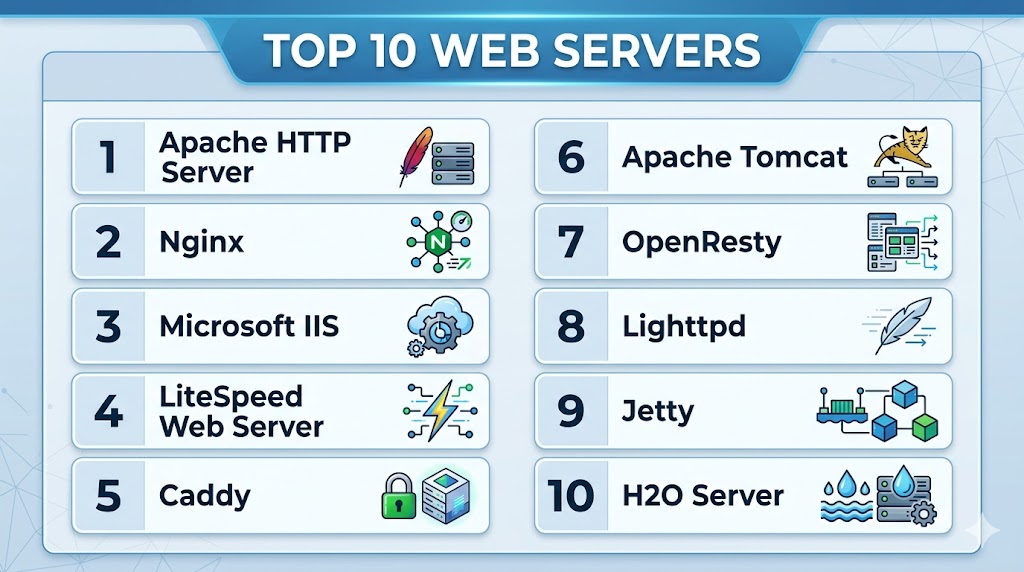
Top 10 Web Servers
#1 — Apache HTTP Server
Short description:
One of the most widely used web servers, trusted for hosting websites, applications, and enterprise web environments.
Key Features
- Modular architecture
- Virtual hosting
- Strong .htaccess support
- SSL/TLS support
- Reverse proxy modules
- URL rewriting
- Broad OS compatibility
Pros
- Massive ecosystem
- Highly flexible configuration
- Long-standing reliability
Cons
- Can require tuning for peak performance
- Configuration complexity for beginners
- Higher resource use than lighter options
Platforms / Deployment
Windows / Linux / macOS
Self-hosted / Cloud / Hybrid
Security & Compliance
TLS, access controls, logging, authentication modules.
Integrations & Ecosystem
Strong compatibility with PHP, CMS platforms, and enterprise apps.
Support & Community
Large global community and documentation base.
#2 — Nginx
Short description:
A high-performance web server widely used for reverse proxying, load balancing, APIs, and large-scale web traffic.
Key Features
- Event-driven architecture
- Reverse proxy
- Load balancing
- Static file speed
- SSL termination
- Caching support
- API traffic handling
Pros
- Excellent performance
- Great for high concurrency
- Popular in cloud environments
Cons
- Different config style than Apache
- Some advanced enterprise features vary
- Learning curve for new admins
Platforms / Deployment
Windows / Linux / macOS
Self-hosted / Cloud / Hybrid
Security & Compliance
TLS, access controls, logging, request filtering.
Integrations & Ecosystem
Strong compatibility with containers, APIs, and modern stacks.
Support & Community
Huge community and commercial options.
#3 — Microsoft IIS
Short description:
Enterprise web server platform designed for Windows environments and business applications.
Key Features
- GUI management tools
- Windows authentication
- ASP.NET support
- SSL management
- Application pools
- Logging tools
- Enterprise integration
Pros
- Excellent Windows alignment
- Familiar GUI management
- Strong enterprise support
Cons
- Windows-focused scope
- Licensing tied to server environments
- Less common in Linux-native stacks
Platforms / Deployment
Windows
Self-hosted / Hybrid
Security & Compliance
Identity integration, TLS, access controls, logging.
Integrations & Ecosystem
Strong fit with enterprise Windows applications.
Support & Community
Strong commercial support ecosystem.
#4 — LiteSpeed Web Server
Short description:
Performance-focused commercial web server known for speed and hosting optimization.
Key Features
- High-performance delivery
- Cache acceleration
- HTTP/3 support
- Apache compatibility options
- Security controls
- Load handling efficiency
- Hosting optimizations
Pros
- Strong speed reputation
- Great for hosting providers
- Efficient caching options
Cons
- Commercial licensing
- Smaller community than leaders
- Best fit for hosting-focused buyers
Platforms / Deployment
Linux / Windows
Self-hosted / Cloud
Security & Compliance
TLS, anti-abuse controls, access controls.
Integrations & Ecosystem
Strong fit with hosting and CMS environments.
Support & Community
Commercial support model.
#5 — Caddy
Short description:
Modern web server popular for automatic HTTPS and simplified configuration.
Key Features
- Automatic TLS certificates
- Simple configuration
- Reverse proxy support
- HTTP/3 support
- Static site hosting
- API proxying
- Modern defaults
Pros
- Very beginner-friendly
- Great secure defaults
- Fast modern setup
Cons
- Smaller ecosystem than Apache/Nginx
- Less legacy enterprise mindshare
- Advanced custom setups may vary
Platforms / Deployment
Windows / Linux / macOS
Self-hosted / Cloud
Security & Compliance
Automatic HTTPS, TLS, access controls.
Integrations & Ecosystem
Great fit for modern app deployments.
Support & Community
Growing community adoption.
#6 — Apache Tomcat
Short description:
Popular Java application server commonly used to run Java web applications and services.
Key Features
- Java servlet support
- JSP support
- WAR deployment
- Session handling
- SSL support
- Logging tools
- Lightweight Java hosting
Pros
- Strong Java ecosystem relevance
- Reliable application hosting
- Broad enterprise usage
Cons
- Best for Java workloads
- Less ideal for generic static hosting
- Tuning may be needed at scale
Platforms / Deployment
Windows / Linux / macOS
Self-hosted / Hybrid
Security & Compliance
TLS, role controls, logging.
Integrations & Ecosystem
Strong compatibility with Java enterprise stacks.
Support & Community
Large Java community.
#7 — OpenResty
Short description:
A web platform built on Nginx with scripting capabilities for advanced traffic logic and APIs.
Key Features
- Nginx foundation
- Lua scripting support
- API gateway patterns
- Reverse proxying
- Traffic customization
- Performance optimization
- Extensibility
Pros
- Great for programmable traffic flows
- High performance
- Flexible API use cases
Cons
- More technical learning curve
- Best for advanced teams
- Smaller mainstream awareness
Platforms / Deployment
Linux / Cloud / Hybrid
Security & Compliance
TLS, request controls, logging.
Integrations & Ecosystem
Strong fit for API and edge traffic logic.
Support & Community
Technical community driven.
#8 — Lighttpd
Short description:
Lightweight web server designed for speed and low resource environments.
Key Features
- Low memory usage
- Fast static serving
- SSL support
- CGI/FastCGI support
- URL rewriting
- Simple deployments
- Efficient architecture
Pros
- Good for lightweight workloads
- Low resource consumption
- Fast static content delivery
Cons
- Smaller ecosystem
- Less enterprise popularity
- Fewer advanced features than leaders
Platforms / Deployment
Linux / Windows
Self-hosted
Security & Compliance
TLS, logging, access controls.
Integrations & Ecosystem
Good fit for embedded or light workloads.
Support & Community
Smaller but active community.
#9 — Jetty
Short description:
Lightweight Java-based web server and servlet container popular in embedded and enterprise Java systems.
Key Features
- Java servlet support
- Embedded server model
- Lightweight runtime
- SSL support
- Async request handling
- Session controls
- Scalable Java hosting
Pros
- Great embedded Java option
- Lightweight footprint
- Strong developer flexibility
Cons
- Primarily Java-focused
- Smaller mainstream hosting use
- Less general-purpose than Apache/Nginx
Platforms / Deployment
Windows / Linux / macOS
Self-hosted / Hybrid
Security & Compliance
TLS, authentication controls, logging.
Integrations & Ecosystem
Strong Java ecosystem compatibility.
Support & Community
Established Java community.
#10 — H2O Server
Short description:
Modern high-performance web server designed for HTTP/2 and newer protocol efficiency.
Key Features
- HTTP/2 optimization
- Low latency design
- TLS support
- Reverse proxying
- Modern protocol focus
- Performance tuning
- Lightweight architecture
Pros
- Strong modern protocol focus
- Efficient performance model
- Lightweight deployment
Cons
- Smaller ecosystem visibility
- Less common enterprise adoption
- Niche compared with leaders
Platforms / Deployment
Linux / Self-hosted / Cloud
Security & Compliance
TLS, logging, access controls.
Integrations & Ecosystem
Useful for performance-focused deployments.
Support & Community
Smaller technical community.
Comparison Table (Top 10)
| Tool Name | Best For | Platform(s) Supported | Deployment | Standout Feature | Public Rating |
|---|---|---|---|---|---|
| Apache HTTP Server | General hosting | Multi-platform | Hybrid | Flexibility | N/A |
| Nginx | High traffic apps | Multi-platform | Hybrid | Performance | N/A |
| Microsoft IIS | Windows business apps | Windows | Hybrid | Windows integration | N/A |
| LiteSpeed | Hosting providers | Multi-platform | Cloud | Speed + caching | N/A |
| Caddy | Easy secure hosting | Multi-platform | Cloud | Automatic HTTPS | N/A |
| Apache Tomcat | Java apps | Multi-platform | Hybrid | Java workloads | N/A |
| OpenResty | APIs | Linux | Hybrid | Programmable traffic | N/A |
| Lighttpd | Lightweight use | Multi-platform | Self-hosted | Low resources | N/A |
| Jetty | Embedded Java | Multi-platform | Hybrid | Lightweight Java | N/A |
| H2O Server | Modern protocols | Linux | Cloud | HTTP/2 focus | N/A |
Evaluation & Scoring of Web Servers
| Tool Name | Core | Ease | Integrations | Security | Performance | Support | Value | Weighted Total |
|---|---|---|---|---|---|---|---|---|
| Apache HTTP Server | 9 | 7 | 10 | 8 | 8 | 9 | 10 | 8.8 |
| Nginx | 10 | 8 | 9 | 9 | 10 | 9 | 9 | 9.3 |
| Microsoft IIS | 8 | 8 | 8 | 8 | 8 | 8 | 7 | 8.0 |
| LiteSpeed | 9 | 8 | 7 | 8 | 10 | 8 | 7 | 8.3 |
| Caddy | 8 | 10 | 7 | 9 | 8 | 7 | 10 | 8.5 |
| Apache Tomcat | 8 | 7 | 8 | 8 | 8 | 8 | 8 | 7.9 |
| OpenResty | 8 | 6 | 8 | 8 | 9 | 7 | 8 | 7.8 |
| Lighttpd | 7 | 8 | 6 | 7 | 8 | 6 | 9 | 7.4 |
| Jetty | 7 | 7 | 7 | 8 | 8 | 7 | 8 | 7.4 |
| H2O Server | 7 | 7 | 6 | 8 | 9 | 6 | 8 | 7.3 |
These scores are comparative benchmarks. The best web server depends on traffic needs, stack compatibility, security priorities, and operational preferences.
Which Web Server Is Right for You?
Solo / Freelancer
Choose Caddy, Apache HTTP Server, or Nginx.
SMB
Choose Nginx, Apache HTTP Server, or LiteSpeed.
Mid-Market
Choose Nginx, IIS, or Apache HTTP Server.
Enterprise
Choose Nginx, Apache HTTP Server, IIS, or OpenResty depending on stack.
Budget vs Premium
Budget: Apache HTTP Server, Caddy, Lighttpd
Premium: LiteSpeed, enterprise Nginx options
Feature Depth vs Ease of Use
Depth: Nginx, Apache HTTP Server
Ease: Caddy, IIS
Integrations & Scalability
Strong options: Nginx, Apache HTTP Server, OpenResty.
Security & Compliance Needs
Strong choices: Nginx, Caddy, IIS.
Frequently Asked Questions (FAQs)
1. What is a web server?
It receives web requests and delivers sites, apps, or APIs.
2. Which web server is most popular?
Apache and Nginx are among the most widely used.
3. Which is faster, Apache or Nginx?
Often Nginx performs better at high concurrency.
4. Is Caddy good for beginners?
Yes, it is known for simple secure setup.
5. Is IIS only for Windows?
Yes, it is primarily built for Windows environments.
6. Can web servers act as reverse proxies?
Yes, many modern web servers support that.
7. What is best for Java apps?
Apache Tomcat and Jetty are common options.
8. Is LiteSpeed worth it?
It can be valuable for hosting performance needs.
9. Do web servers need SSL?
Yes, HTTPS is strongly recommended.
10. What should I test first?
Performance, security, compatibility, and ease of management.
Conclusion
Web Servers remain the backbone of websites, APIs, and digital services across every industry. The best choice depends on your traffic volume, application stack, security priorities, and operational skill level. Some platforms excel at raw performance, while others focus on simplicity, enterprise compatibility, or developer flexibility. Reliability, TLS security, and scalability should be top evaluation factors. Shortlist two or three options, benchmark real workloads, and choose the platform that delivers the best long-term performance for your environment.