Introduction
Server Management Tools help businesses monitor, configure, patch, automate, secure, and maintain physical or virtual servers across data centers, branch offices, and cloud environments. Instead of manually handling each machine, these platforms centralize server operations and improve uptime, consistency, and administrative efficiency.
As organizations run hybrid infrastructure with growing workloads, server management remains critical for performance optimization, compliance, patching, capacity planning, and faster troubleshooting. Whether managing a few servers or thousands, the right platform reduces operational risk and saves valuable IT time.
Common use cases include:
- Server health monitoring
- Patch management
- Capacity planning
- Configuration management
- Asset visibility
- Automation and provisioning
- Incident troubleshooting
- Compliance reporting
Buyers should evaluate:
- Monitoring depth
- Ease of administration
- Automation features
- Security controls
- Multi-vendor support
- Alerting quality
- Scalability
- Reporting dashboards
- Cloud and hybrid readiness
- Pricing and support quality
Best for: IT operations teams, infrastructure admins, MSPs, enterprises, data center teams, and growing businesses managing multiple servers.
Not ideal for: Very small teams with only one basic server, fully SaaS-based companies with no infrastructure, or users needing only simple desktop monitoring.
Key Trends in Server Management Tools
- AI-driven anomaly detection and remediation
- Unified management across cloud and on-prem servers
- Zero Trust administrative access models
- Automated patching and compliance workflows
- Predictive capacity planning increasing
- Infrastructure-as-code integrations growing
- Better observability and telemetry analytics
- Energy efficiency reporting becoming important
- Self-healing automation workflows rising
- Agentless monitoring demand increasing
How We Selected These Tools (Methodology)
These tools were selected based on:
- Market trust and adoption
- Monitoring and lifecycle depth
- Automation capabilities
- Security and access controls
- Scalability across environments
- Multi-vendor compatibility
- Hybrid cloud readiness
- Reporting quality
- Support ecosystem
- Long-term infrastructure relevance
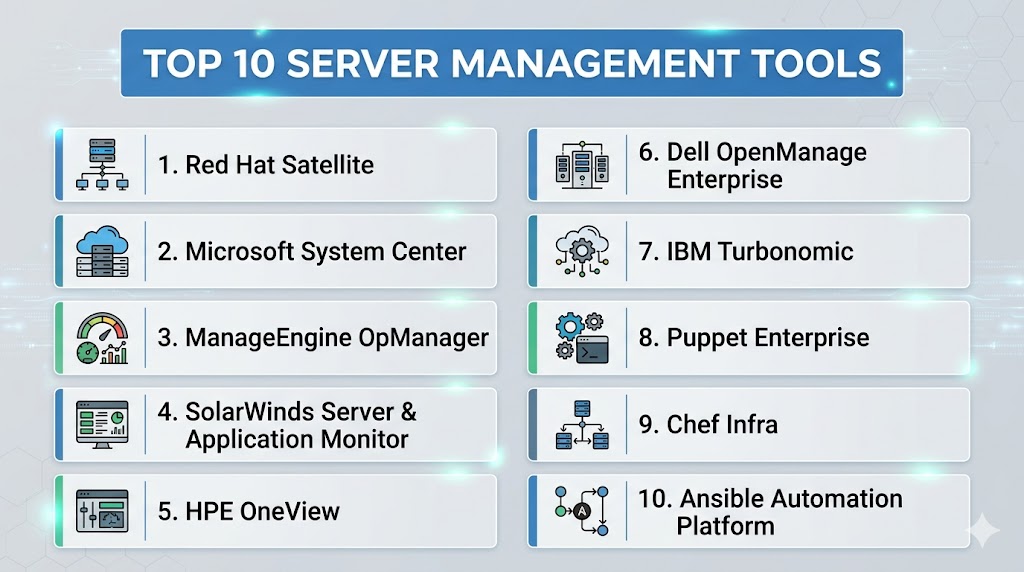
Top 10 Server Management Tools
#1 — Red Hat Satellite
Short description:
Enterprise server management platform focused on lifecycle control, patching, compliance, and Linux infrastructure management at scale.
Key Features
- Patch management
- Provisioning workflows
- Configuration control
- Subscription management
- Compliance tooling
- Content lifecycle management
- Large-scale automation support
Pros
- Excellent for Linux fleets
- Strong enterprise governance
- Reliable lifecycle controls
Cons
- Best fit for Linux-centric teams
- Learning curve for new admins
- Smaller relevance for mixed SMB setups
Platforms / Deployment
Linux
Self-hosted / Hybrid
Security & Compliance
RBAC, audit controls, patch governance.
Integrations & Ecosystem
Strong alignment with Linux and automation ecosystems.
Support & Community
Strong enterprise support reputation.
#2 — Microsoft System Center
Short description:
Comprehensive server and infrastructure management suite suited for Windows-heavy enterprise environments.
Key Features
- Server monitoring
- Patch workflows
- Configuration management
- Inventory visibility
- Reporting dashboards
- Virtualization alignment
- Automation support
Pros
- Strong Windows ecosystem fit
- Broad enterprise capabilities
- Familiar admin workflows
Cons
- Best in same ecosystem
- Complexity for smaller teams
- Interface preferences vary
Platforms / Deployment
Windows
Self-hosted / Hybrid
Security & Compliance
RBAC, identity integration, logging.
Integrations & Ecosystem
Strong compatibility with enterprise infrastructure stacks.
Support & Community
Large enterprise user base.
#3 — ManageEngine OpManager
Short description:
Popular infrastructure monitoring and server management tool designed for SMB to enterprise IT teams.
Key Features
- Server monitoring
- Performance dashboards
- Alerting engine
- Capacity insights
- Network visibility
- Reports
- Multi-platform support
Pros
- Good value proposition
- Broad infrastructure coverage
- Easier onboarding than some enterprise suites
Cons
- Deep enterprise customization may vary
- Large environments need planning
- UI preferences differ by users
Platforms / Deployment
Windows / Linux
Self-hosted / Hybrid
Security & Compliance
RBAC, alerts, access controls.
Integrations & Ecosystem
Strong compatibility with broader IT operations tools.
Support & Community
Strong commercial support presence.
#4 — SolarWinds Server & Application Monitor
Short description:
Monitoring-focused platform for server performance, application visibility, and proactive troubleshooting.
Key Features
- Server health monitoring
- Application dependency views
- Alert automation
- Capacity forecasting
- Performance analytics
- Dashboards
- Root-cause visibility
Pros
- Strong monitoring depth
- Useful diagnostics
- Good enterprise visibility
Cons
- Monitoring-first rather than full lifecycle suite
- Pricing varies by scale
- Setup tuning may be needed
Platforms / Deployment
Windows / Web
Self-hosted / Hybrid
Security & Compliance
Access controls, logging, permissions.
Integrations & Ecosystem
Works well with IT monitoring environments.
Support & Community
Established enterprise vendor support.
#5 — HPE OneView
Short description:
Infrastructure management platform focused on HPE server environments, automation, and lifecycle operations.
Key Features
- Server profile templates
- Firmware management
- Lifecycle automation
- Capacity visibility
- Hardware health monitoring
- Infrastructure templates
- Centralized management
Pros
- Excellent for HPE environments
- Strong hardware automation
- Good operational consistency
Cons
- Best fit with same vendor hardware
- Less useful for mixed fleets
- Specialized infrastructure focus
Platforms / Deployment
Self-hosted / Hybrid
Security & Compliance
RBAC, admin controls, logging.
Integrations & Ecosystem
Strong alignment with data center hardware operations.
Support & Community
Vendor-backed enterprise support.
#6 — Dell OpenManage Enterprise
Short description:
Centralized server management platform for Dell infrastructure focused on lifecycle, health, and automation.
Key Features
- Firmware updates
- Hardware monitoring
- Asset inventory
- Alerting tools
- Configuration templates
- Lifecycle workflows
- Central dashboards
Pros
- Great for Dell server fleets
- Strong lifecycle management
- Good hardware visibility
Cons
- Best fit in same vendor environments
- Less value for mixed fleets
- Hardware-centric scope
Platforms / Deployment
Self-hosted / Hybrid
Security & Compliance
Access controls, logging, admin permissions.
Integrations & Ecosystem
Strong compatibility with Dell infrastructure operations.
Support & Community
Reliable enterprise support options.
#7 — IBM Turbonomic
Short description:
Resource optimization and performance management platform focused on intelligent workload placement and efficiency.
Key Features
- Resource optimization
- Capacity planning
- Performance assurance
- Cost efficiency insights
- Automation actions
- Hybrid visibility
- Analytics engine
Pros
- Strong optimization focus
- Great for complex environments
- Useful cost efficiency insights
Cons
- More optimization-focused than basic admin tool
- Premium enterprise orientation
- Requires planning maturity
Platforms / Deployment
Cloud / Self-hosted / Hybrid
Security & Compliance
RBAC, controls, logging.
Integrations & Ecosystem
Works with virtualization, cloud, and operations stacks.
Support & Community
Strong enterprise support model.
#8 — Puppet Enterprise
Short description:
Configuration automation platform used for large-scale server standardization and policy-driven operations.
Key Features
- Configuration management
- Desired state enforcement
- Patch workflows
- Compliance automation
- Role-based controls
- Reporting
- Large-scale automation
Pros
- Excellent for consistency
- Strong automation power
- Great at scale
Cons
- Learning curve for teams
- Best for automation-first environments
- Overkill for tiny teams
Platforms / Deployment
Windows / Linux
Self-hosted / Hybrid
Security & Compliance
RBAC, audit trails, policy controls.
Integrations & Ecosystem
Strong DevOps and infrastructure automation compatibility.
Support & Community
Established enterprise and community presence.
#9 — Chef Infra
Short description:
Infrastructure automation platform designed for repeatable server configuration and policy enforcement.
Key Features
- Infrastructure as code
- Policy automation
- Configuration templates
- Compliance workflows
- Multi-platform support
- Scalable automation
- Reporting tools
Pros
- Strong automation flexibility
- Good developer alignment
- Scales well
Cons
- Learning curve
- Best for code-driven teams
- Smaller mainstream momentum than some rivals
Platforms / Deployment
Windows / Linux
Self-hosted / Hybrid
Security & Compliance
Policy controls, audit options, permissions.
Integrations & Ecosystem
Strong alignment with DevOps pipelines.
Support & Community
Commercial and community support options.
#10 — Ansible Automation Platform
Short description:
Agentless automation platform used for server management, provisioning, patching, and repeatable operations.
Key Features
- Agentless automation
- Playbook workflows
- Server provisioning
- Patch orchestration
- Inventory management
- Multi-platform support
- Workflow automation
Pros
- Easy to start compared with some rivals
- Strong automation flexibility
- Broad ecosystem relevance
Cons
- Requires process discipline
- Deep governance varies by setup
- Advanced scale needs planning
Platforms / Deployment
Windows / Linux
Cloud / Self-hosted / Hybrid
Security & Compliance
RBAC, logging, workflow controls.
Integrations & Ecosystem
Strong compatibility with infrastructure and cloud tooling.
Support & Community
Large community and enterprise support options.
Comparison Table (Top 10)
| Tool Name | Best For | Platform(s) Supported | Deployment | Standout Feature | Public Rating |
|---|---|---|---|---|---|
| Red Hat Satellite | Linux fleets | Linux | Hybrid | Lifecycle control | N/A |
| Microsoft System Center | Windows enterprises | Windows | Hybrid | Broad suite | N/A |
| OpManager | SMB to enterprise | Multi-platform | Hybrid | Value monitoring | N/A |
| SolarWinds SAM | Ops teams | Multi-platform | Hybrid | Deep visibility | N/A |
| HPE OneView | HPE hardware | Vendor-focused | Hybrid | Hardware automation | N/A |
| Dell OpenManage | Dell fleets | Vendor-focused | Hybrid | Lifecycle ops | N/A |
| IBM Turbonomic | Optimization teams | Multi-platform | Hybrid | Smart efficiency | N/A |
| Puppet Enterprise | Automation teams | Multi-platform | Hybrid | Desired state | N/A |
| Chef Infra | DevOps teams | Multi-platform | Hybrid | Code-driven ops | N/A |
| Ansible Automation Platform | Broad automation | Multi-platform | Hybrid | Agentless workflows | N/A |
Evaluation & Scoring of Server Management Tools
| Tool Name | Core | Ease | Integrations | Security | Performance | Support | Value | Weighted Total |
|---|---|---|---|---|---|---|---|---|
| Red Hat Satellite | 9 | 7 | 8 | 9 | 8 | 9 | 7 | 8.1 |
| Microsoft System Center | 8 | 7 | 8 | 8 | 8 | 8 | 8 | 7.9 |
| OpManager | 8 | 8 | 8 | 8 | 8 | 8 | 9 | 8.2 |
| SolarWinds SAM | 9 | 7 | 8 | 8 | 9 | 8 | 7 | 8.1 |
| HPE OneView | 8 | 8 | 7 | 8 | 8 | 8 | 7 | 7.8 |
| Dell OpenManage | 8 | 8 | 7 | 8 | 8 | 8 | 7 | 7.8 |
| IBM Turbonomic | 9 | 7 | 8 | 8 | 9 | 8 | 7 | 8.1 |
| Puppet Enterprise | 9 | 6 | 8 | 9 | 8 | 8 | 8 | 8.0 |
| Chef Infra | 8 | 6 | 8 | 8 | 8 | 7 | 8 | 7.6 |
| Ansible Automation Platform | 9 | 8 | 9 | 8 | 8 | 9 | 8 | 8.5 |
These scores are comparative benchmarks. The best fit depends on your server count, operating systems, automation maturity, and vendor ecosystem.
Which Server Management Tool Is Right for You?
Solo / Freelancer
Choose lightweight monitoring or basic automation solutions.
SMB
Choose OpManager or Ansible Automation Platform.
Mid-Market
Choose SolarWinds SAM, OpManager, or Microsoft System Center.
Enterprise
Choose Red Hat Satellite, System Center, Turbonomic, or Ansible Automation Platform.
Budget vs Premium
Budget: OpManager, community automation tools
Premium: Red Hat Satellite, Turbonomic
Feature Depth vs Ease of Use
Depth: Red Hat Satellite, Puppet Enterprise
Ease: OpManager, Ansible Automation Platform
Integrations & Scalability
Strong options: Ansible Automation Platform, System Center, Turbonomic.
Security & Compliance Needs
Strong choices: Red Hat Satellite, Puppet Enterprise, Ansible Automation Platform.
Frequently Asked Questions (FAQs)
1. What are server management tools?
They help monitor, automate, secure, and maintain servers centrally.
2. Are they only for enterprises?
No, many options also suit SMBs.
3. Can they automate patching?
Yes, many platforms support patch workflows.
4. Which tool is best for Linux fleets?
Red Hat Satellite is a common choice.
5. Which tool fits Windows environments?
Microsoft System Center is widely used.
6. Is monitoring included?
Many tools include monitoring or integrate with monitoring platforms.
7. What is agentless management?
Management without installing agents on every server.
8. Can these tools reduce downtime?
Yes, through alerting, automation, and preventive maintenance.
9. What should I evaluate first?
Ease of use, OS compatibility, automation depth, and pricing.
10. Are cloud servers supported?
Many modern tools support hybrid and cloud infrastructure.
Conclusion
Server Management Tools remain essential for keeping infrastructure stable, secure, and efficient as environments grow more complex. The best choice depends on your operating systems, hardware mix, automation maturity, and budget. Some platforms excel at monitoring, while others focus on lifecycle management or infrastructure automation. Scalability, security, and ease of operations should be top priorities when comparing options. Shortlist two or three tools, test them in your real environment, and compare long-term operational value before making a final decision.