Introduction
Virtualization Platforms allow businesses to run multiple virtual machines, workloads, applications, and operating systems on shared physical hardware. Instead of dedicating one server to one task, organizations can divide compute resources into flexible virtual environments that improve utilization, reduce hardware costs, and simplify IT operations.
These platforms are now core infrastructure for data centers, private clouds, hybrid environments, disaster recovery planning, development labs, and enterprise application hosting. As organizations modernize IT operations, virtualization remains critical for scalability, business continuity, and workload portability.
Common use cases include:
- Server consolidation
- Private cloud infrastructure
- Development and testing labs
- Disaster recovery environments
- Multi-tenant hosting
- Legacy application support
Buyers should evaluate:
- Hypervisor performance
- Management simplicity
- High availability features
- Scalability
- Backup and disaster recovery support
- Security controls
- Automation capabilities
- Hybrid cloud readiness
- Licensing costs
- Ecosystem compatibility
Best for: Enterprises, data centers, managed service providers, educational labs, growing SMBs, and organizations modernizing infrastructure.
Not ideal for: Very small teams using only SaaS tools, businesses with no on-prem workloads, or users needing simple desktop-only virtualization.
Key Trends in Virtualization Platforms
- Stronger hybrid cloud integration
- Kubernetes and VM coexistence models growing
- AI-driven capacity planning and optimization
- Increased automation for provisioning and patching
- Security hardening and Zero Trust controls
- Better energy efficiency through consolidation
- Simpler HCI-based virtualization adoption
- GPU virtualization demand increasing
- Cost optimization replacing legacy licensing models
- Unified management across cloud and on-prem systems
How We Selected These Tools (Methodology)
These platforms were selected based on:
- Industry adoption and reputation
- Hypervisor maturity
- Performance and reliability
- Enterprise scalability
- Management and automation depth
- Security capabilities
- Ecosystem strength
- Hybrid cloud relevance
- Support quality
- Long-term infrastructure value
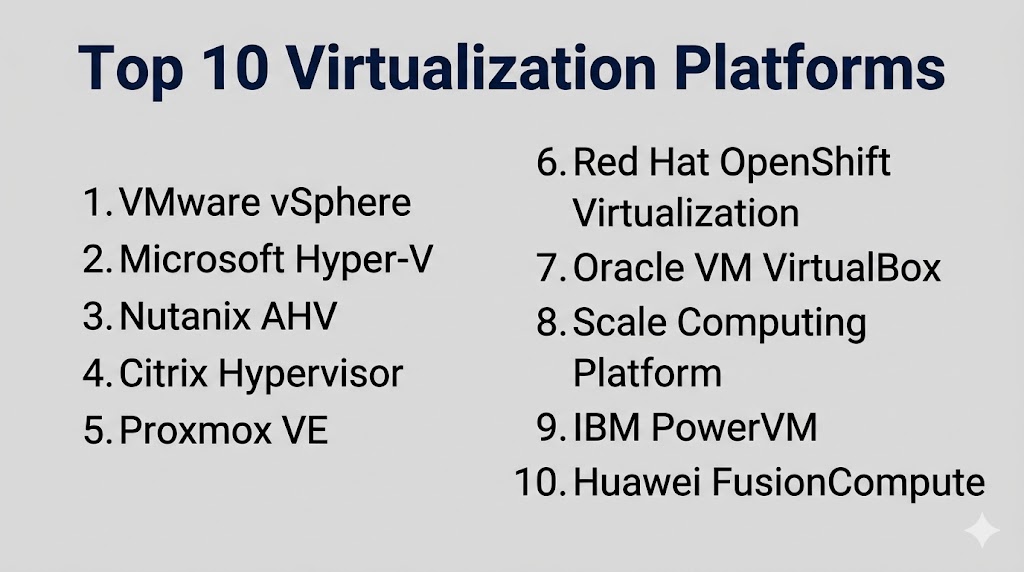
Top 10 Virtualization Platforms
#1 — VMware vSphere
Short description:
One of the most established enterprise virtualization platforms for running mission-critical workloads at scale.
Key Features
- Mature hypervisor technology
- Centralized management
- High availability
- Live migration
- Resource scheduling
- Strong ecosystem support
- Advanced automation tools
Pros
- Enterprise-grade maturity
- Excellent reliability
- Broad third-party ecosystem
Cons
- Premium licensing perception
- Can be complex at scale
- Requires trained admins
Platforms / Deployment
Windows / Linux
Self-hosted / Hybrid
Security & Compliance
RBAC, encryption, audit controls, identity integrations.
Integrations & Ecosystem
Strong compatibility with backup, networking, storage, and enterprise tooling.
Support & Community
Large global ecosystem and strong enterprise support.
#2 — Microsoft Hyper-V
Short description:
A widely used virtualization platform ideal for Windows-centric businesses and Microsoft environments.
Key Features
- Native Windows integration
- Live migration
- Replica capabilities
- High availability clustering
- Virtual networking
- Central management options
- Resource controls
Pros
- Strong Windows ecosystem fit
- Familiar for Microsoft admins
- Good enterprise capability
Cons
- Best fit in Microsoft environments
- Smaller ecosystem than some rivals
- Management complexity can vary
Platforms / Deployment
Windows
Self-hosted / Hybrid
Security & Compliance
Encryption, identity integration, access controls.
Integrations & Ecosystem
Strong alignment with Microsoft server and management tools.
Support & Community
Large enterprise user base.
#3 — Nutanix AHV
Short description:
Modern hypervisor platform tightly integrated with hyperconverged infrastructure for simplified operations.
Key Features
- Built into HCI stack
- Centralized management
- High availability
- Automation tools
- Simplified scaling
- Strong analytics
- Disaster recovery options
Pros
- Easy operational model
- Strong HCI integration
- Good scalability
Cons
- Best fit inside same ecosystem
- Less standalone focus
- Pricing depends on infrastructure bundle
Platforms / Deployment
Self-hosted / Hybrid
Security & Compliance
RBAC, encryption, admin controls.
Integrations & Ecosystem
Works well with storage, DR, and private cloud operations.
Support & Community
Strong enterprise support reputation.
#4 — Citrix Hypervisor
Short description:
Virtualization platform often considered by organizations focused on desktop virtualization and secure workloads.
Key Features
- VM hosting
- Resource pooling
- High availability
- Snapshot capabilities
- Live migration
- Security controls
- Management tools
Pros
- Useful for certain VDI environments
- Strong workload isolation
- Proven virtualization foundation
Cons
- Smaller market mindshare
- Ecosystem narrower than leaders
- Strategy fit depends on environment
Platforms / Deployment
Self-hosted
Security & Compliance
Access controls, encryption support, logging.
Integrations & Ecosystem
Often aligned with desktop delivery environments.
Support & Community
Enterprise support available.
#5 — Proxmox VE
Short description:
Popular open-source virtualization platform combining virtual machines and containers in one interface.
Key Features
- Open-source platform
- VM and container support
- Web management UI
- Backup tools
- Clustering
- Live migration
- Storage flexibility
Pros
- Strong value proposition
- Active community
- Great for labs and SMBs
Cons
- Enterprise polish lower than premium vendors
- Requires Linux comfort
- Support model differs from traditional vendors
Platforms / Deployment
Linux
Self-hosted
Security & Compliance
Role controls, backup security, admin permissions.
Integrations & Ecosystem
Works with open-source infrastructure stacks.
Support & Community
Strong community plus commercial support options.
#6 — Red Hat OpenShift Virtualization
Short description:
Designed for organizations modernizing traditional VMs alongside containerized workloads.
Key Features
- VM + container coexistence
- Kubernetes-based operations
- Migration tooling
- Automation support
- Enterprise Linux alignment
- Policy controls
- Scalable orchestration
Pros
- Strong modernization path
- Great for hybrid workloads
- Enterprise open platform strength
Cons
- Higher learning curve
- Best for platform engineering teams
- Complexity for small businesses
Platforms / Deployment
Linux
Self-hosted / Hybrid
Security & Compliance
RBAC, policy controls, enterprise security options.
Integrations & Ecosystem
Strong cloud-native ecosystem compatibility.
Support & Community
Enterprise support with open-source backing.
#7 — Oracle VM VirtualBox
Short description:
Desktop-focused virtualization tool commonly used for labs, development, and personal testing.
Key Features
- Multi-OS guest support
- Snapshot management
- Desktop virtualization
- Networking modes
- Shared folders
- Portable testing labs
- Free usage options
Pros
- Great for developers
- Easy lab testing
- Broad OS compatibility
Cons
- Not ideal for enterprise data centers
- Limited compared to server platforms
- Desktop-focused scope
Platforms / Deployment
Windows / macOS / Linux
Security & Compliance
Basic access and host-level controls.
Integrations & Ecosystem
Best suited for development and training environments.
Support & Community
Large technical community.
#8 — Scale Computing Platform
Short description:
Simple HCI-based virtualization platform targeting SMB and edge infrastructure use cases.
Key Features
- HCI architecture
- Built-in virtualization
- Easy management
- High availability
- Automated healing
- Compact deployment
- Edge-ready operations
Pros
- Very SMB friendly
- Low admin overhead
- Good branch office fit
Cons
- Less enterprise ecosystem scale
- Smaller market visibility
- Advanced niche features may vary
Platforms / Deployment
Self-hosted
Security & Compliance
Access controls, admin management.
Integrations & Ecosystem
Strong for simple infrastructure deployments.
Support & Community
Good business support reputation.
#9 — IBM PowerVM
Short description:
Enterprise virtualization platform for IBM Power environments running critical workloads.
Key Features
- Partitioning technology
- High reliability
- Enterprise workload support
- Resource optimization
- Security controls
- Performance tuning
- Hardware alignment
Pros
- Excellent for Power workloads
- Strong reliability
- Enterprise-grade architecture
Cons
- Specialized market focus
- Higher platform commitment
- Less relevant outside Power ecosystem
Platforms / Deployment
Self-hosted
Security & Compliance
Enterprise security controls vary by environment.
Integrations & Ecosystem
Best within IBM enterprise environments.
Support & Community
Strong enterprise support.
#10 — Huawei FusionCompute
Short description:
Enterprise virtualization platform designed for data center and private cloud environments.
Key Features
- VM management
- Resource pooling
- High availability
- Central management
- Network virtualization support
- Scalability tools
- Data center readiness
Pros
- Strong enterprise infrastructure focus
- Good scalability
- Private cloud alignment
Cons
- Regional fit may vary
- Ecosystem depends on market
- Visibility differs globally
Platforms / Deployment
Self-hosted / Hybrid
Security & Compliance
Access controls, admin management.
Integrations & Ecosystem
Often aligned with broader infrastructure stacks.
Support & Community
Enterprise support availability varies by region.
Comparison Table (Top 10)
| Tool Name | Best For | Platform(s) Supported | Deployment | Standout Feature | Public Rating |
|---|---|---|---|---|---|
| VMware vSphere | Enterprise DC | Multi-platform | Hybrid | Mature ecosystem | N/A |
| Microsoft Hyper-V | Windows shops | Windows | Hybrid | Native alignment | N/A |
| Nutanix AHV | HCI buyers | Multi-platform | Hybrid | Simplicity | N/A |
| Citrix Hypervisor | VDI workloads | Multi-platform | Self-hosted | Secure workloads | N/A |
| Proxmox VE | SMB / Labs | Linux | Self-hosted | Open-source value | N/A |
| Red Hat OpenShift Virtualization | Modernization | Linux | Hybrid | VM + containers | N/A |
| Oracle VM VirtualBox | Desktop labs | Multi-platform | Local | Test environments | N/A |
| Scale Computing Platform | SMB Edge | Multi-platform | Self-hosted | Low admin overhead | N/A |
| IBM PowerVM | Power systems | Specialized | Self-hosted | Power workload strength | N/A |
| Huawei FusionCompute | Private cloud | Multi-platform | Hybrid | Data center focus | N/A |
Evaluation & Scoring of Virtualization Platforms
| Tool Name | Core | Ease | Integrations | Security | Performance | Support | Value | Weighted Total |
|---|---|---|---|---|---|---|---|---|
| VMware vSphere | 10 | 7 | 10 | 9 | 10 | 9 | 6 | 8.7 |
| Microsoft Hyper-V | 8 | 8 | 8 | 8 | 8 | 8 | 8 | 8.0 |
| Nutanix AHV | 9 | 9 | 8 | 8 | 9 | 8 | 8 | 8.5 |
| Citrix Hypervisor | 7 | 7 | 7 | 8 | 8 | 7 | 7 | 7.3 |
| Proxmox VE | 8 | 8 | 7 | 7 | 8 | 7 | 10 | 8.0 |
| Red Hat OpenShift Virtualization | 9 | 6 | 9 | 9 | 8 | 8 | 7 | 8.0 |
| Oracle VM VirtualBox | 6 | 9 | 6 | 6 | 6 | 7 | 10 | 7.1 |
| Scale Computing Platform | 8 | 9 | 7 | 8 | 8 | 8 | 8 | 8.1 |
| IBM PowerVM | 9 | 6 | 7 | 9 | 10 | 8 | 6 | 7.9 |
| Huawei FusionCompute | 8 | 7 | 7 | 8 | 8 | 7 | 8 | 7.7 |
These scores are comparative only. Your ideal platform depends on current infrastructure, skillset, licensing priorities, and long-term modernization goals.
Which Virtualization Platform Is Right for You?
Solo / Freelancer
Choose Oracle VM VirtualBox or Proxmox VE.
SMB
Choose Proxmox VE or Scale Computing Platform.
Mid-Market
Choose Microsoft Hyper-V or Nutanix AHV.
Enterprise
Choose VMware vSphere, Nutanix AHV, or Red Hat OpenShift Virtualization.
Budget vs Premium
Budget: Proxmox VE, VirtualBox
Premium: VMware vSphere, Nutanix AHV
Feature Depth vs Ease of Use
Depth: VMware vSphere, Red Hat OpenShift Virtualization
Ease: Scale Computing Platform, Nutanix AHV
Integrations & Scalability
Best aligned: VMware vSphere, Hyper-V, Red Hat platforms.
Security & Compliance Needs
Strong options: VMware vSphere, Nutanix AHV, IBM PowerVM.
Frequently Asked Questions (FAQs)
1. What is a virtualization platform?
It allows multiple virtual systems to run on shared hardware.
2. Why use virtualization?
It reduces hardware costs and improves flexibility.
3. Is virtualization still relevant?
Yes, it remains core to private cloud and hybrid IT.
4. Which tool is best for enterprises?
VMware vSphere and Nutanix AHV are common choices.
5. Which tool is best for budget users?
Proxmox VE and VirtualBox are popular options.
6. Can virtualization improve disaster recovery?
Yes, workload mobility and backups help recovery plans.
7. Is Linux support available?
Yes, several leading platforms support Linux workloads.
8. What is HCI?
Hyperconverged infrastructure combines compute, storage, and virtualization.
9. Can I run containers too?
Some modern platforms support VMs and containers together.
10. What should I test first?
Performance, manageability, compatibility, and total cost.
Conclusion
Virtualization Platforms continue to power modern infrastructure by improving hardware efficiency, flexibility, and workload resilience. The right solution depends on your business size, existing ecosystem, budget, and modernization strategy. Some platforms focus on enterprise depth, while others prioritize simplicity or open-source value. Organizations moving toward hybrid cloud should also consider container and VM coexistence strategies. Shortlist two or three platforms, test live workloads, and compare operational costs before making a long-term decision.