Introduction
Secure File Transfer (MFT) Tools help organizations securely exchange sensitive files between employees, customers, vendors, systems, and business partners. Unlike basic FTP tools, Managed File Transfer (MFT) platforms add encryption, automation, auditing, compliance controls, workflow orchestration, and centralized governance.
As businesses handle growing volumes of confidential data, regulations, and cross-company integrations, simple file transfer methods are no longer enough. MFT tools reduce security risks, improve visibility, automate repetitive transfers, and support business continuity across hybrid environments.
Common use cases include:
- B2B file exchange
- SFTP / FTPS automation
- Banking and EDI transfers
- Vendor data exchange
- Compliance-driven secure delivery
- Automated scheduled transfers
- Audit-ready transfer logging
What buyers should evaluate:
- Supported protocols (SFTP, FTPS, AS2, HTTPS)
- Automation and workflow depth
- Security and encryption controls
- Audit logging and compliance tools
- Cloud / hybrid deployment support
- Scalability
- API integrations
- Ease of administration
- Disaster recovery readiness
- Pricing model
Best for: Enterprises, finance, healthcare, logistics, retail, MSPs, government, and any company exchanging sensitive files regularly.
Not ideal for: Individuals or micro businesses with occasional low-risk transfers.
Key Trends in Secure File Transfer (MFT) Tools
- Zero-trust secure file transfer models increasing
- Cloud-native MFT adoption growing rapidly
- API-based transfer automation replacing scripts
- Ransomware-resistant storage integrations expanding
- Real-time visibility dashboards becoming standard
- Multi-cloud partner exchange workflows increasing
- Compliance automation for audits growing
- Large-file acceleration demand rising
- AI anomaly detection entering enterprise transfer platforms
- Hybrid deployment flexibility remaining critical
How We Selected These Tools (Methodology)
- Strong market adoption and reputation
- Broad protocol support
- Security and compliance maturity
- Workflow automation strength
- Reliability and uptime reputation
- Hybrid/cloud deployment flexibility
- Integration ecosystem quality
- Suitability for SMB to enterprise buyers
- Support reputation
- Overall operational value
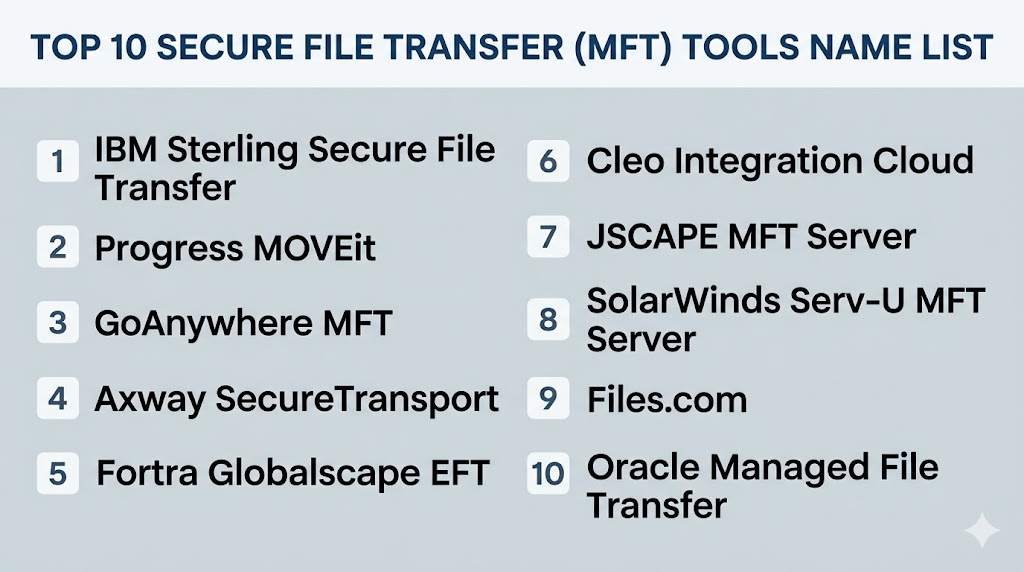
Top 10 Secure File Transfer (MFT) Tools
#1 — IBM Sterling Secure File Transfer
Short description: Enterprise-grade MFT platform built for large-scale, mission-critical, and compliance-heavy file transfers.
Key Features
- High-volume file transfers
- Centralized governance
- B2B integration support
- Strong automation tools
- End-to-end visibility
- Secure partner exchange
- Enterprise scalability
Pros
- Excellent for complex enterprises
- Strong reliability reputation
- Deep integration capabilities
Cons
- Complex implementation possible
- Premium enterprise pricing
Platforms / Deployment
Cloud / On-prem / Hybrid
Security & Compliance
Encryption, RBAC, audit logs, enterprise security controls
Integrations & Ecosystem
- IBM ecosystem
- ERP systems
- APIs
- B2B networks
Support & Community
Strong enterprise vendor support.
#2 — Progress MOVEit
Short description: A widely used MFT platform focused on secure automation, compliance, and centralized control.
Key Features
- Secure transfer automation
- Web management console
- Detailed audit trails
- Workflow scheduling
- Encryption controls
- Large file handling
- Policy enforcement
Pros
- Strong compliance fit
- Good usability
- Popular enterprise choice
Cons
- Premium pricing possible
- Advanced customization may need expertise
Platforms / Deployment
Cloud / On-prem / Hybrid
Security & Compliance
Encryption, access controls, audit reporting
Integrations & Ecosystem
- Enterprise apps
- APIs
- Cloud storage
Support & Community
Large installed base.
#3 — GoAnywhere MFT
Short description: Popular all-in-one MFT solution known for usability, automation, and broad protocol support.
Key Features
- SFTP / FTPS / HTTPS / AS2
- Drag-and-drop workflows
- Built-in scheduler
- Secure email options
- Reporting dashboards
- Cloud connectors
- Role-based administration
Pros
- Strong balance of power and usability
- Broad deployment flexibility
- Excellent automation depth
Cons
- Enterprise pricing for advanced tiers
- UI preferences vary by user
Platforms / Deployment
Cloud / On-prem / Hybrid
Security & Compliance
Encryption, RBAC, audit logging, policy controls
Integrations & Ecosystem
- AWS
- Azure
- Databases
- APIs
Support & Community
Highly visible in MFT market.
#4 — Axway SecureTransport
Short description: Enterprise MFT platform designed for high-volume multi-partner data exchange environments.
Key Features
- Large-scale transfer automation
- Policy management
- Central dashboards
- High availability support
- Multi-protocol support
- API integrations
- Partner onboarding tools
Pros
- Strong for large enterprises
- Good governance controls
Cons
- More enterprise-focused than SMB-friendly
- Complex implementations possible
Platforms / Deployment
Cloud / Hybrid / On-prem
Security & Compliance
Encryption, audit trails, access controls
Integrations & Ecosystem
- B2B ecosystems
- APIs
- Enterprise platforms
Support & Community
Strong global enterprise presence.
#5 — Fortra Globalscape EFT
Short description: Secure transfer platform focused on automation, visibility, and compliance-ready workflows.
Key Features
- Secure FTP protocols
- Event-driven automation
- Monitoring alerts
- Access controls
- Reporting tools
- Workflow engine
- Secure collaboration options
Pros
- Strong automation engine
- Good compliance support
Cons
- UI may feel dated for some users
- Enterprise-focused pricing
Platforms / Deployment
Cloud / On-prem / Hybrid
Security & Compliance
Encryption, RBAC, audit reporting
Integrations & Ecosystem
- Identity systems
- APIs
- Storage platforms
Support & Community
Established MFT presence.
#6 — Cleo Integration Cloud
Short description: Combines secure file transfer with EDI, integration, and supply-chain workflows.
Key Features
- MFT + EDI workflows
- Partner onboarding
- Cloud integrations
- Central visibility
- Automation tools
- Secure exchange
- Workflow analytics
Pros
- Great for supply chain workflows
- Strong B2B integration value
Cons
- Broader than pure MFT use case
- Complexity for simple needs
Platforms / Deployment
Cloud / Hybrid
Security & Compliance
Encryption, access controls
Integrations & Ecosystem
- ERP
- EDI systems
- APIs
Support & Community
Strong B2B operations focus.
#7 — JSCAPE MFT Server
Short description: Flexible MFT server supporting many protocols with centralized management.
Key Features
- Multi-protocol support
- Automation workflows
- Platform independence
- Central management
- Security controls
- Scheduling tools
- Cloud connectors
Pros
- Broad protocol support
- Flexible deployments
Cons
- Smaller market presence than leaders
- Enterprise depth varies
Platforms / Deployment
Cloud / On-prem / Hybrid
Security & Compliance
Encryption, access controls
Integrations & Ecosystem
- AWS
- Azure
- APIs
Support & Community
Solid niche reputation.
#8 — SolarWinds Serv-U MFT Server
Short description: Self-hosted secure transfer platform focused on centralized file movement control.
Key Features
- FTP/SFTP/FTPS support
- Self-hosted deployment
- Access controls
- File sharing
- Event automation
- Logging
- Web client access
Pros
- Good on-prem control
- Practical SMB to mid-market fit
Cons
- Less cloud-native than newer rivals
- Narrower enterprise depth
Platforms / Deployment
On-prem / Hybrid
Security & Compliance
Encryption, RBAC, logs
Integrations & Ecosystem
- Windows ecosystems
- APIs
Support & Community
Known IT operations vendor.
#9 — Files.com
Short description: Cloud-native file transfer and workflow platform emphasizing ease of use and integrations.
Key Features
- Cloud MFT workflows
- SFTP/FTP support
- Automation tools
- Integrations library
- Centralized admin
- Audit logs
- API-first workflows
Pros
- Easy deployment
- Strong cloud-first experience
Cons
- Best for cloud-first buyers
- Traditional on-prem preferences may vary
Platforms / Deployment
Cloud
Security & Compliance
Encryption, access controls, logging
Integrations & Ecosystem
- Cloud storage
- SaaS apps
- APIs
Support & Community
Growing modern platform presence.
#10 — Oracle Managed File Transfer
Short description: Enterprise secure transfer platform aligned with Oracle integration environments.
Key Features
- Secure file exchange
- Oracle ecosystem alignment
- Reporting tools
- Scheduling automation
- Role controls
- Monitoring tools
- Internal/external transfers
Pros
- Strong Oracle customer fit
- Useful enterprise integration value
Cons
- Best for Oracle-centric environments
- Less mainstream mindshare
Platforms / Deployment
On-prem / Hybrid
Security & Compliance
Encryption, access controls, audit tools
Integrations & Ecosystem
- Oracle ecosystem
- APIs
- Enterprise systems
Support & Community
Strong enterprise vendor backing.
Comparison Table (Top 10)
| Tool Name | Best For | Platform(s) Supported | Deployment | Standout Feature | Public Rating |
|---|---|---|---|---|---|
| IBM Sterling | Large enterprises | Web | Hybrid | High-volume B2B transfers | N/A |
| MOVEit | Compliance-heavy teams | Web | Hybrid | Audit-ready automation | N/A |
| GoAnywhere MFT | Balanced enterprise use | Web | Hybrid | Workflow automation | N/A |
| Axway SecureTransport | Multi-partner exchange | Web | Hybrid | Governance controls | N/A |
| Globalscape EFT | Secure automation | Web | Hybrid | Event workflows | N/A |
| Cleo | Supply chain flows | Web | Cloud/Hybrid | EDI + MFT | N/A |
| JSCAPE | Protocol flexibility | Web | Hybrid | Broad protocol support | N/A |
| Serv-U MFT | Self-hosted control | Web | On-prem | Practical SMB fit | N/A |
| Files.com | Cloud-first teams | Web | Cloud | Fast deployment | N/A |
| Oracle MFT | Oracle customers | Web | Hybrid | Oracle alignment | N/A |
Evaluation & Scoring of Secure File Transfer (MFT) Tools
| Tool Name | Core (25%) | Ease (15%) | Integrations (15%) | Security (10%) | Performance (10%) | Support (10%) | Value (15%) | Weighted Total |
|---|---|---|---|---|---|---|---|---|
| IBM Sterling | 9 | 6 | 9 | 9 | 9 | 8 | 6 | 8.00 |
| MOVEit | 8 | 8 | 8 | 9 | 8 | 8 | 7 | 7.95 |
| GoAnywhere | 9 | 8 | 8 | 9 | 8 | 8 | 8 | 8.35 |
| Axway | 8 | 7 | 8 | 9 | 8 | 8 | 7 | 7.80 |
| Globalscape EFT | 8 | 7 | 7 | 8 | 8 | 8 | 7 | 7.55 |
| Cleo | 8 | 7 | 9 | 8 | 8 | 8 | 7 | 7.85 |
| JSCAPE | 7 | 8 | 7 | 8 | 7 | 7 | 8 | 7.45 |
| Serv-U | 7 | 8 | 6 | 8 | 7 | 7 | 8 | 7.30 |
| Files.com | 8 | 9 | 8 | 8 | 8 | 7 | 8 | 8.00 |
| Oracle MFT | 7 | 7 | 7 | 8 | 7 | 8 | 7 | 7.20 |
These scores are comparative benchmarks. Enterprise platforms usually score higher in governance and scale, while cloud-first tools often win on usability and deployment speed.
Which Secure File Transfer (MFT) Tool Is Right for You?
Solo / Freelancer
Simple secure sharing tools may be enough rather than enterprise MFT.
SMB
Files.com, Serv-U MFT, and JSCAPE offer easier operational fit.
Mid-Market
GoAnywhere, MOVEit, and Globalscape EFT provide strong balance.
Enterprise
IBM Sterling, Axway, Cleo, and GoAnywhere are strong choices.
Budget vs Premium
- Budget: Serv-U, JSCAPE, Files.com
- Premium: IBM Sterling, Axway, MOVEit
Feature Depth vs Ease of Use
- Deep features: IBM Sterling, Axway, Cleo
- Easy to use: Files.com, GoAnywhere, MOVEit
Integrations & Scalability
- Best integrations: IBM Sterling, Cleo, GoAnywhere
- Best scalability: IBM Sterling, Axway, MOVEit
Security & Compliance Needs
- High-security environments: MOVEit, IBM Sterling, GoAnywhere
- General business needs: Files.com, Serv-U, JSCAPE
Frequently Asked Questions (FAQs)
1. What is MFT software?
Managed File Transfer software securely automates business file exchanges with governance controls.
2. How is MFT different from FTP?
MFT adds encryption, auditing, automation, and centralized management.
3. Who needs MFT tools?
Organizations exchanging sensitive or frequent files with partners or systems.
4. Are MFT tools cloud-based?
Many modern vendors support cloud, hybrid, and on-prem models.
5. Is MFT important for compliance?
Yes. Logging, retention, and secure workflows help audits and regulations.
6. Can MFT automate transfers?
Yes. Scheduling and trigger-based workflows are common features.
7. What protocols matter most?
SFTP, FTPS, HTTPS, and AS2 are common enterprise choices.
8. Are these tools only for enterprises?
No. Some vendors suit SMB and mid-market teams well.
9. How is pricing structured?
Usually by users, servers, transfer volume, or enterprise licensing.
10. How should I choose one?
Start with protocol needs, integrations, compliance goals, and deployment model.
Conclusion
Secure File Transfer tools are essential when businesses need more than basic FTP or ad hoc file sharing. The right MFT platform can improve security, automate operations, and provide the visibility needed for audits and partner workflows. Enterprises often prioritize governance, scalability, and deep integrations, while smaller teams may focus on simplicity and cost efficiency. Cloud-first organizations may prefer faster SaaS deployment, while regulated sectors often need mature enterprise controls. There is no universal best platform—only the best fit for your transfer volume, risk profile, and ecosystem. Shortlist a few strong options, test workflows, and validate security controls before committing.