Introduction
Mac Management Tools help IT teams deploy, configure, secure, monitor, patch, and support macOS devices across business environments. These platforms are used to manage MacBooks, iMacs, shared Apple devices, applications, security policies, software updates, device compliance, and remote troubleshooting workflows from a centralized console.
As more organizations adopt Apple devices for engineering, design, marketing, leadership, education, and remote work teams, Mac management has become a critical part of endpoint operations. Manual Mac administration is difficult at scale because IT teams must manage enrollment, identity, application deployment, encryption, compliance, inventory, and security settings consistently across distributed users.
Real-world use cases include:
- Enrolling and configuring corporate Mac devices
- Deploying macOS applications and updates
- Enforcing security baselines and compliance policies
- Managing FileVault, certificates, and device restrictions
- Supporting remote Mac troubleshooting and inventory tracking
Buyers evaluating Mac Management Tools should consider:
- Apple device enrollment support
- macOS patch and update management
- Application deployment capabilities
- Security policy enforcement
- FileVault and encryption management
- Inventory and reporting depth
- Remote support capabilities
- Identity provider integrations
- Automation and scripting support
- Scalability across distributed teams
Best for: IT administrators, Apple device management teams, enterprise IT operations, schools, creative agencies, software companies, healthcare organizations, financial services firms, managed service providers, and businesses supporting Mac-first or mixed-device environments.
Not ideal for: Very small teams with only a few unmanaged Macs or organizations that only need basic manual setup without centralized policy enforcement, inventory, compliance, or remote administration.
Key Trends in Mac Management Tools
- Cloud-based Mac management is becoming the preferred model for distributed organizations.
- Automated device enrollment is now a core requirement for Apple-focused IT teams.
- Zero-touch deployment is replacing manual Mac provisioning workflows.
- Identity-based access controls are becoming more important for device compliance.
- Patch management for macOS and third-party applications is now a major buying factor.
- Security baseline enforcement is becoming central to Mac administration.
- Endpoint detection and response integration is increasingly common.
- Remote troubleshooting is becoming essential for hybrid and remote employees.
- Automation and scripting capabilities are helping IT teams reduce repetitive work.
- Unified endpoint management platforms are expanding Mac support alongside Windows and mobile devices.
How We Selected These Tools
The tools in this list were selected based on Mac management depth, Apple ecosystem support, market adoption, operational maturity, and practical value for IT teams.
Selection criteria included:
- Strength of macOS device management features
- Support for automated enrollment and zero-touch deployment
- Patch management and application deployment capabilities
- Security and compliance policy controls
- Inventory and reporting quality
- Remote support and troubleshooting functionality
- Integration with identity and ITSM platforms
- Scalability across SMB, mid-market, and enterprise environments
- Ease of deployment and administration
- Suitability for Mac-first and mixed-device organizations
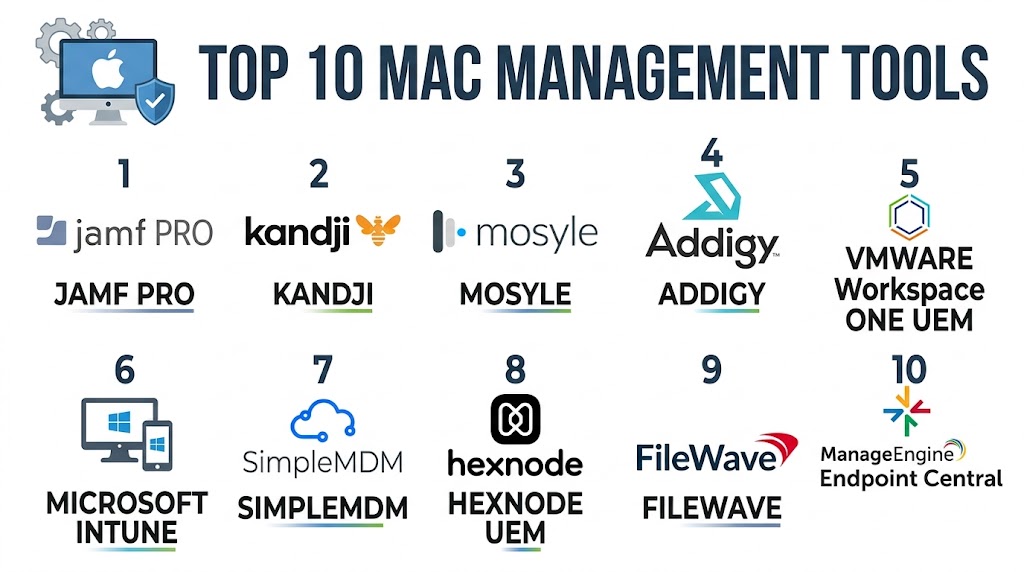
Top 10 Mac Management Tools
1- Jamf Pro
Short description: Jamf Pro is one of the most recognized Apple device management platforms for enterprises, schools, and Apple-heavy organizations. It provides deep macOS management, automated enrollment, application deployment, inventory, security controls, and Apple ecosystem-specific administration.
Key Features
- Automated Mac enrollment
- macOS configuration profiles
- Application deployment
- Patch management workflows
- Inventory and reporting
- FileVault management
- Scripting and automation
Pros
- Deep Apple ecosystem specialization
- Strong enterprise and education adoption
- Excellent macOS management depth
Cons
- Pricing may be high for smaller teams
- Requires Apple management knowledge
- Advanced workflows can take time to configure
Platforms / Deployment
- macOS / iOS / iPadOS / tvOS
- Cloud / Self-hosted
Security & Compliance
- SSO/SAML
- MFA
- RBAC
- Audit logs
- Encryption
- FileVault management
- Compliance reporting
Integrations & Ecosystem
Jamf Pro integrates strongly with Apple, identity, security, and IT operations ecosystems.
- Apple Business Manager
- Apple School Manager
- Microsoft Entra ID
- Okta
- Google Workspace
- Security platforms
Support & Community
Jamf has a large Apple administrator community, strong documentation, training resources, certification programs, and enterprise support options.
2- Kandji
Short description: Kandji is a modern Apple device management platform focused on automation, security, compliance, and simplified Mac administration. It is popular with modern IT teams that want strong Apple management without heavy manual configuration.
Key Features
- Automated device enrollment
- Security baseline templates
- macOS patch management
- Application deployment
- Compliance monitoring
- FileVault enforcement
- Device inventory
Pros
- Modern and clean admin experience
- Strong automation capabilities
- Good fit for fast-growing Apple environments
Cons
- Apple-only focus may not suit mixed-device needs
- Premium pricing for smaller teams
- Advanced custom workflows may require planning
Platforms / Deployment
- macOS / iOS / iPadOS / tvOS
- Cloud
Security & Compliance
- SSO/SAML
- MFA
- RBAC
- Audit logs
- Encryption
- FileVault management
- Compliance reporting
Integrations & Ecosystem
Kandji integrates with identity, security, productivity, and Apple deployment ecosystems.
- Apple Business Manager
- Okta
- Microsoft Entra ID
- Google Workspace
- Slack
- Security platforms
Support & Community
Kandji provides strong onboarding support, clear documentation, and customer success resources for IT teams managing Apple fleets.
3- Microsoft Intune
Short description: Microsoft Intune is a cloud-based endpoint management platform that supports macOS alongside Windows, mobile, and other endpoints. It is a strong option for organizations already using Microsoft identity, security, and productivity tools.
Key Features
- macOS device management
- Compliance policies
- Application deployment
- Conditional access integration
- Device configuration profiles
- Inventory reporting
- Security baseline enforcement
Pros
- Strong Microsoft ecosystem integration
- Good mixed-device management
- Cloud-based administration
Cons
- Mac-specific depth is not as strong as Apple-focused tools
- Advanced configuration can be complex
- Best suited for Microsoft-centric organizations
Platforms / Deployment
- macOS / Windows / iOS / Android
- Cloud
Security & Compliance
- MFA
- RBAC
- Audit logs
- Encryption
- SSO/SAML
- Conditional access
- Compliance reporting
Integrations & Ecosystem
Microsoft Intune integrates deeply with Microsoft identity, security, and productivity ecosystems.
- Microsoft Entra ID
- Microsoft Defender
- Microsoft 365
- Apple Business Manager
- PowerShell
- ITSM platforms
Support & Community
Extensive Microsoft documentation, large administrator community, partner ecosystem, and enterprise support resources.
4- Mosyle Business
Short description: Mosyle Business is an Apple device management platform designed for businesses that need affordable, focused, and practical Mac, iPhone, iPad, and Apple TV management. It is especially useful for SMBs and growing Apple-focused teams.
Key Features
- Apple device enrollment
- macOS configuration management
- Application deployment
- Security policy enforcement
- Inventory reporting
- FileVault management
- Web filtering options
Pros
- Strong Apple-focused functionality
- Good value for SMBs
- Simple administration experience
Cons
- Smaller enterprise ecosystem than larger vendors
- Advanced customization may be limited
- Best suited for Apple-only environments
Platforms / Deployment
- macOS / iOS / iPadOS / tvOS
- Cloud
Security & Compliance
- MFA
- RBAC
- Encryption
- Audit logs
- FileVault management
- Compliance controls
Integrations & Ecosystem
Mosyle integrates with Apple deployment and identity ecosystems used by businesses and schools.
- Apple Business Manager
- Apple School Manager
- Google Workspace
- Microsoft environments
- Identity providers
- Security workflows
Support & Community
Good onboarding resources, practical documentation, and support options focused on Apple administration.
5- Addigy
Short description: Addigy is a cloud-based Apple device management platform designed for IT teams and managed service providers. It supports real-time device management, policy automation, remote support, inventory, and Mac administration workflows.
Key Features
- Cloud-based Mac management
- Real-time device visibility
- Remote support tools
- Policy automation
- Patch management
- Application deployment
- Inventory reporting
Pros
- Strong MSP-friendly capabilities
- Real-time device management
- Good remote support functionality
Cons
- Interface may require learning
- Advanced workflows need planning
- Smaller ecosystem than Jamf
Platforms / Deployment
- macOS / iOS / iPadOS / tvOS
- Cloud
Security & Compliance
- MFA
- RBAC
- Audit logs
- Encryption
- FileVault management
- Compliance reporting
Integrations & Ecosystem
Addigy integrates with Apple deployment, identity, remote support, and MSP workflows.
- Apple Business Manager
- Identity providers
- PSA platforms
- Remote support tools
- Security platforms
- REST APIs
Support & Community
Strong MSP-focused support, documentation, onboarding resources, and Apple administration community presence.
6- VMware Workspace ONE
Short description: VMware Workspace ONE is a unified endpoint management platform that supports Mac management alongside Windows, mobile, and workspace access controls. It is suitable for enterprises managing mixed-device environments.
Key Features
- macOS device management
- Application lifecycle management
- Compliance enforcement
- Workspace access control
- Device inventory
- Remote actions
- Security policy management
Pros
- Strong unified endpoint management
- Good for mixed-device organizations
- Useful workspace and identity integrations
Cons
- Mac-specific depth may be lower than Apple-only tools
- Enterprise deployment can be complex
- Best value comes within VMware ecosystems
Platforms / Deployment
- macOS / Windows / iOS / Android
- Cloud / Hybrid
Security & Compliance
- MFA
- RBAC
- Audit logs
- Encryption
- SSO/SAML
- Device compliance policies
Integrations & Ecosystem
Workspace ONE integrates with virtualization, endpoint security, identity, and productivity platforms.
- VMware Horizon
- Microsoft Entra ID
- Okta
- Apple Business Manager
- Microsoft 365
- Service management platforms
Support & Community
Strong enterprise support ecosystem, detailed documentation, and partner-led implementation resources.
7- JumpCloud
Short description: JumpCloud combines device management, identity management, directory services, and access control in one cloud-based platform. It is useful for organizations that want Mac management connected closely with identity and Zero Trust-style access workflows.
Key Features
- macOS device management
- Cloud directory services
- Identity and access management
- Policy enforcement
- Software management
- Device compliance
- Remote command execution
Pros
- Strong identity and device combination
- Good for mixed operating system environments
- Useful for cloud-first IT teams
Cons
- Mac management depth may not match Apple-specialist tools
- Advanced setup requires planning
- Some features may require higher plans
Platforms / Deployment
- macOS / Windows / Linux
- Cloud
Security & Compliance
- MFA
- RBAC
- Audit logs
- Encryption
- SSO/SAML
- Conditional access-style controls
Integrations & Ecosystem
JumpCloud integrates with identity, productivity, security, and device administration ecosystems.
- Google Workspace
- Microsoft 365
- Okta
- Apple Business Manager
- Slack
- Security tools
Support & Community
Good documentation, growing IT admin community, and support resources for cloud-first device and identity management.
8- Hexnode UEM
Short description: Hexnode UEM is a unified endpoint management platform that supports Mac management, mobile device management, application control, compliance policies, and remote device administration. It is suitable for SMB, mid-market, and distributed teams.
Key Features
- macOS device management
- Application management
- Device compliance policies
- Security restrictions
- Remote actions
- Inventory reporting
- Multi-platform endpoint support
Pros
- Good multi-platform coverage
- Simple cloud-based administration
- Practical value for growing teams
Cons
- Apple-specific depth may be lower than specialist tools
- Advanced automation can be limited
- Enterprise-scale customization may vary
Platforms / Deployment
- macOS / Windows / iOS / Android / tvOS
- Cloud
Security & Compliance
- MFA
- RBAC
- Audit logs
- Encryption
- Compliance reporting
Integrations & Ecosystem
Hexnode integrates with Apple deployment, identity, productivity, and endpoint workflows.
- Apple Business Manager
- Google Workspace
- Microsoft Entra ID
- Okta
- Microsoft 365
- REST APIs
Support & Community
Good onboarding resources, accessible support, documentation, and practical guidance for SMB and mid-market teams.
9- SimpleMDM
Short description: SimpleMDM is a straightforward Apple device management platform focused on ease of use, device enrollment, application deployment, configuration management, and inventory visibility. It is useful for small and mid-sized Apple-focused organizations.
Key Features
- Apple device enrollment
- Configuration profile management
- Application deployment
- Inventory tracking
- FileVault support
- Remote lock and wipe
- macOS update workflows
Pros
- Simple and clean administration
- Good for Apple-focused SMBs
- Easy deployment and onboarding
Cons
- Limited advanced enterprise automation
- Smaller ecosystem than larger vendors
- Less suitable for complex multinational environments
Platforms / Deployment
- macOS / iOS / iPadOS / tvOS
- Cloud
Security & Compliance
- MFA
- RBAC
- Encryption
- Audit logs
- FileVault management
Integrations & Ecosystem
SimpleMDM integrates with Apple deployment and common IT administration workflows.
- Apple Business Manager
- Apple School Manager
- Identity workflows
- Application deployment tools
- REST APIs
Support & Community
Clear documentation, responsive support resources, and simple onboarding experience for Apple administrators.
10- Fleet
Short description: Fleet is an endpoint visibility and management platform built around osquery, offering strong device telemetry, compliance visibility, and endpoint operations capabilities. It can be useful for teams that want open and flexible endpoint visibility across Mac, Windows, and Linux devices.
Key Features
- Endpoint inventory
- osquery-based visibility
- Compliance monitoring
- Device telemetry
- Policy checks
- Vulnerability visibility
- Cross-platform endpoint support
Pros
- Strong endpoint visibility
- Flexible and developer-friendly
- Useful for security and IT operations teams
Cons
- Less traditional MDM functionality
- Requires technical expertise
- Application deployment capabilities are limited compared to MDM tools
Platforms / Deployment
- macOS / Windows / Linux
- Cloud / Self-hosted
Security & Compliance
- RBAC
- Audit logs
- Encryption
- Compliance policy checks
- SSO/SAML support varies by configuration
Integrations & Ecosystem
Fleet integrates with security, compliance, endpoint telemetry, and developer-focused workflows.
- osquery ecosystem
- SIEM platforms
- Security workflows
- IT operations tools
- REST APIs
- Cloud environments
Support & Community
Strong technical documentation, developer-friendly ecosystem, and growing endpoint operations community.
Comparison Table
| Tool Name | Best For | Platforms Supported | Deployment | Standout Feature | Public Rating |
|---|---|---|---|---|---|
| Jamf Pro | Enterprise Apple device management | macOS / iOS / iPadOS / tvOS | Cloud / Self-hosted | Deep Apple management depth | N/A |
| Kandji | Automated Apple management | macOS / iOS / iPadOS / tvOS | Cloud | Security baseline automation | N/A |
| Microsoft Intune | Microsoft-centric mixed environments | macOS / Windows / iOS / Android | Cloud | Identity-driven endpoint management | N/A |
| Mosyle Business | SMB Apple management | macOS / iOS / iPadOS / tvOS | Cloud | Affordable Apple-focused management | N/A |
| Addigy | MSP and real-time Apple management | macOS / iOS / iPadOS / tvOS | Cloud | Real-time device administration | N/A |
| VMware Workspace ONE | Unified endpoint management | macOS / Windows / iOS / Android | Cloud / Hybrid | Mixed-device workspace management | N/A |
| JumpCloud | Identity and device management | macOS / Windows / Linux | Cloud | Directory and device control | N/A |
| Hexnode UEM | Multi-platform endpoint management | macOS / Windows / iOS / Android | Cloud | Simple UEM administration | N/A |
| SimpleMDM | Lightweight Apple management | macOS / iOS / iPadOS / tvOS | Cloud | Simple Apple device enrollment | N/A |
| Fleet | Endpoint visibility and compliance | macOS / Windows / Linux | Cloud / Self-hosted | osquery-based telemetry | N/A |
Evaluation & Scoring of Mac Management Tools
| Tool Name | Core 25% | Ease 15% | Integrations 15% | Security 10% | Performance 10% | Support 10% | Value 15% | Weighted Total |
|---|---|---|---|---|---|---|---|---|
| Jamf Pro | 9.6 | 7.8 | 9.2 | 9.3 | 9.0 | 9.2 | 7.8 | 8.84 |
| Kandji | 9.1 | 8.7 | 8.6 | 9.2 | 8.9 | 8.6 | 8.0 | 8.70 |
| Microsoft Intune | 8.3 | 8.0 | 9.2 | 9.1 | 8.6 | 8.8 | 8.5 | 8.54 |
| Mosyle Business | 8.2 | 8.8 | 7.8 | 8.5 | 8.4 | 8.0 | 9.0 | 8.37 |
| Addigy | 8.7 | 8.1 | 8.3 | 8.7 | 8.6 | 8.4 | 8.2 | 8.43 |
| VMware Workspace ONE | 8.2 | 7.6 | 8.8 | 8.9 | 8.4 | 8.5 | 7.8 | 8.27 |
| JumpCloud | 8.0 | 8.4 | 8.5 | 8.8 | 8.2 | 8.1 | 8.5 | 8.33 |
| Hexnode UEM | 7.9 | 8.6 | 8.0 | 8.3 | 8.1 | 8.0 | 8.8 | 8.24 |
| SimpleMDM | 7.8 | 9.1 | 7.5 | 8.2 | 8.0 | 8.2 | 8.9 | 8.21 |
| Fleet | 7.6 | 7.4 | 8.2 | 8.5 | 8.3 | 8.0 | 8.4 | 7.99 |
These scores are comparative and should be used as a practical guide rather than a universal ranking. Apple-specialist platforms usually score higher in Mac-specific management depth, while unified endpoint platforms may score higher in cross-platform management and identity integration. The best tool depends on device mix, security needs, IT maturity, and whether the organization is Apple-first or mixed-platform.
Which Mac Management Tool Is Right for You?
Solo / Freelancer
Solo IT consultants and very small teams usually need simple enrollment, application deployment, basic security controls, and inventory tracking. SimpleMDM and Mosyle Business are practical choices because they are easier to operate and focused on Apple device administration without heavy enterprise complexity.
SMB
SMBs typically need affordable Apple management, remote configuration, software deployment, FileVault control, and simple reporting. Mosyle Business, SimpleMDM, Hexnode UEM, and JumpCloud are strong options depending on whether the business is Apple-only or mixed-platform.
Mid-Market
Mid-market organizations often need stronger automation, compliance visibility, identity integrations, and support for distributed teams. Kandji, Addigy, Microsoft Intune, and JumpCloud can work well for growing IT teams that need more structure without excessive operational overhead.
Enterprise
Large enterprises usually need deep Apple management, security baselines, compliance reporting, scalable automation, role-based administration, and strong ecosystem integrations. Jamf Pro, Kandji, Microsoft Intune, and VMware Workspace ONE are strong enterprise-focused options.
Budget vs Premium
Mosyle Business, SimpleMDM, and Hexnode UEM are practical options for teams prioritizing affordability and ease of deployment. Jamf Pro, Kandji, and VMware Workspace ONE are better suited for organizations that need deeper management, stronger automation, and broader enterprise controls.
Feature Depth vs Ease of Use
Jamf Pro offers deep Apple management capabilities but may require experienced administrators. Kandji provides strong automation with a modern interface. SimpleMDM and Mosyle Business are easier to use, while Intune and Workspace ONE are better for teams managing multiple operating systems.
Integrations & Scalability
Organizations using Microsoft identity and security tools should evaluate Intune closely. Apple-first enterprises should consider Jamf Pro or Kandji. MSPs may prefer Addigy, while cloud-first teams that want identity and device management together may benefit from JumpCloud.
Security & Compliance Needs
Organizations with strict security and compliance requirements should prioritize FileVault management, audit logs, RBAC, MFA, encryption, compliance reporting, device posture checks, and identity integration. Jamf Pro, Kandji, Intune, and Workspace ONE are strong choices for compliance-focused Mac management.
Frequently Asked Questions
1. What is a Mac Management Tool?
A Mac Management Tool helps IT teams centrally manage macOS devices, applications, security settings, updates, inventory, and compliance policies. It reduces manual setup and helps maintain consistent Mac configurations across an organization.
2. Why are Mac Management Tools important?
They help organizations secure and standardize Mac devices at scale. Without centralized management, IT teams may struggle with inconsistent settings, unpatched devices, weak encryption controls, and poor inventory visibility.
3. What is Apple automated device enrollment?
Automated device enrollment allows organizations to deploy Apple devices with minimal manual setup. When a user turns on a corporate Mac, it can automatically enroll into the management platform and receive policies, apps, and configurations.
4. Is Jamf better than Intune for Mac management?
Jamf is generally stronger for deep Apple-specific management, while Intune is stronger for Microsoft-centric mixed-device environments. The better choice depends on whether the organization is Apple-first or Microsoft-first.
5. Can Mac Management Tools deploy applications?
Yes. Most Mac management platforms support application deployment, updates, package installation, and managed app distribution. Some tools also include patch management for common third-party applications.
6. Do these tools support FileVault management?
Many leading Mac management platforms support FileVault enforcement, recovery key escrow, encryption reporting, and compliance checks. Buyers should verify the depth of FileVault workflows before selecting a tool.
7. Are Mac Management Tools only for enterprises?
No. SMBs, schools, agencies, startups, and MSPs also use Mac management platforms. Tools like SimpleMDM, Mosyle Business, Hexnode UEM, and Addigy can be practical for smaller teams.
8. What are common implementation mistakes?
Common mistakes include poor enrollment planning, weak identity integration, incomplete app deployment workflows, unclear security baselines, and lack of testing before rolling policies to all devices.
9. Can these tools manage remote Mac devices?
Yes. Cloud-based Mac management tools can enroll, configure, update, and monitor remote Mac devices as long as they have internet connectivity and are properly enrolled.
10. What should buyers evaluate before choosing a tool?
Buyers should evaluate Mac-specific depth, Apple Business Manager support, FileVault management, patching, app deployment, identity integrations, reporting, automation, support quality, and total cost of ownership.
Conclusion
Mac Management Tools are essential for organizations that need secure, consistent, and scalable control over Apple devices across office, remote, hybrid, and distributed work environments. The right platform can simplify device enrollment, application deployment, macOS updates, FileVault management, compliance reporting, inventory tracking, and remote administration while reducing manual IT workload. Apple-first organizations may benefit most from Jamf Pro, Kandji, Mosyle Business, or Addigy because of their strong macOS-focused capabilities, while mixed-device businesses may prefer Microsoft Intune, VMware Workspace ONE, JumpCloud, or Hexnode UEM. The best choice depends on your device mix, security requirements, identity ecosystem, team size, budget, and administrative maturity. Shortlist two or three tools, test enrollment and policy workflows with real Mac devices, validate application deployment and encryption controls, and confirm that the platform can scale with your future Apple device strategy.