Introduction
Business Continuity Planning (BCP) Tools are software platforms that help organizations prepare for, respond to, and recover from disruptions such as cyberattacks, system failures, natural disasters, or operational breakdowns. Unlike static documents, these tools provide structured workflows, automation, and real-time insights to ensure critical business functions continue with minimal impact.
In today’s risk-heavy environment, disruptions are not rare—they are expected. Organizations must maintain resilience, protect revenue, and ensure compliance. BCP tools enable teams to identify critical processes, assess risks, and create actionable recovery strategies.
Real-world use cases:
- IT teams ensuring system recovery objectives are met
- Enterprises maintaining operations during outages or disruptions
- Financial institutions meeting compliance requirements
- Healthcare organizations ensuring service continuity
- Logistics companies managing supply chain disruptions
What buyers should evaluate:
- Business Impact Analysis (BIA) capabilities
- Risk assessment and scenario planning
- Automation of workflows and plan updates
- Testing and simulation features
- Integration with IT, HR, and risk systems
- Scalability across departments and locations
- Reporting and audit readiness
- Ease of use and adoption
- Security and compliance support
Best for: Risk managers, IT leaders, compliance teams, and enterprises with complex operations or regulatory requirements.
Not ideal for: Small teams with minimal operational risk or those who only need basic documentation tools.
Key Trends in Business Continuity Planning (BCP) Tools
- AI-driven risk assessment and predictive analytics
- Integration of BCP with GRC (Governance, Risk, Compliance) platforms
- Real-time dashboards for operational visibility
- Automated plan updates and workflows
- Scenario simulation and stress testing
- Cloud-native platforms for scalability
- API-first ecosystems for integration
- Mobile access for remote teams
- Increased focus on operational resilience
- Continuous compliance monitoring
How We Selected These Tools (Methodology)
- Evaluated market adoption and credibility
- Assessed feature completeness and innovation
- Reviewed BIA and risk assessment capabilities
- Considered usability and onboarding experience
- Analyzed integration and API flexibility
- Evaluated scalability across industries
- Reviewed security and compliance readiness
- Balanced enterprise and mid-market tools
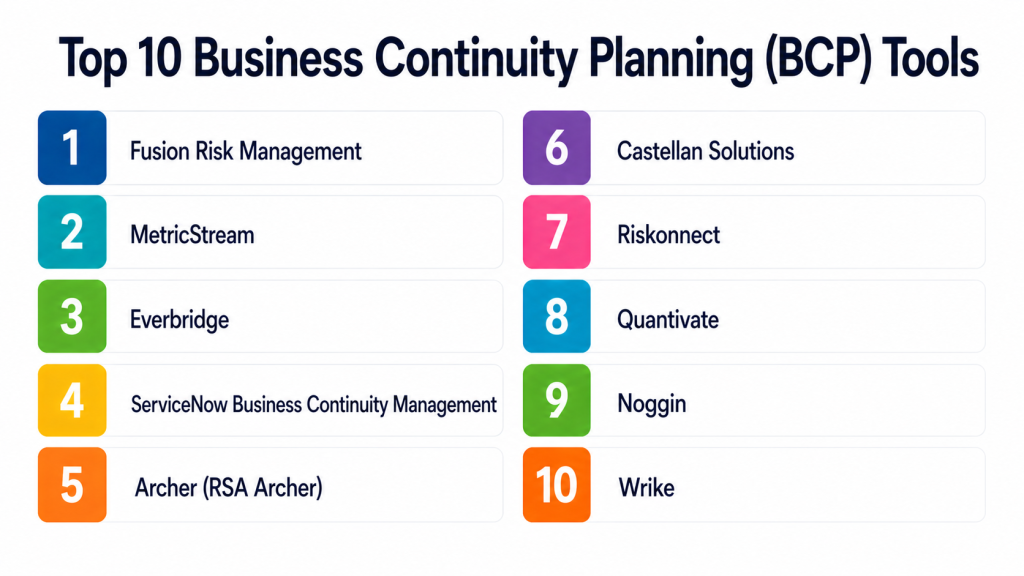
Top 10 Business Continuity Planning (BCP) Tools
#1 — Fusion Risk Management
Short description:
A leading resilience platform combining business continuity, disaster recovery, and risk management in a unified system.
Key Features
- Business Impact Analysis (BIA)
- Dependency mapping
- Scenario testing and simulations
- Workflow automation
- Real-time dashboards
- Risk analytics
Pros
- Highly scalable
- Advanced analytics
- Comprehensive feature set
Cons
- Complex setup
- Requires training
- Premium pricing
Platforms / Deployment
Web
Cloud
Security & Compliance
SSO, RBAC, encryption, audit logs
Not publicly stated
Integrations & Ecosystem
Strong integration capabilities with enterprise tools and APIs.
- Salesforce ecosystem
- APIs
- Enterprise systems
Support & Community
Enterprise-grade support and onboarding.
#2 — MetricStream
Short description:
A GRC platform with strong business continuity capabilities for large organizations.
Key Features
- Risk assessment
- BIA tools
- Compliance tracking
- Workflow automation
- Reporting dashboards
Pros
- Strong compliance features
- Enterprise scalability
- Integrated GRC capabilities
Cons
- Complex interface
- Longer implementation
- Higher cost
Platforms / Deployment
Web
Cloud / On-prem
Security & Compliance
SSO, RBAC
Not publicly stated
Integrations & Ecosystem
Supports enterprise integrations.
- ERP systems
- APIs
- Risk platforms
Support & Community
Enterprise-level support.
#3 — Everbridge
Short description:
A critical event management platform with strong business continuity and crisis response features.
Key Features
- Incident management
- Mass notification
- Risk intelligence
- Automation workflows
- Real-time dashboards
Pros
- Strong communication capabilities
- Scalable
- Reliable
Cons
- Complex setup
- Higher pricing
- Requires training
Platforms / Deployment
Web / Mobile
Cloud
Security & Compliance
SSO, MFA
Not publicly stated
Integrations & Ecosystem
Supports integrations.
- APIs
- IT monitoring tools
- Security systems
Support & Community
Enterprise support available.
#4 — ServiceNow Business Continuity Management
Short description:
A module within ServiceNow that integrates continuity planning with IT service management.
Key Features
- BIA and risk assessment
- Workflow automation
- Incident integration
- Reporting dashboards
- Compliance tracking
Pros
- Strong IT integration
- Scalable
- Unified platform
Cons
- Requires ServiceNow ecosystem
- Complex setup
- Higher cost
Platforms / Deployment
Web
Cloud
Security & Compliance
SSO, RBAC
Not publicly stated
Integrations & Ecosystem
Deep integration within ServiceNow ecosystem.
- ITSM tools
- APIs
- Enterprise systems
Support & Community
Strong enterprise support.
#5 — Archer (RSA Archer)
Short description:
A GRC-focused platform with robust business continuity and risk management features.
Key Features
- Risk management
- BIA tools
- Compliance tracking
- Workflow automation
- Reporting
Pros
- Strong GRC integration
- Enterprise-ready
- Flexible
Cons
- Complex implementation
- Requires training
- Pricing varies
Platforms / Deployment
Web
Cloud / On-prem
Security & Compliance
SSO, audit logs
Not publicly stated
Integrations & Ecosystem
Supports integrations.
- Risk systems
- APIs
- Enterprise tools
Support & Community
Enterprise support.
#6 — Castellan Solutions (Riskonnect)
Short description:
A business continuity and resilience platform focused on risk intelligence and automation.
Key Features
- BIA and risk assessment
- Threat intelligence
- Workflow automation
- Reporting dashboards
- Compliance tools
Pros
- Strong analytics
- Flexible workflows
- Scalable
Cons
- Learning curve
- Pricing not transparent
- Setup effort
Platforms / Deployment
Web
Cloud
Security & Compliance
Not publicly stated
Integrations & Ecosystem
Supports integrations.
- APIs
- Enterprise systems
Support & Community
Professional support available.
#7 — Quantivate
Short description:
A continuity platform designed for regulated industries like banking and finance.
Key Features
- BIA tools
- Risk management
- Compliance tracking
- Workflow automation
- Reporting
Pros
- Industry-specific features
- Easy compliance tracking
- Good usability
Cons
- Limited outside finance sector
- Smaller ecosystem
- Customization limits
Platforms / Deployment
Web
Cloud
Security & Compliance
Not publicly stated
Integrations & Ecosystem
Supports integrations.
- APIs
- Data systems
Support & Community
Standard support.
#8 — BC in the Cloud (Infinite Blue)
Short description:
A flexible cloud-based platform for continuity planning and disaster recovery.
Key Features
- BIA tools
- Risk assessment
- Workflow automation
- Reporting dashboards
- Scenario testing
Pros
- Easy to use
- Scalable
- Good feature balance
Cons
- Limited advanced analytics
- Interface improvements needed
- Pricing varies
Platforms / Deployment
Web
Cloud
Security & Compliance
Not publicly stated
Integrations & Ecosystem
Supports integrations.
- APIs
- Enterprise tools
Support & Community
Good customer support.
#9 — Continuity Logic
Short description:
A resilience platform focused on compliance-heavy industries and operational continuity.
Key Features
- BIA and risk assessment
- Incident management
- Workflow automation
- Reporting
- Compliance tools
Pros
- Strong compliance features
- Scalable
- Reliable
Cons
- Complex interface
- Learning curve
- Pricing varies
Platforms / Deployment
Web
Cloud
Security & Compliance
Not publicly stated
Integrations & Ecosystem
Supports integrations.
- APIs
- Enterprise systems
Support & Community
Enterprise support.
#10 — Wrike
Short description:
A work management platform that supports business continuity planning through task management and collaboration.
Key Features
- Task and workflow management
- Collaboration tools
- Automation
- Reporting dashboards
- Risk tracking
Pros
- Easy to use
- Flexible workflows
- Strong collaboration
Cons
- Not a dedicated BCP tool
- Limited advanced risk features
- Requires customization
Platforms / Deployment
Web / iOS / Android
Cloud
Security & Compliance
RBAC, encryption
Not publicly stated
Integrations & Ecosystem
Supports integrations with business tools.
- APIs
- Collaboration tools
- Project systems
Support & Community
Strong documentation and support.
Comparison Table
| Tool Name | Best For | Platform(s) Supported | Deployment | Standout Feature | Public Rating |
|---|---|---|---|---|---|
| Fusion Risk Management | Enterprise resilience | Web | Cloud | Dependency mapping | N/A |
| MetricStream | GRC integration | Web | Cloud/On-prem | Compliance tracking | N/A |
| Everbridge | Crisis + continuity | Web/Mobile | Cloud | Communication tools | N/A |
| ServiceNow BCM | IT-driven orgs | Web | Cloud | ITSM integration | N/A |
| Archer | Risk & compliance | Web | Cloud/On-prem | GRC platform | N/A |
| Castellan | Risk intelligence | Web | Cloud | Threat analytics | N/A |
| Quantivate | Financial sector | Web | Cloud | Industry templates | N/A |
| BC in the Cloud | Flexible teams | Web | Cloud | Ease of use | N/A |
| Continuity Logic | Compliance-heavy orgs | Web | Cloud | Playbooks | N/A |
| Wrike | SMB teams | Web/Mobile | Cloud | Workflow management | N/A |
Evaluation & Scoring of Business Continuity Planning (BCP) Tools
| Tool Name | Core (25%) | Ease (15%) | Integrations (15%) | Security (10%) | Performance (10%) | Support (10%) | Value (15%) | Weighted Total |
|---|---|---|---|---|---|---|---|---|
| Fusion Risk Management | 9 | 6 | 9 | 8 | 9 | 8 | 6 | 7.9 |
| MetricStream | 9 | 6 | 8 | 8 | 8 | 8 | 6 | 7.7 |
| Everbridge | 8 | 7 | 8 | 7 | 8 | 8 | 7 | 7.6 |
| ServiceNow BCM | 9 | 6 | 9 | 8 | 8 | 8 | 6 | 7.8 |
| Archer | 8 | 6 | 8 | 8 | 8 | 7 | 6 | 7.4 |
| Castellan | 8 | 7 | 7 | 7 | 8 | 7 | 7 | 7.4 |
| Quantivate | 7 | 8 | 6 | 7 | 7 | 7 | 7 | 7.0 |
| BC in the Cloud | 7 | 8 | 6 | 6 | 7 | 7 | 8 | 7.1 |
| Continuity Logic | 8 | 6 | 7 | 7 | 8 | 7 | 6 | 7.2 |
| Wrike | 6 | 9 | 7 | 7 | 7 | 8 | 9 | 7.5 |
How to interpret scores:
- Scores are comparative, not absolute
- Higher scores indicate stronger overall capability
- Enterprise tools score higher on features and integrations
- SMB tools score higher on ease of use and value
Which Business Continuity Planning (BCP) Tool Is Right for You?
Solo / Freelancer
- Use lightweight tools like Wrike
- Focus on simplicity and cost
SMB
- BC in the Cloud or Wrike
- Prioritize usability and flexibility
Mid-Market
- Castellan or Quantivate
- Balance features and cost
Enterprise
- Fusion Risk Management, MetricStream, ServiceNow
- Focus on scalability and compliance
Budget vs Premium
- Budget: Wrike, BC in the Cloud
- Premium: Fusion, MetricStream
Feature Depth vs Ease of Use
- Advanced: Fusion, Archer
- Easy: Wrike, BC in the Cloud
Integrations & Scalability
- High: ServiceNow, Fusion
- Moderate: Castellan
Security & Compliance Needs
- High: MetricStream, Archer
- Moderate: Wrike
Frequently Asked Questions (FAQs) (numbring )
Q1: What is a BCP tool?
A BCP tool helps organizations prepare for and recover from disruptions by managing risks and continuity plans.
Q2: Who needs BCP tools?
Organizations with critical operations, compliance requirements, or high-risk environments.
Q3: Are BCP tools only for large enterprises?
No, some tools are designed for SMBs and mid-market companies.
Q4: What features are most important?
Risk assessment, BIA, automation, reporting, and integrations.
Q5: Do these tools support compliance?
Yes, many include audit and compliance tracking features.
Q6: Can BCP tools integrate with IT systems?
Yes, most support integrations with ITSM, ERP, and HR systems.
Q7: How long does implementation take?
It varies from weeks to months depending on complexity.
Q8: Are these tools cloud-based?
Most modern tools are cloud-based.
Q9: Do they support testing and simulations?
Yes, many include scenario testing and drills.
Q10: Are there affordable options?
Yes, some tools offer flexible pricing for smaller teams.
Conclusion
Business Continuity Planning (BCP) Tools are essential for organizations aiming to maintain operations during disruptions and build long-term resilience. They provide structured frameworks, automation, and real-time insights that go far beyond traditional documentation. From enterprise-grade platforms with deep analytics to simpler tools focused on usability, there is a wide range of options available. The right choice depends on your organization’s size, complexity, and compliance needs. It is important to prioritize usability, integration, and scalability when selecting a tool. A well-chosen platform should not only support planning but also enable effective execution during real incidents. There is no single best tool for every organization. The most practical approach is to shortlist a few options, test them in real scenarios, and ensure they align with your workflows and security requirements before making a final decision.