Introduction
Mechanical design software enables engineers and product designers to create, simulate, and optimize mechanical components and systems digitally. These tools are widely used to design everything from simple parts to complex assemblies, reducing the need for physical prototypes and accelerating product development cycles.
With increasing demand for faster innovation and precision engineering, mechanical design software has become a core part of modern product development workflows. It supports not only 3D modeling but also simulation, collaboration, and manufacturing readiness.
Common use cases include:
- Designing mechanical components and assemblies
- Creating detailed engineering drawings
- Product prototyping and validation
- Simulation and stress testing
- Manufacturing and CNC preparation
Key evaluation criteria:
- 3D modeling capabilities and precision
- Ease of use and learning curve
- Simulation and analysis features
- Integration with CAD, CAM, and PLM systems
- Collaboration and version control
- Performance with large assemblies
- Cloud vs desktop deployment
- Pricing and licensing flexibility
- Support and documentation
Best for: Mechanical engineers, product designers, manufacturing teams, and startups building physical products.
Not ideal for: Users who only need basic 2D drafting or simple diagram tools—lighter alternatives may be sufficient.
Key Trends in Mechanical Design Software
- Cloud-based design platforms: Increasing shift toward browser-based CAD tools for collaboration
- AI-assisted design: Automated suggestions for geometry optimization and design improvements
- Generative design: Software proposing optimized structures based on constraints
- Real-time collaboration: Multiple users working on the same model simultaneously
- Integration with simulation tools: Built-in FEA and motion analysis capabilities
- Digital manufacturing workflows: Seamless transition from design to production
- Low-code design automation: Simplified scripting and automation tools
- Interoperability improvements: Better compatibility across CAD formats
- Subscription-based licensing: Flexible pricing replacing traditional licenses
- Lightweight mobile access: Viewing and minor edits via mobile devices
How We Selected These Tools (Methodology)
- Evaluated industry adoption and popularity
- Assessed core modeling and design capabilities
- Reviewed performance with complex assemblies
- Analyzed integration with engineering ecosystems
- Considered ease of use for beginners and professionals
- Examined deployment options (cloud vs desktop)
- Evaluated support, training, and documentation quality
- Included tools for enterprise, SMB, and individual users
- Considered collaboration and workflow capabilities
- Ensured global usability across industries
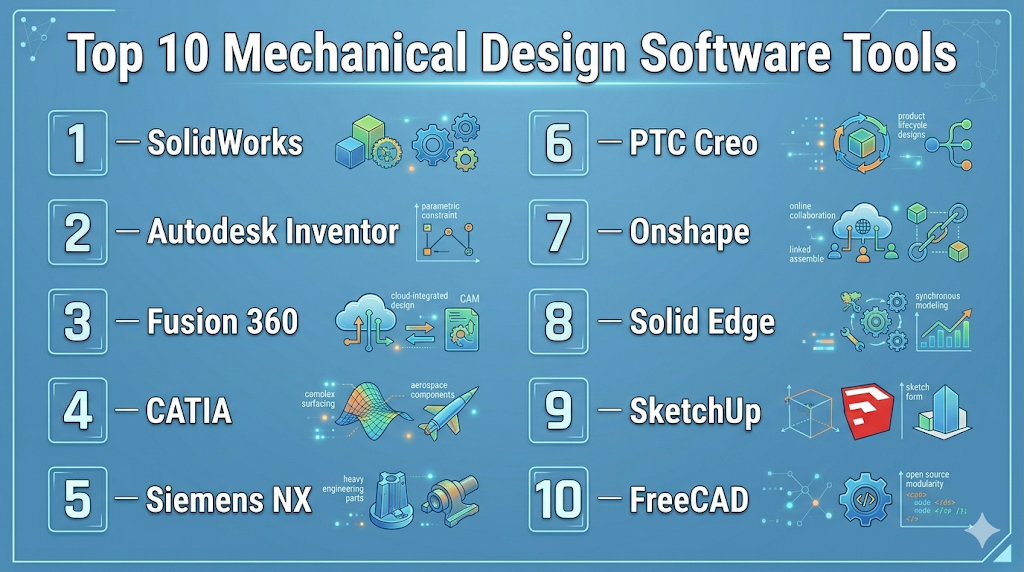
Top 10 Mechanical Design Software Tools
#1 — SolidWorks
Short description: A widely used CAD software for 3D modeling and product design, ideal for engineers and design teams.
Key Features
- Parametric 3D modeling
- Assembly design tools
- Integrated simulation capabilities
- Drawing and documentation tools
- Design automation
- Visualization and rendering
Pros
- User-friendly interface
- Strong ecosystem and community
Cons
- Resource-intensive
- Higher licensing cost
Platforms / Deployment
- Windows
- Self-hosted
Security & Compliance
- Not publicly stated
Integrations & Ecosystem
Strong integration within engineering workflows.
- CAD and CAM tools
- PLM systems
- Add-ons and plugins
- APIs
Support & Community
Large global community with extensive training resources.
#2 — Autodesk Inventor
Short description: A professional-grade mechanical design tool focused on product engineering and manufacturing workflows.
Key Features
- Parametric and direct modeling
- Assembly modeling
- Simulation tools
- Sheet metal design
- Automation tools
Pros
- Strong integration with manufacturing workflows
- Good for complex assemblies
Cons
- Windows-only
- Learning curve for beginners
Platforms / Deployment
- Windows
- Self-hosted
Security & Compliance
- Not publicly stated
Integrations & Ecosystem
Part of Autodesk ecosystem.
- CAD tools
- CAM solutions
- Cloud storage
- APIs
Support & Community
Good documentation and training resources.
#3 — Fusion 360
Short description: A cloud-based CAD/CAM tool combining design, simulation, and manufacturing capabilities.
Key Features
- 3D modeling
- Generative design
- Cloud collaboration
- CAM integration
- Simulation tools
Pros
- All-in-one platform
- Affordable for small teams
Cons
- Limited advanced features
- Internet dependency
Platforms / Deployment
- Web / Windows / macOS
- Cloud
Security & Compliance
- Not publicly stated
Integrations & Ecosystem
Supports modern workflows.
- Cloud storage
- APIs
- Third-party plugins
Support & Community
Active community and strong learning resources.
#4 — CATIA
Short description: A high-end design platform used in aerospace and automotive industries for complex systems.
Key Features
- Advanced surface modeling
- Large assembly management
- Systems engineering
- Simulation integration
- PLM integration
Pros
- Extremely powerful
- Industry-standard in aerospace
Cons
- Expensive
- Complex interface
Platforms / Deployment
- Windows
- Cloud / Self-hosted
Security & Compliance
- Not publicly stated
Integrations & Ecosystem
Deep enterprise integrations.
- PLM systems
- CAD tools
- APIs
Support & Community
Strong enterprise support and training.
#5 — Siemens NX
Short description: A comprehensive CAD/CAM/CAE solution for advanced engineering and manufacturing.
Key Features
- Advanced 3D modeling
- Integrated simulation
- CAM capabilities
- Digital twin support
- Automation tools
Pros
- End-to-end solution
- Highly scalable
Cons
- Expensive
- Requires training
Platforms / Deployment
- Windows / Linux
- Cloud / Self-hosted
Security & Compliance
- Not publicly stated
Integrations & Ecosystem
Enterprise-level integrations.
- PLM systems
- Manufacturing tools
- APIs
Support & Community
Strong enterprise documentation and support.
#6 — PTC Creo
Short description: A powerful CAD tool with strong parametric modeling and simulation capabilities.
Key Features
- Parametric modeling
- Simulation tools
- Augmented reality support
- Design automation
- Assembly management
Pros
- Strong performance
- Advanced features
Cons
- Complex interface
- Higher cost
Platforms / Deployment
- Windows
- Self-hosted
Security & Compliance
- Not publicly stated
Integrations & Ecosystem
Supports enterprise workflows.
- PLM integration
- CAD tools
- APIs
Support & Community
Good enterprise support.
#7 — Onshape
Short description: A cloud-native CAD platform designed for collaboration and real-time design workflows.
Key Features
- Browser-based CAD
- Real-time collaboration
- Version control
- Parametric modeling
- Cloud storage
Pros
- No installation required
- Excellent collaboration features
Cons
- Requires internet
- Subscription-based
Platforms / Deployment
- Web / iOS / Android
- Cloud
Security & Compliance
- Not publicly stated
Integrations & Ecosystem
Built for modern cloud workflows.
- APIs
- Cloud integrations
- Collaboration tools
Support & Community
Growing community with solid documentation.
#8 — Solid Edge
Short description: A mechanical design software offering synchronous and parametric modeling.
Key Features
- 3D modeling
- Simulation tools
- Sheet metal design
- Electrical design integration
- Data management
Pros
- Flexible modeling approach
- Good for mid-sized teams
Cons
- Windows-only
- Smaller community
Platforms / Deployment
- Windows
- Self-hosted
Security & Compliance
- Not publicly stated
Integrations & Ecosystem
Supports engineering workflows.
- CAD tools
- PLM systems
- APIs
Support & Community
Moderate community support.
#9 — FreeCAD
Short description: An open-source parametric 3D CAD tool suitable for hobbyists and basic engineering work.
Key Features
- Parametric modeling
- Modular architecture
- Custom scripting
- Open-source flexibility
- Basic simulation tools
Pros
- Free to use
- Customizable
Cons
- Limited advanced features
- UI can be inconsistent
Platforms / Deployment
- Windows / macOS / Linux
- Self-hosted
Security & Compliance
- Not publicly stated
Integrations & Ecosystem
Extensible through plugins.
- APIs
- Community modules
- Custom tools
Support & Community
Active open-source community.
#10 — SketchUp
Short description: A user-friendly 3D design tool often used for conceptual modeling and simple mechanical designs.
Key Features
- Easy 3D modeling
- Visualization tools
- Large model library
- Simple interface
- Cloud collaboration
Pros
- Very easy to use
- Fast learning curve
Cons
- Limited engineering precision
- Not suitable for complex simulations
Platforms / Deployment
- Web / Windows / macOS
- Cloud / Self-hosted
Security & Compliance
- Not publicly stated
Integrations & Ecosystem
Supports design workflows.
- Plugins
- Model libraries
- APIs
Support & Community
Large user base and tutorials.
Comparison Table (Top 10)
| Tool Name | Best For | Platform(s) Supported | Deployment | Standout Feature | Public Rating |
|---|---|---|---|---|---|
| SolidWorks | Product design | Windows | Self-hosted | Ease of use | N/A |
| Inventor | Manufacturing | Windows | Self-hosted | Workflow integration | N/A |
| Fusion 360 | SMB teams | Web, Desktop | Cloud | All-in-one platform | N/A |
| CATIA | Enterprise | Windows | Hybrid | Advanced modeling | N/A |
| Siemens NX | Enterprise | Windows, Linux | Hybrid | End-to-end solution | N/A |
| PTC Creo | Advanced design | Windows | Self-hosted | Parametric modeling | N/A |
| Onshape | Collaboration | Web, Mobile | Cloud | Real-time editing | N/A |
| Solid Edge | Mid-market | Windows | Self-hosted | Flexible modeling | N/A |
| FreeCAD | Budget users | All major OS | Self-hosted | Open-source | N/A |
| SketchUp | Beginners | Web, Desktop | Hybrid | Simplicity | N/A |
Evaluation & Scoring of Mechanical Design Software
| Tool Name | Core (25%) | Ease (15%) | Integrations (15%) | Security (10%) | Performance (10%) | Support (10%) | Value (15%) | Weighted Total (0–10) |
|---|---|---|---|---|---|---|---|---|
| SolidWorks | 9 | 8 | 9 | 7 | 9 | 9 | 7 | 8.5 |
| Inventor | 8 | 7 | 8 | 7 | 8 | 8 | 7 | 7.8 |
| Fusion 360 | 7 | 9 | 7 | 6 | 7 | 8 | 9 | 7.8 |
| CATIA | 10 | 5 | 9 | 7 | 10 | 8 | 6 | 8.3 |
| Siemens NX | 10 | 6 | 9 | 7 | 10 | 8 | 6 | 8.4 |
| PTC Creo | 9 | 6 | 8 | 7 | 9 | 8 | 7 | 8.0 |
| Onshape | 7 | 9 | 8 | 6 | 7 | 7 | 8 | 7.7 |
| Solid Edge | 8 | 7 | 7 | 6 | 8 | 7 | 7 | 7.4 |
| FreeCAD | 6 | 6 | 6 | 5 | 6 | 6 | 10 | 6.6 |
| SketchUp | 5 | 10 | 6 | 5 | 6 | 7 | 8 | 6.9 |
How to interpret scores:
- Scores are comparative and depend on use cases
- Enterprise tools score higher in performance and features
- Cloud tools excel in ease of use and collaboration
- Open-source tools provide strong value but require effort
- Always align scores with your specific workflow needs
Which Mechanical Design Software Tool Is Right for You?
Solo / Freelancer
- Best options: Fusion 360, FreeCAD, SketchUp
- Focus on affordability and simplicity
SMB
- Best options: SolidWorks, Fusion 360, Solid Edge
- Balance between cost and functionality
Mid-Market
- Best options: PTC Creo, Solid Edge, Onshape
- Require scalability and flexibility
Enterprise
- Best options: CATIA, Siemens NX
- High-end performance and complex workflows
Budget vs Premium
- Budget: FreeCAD, SketchUp
- Premium: CATIA, Siemens NX
Feature Depth vs Ease of Use
- Easy: SketchUp, Fusion 360
- Advanced: CATIA, NX
Integrations & Scalability
- Strong: Siemens NX, SolidWorks
- Moderate: Fusion 360
Security & Compliance Needs
- Enterprise tools provide better governance
- Cloud tools require evaluation of data handling policies
Frequently Asked Questions (FAQs)
What is mechanical design software?
It is software used to create, simulate, and document mechanical components and systems.
Is CAD the same as mechanical design software?
CAD is a core part of mechanical design software but may not include simulation or manufacturing features.
Which software is best for beginners?
Tools like Fusion 360 and SketchUp are easier for beginners.
Is cloud CAD better than desktop?
Cloud CAD offers collaboration, while desktop tools provide more control and performance.
Do I need a powerful computer?
Yes, especially for complex models and simulations.
Can I use free tools professionally?
Yes, but they may lack advanced features and support.
What industries use these tools?
Manufacturing, automotive, aerospace, and product design industries.
How long does it take to learn?
Basic skills can be learned quickly, but mastery takes time.
Can these tools integrate with manufacturing?
Yes, many include CAM and production workflows.
Are these tools secure?
Security varies by vendor; enterprise tools typically offer more controls.
Conclusion
Mechanical design software is essential for modern product development, enabling engineers to design, test, and optimize products efficiently. From beginner-friendly tools to advanced enterprise platforms, the right choice depends on your needs, budget, and technical expertise.