Introduction
Workflow Automation Platforms are software tools that automate repetitive tasks, processes, and business workflows with minimal human intervention. These platforms use triggers, conditions, and actions to move tasks across systems, teams, and applications automatically, improving efficiency and consistency.
In modern organizations, workflow automation has become critical for scaling operations, reducing manual errors, and improving productivity. Instead of manually handling tasks like approvals, data syncing, or notifications, these platforms ensure processes run seamlessly in the background.
Common Use Cases
- Automating marketing campaigns and lead routing
- Employee onboarding and HR workflows
- IT service management and ticket routing
- Data synchronization between apps
- Business process automation across departments
What Buyers Should Evaluate
- Ease of use (no-code vs low-code)
- Integration ecosystem (apps, APIs)
- Workflow customization and logic
- Scalability and performance
- Monitoring and analytics
- Security and compliance
- Deployment flexibility
- Pricing and usage limits
Best for: Businesses, IT teams, marketers, operations teams, and enterprises aiming to streamline repetitive workflows and integrations.
Not ideal for: Very small teams with minimal automation needs or organizations relying on simple task management tools only.
Key Trends in Workflow Automation Platforms
- Rise of no-code and low-code automation tools
- Adoption of AI-powered automation and decision-making
- Growth of event-driven workflows and real-time triggers
- Integration with API and iPaaS platforms
- Expansion of hyperautomation strategies
- Increased focus on cross-platform integrations
- Use of visual workflow builders for accessibility
- Enhanced analytics and observability dashboards
- Growth of automation-first business operations
- Integration with AI copilots and assistants
How We Selected These Tools (Methodology)
- Market adoption and popularity
- Feature completeness across automation lifecycle
- Integration ecosystem strength
- Performance and scalability signals
- Security and compliance readiness
- Ease of use for both technical and non-technical users
- Innovation in AI and automation
- Community and enterprise support
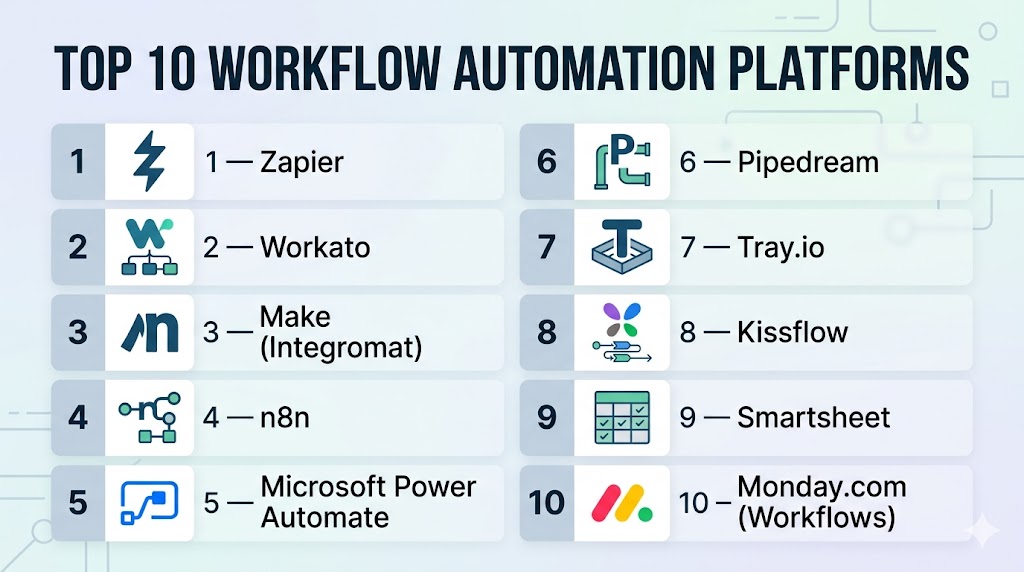
Top 10 Workflow Automation Platforms
#1 — Zapier
Short description: A leading no-code automation platform connecting thousands of apps for workflow automation.
Key Features
- Multi-step workflows
- App integrations
- Trigger-based automation
- Visual builder
- Pre-built templates
Pros
- Extremely easy to use
- Massive integration ecosystem
Cons
- Limited advanced customization
- Pricing scales with usage
Platforms / Deployment
Cloud
Security & Compliance
Basic authentication, encryption
Integrations & Ecosystem
Zapier connects with thousands of SaaS applications, enabling seamless automation across tools.
- CRM tools
- Marketing platforms
- Productivity apps
Support & Community
Large user base with strong documentation
#2 — Workato
Short description: A powerful automation platform combining no-code ease with enterprise-grade capabilities.
Key Features
- Workflow automation
- Pre-built recipes
- API integrations
- AI automation
- Real-time triggers
Pros
- Enterprise-ready
- Strong automation capabilities
Cons
- Pricing complexity
- Requires onboarding
Platforms / Deployment
Cloud
Security & Compliance
Encryption, access control
Integrations & Ecosystem
- SaaS tools
- APIs
- Enterprise systems
Support & Community
Strong support and active community
#3 — Make (Integromat)
Short description: A visual automation platform offering advanced workflow control and flexibility.
Key Features
- Visual workflow builder
- Conditional logic
- API integration
- Data transformation
- Real-time execution
Pros
- Highly flexible
- Powerful visual interface
Cons
- Learning curve
- Complex workflows can be difficult to manage
Platforms / Deployment
Cloud
Security & Compliance
Not publicly stated
Integrations & Ecosystem
- APIs
- SaaS tools
Support & Community
Active community
#4 — n8n
Short description: An open-source workflow automation tool with strong customization capabilities.
Key Features
- Visual workflows
- Self-hosting option
- API integrations
- Custom logic
- Automation triggers
Pros
- Open-source flexibility
- Highly customizable
Cons
- Requires setup
- Technical knowledge needed
Platforms / Deployment
Cloud / Self-hosted
Security & Compliance
Not publicly stated
Integrations & Ecosystem
- APIs
- Dev tools
Support & Community
Active open-source community
#5 — Microsoft Power Automate
Short description: A low-code automation platform integrated with the Microsoft ecosystem.
Key Features
- Workflow automation
- AI builder
- Integration with Microsoft apps
- Process automation
- Templates
Pros
- Strong Microsoft integration
- Easy to use
Cons
- Limited outside ecosystem
- Licensing complexity
Platforms / Deployment
Cloud / Hybrid
Security & Compliance
Enterprise-grade security
Integrations & Ecosystem
- Microsoft 365
- Azure services
Support & Community
Enterprise-level support
#6 — Pipedream
Short description: A developer-friendly automation platform combining workflows with code.
Key Features
- Code + no-code workflows
- Event-driven automation
- API integrations
- Real-time processing
- Serverless execution
Pros
- Developer-friendly
- Flexible
Cons
- Requires coding knowledge
- Smaller ecosystem
Platforms / Deployment
Cloud
Security & Compliance
Not publicly stated
Integrations & Ecosystem
- APIs
- Dev tools
Support & Community
Growing developer community
#7 — Tray.io
Short description: A low-code platform designed for scalable automation and API integrations.
Key Features
- Visual workflow builder
- API integrations
- Automation logic
- Scalable architecture
- Data processing
Pros
- Highly flexible
- Good for developers
Cons
- Learning curve
- Pricing varies
Platforms / Deployment
Cloud
Security & Compliance
Not publicly stated
Integrations & Ecosystem
- APIs
- SaaS tools
Support & Community
Strong documentation
#8 — Kissflow
Short description: A business process automation platform focused on workflow management and approvals.
Key Features
- Process automation
- Workflow builder
- Approval management
- Reporting tools
- Integration capabilities
Pros
- Business-user friendly
- Strong workflow management
Cons
- Limited advanced integrations
- Less developer flexibility
Platforms / Deployment
Cloud
Security & Compliance
Not publicly stated
Integrations & Ecosystem
- Business apps
- APIs
Support & Community
Moderate support
#9 — Smartsheet
Short description: A collaboration and automation platform combining project management with workflows.
Key Features
- Workflow automation
- Task management
- Collaboration tools
- Reporting dashboards
- Conditional logic
Pros
- Easy collaboration
- Good reporting
Cons
- Not a pure automation tool
- Limited deep integrations
Platforms / Deployment
Cloud
Security & Compliance
Not publicly stated
Integrations & Ecosystem
- Project tools
- APIs
Support & Community
Strong documentation
#10 — Monday.com (Workflows)
Short description: A work management platform with built-in workflow automation features.
Key Features
- Automation templates
- Task management
- Visual dashboards
- Integration tools
- Collaboration features
Pros
- Easy to use
- Strong UI
Cons
- Limited advanced automation
- Pricing tiers
Platforms / Deployment
Cloud
Security & Compliance
Not publicly stated
Integrations & Ecosystem
- SaaS apps
- Productivity tools
Support & Community
Large user base
Comparison Table (Top 10)
| Tool Name | Best For | Platform(s) Supported | Deployment | Standout Feature | Public Rating |
|---|---|---|---|---|---|
| Zapier | Beginners | Web | Cloud | App integrations | N/A |
| Workato | Enterprise | Web | Cloud | AI automation | N/A |
| Make | Advanced users | Web | Cloud | Visual workflows | N/A |
| n8n | Open-source | Web | Cloud/Self-hosted | Custom workflows | N/A |
| Power Automate | Microsoft users | Web | Cloud/Hybrid | MS integration | N/A |
| Pipedream | Developers | Web | Cloud | Code workflows | N/A |
| Tray.io | API automation | Web | Cloud | Flexibility | N/A |
| Kissflow | Business workflows | Web | Cloud | Approval flows | N/A |
| Smartsheet | Collaboration | Web | Cloud | Dashboards | N/A |
| Monday.com | Work management | Web | Cloud | UI simplicity | N/A |
Evaluation & Scoring of Workflow Automation Platforms
| Tool Name | Core (25%) | Ease (15%) | Integrations (15%) | Security (10%) | Performance (10%) | Support (10%) | Value (15%) | Weighted Total |
|---|---|---|---|---|---|---|---|---|
| Zapier | 8 | 10 | 10 | 7 | 7 | 8 | 8 | 8.5 |
| Workato | 9 | 8 | 9 | 8 | 8 | 8 | 7 | 8.4 |
| Make | 9 | 7 | 9 | 7 | 8 | 7 | 8 | 8.2 |
| n8n | 8 | 7 | 8 | 7 | 8 | 7 | 9 | 8.0 |
| Power Automate | 8 | 9 | 8 | 8 | 8 | 8 | 8 | 8.3 |
| Pipedream | 8 | 7 | 8 | 7 | 8 | 7 | 8 | 7.9 |
| Tray.io | 9 | 7 | 9 | 7 | 8 | 7 | 7 | 8.0 |
| Kissflow | 7 | 9 | 7 | 7 | 7 | 7 | 8 | 7.6 |
| Smartsheet | 7 | 9 | 7 | 7 | 7 | 7 | 8 | 7.6 |
| Monday.com | 7 | 10 | 7 | 7 | 7 | 7 | 8 | 7.7 |
How to interpret scores:
- No-code tools score higher in ease of use
- Enterprise tools excel in integrations and scalability
- Open-source tools provide better value and flexibility
- Choose based on complexity and team expertise
Which Workflow Automation Platform Is Right for You?
Solo / Freelancer
- Best: Zapier, Monday.com
- Simple automation and ease of use
SMB
- Best: Make, Power Automate
- Balance of flexibility and usability
Mid-Market
- Best: Workato, Tray.io
- Need scalability and integrations
Enterprise
- Best: Workato, Power Automate
- Require governance and performance
Budget vs Premium
- Budget: n8n
- Premium: Workato
Feature Depth vs Ease of Use
- Advanced: Make, Tray.io
- Easy: Zapier, Monday.com
Integrations & Scalability
- Strong: Zapier, Workato
- Moderate: Kissflow
Security & Compliance Needs
- Enterprise: Workato
- Basic: No-code tools
Frequently Asked Questions (FAQs)
What is a workflow automation platform?
It is software that automates business processes using triggers, rules, and actions.
Why use workflow automation tools?
They reduce manual work, improve efficiency, and minimize errors.
Are these tools no-code?
Many platforms offer no-code or low-code interfaces.
Can I automate any workflow?
Most business processes can be automated with proper configuration.
Do these tools support APIs?
Yes, most platforms support API integrations.
Are they scalable?
Yes, they are designed to scale with business growth.
Are workflow automation tools secure?
Security depends on the platform; enterprise tools offer stronger controls.
Can I integrate multiple apps?
Yes, integration is a core feature of these platforms.
How long does setup take?
From minutes for simple workflows to weeks for complex setups.
What are alternatives?
Manual processes, RPA tools, or custom-built automation systems.
Conclusion
Workflow automation platforms are essential for improving efficiency, reducing manual effort, and enabling scalable business operations. From simple no-code tools to advanced enterprise solutions, each platform offers different capabilities depending on your needs. The right choice depends on your workflow complexity, integration requirements, and technical expertise. Focus on tools that provide flexibility, scalability, and strong integrations. Start by testing a few platforms to find the best fit for your business processes.